
Product design for non-designers
What’s the minimum you should know about digital product design? Why should you care?
My main goal is to call attention to the product designer’s role. The audience is developers and product managers. Let’s start with why.
Why?
Isn’t product design for designers? No. Product design is all about solving users’ problems and that’s hopefully a team concern. A healthy team has no set-in-stone turfs. Intra-role collaboration is a win-win undertaking — through the cross-pollination of different perspectives, everyone learns and the product gets better.
[…] the horizontal bar is the ability to collaborate across disciplines with experts in other areas and to apply knowledge in areas of expertise other than one’s own. T-shaped skills
Design is a job and nobody is telling you to do it (don’t be the one looking over the designer’s shoulder suggesting colors). Why should we, developers and product managers, delve into it?
- you increase your empathy and respect toward product designers and their work; you learn more about design;
- you can contribute with more insightful questions and observations (e.g. in design reviews, pairing);
- you reduce the knowledge gap between designers and the rest of the team thus reducing handoffs (these are waste in lean);
- it’s much easier to be lean if you’re involved in the design process: doing only the bare minimum and preventing over-engineering;
- you end up more motivated because you understand your users and feel enabled to make them happier.
Key concepts
Digital product design is design applied to businesses — it’s concerned with creating digital products as the interplay of user and business needs. For simplicity, I’ll just say product design from now on.
Product design is the process designers use to blend user needs with business goals to help brands make consistently successful products. Product designers work to optimize the user experience in the solutions they make for their users — and help their brands by making products sustainable for longer-term business needs. What is Product Design?
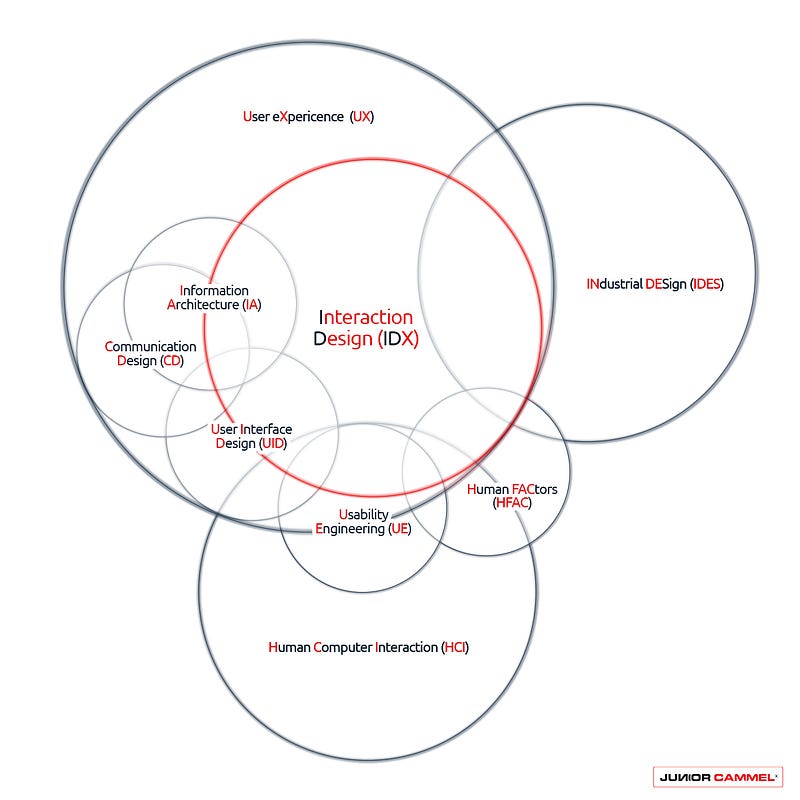
I’ll briefly go over the main concepts behind digital product design so I can cover more ground, enabling you to research them on your own. I recommend you explore the links. Be aware that some concepts can vary from author to author, which is a symptom of the complexity of this field.
Human-computer interaction
Human-computer interaction (HCI) studies the relationship between humans and computers. It’s a multidisciplinary field situated at the intersection of computer science, behavioral sciences, design, media studies, and several other fields of study. It’s close to interaction design although it usually represents the academic side of it.
Human-computer interaction (HCI) is a multidisciplinary field of study focusing on the design of computer technology and, in particular, the interaction between humans (the users) and computers. Human-Computer Interaction
There are many types of user interfaces (UIs) but the most well-known are GUIs (typically web-based or native), CLIs, and voice-based (e.g. Cortana).
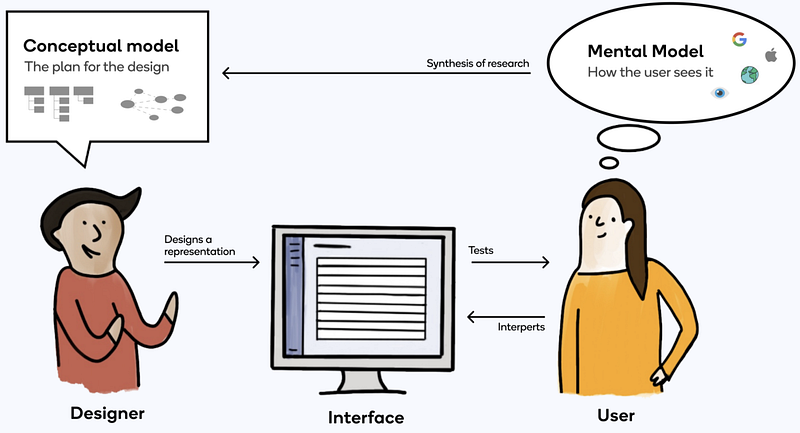
Also, bear in mind the notion of conceptual models and mental models. A conceptual model is the intended plan for the product; a mental model is how it ends up being understood by each user so it’s continuously being reshaped while the product is being used. The designer strives to reduce the gap between those models, through interaction design patterns (e.g. progressive disclosure), looking at existing systems, and applying interface metaphors, among others.
UI/UX
There are a lot of job ads like UI/UX designer. It’s unfortunate because it puts UI and UX at the same level. The UI is the visible outcome of the design work; it’s what the users interact with. On the other hand, user experience (UX) is the sum of all the user interactions and consequent feelings along the whole product journey (e.g. it can get started by scanning a QR code). UI is to UX as a car is to your experience when acquiring it and driving it.
No product is an island. A product is more than the product. It is a cohesive, integrated set of experiences. Think through all of the stages of a product or service — from initial intentions through final reflections, from first usage to help, service, and maintenance. Make them all work together seamlessly. (Don Norman)
Typically, a UX designer (or UI/UX) is a generalist (same as an interaction designer), but there are specific roles like graphic designers or UX researchers. All work in the design thinking process (check out the double-diamond process), which is the way to define the boundaries of the problem and then work on a proposal.
The real problem with the interface is that it is an interface. Interfaces get in the way. I don’t want to focus my energies on an interface. I want to focus on the job… I don’t want to think of myself as using a computer, I want to think of myself as doing my job. (Donald Norman)
Interaction design
Interaction design (or UX design) is a confusing term as it’s interchangeably used to mean product design but it’s more specific than that:
Interaction design is concerned with describing possible user behavior and defining how the system will accommodate and respond to that behavior. Any time a person uses a product, a sort of dance goes on between the two of them. The user moves around, and the system responds. Then the user moves in response to the system, and so the dance goes on. The Elements of User Experience
There’s an immense amount of techniques and concepts that directly support the interaction design process, like paper prototyping, design reviews, storyboards, or usability testing.
Interaction design patterns (or just UI patterns) are predefined reusable solutions to typical UI problems (equivalent to software design patterns). Typically they’re organized in catalogs (e.g. UI-Patterns). They can also be found in design systems, which are reference catalogs of digital assets (e.g. code snippets, UI components, style guides, patterns, guidelines, icons, etc.) concerning a company or a brand. Fluent UI (Microsoft), Material Design (Google), and Human Interface Guidelines (Apple) are the most well-known but, typically, each company develops its own.
User-centered design
User-centered design (UCD) or user-centric design is an approach to product design that puts the user in the spotlight at every step of the design process (it’s a subset of human-centered design). Empathy is essential because you can only design a product if you know/feel the users’ pains and needs, so you should start there (empathy may be insufficient though; diversity in the company is a step further). Designers and designs are supposed to adapt to the users; not the other way around.
There should be no managers or similar figures that “know” what the users want. Beware of assumptions — devise small experiments so you can keep validating and refining what you know about your users. The solution is to address the users. Try applied ethnography (observing real users), user interviews, prototype testing, and building personas, among other user research techniques.
There’s a technical name for the absence of user research: guessing. (Jared Spool)
The biggest cause of failure in software-intensive systems is not technical failure; it’s building the wrong thing. Leading Lean Software Development
It’s hard to do proper user research if design happens outside of the team. A multidisciplinary team has all the skills to deliver user value (balanced teams), including designers, ideally not shared across teams. The whole team should be involved in the design process, namely in user research. As a developer, I’m happy to have conducted and shadowed user interviews, and I can assure you it’s rewarding. I felt much more motivated to make users’ lives better. Also, the designers didn’t need to act as pass-through messengers (reducing going back-and-forth communication). It was so much easier to be leaner when creating user stories and coding (preventing over-engineering and going around in circles).
Usability
Usability is the after-the-fact quality of a product, denoting whether it is efficient, effective, and satisfying for its users. It’s one of the tenets of software quality. It can be assessed with usability testing, hallway usability testing, heuristic evaluations (10 Usability Heuristics for UI Design is a landmark article), or others.
Accessibility is a subset of usability (its most common form being web accessibility). It should never be seen as a “feature that you add later” or “we’ll do it for legal reasons”, as I heard recently. Instead, it should be present from day one, not only for inclusiveness but because it improves usability for everyone, and optimizes SEO and code maintainability.
Myths
Myth debunking is probably the best way to help designers. You might end up annoying them (and harm the team) if you have wrong preconceived ideas about them or their jobs. I’ve talked with some designers to gather the most common misconceptions:
🦄 Design is only for designers
This is the myth that this article tackles. Design is about solving users’ problems so everyone on the team should be involved. Of course, designers have more skills and experience so it’s normal they take the lead, but that doesn’t mean you shouldn’t care.
🦄 Making a product with usability is expensive
Just imagine how expensive it is to lose customers due to bad usability. A classic Jakob Nielsen article demonstrates that you only need 5 users to find out about most usability problems. This goes in line with the law of diminishing returns. Besides that, doing user research is way cheaper than doing the wrong things.
As you add more and more users, you learn less and less because you will keep seeing the same things again and again. There is no real need to keep observing the same thing multiple times, and you will be very motivated to go back to the drawing board and redesign the site to eliminate the usability problems. After the fifth user, you are wasting your time by observing the same findings repeatedly but not learning much new. Why You Only Need to Test with 5 Users
🦄 If the user can’t do it, it’s their fault
No. It’s your fault. You’re supposed to work for the users. It’s your job to enable them to accomplish their tasks. It’s your problem if they can’t. I had a boss that said that our users are stupid. Chapter 5 of The Design of Everyday Things talks about how bad design is a source of human errors.
🦄 “We just need an intuitive interface”
That’s a non-existent concept. There's a very good article about this, so I won’t go into details.
🦄 Design is just inspiration
Design is not art. Designers don’t get inspiration from the skies or any substance. They have a systematic approach to problems, resorting to the design process and a strong set of techniques. Like developers, they also follow design patterns. Of course, inspiration is involved, but no more than in coding.
[…] art has as much in common with design as a lobster has with a carrot cake. Ruined by Design
🦄 Design is just visuals
“A beautiful design will be easy to use” supports the belief that design is only concerned with the look and feel. I had a boss that compared designing to “just painting”. There’s more than meets the eye. The visual part of the product is the tip of the iceberg. UX design encompasses many other disciplines such as user research. “We don’t need design because we don’t have a complicated UI” is an unfortunate sentence in that context.
🦄 Design is making things pretty
“We don’t need design because we don’t need to make this pretty” shows the lack of knowledge on what product design is all about. Product design is not drawing or mastering Photoshop (that’s comparable to asking a developer to fix your PC). Commonly, a user might have a much better experience on an ugly UI than on a pretty one. You need to be looking beyond the functional or aesthetic.
🦄 If it’s easy to use, it’s user-friendly
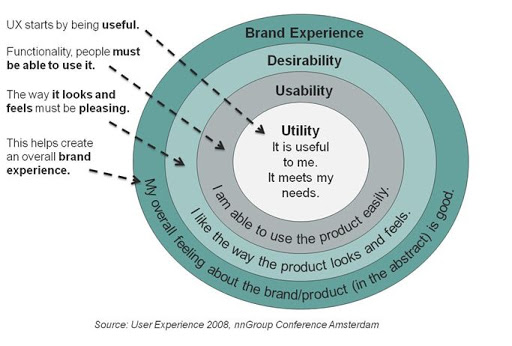
Even if you have a fancy UI with awesome usability, you may still be providing a bad overall experience. There are more layers to the user experience. For example, product utility is about building products that the users want and that solve real problems.
🦄 Accessibility is only for the disabled
Accessibility makes products better for everyone.
Many accessibility requirements improve usability for everyone, especially in limiting situations. For example, providing sufficient contrast benefits people using the web on a mobile device in bright sunlight or in a dark room. Captions benefit people in noisy and in quiet environments. Some people have age-related functional limitations, and may not identify these as “disability”. Accessibility, Usability, and Inclusion — W3C


