Leveraging technology for psychological safety
Technology can be put at our service as a means to make us feel psychologically safer in the team and the company. “Move fast and break things” is only unleashed if technology provides us with the necessary safety net.
This is the continuation of my previous article:
Courage is one of the XP values. To avoid confusing it with recklessness, we need to put technology at our service. Examples include source code control, automated testing, test-driven development, and CI/CD. Confidence in the system equals increased psychological safety; you feel safer making mistakes because you reduced the likelihood and the consequences of mistakes. The book Accelerate explores this connection further.
Jakob Nielsen proposed the 10 Usability Heuristics for User Interface Design in 1994 (later refined), which are a landmark in usability. Some of them serve as good mnemonics when adapted to the use of technology in a software team. Let’s use that as a guide.
Visibility of system status
The design should always keep users informed about what is going on, through appropriate feedback within a reasonable amount of time. 10 Usability Heuristics for User Interface Design
Knowing the current system status is essential for dealing with anxiety. How can you manage a system if you don’t know its status?
A CI/CD dashboard can easily summarize the current build status. Some teams have it always displayed on a TV set in the team space.
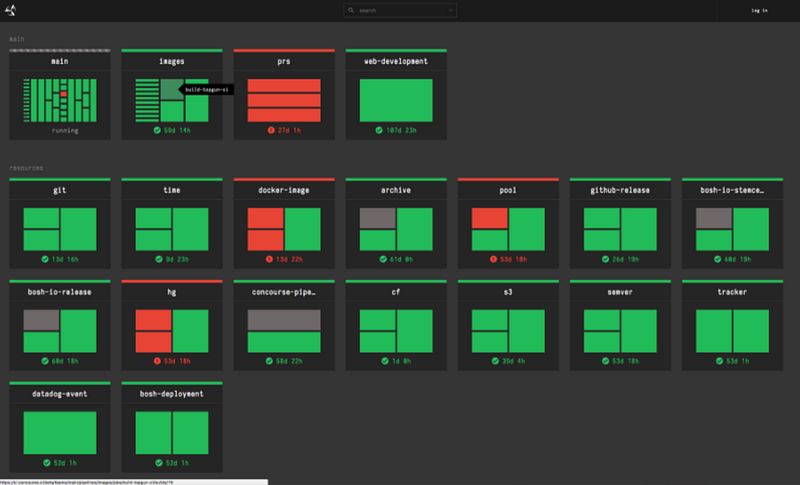
Whenever a problem is happening in production, you also want to know what’s happening behind the scenes. For that, there’s the concept of observability, which means that one can determine the entire system's behavior from its outputs. Logs, metrics, and traces are the three observability pillars.
Observability is a superset of monitoring. It provides not only high-level overviews of the system’s health but also highly granular insights into the implicit failure modes of the system. In addition, an observable system furnishes ample context about its inner workings, unlocking the ability to uncover deeper, systemic issues. Distributed Systems Observability
Error prevention
Good error messages are important, but the best designs carefully prevent problems from occurring in the first place. Either eliminate error-prone conditions, or check for them and present users with a confirmation option before they commit to the action.
If we apply this rule to software development, we’re talking about building safety nets to prevent problems in the first place. We should accept that we, as humans, can make mistakes. Automating repetitive and error-prone tasks is essential because we put the machines doing what they’re good at. Let’s go through the most common examples:
- Define an adequate testing strategy for your needs. From unit testing to end-to-end testing, all have their role in the creation of safety nets — one of the goals of automated testing.
- Practice TDD. Ever since I practice it (coupled with a pipeline that automatically runs the test suite) I reduced my fear of changing code by many orders of magnitude. It’s not normal to be afraid. I barely do code debugging. No code is developed without tests. It protects you against future mistakes. It’s refreshing.
- You should run the test suite locally often; at least before pushing code to source control. The local testing environment should be the closest possible to a realistic one (Docker can help a lot with that). Running the tests should be as simple as “one step away”.
- High-feedback loop and automated build system: configure the CI/CD pipeline with care. It should trigger a build for every push, running the tests first; if a single test fails, the system is not deployed into production; if all the tests pass, you have a green build and the system is deployed. It’s all or nothing.
- Stop messing with the production database. Instead, create command-line and/or graphical tools for the support team and the developers. Besides being much safer, these guarantee you always run your domain logic when updating live data.
- Create automated scripts for frequent developer tasks (e.g.
ship.sh,test.sh). This reduces the likelihood of forgetting certain agreed-upon steps. Consider git hooks for some of them. - Be careful with the broken windows theory; applied to software development. For example, I like to follow a “no warnings policy”. If all teammates care about the codebase, all can develop a feeling of care and ownership towards it. Resorting to static analysis tools can help.
Our goal should be to discover how we could improve information flow so that people have better or more timely information, or to find better tools to help prevent catastrophic failures following apparently mundane operations. Accelerate
In theory, you should consider automation for repetitive or error-prone tasks. Still, be aware of the cost/benefit of the dev tools you create — the cost of implementation and maintenance versus the benefit they’ll create.
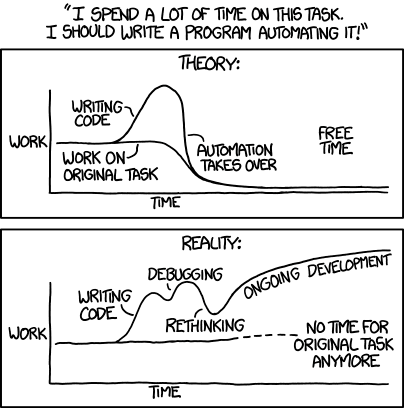
Automation matters because it gives over to computers the things computers are good at — rote tasks that require no thinking and that in fact are done better when you don’t think too much about them. Accelerate
Help users recognize, diagnose, and recover from errors
Error messages should be expressed in plain language (no error codes), precisely indicate the problem, and constructively suggest a solution.
If you can’t prevent the error in the first place, it should be easy to recover from it. The obvious example here is that it should be easy to revert a change that generated an issue: if something goes wrong, going back should be as simple as reverting the commit, pushing it, and waiting for another automated build (hopefully fast). Still, don’t easily fall back to this — always question how could the problem have been avoided in the first place (i.e. with some automatic mechanism in place).
As in error prevention, developers should also build tools to help them in these situations, namely CLIs and GUIs to further inspect the problem.
If some serious problem happens, talk openly about it and apply the post mortem practices. Also, keep in mind that if that happened, it’s because there were no mechanisms in place to prevent it or to recover from it; don’t blame people or make them feel bad about it. Learn from the errors and act on them. Be careful not the act on the symptoms but rather find out the root cause and work on it.