avatarTeri Radichel

Free AI web copilot to create summaries, insights and extended knowledge, download it at here

4554

Abstract

p></div> </div> <div> <div style="background-image: url(https://miro.readmedium.com/v2/resize:fit:320/)"></div> </div> </div> </a> </div><p id="4ad3">The statement looks like a typical policy: Effect, Principal, Action, Resource, and optional Condition.</p><p id="d8b4">So what do we want in our statement?</p><p id="b59e"><b>Principal:</b> <i>root-orgadmin</i> account</p><p id="ab16"><b>Action: </b>Any AWS Organizations actions</p><p id="abff"><b>Resources:</b> Any except the <i>management account </i>or the <i>root-orgadmin</i></p><p id="8d4b">We’ll segregate duties in other accounts below this one. We may want to consider additional restrictions as well, but the whole point of this account is to perform any Organizations actions. It will set up the AWS Organization and then we will lock the account down and only use it in case of emergency.</p><p id="d5f6">So for now, let’s try to give the <i>orgadmin</i> AWS account full access to AWS Organizations.</p><p id="2603">First we need to create the policy. Recall that I created my directory structure for resources by parsing the AWS documentation.</p><div id="811c" class="link-block"> <a href="https://readmedium.com/generating-a-directory-structure-for-cloudformation-templates-1954a4b53520"> <div> <div> <h2>Generating A Directory Structure For CloudFormation Templates</h2> <div><h3>ACM.362 Leveraging the AWS documentation to create a directory structure for CloudFormation templates</h3></div> <div><p>medium.com</p></div> </div> <div> <div style="background-image: url(https://miro.readmedium.com/v2/resize:fit:320/1*uQPbA5YX7yMKDYQ-z_o8ug.png)"></div> </div> </div> </a> </div><p id="4ef9">I only added one variation so far and that was for my empty stack to import my AWS Organization. I’ve since moved that to <i>emptystack/emptystack.yaml</i>.</p><p id="4c36">When I list the directories under<i> resources/organizations/ </i>I see the following directories:</p><figure id="3a44"><img src="https://cdn-images-1.readmedium.com/v2/resize:fit:800/1*MC4AvERpEgvviMFX4pGVUw.png"><figcaption></figcaption></figure><figure id="9228"><img src="https://cdn-images-1.readmedium.com/v2/resize:fit:800/1*HKz9fQz6Tlqv4LHVpy2jJA.png"><figcaption></figcaption></figure><p id="d12a">We want to create a Resource Policy type:</p><figure id="d634"><img src="https://cdn-images-1.readmedium.com/v2/resize:fit:800/1*pdGsGsRWZLgKDoXKHxribQ.png"><figcaption></figcaption></figure><p id="c0b5">Here are the properties:</p><figure id="96b9"><img src="https://cdn-images-1.readmedium.com/v2/resize:fit:800/1*oyHIzRE2SRDq3syS243KwQ.png"><figcaption></figcaption></figure><p id="338b">The content is the policy with an interesting warning on drift detection:</p><figure id="19e6"><img src="https://cdn-images-1.readmedium.com/v2/resize:fit:800/1*z_oKlgQWhzpZoVgb7-xxng.png"><figcaption></figcaption></figure><p id="7093">What does that mean exactly? I don’t know. Are they talking about ToJsonString function in AWS Language Extensions?<b> I looked at the CloudFormation language extensions and they had other security implications I don’t like and don’t recall at the moment so I don’t use them.</b></p><div id="d7fa" class="link-block"> <a href="https://docs.aws.amazon.com/AWSCloudFormation/latest/UserGuide/intrinsic-function-reference-ToJsonString.html"> <div> <div> <h2>Fn::ToJsonString</h2> <div><h3>Convert an object or array to its corresponding JSON string by using the Fn::ToJsonString intrinsic function.</h3></div> <div><p>docs.aws.amazon.com</p></div> </div> <div> <div style="background-image: url(https://miro.readmedium.com/v2/resize:fit:320/)"></div> </div> </div> </a> </div><p id="1a70">If you scroll down, AWS has examples of an object vs a string. Here are couple examples — there are more for both JSON and YAML:</p><p id="a666"><i>JSON object:</i></p><figure id="a55f"><img src="https://cdn-images-1.readmedium.com/v2/resize:fit:800/1*IC-e5nyb0XFT6Vzn4GJFPg.png"><figcaption></figcaption></figure><p id="e060"><i>JSON String</i></p><figure id="4a38"><img src="https://cdn-images-1.readmedium.com/v2/resize:fit:800/1*DZCtF9DNHH5orc8Dfijptg.png"><figcapt

Options

ion></figcaption></figure><p id="8fc6">Now, what I’m wondering is if this same statement is true for all policies created in CloudFormation, or just this one. I’ll save that for another day but someone might want to test that and if true, add that comment to all CloudFormation policy template. I don’t recall seeing that before but maybe I missed it.</p><p id="bbf2">Here’s my<i> </i>code:</p><p id="fbf6"><i>resources/organizations/resourcepolicy/resourcepolicy.yaml</i></p><figure id="2a21"><img src="https://cdn-images-1.readmedium.com/v2/resize:fit:800/1*IjMvTNMjRxdxZz4xqouJlg.png"><figcaption></figcaption></figure><p id="e602">Now there’s a problem with the above. When I tried to run that I got an unsupported action error. That’s because we can only specify the supported AWS Organizations actions:</p><figure id="0337"><img src="https://cdn-images-1.readmedium.com/v2/resize:fit:800/1*M6yg1ylaNpWwodWu98EmTw.png"><figcaption></figcaption></figure><p id="e66d">So what’s the problem with this scenario? What if you need to <b><i>create an account</i></b>? You still <b><i>have to do that in the management account and actions taken in the management account are not governed by SCPs</i></b>. More on that later.</p><p id="248b"><b><i>That fact is making my plans complicated at the moment.</i></b></p><p id="a9fd"><i>resources/organizations/resourcepolicy/resourcepolicy_functions.sh</i></p><figure id="9fd6"><img src="https://cdn-images-1.readmedium.com/v2/resize:fit:800/1*24Us9T0bieDtknBGj17G0Q.png"><figcaption></figcaption></figure><p id="b580"><i>deploy/rootadminrole/organization_resource_policy.sh</i></p><figure id="2760"><img src="https://cdn-images-1.readmedium.com/v2/resize:fit:800/1*4Od6a-_9sGCs_JmqqtRBwQ.png"><figcaption></figcaption></figure><p id="3141">I deploy that stack successfully.</p><p id="9972">Now we can check to see if the policy exists for our AWS Organization in the AWS Organizations dashboard console. And it does.</p><figure id="c842"><img src="https://cdn-images-1.readmedium.com/v2/resize:fit:800/1*QUv3Suxy2sPoOaRNzDSmLA.png"><figcaption></figcaption></figure><p id="248e">Recall that I did this in my container that requires MFA to execute deployment jobs:</p><div id="3332" class="link-block"> <a href="https://readmedium.com/creating-a-common-deployment-container-that-requires-mfa-768f02856e41"> <div> <div> <h2>Creating a Common Deployment Container That Requires MFA</h2> <div><h3>ACM.377 Leveraging a container and my new directory structure for running deployment jobs</h3></div> <div><p>medium.com</p></div> </div> <div> <div style="background-image: url(https://miro.readmedium.com/v2/resize:fit:320/1*ZBD_oKAamWiau6mPObh5pQ.png)"></div> </div> </div> </a> </div><p id="b04f">Great! On to the next step.</p><p id="47b9">Follow for updates.</p><p id="4a3a">Teri Radichel | <i>© <a href="https://2ndsightlab.com/?source=post_page---------------------------">2nd Sight Lab</a> 2023</i></p><div id="8b5f"><pre><span class="hljs-section">About Teri Radichel:

⭐️ Author: Cybersecurity Books
⭐️ Presentations: Presentations by Teri Radichel
⭐️ Recognition: SANS Award, AWS Security Hero, IANS Faculty
⭐️ Certifications: SANS ~ GSE 240
⭐️ Education: BA Business, Master of Software Engineering, Master of Infosec
⭐️ Company: Penetration Tests, Assessments, Phone Consulting ~ 2nd Sight Lab</pre></div><div id="caae"><pre><span class="hljs-section">Need Help With Cybersecurity, Cloud, or Application Security?
~~~~~~~~~~~~~~~~~~~~~~~~~~~~~~~~~~~~~~~~~~~~~~~~~~~~~~~~~~~~~</span>
🔒 Request a penetration test or security assessment
🔒 Schedule a consulting call
🔒 Cybersecurity Speaker for Presentation</pre></div><div id="1e17"><pre>Follow <span class="hljs-keyword">for</span> more stories like <span class="hljs-keyword">this</span>:

❤️ Sign Up my Medium Email List ❤️ Twitter: <span class="hljs-meta">@teriradichel</span> ❤️ LinkedIn: https:<span class="hljs-comment">//www.linkedin.com/in/teriradichel</span> ❤️ Mastodon: <span class="hljs-meta">@teriradichel</span><span class="hljs-meta">@infosec</span>.exchange ❤️ Facebook: 2nd Sight Lab ❤️ YouTube: @2ndsightlab</pre></div><figure id="843d"><img src="https://cdn-images-1.readmedium.com/v2/resize:fit:800/0*H9Ew1KCl-29nZiPR.jpeg"><figcaption></figcaption></figure></article></body>

Automated Deployment of a Resource Policy for an AWS Organizations

ACM.397 Deploying an Organization Resource Policy with CloudFormation to define Delegated Administrators that operate outside the Management Account

~~~~~~~~~~~~~~~~~~~~~~~~~~~~~~~~~~~~~~~~~~~~~~~~~~~~~~~~~~~

⚙️ Part of my series on Automating Cybersecurity Metrics. The Code.

🔒 Related Stories: AWS Organizations | AWS Security

💻 Free Content on Jobs in Cybersecurity | ✉️ Sign up for the Email List

~~~~~~~~~~~~~~~~~~~~~~~~~~~~~~~~~~~~~~~~~~~~~~~~~~~~~~~~~~~

In the last post I created some functions for assigning accounts as Delegated Administrators for AWS services that integrate with Organizations.

In this post I want to assign the root-orgadmin account I created as an administrator for AWS Organizations. However, AWS Organizations does not work the same way as the services that work with it.

Note:

I have an update version that deploys this resource using my container that requires MFA for deployments here:

Here’s the original proof of concept version:

For AWS Organizations itself we can apply a resource policy that specifies which accounts can take what actions related to AWS Organizations to your AWS Organization.

Let’s see if we can automate that in our new code base.

The documentation says we can use the AWS Organizations put-resource-policy command, but it’s linking to the old version of the documentation. Here’s the latest:

The statement looks like a typical policy: Effect, Principal, Action, Resource, and optional Condition.

So what do we want in our statement?

Principal: root-orgadmin account

Action: Any AWS Organizations actions

Resources: Any except the management account or the root-orgadmin

We’ll segregate duties in other accounts below this one. We may want to consider additional restrictions as well, but the whole point of this account is to perform any Organizations actions. It will set up the AWS Organization and then we will lock the account down and only use it in case of emergency.

So for now, let’s try to give the orgadmin AWS account full access to AWS Organizations.

First we need to create the policy. Recall that I created my directory structure for resources by parsing the AWS documentation.

I only added one variation so far and that was for my empty stack to import my AWS Organization. I’ve since moved that to emptystack/emptystack.yaml.

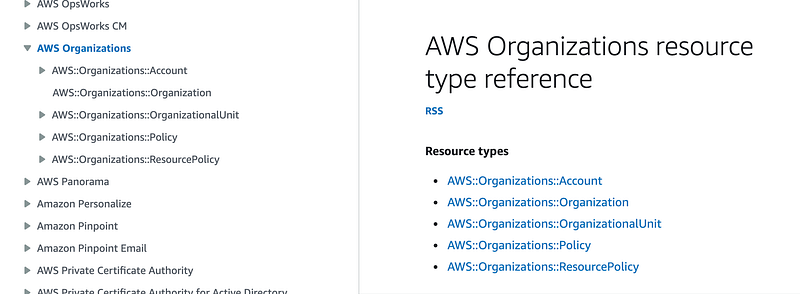
When I list the directories under resources/organizations/ I see the following directories:

We want to create a Resource Policy type:
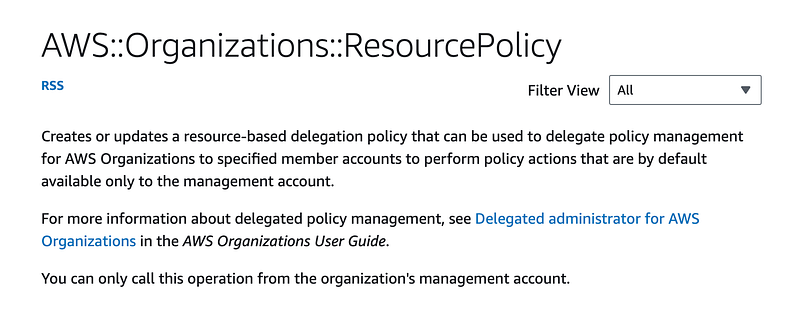
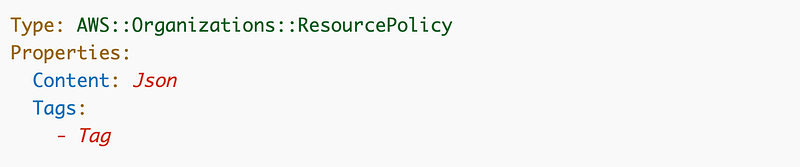
Here are the properties:
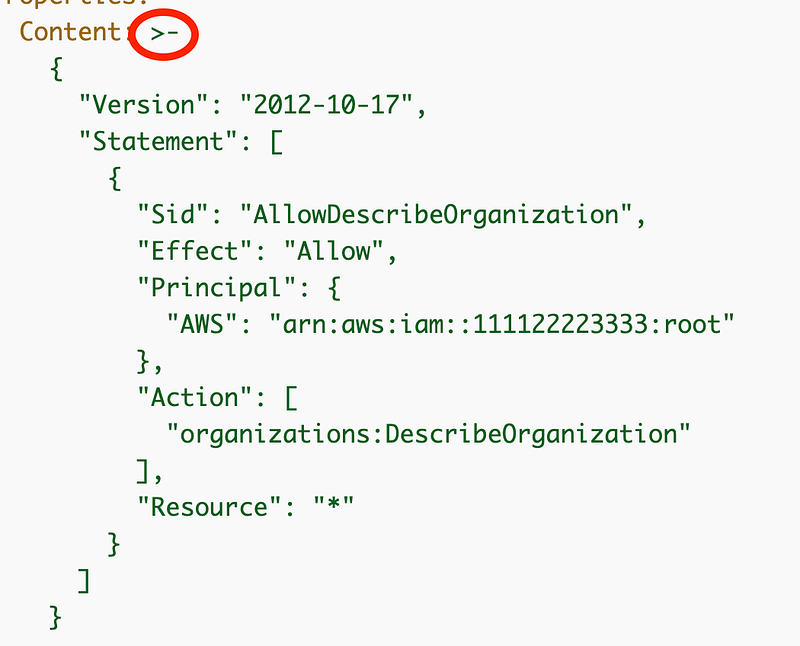
The content is the policy with an interesting warning on drift detection:
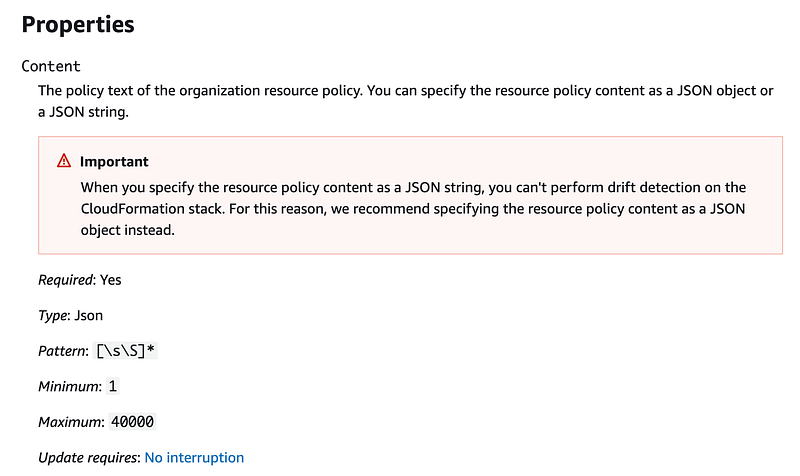
What does that mean exactly? I don’t know. Are they talking about ToJsonString function in AWS Language Extensions? I looked at the CloudFormation language extensions and they had other security implications I don’t like and don’t recall at the moment so I don’t use them.

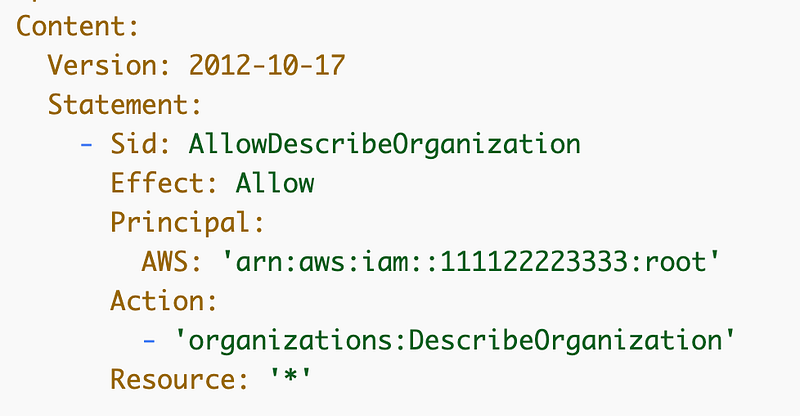
If you scroll down, AWS has examples of an object vs a string. Here are couple examples — there are more for both JSON and YAML:

JSON object:
JSON String
Now, what I’m wondering is if this same statement is true for all policies created in CloudFormation, or just this one. I’ll save that for another day but someone might want to test that and if true, add that comment to all CloudFormation policy template. I don’t recall seeing that before but maybe I missed it.

Here’s my code:

resources/organizations/resourcepolicy/resourcepolicy.yaml
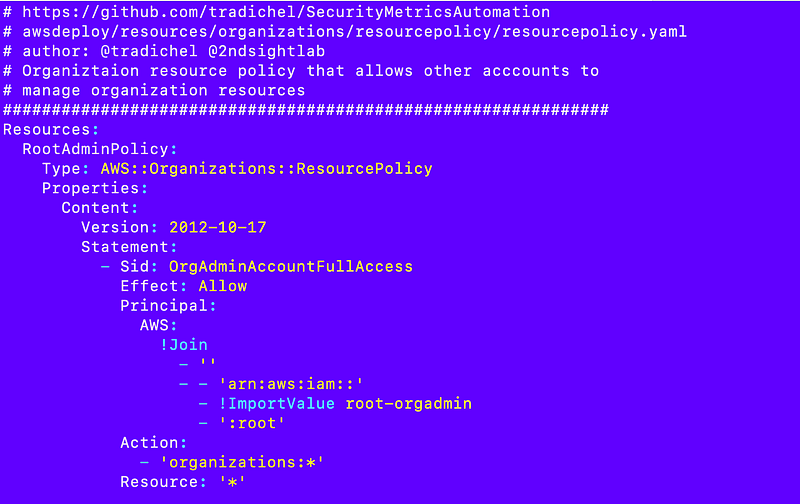
Now there’s a problem with the above. When I tried to run that I got an unsupported action error. That’s because we can only specify the supported AWS Organizations actions:
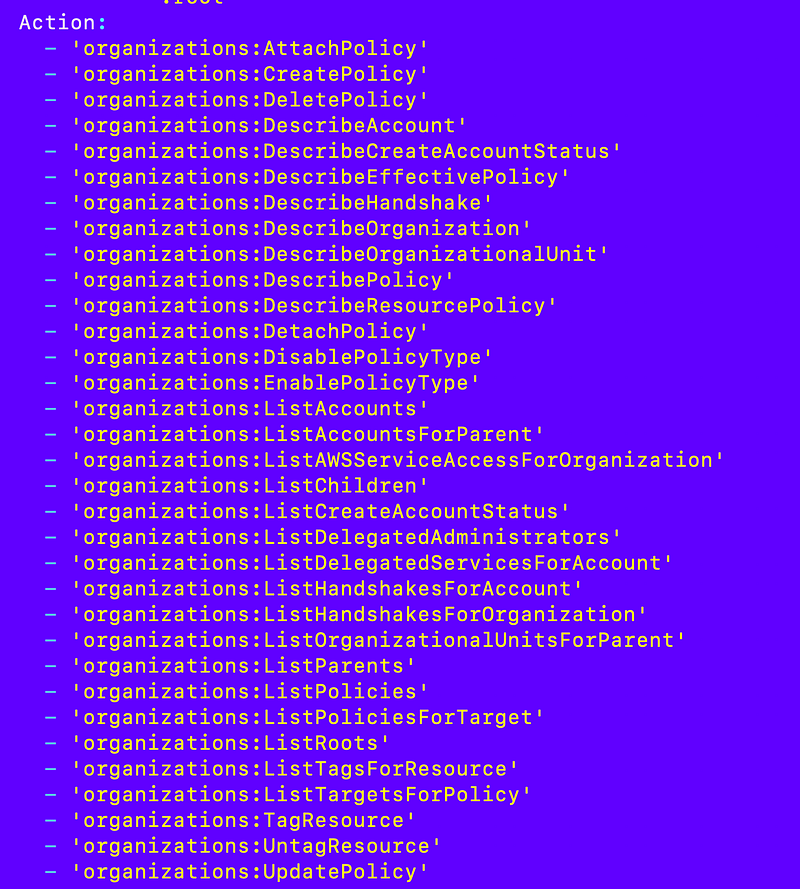
So what’s the problem with this scenario? What if you need to create an account? You still have to do that in the management account and actions taken in the management account are not governed by SCPs. More on that later.

That fact is making my plans complicated at the moment.

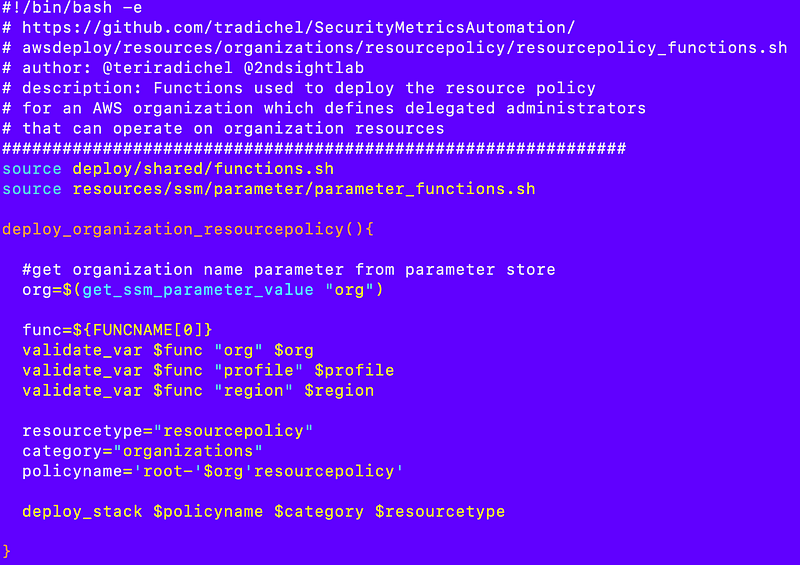
resources/organizations/resourcepolicy/resourcepolicy_functions.sh
deploy/rootadminrole/organization_resource_policy.sh
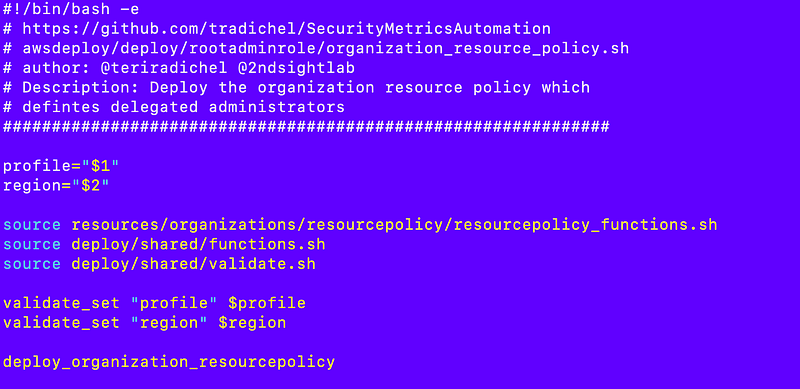
I deploy that stack successfully.

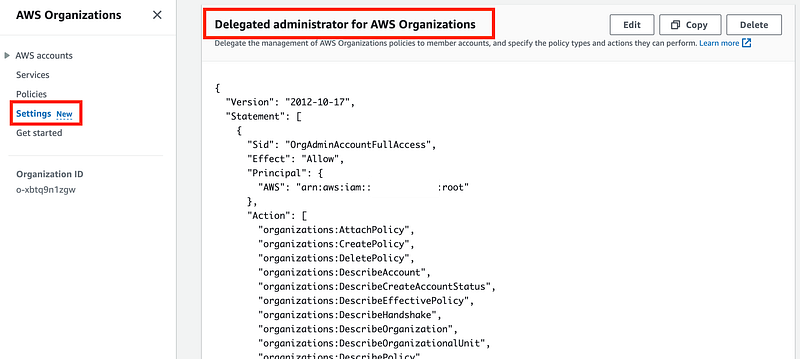
Now we can check to see if the policy exists for our AWS Organization in the AWS Organizations dashboard console. And it does.
Recall that I did this in my container that requires MFA to execute deployment jobs:

Great! On to the next step.

Follow for updates.

Teri Radichel | © 2nd Sight Lab 2023

About Teri Radichel:
~~~~~~~~~~~~~~~~~~~~
⭐️ Author: Cybersecurity Books
⭐️ Presentations: Presentations by Teri Radichel
⭐️ Recognition: SANS Award, AWS Security Hero, IANS Faculty
⭐️ Certifications: SANS ~ GSE 240
⭐️ Education: BA Business, Master of Software Engineering, Master of Infosec
⭐️ Company: Penetration Tests, Assessments, Phone Consulting ~ 2nd Sight Lab
Need Help With Cybersecurity, Cloud, or Application Security?
~~~~~~~~~~~~~~~~~~~~~~~~~~~~~~~~~~~~~~~~~~~~~~~~~~~~~~~~~~~~~
🔒 Request a penetration test or security assessment
🔒 Schedule a consulting call
🔒 Cybersecurity Speaker for Presentation
Follow for more stories like this:
~~~~~~~~~~~~~~~~~~~~~~~~~~~~~~~~~~~~~~~~~~~~~~~~~~~~~~~~~~~~~ 
❤️ Sign Up my Medium Email List
❤️ Twitter: @teriradichel
❤️ LinkedIn: https://www.linkedin.com/in/teriradichel
❤️ Mastodon: @teriradichel@infosec.exchange
❤️ Facebook: 2nd Sight Lab
❤️ YouTube: @2ndsightlab

AWS
Organizations
Delegated Administrator
Resource Policy
Governance
Recommended from ReadMedium