avatarEivind Kjosbakken

Free AI web copilot to create summaries, insights and extended knowledge, download it at here

4937

Abstract

/div><p id="4da0">You can then see the output here:</p><figure id="1c4e"><img src="https://cdn-images-1.readmedium.com/v2/resize:fit:800/1*km615Ua7h-gSut7wEGFusw.png"><figcaption>Output from stemming different conjugations of the word “walk”</figcaption></figure><h1 id="6139">Remove unnecessary characters:</h1><p id="8c1b">Sometimes, it can also be good to remove certain characters. An example could be to remove punctuation. Removing characters can be done with the RegexpTokenizer from nltk.tokenize. The tokenizer takes in a regex string and tokenizes the sentence with the use of the regex string. There is a lot of depth to regex which I will not go into here, but you can check it out at <a href="https://docs.python.org/3/library/re.html">RegexDocs</a>. If you want to remove punctuations, you can for example use the code below. Do note that the tokenizer converts a string, to a list of strings containing a token (a part of the sentence), so if you want to make the list a string again, you can use the last line below, joining the list into a string.</p><div id="8752"><pre><span class="hljs-comment">#nltk tokenizer to remove punctuations</span> <span class="hljs-keyword">from</span> nltk.tokenize <span class="hljs-keyword">import</span> RegexpTokenizer tokenizer = RegexpTokenizer(<span class="hljs-string">r'\w+'</span>) <span class="hljs-comment">#tokenizer = RegexpTokenizer('\w+')</span>

sentence = <span class="hljs-string">"I love apples. They taste very nice"</span> tokenizedSentence = tokenizer.tokenize(sentence)

<span class="hljs-comment"># in list format</span> <span class="hljs-built_in">print</span>(tokenizedSentence)

<span class="hljs-comment"># in string format:</span> <span class="hljs-built_in">print</span>(<span class="hljs-string">" "</span>.join(tokenizedSentence))</pre></div><figure id="49a1"><img src="https://cdn-images-1.readmedium.com/v2/resize:fit:800/1*30L4Eq2aVwtin1hAgXYA3A.png"><figcaption>Output from removing punctuations. On the first line, you see the tokenized version (a list of strings), and the second line shows the tokenized version joined together to a string again using “ “.join(token) in Python</figcaption></figure><h1 id="006a">Stop-words:</h1><p id="a082">Stop words are commonly used words in a language such as “the” or “I”. These words often do not contribute a lot to the meaning of a sentence, and can therefore be removed. You can remove stopwords in Python with the following code:</p><div id="8889"><pre><span class="hljs-comment">#remove stopwords in Python</span> <span class="hljs-keyword">from</span> nltk.tokenize <span class="hljs-keyword">import</span> word_tokenize <span class="hljs-keyword">from</span> nltk.corpus <span class="hljs-keyword">import</span> stopwords stop_words = <span class="hljs-built_in">set</span>(stopwords.words(<span class="hljs-string">'english'</span>))

<span class="hljs-keyword">def</span> <span class="hljs-title function_">removeStopWords</span>(<span class="hljs-params">string</span>) -> <span class="hljs-built_in">str</span>: <span class="hljs-string">"""takes in a string, removes stop words from it, and returns the string without stopwords"""</span> word_tokens = word_tokenize(string) filtered_sentence = [w <span class="hljs-keyword">for</span> w <span class="hljs-keyword">in</span> word_tokens <span class="hljs-keyword">if</span> <span class="hljs-keyword">not</span> w.lower() <span class="hljs-keyword">in</span> stop_words] <span class="hljs-keyword">return</span> <span class="hljs-string">" "</span>.join(filtered_sentence)

sentence = <span class="hljs-string">"Hi, I am a Python programmer that likes the platform Medium"</span>

<span class="hljs-built_in">print</span>(removeStopWords(sentence))</pre></div><figure id="328b"><img src="https://cdn-images-1.readmedium.com/v2/resize:fit:800/1*qKOu1dAzUtoIHdg3s0yWog.png"><figcaption>Here you can see the output after removing stopwords. First, you see the sentence before removing stopwords, and then the same sentence after removing stopwords. You can note that words such as “I”, “am” and “a” are removed.</figcaption></figure><h1 id="c849">Lower case:</h1><p id="5d6d">It is a good idea to have all words be lowercase, as a word with a first letter lowercase or uppercase is rarely different. It should be noted that sometimes capital letters can be used to express feelings, for example, if a word is written in all uppercase. To make words in Python lower, you can use the code below (this will make all letters lowercase, except if the whole word is upper case, then it is kept as uppercase):</p><div id="6e81"><pre><span class="hljs-comment">#convert string lower case except words in all uppercase</span> <span class="hljs-keyword">import</span> re

<span class="hljs-comment">#use regex to make all words lowercase except all uppercase words</span> inputString = <span class="hljs-string">"I am SO EXCITED for Th

Options

is course. It looks SUPER Interesting."</span> pat = re.<span class="hljs-built_in">compile</span>(<span class="hljs-string">r"[A-Z]*[a-z]|\s[A-Z]\s|^[A-Z]\s"</span>)
outputString = pat.sub(<span class="hljs-keyword">lambda</span> <span class="hljs-keyword">match</span>: <span class="hljs-keyword">match</span>.group().lower(), inputString)

<span class="hljs-built_in">print</span>(inputString) <span class="hljs-built_in">print</span>(outputString) <span class="hljs-built_in">print</span>(inputString.lower()) <span class="hljs-comment">#make the whole string lowercase with .lower()</span></pre></div><figure id="e8c8"><img src="https://cdn-images-1.readmedium.com/v2/resize:fit:800/1*-EpM03-ORY_GfMydbeAVLQ.png"><figcaption>Here you can see the original sentence on the first line. The sentence where all words are lowercase except words that are all uppercase. And on the third line you can see the whole string is lowercase</figcaption></figure><h1 id="068e">Correct spelling:</h1><p id="d01b">The last pre-processing technique is making sure you have the correct spelling. If something is spelled wrong, then it could be difficult to retrieve the correct information. The spelling correction can be used both in your corpus (the text you are retrieving information from), or the query that is used to retrieve information, so it is not just a pre-processing technique.</p><p id="f45a">First, you have to install the autocorrect package in the terminal:</p><div id="d901"><pre>pip install autocorrect</pre></div><p id="0cdd">Now you simply import the package and run the spell checker, you can see it outputs the correct words. Do note that sometimes, especially with severe spelling mistakes, it can be hard to know the intent of which word was intended to use, so this spellchecker will just choose the most likely word given the word that is input.</p><div id="214c"><pre><span class="hljs-comment"># correct spelling in Python with autocorrect</span>

<span class="hljs-keyword">from</span> autocorrect <span class="hljs-keyword">import</span> Speller

spell = Speller(lang=<span class="hljs-string">'en'</span>)

<span class="hljs-comment">#spellchecking single words</span> <span class="hljs-built_in">print</span>(spell(<span class="hljs-string">"nicee"</span>)) <span class="hljs-built_in">print</span>(spell(<span class="hljs-string">"intresting"</span>)) <span class="hljs-built_in">print</span>(spell(<span class="hljs-string">"botlte"</span>))

<span class="hljs-comment">#spellchecking for whole sentence</span> sentence = <span class="hljs-string">"I think the botlte was verry intresting"</span> tokenizedSentence = sentence.split() <span class="hljs-keyword">for</span> idx, token <span class="hljs-keyword">in</span> <span class="hljs-built_in">enumerate</span>(tokenizedSentence): tokenizedSentence[idx] = spell(token)

spellCheckedSentence = <span class="hljs-string">" "</span>.join(tokenizedSentence) <span class="hljs-built_in">print</span>(<span class="hljs-string">"\nOld sentence: "</span>, sentence) <span class="hljs-built_in">print</span>(<span class="hljs-string">"\nSpellchecked sentence: "</span>, spellCheckedSentence)</pre></div><figure id="51ca"><img src="https://cdn-images-1.readmedium.com/v2/resize:fit:800/1*0gJCV0uoKWyKsFjpEYarSA.png"><figcaption>Here you can see the output from spellchecking. First are the corrected version of the single words, and then you can see the old sentence with several spelling mistakes, followed by the new spellchecked sentence.</figcaption></figure><h1 id="fc8c">Conclusion:</h1><p id="3bf2">These are just some pre-processing techniques you can implement in your information retrieval system. I recommend using them with care since sometimes a pre-processing technique can change your data in different ways than you intended. Other than that, they can also be used in combination. I would for example remove stopwords from a corpus (your data), spellcheck the words, and then do stemming on the words. This is just an example of some pre-processing you can do on your data.</p><p id="8abc">If you want to check some other related articles I have written, please check out:</p><ul><li><a href="https://readmedium.com/how-to-fine-tune-easyocr-to-achieve-better-ocr-performance-1540f5076428">✅ Fine-tuning EasyOCR</a></li><li><a href="https://readmedium.com/empower-your-donut-model-for-receipts-with-self-annotated-data-51fc882b7229">✅ Empower your Donut (document understanding transformer) model</a></li><li><a href="https://readmedium.com/downloading-and-running-llama2-for-windows-bf99ef45c855">✅ Running Llama2 locally on Windows</a></li><li><a href="https://readmedium.com/analyzing-graph-networks-part-2-utilizing-advanced-methods-604ade49f9b8">Analyzing graph networks: Utilizing advanced methods</a></li></ul><p id="5cc1">You can also read my articles on <a href="https://eivindkjosbakken.wordpress.com/">WordPress.</a></p></article></body>

6 pre-processing techniques to use for your information retrieval system

Story overview

  • Introduction
  • Lemmatization
  • Stemming
  • Remove unnecessary characters
  • Stop-words
  • Lower case
  • Correct spelling
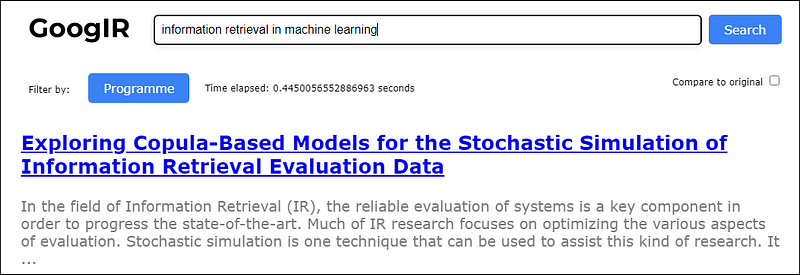
Example of a search engine where preprocessing techniques such as the ones shown in this article, could be useful

Introduction

This article will talk about different pre-processing techniques you can use within information retrieval (IR). Pre-processing techniques here, refer to methods you can apply to your data, to make your information retrieval algorithm like for example TF-IDF, work better.

The data in this case will be documents. Documents are just a string representing the information contained in our document. For our IR algorithm, we would like to retrieve the documents (information), that is most relevant to our query, where the query is what we search for. Our documents could therefore look like a list of strings.

Now, we would like to pre-process these strings by applying different techniques to them:

Lemmatization

Lemmatization is converting similar words, to the same word. This is important for IR, as you want to fetch the most relevant documents, and if words are similar, they are often relevant as well.

Examples of lemmatization:

  • Programming -> program
  • Walking -> walk
  • Better -> good

With lemmatization, our vocabulary will be smaller, and algorithms like TF-IDF can therefore work better.

Lemmatization implementation in Python:

To implement lemmatization, we will use the nltk package. Before importing the WordNetLemmatizer, we need to download a package from NLTK first. Run the code below in a separate file (or cell if you are using a notebook)

#download wordnet from the NLTK package
import nltk
nltk.download('wordnet')

This will download word net. Now you can import the Lemmatizer:

#Implementing lemmatizer in Python
from nltk.stem import WordNetLemmatizer
  
lemmatizer = WordNetLemmatizer()
  
# a denotes adjective in "pos"
print("better :", lemmatizer.lemmatize("better", pos ="a"))
print("good :", lemmatizer.lemmatize("good", pos ="a"))
print("\nworst :", lemmatizer.lemmatize("worst", pos ="a"))
print("bad :", lemmatizer.lemmatize("bad", pos ="a"))

You can now see that some of the words like “better” and “worst” are changed, while “good” and “bad” stay the same. The overall theme here however is that lemmatization reduces the vocabulary size of your corpus.
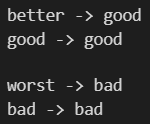
Output from lemmatization code

Stemming:

Stemming is changing words to the standard form of the word. This works because the present tense of a word often means the same as the infinitive of a word. We therefore convert all conjugations of a word, to its infinitive form. An example is shown below:

#stemming implementation Python:
from nltk.stem import PorterStemmer
stemmer = PorterStemmer()

print("Walk : ", stemmer.stem("walk"))
print("walking : ", stemmer.stem("walking"))
print("walked : ", stemmer.stem("walked"))

You can then see the output here:
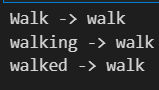
Output from stemming different conjugations of the word “walk”

Remove unnecessary characters:

Sometimes, it can also be good to remove certain characters. An example could be to remove punctuation. Removing characters can be done with the RegexpTokenizer from nltk.tokenize. The tokenizer takes in a regex string and tokenizes the sentence with the use of the regex string. There is a lot of depth to regex which I will not go into here, but you can check it out at RegexDocs. If you want to remove punctuations, you can for example use the code below. Do note that the tokenizer converts a string, to a list of strings containing a token (a part of the sentence), so if you want to make the list a string again, you can use the last line below, joining the list into a string.

#nltk tokenizer to remove punctuations
from nltk.tokenize import RegexpTokenizer
tokenizer = RegexpTokenizer(r'\w+')   #tokenizer = RegexpTokenizer('\w+')
     
sentence = "I love apples. They taste very nice"
tokenizedSentence = tokenizer.tokenize(sentence)

# in list format
print(tokenizedSentence)

# in string format:
print(" ".join(tokenizedSentence))

Output from removing punctuations. On the first line, you see the tokenized version (a list of strings), and the second line shows the tokenized version joined together to a string again using “ “.join(token) in Python

Stop-words:

Stop words are commonly used words in a language such as “the” or “I”. These words often do not contribute a lot to the meaning of a sentence, and can therefore be removed. You can remove stopwords in Python with the following code:

#remove stopwords in Python
from nltk.tokenize import word_tokenize
from nltk.corpus import stopwords
stop_words = set(stopwords.words('english'))

def removeStopWords(string) -> str:
    """takes in a string, removes stop words from it, and returns the string without stopwords"""
    word_tokens = word_tokenize(string)
    filtered_sentence = [w for w in word_tokens if not w.lower() in stop_words]
    return " ".join(filtered_sentence)

sentence = "Hi, I am a Python programmer that likes the platform Medium"

print(removeStopWords(sentence))
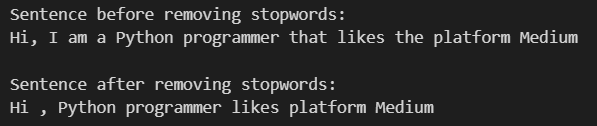
Here you can see the output after removing stopwords. First, you see the sentence before removing stopwords, and then the same sentence after removing stopwords. You can note that words such as “I”, “am” and “a” are removed.

Lower case:

It is a good idea to have all words be lowercase, as a word with a first letter lowercase or uppercase is rarely different. It should be noted that sometimes capital letters can be used to express feelings, for example, if a word is written in all uppercase. To make words in Python lower, you can use the code below (this will make all letters lowercase, except if the whole word is upper case, then it is kept as uppercase):

#convert string lower case except words in all uppercase
import re

#use regex to make all words lowercase except all uppercase words
inputString = "I am SO EXCITED for This course. It looks SUPER Interesting."
pat = re.compile(r"[A-Z]*[a-z]|\s[A-Z]\s|^[A-Z]\s")   
outputString = pat.sub(lambda match: match.group().lower(), inputString)

print(inputString)
print(outputString)
print(inputString.lower()) #make the whole string lowercase with .lower()

Here you can see the original sentence on the first line. The sentence where all words are lowercase except words that are all uppercase. And on the third line you can see the whole string is lowercase

Correct spelling:

The last pre-processing technique is making sure you have the correct spelling. If something is spelled wrong, then it could be difficult to retrieve the correct information. The spelling correction can be used both in your corpus (the text you are retrieving information from), or the query that is used to retrieve information, so it is not just a pre-processing technique.

First, you have to install the autocorrect package in the terminal:

pip install autocorrect

Now you simply import the package and run the spell checker, you can see it outputs the correct words. Do note that sometimes, especially with severe spelling mistakes, it can be hard to know the intent of which word was intended to use, so this spellchecker will just choose the most likely word given the word that is input.

# correct spelling in Python with autocorrect

from autocorrect import Speller

spell = Speller(lang='en')

#spellchecking single words
print(spell("nicee"))
print(spell("intresting"))
print(spell("botlte"))

#spellchecking for whole sentence
sentence = "I think the botlte was verry intresting"
tokenizedSentence = sentence.split()
for idx, token in enumerate(tokenizedSentence):
    tokenizedSentence[idx] = spell(token)

spellCheckedSentence = " ".join(tokenizedSentence)
print("\nOld sentence: ", sentence)
print("\nSpellchecked sentence: ", spellCheckedSentence)
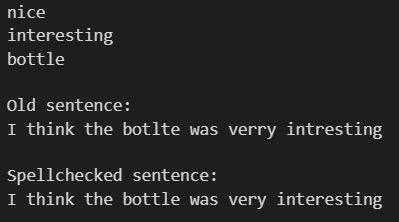
Here you can see the output from spellchecking. First are the corrected version of the single words, and then you can see the old sentence with several spelling mistakes, followed by the new spellchecked sentence.

Conclusion:

These are just some pre-processing techniques you can implement in your information retrieval system. I recommend using them with care since sometimes a pre-processing technique can change your data in different ways than you intended. Other than that, they can also be used in combination. I would for example remove stopwords from a corpus (your data), spellcheck the words, and then do stemming on the words. This is just an example of some pre-processing you can do on your data.

If you want to check some other related articles I have written, please check out:

You can also read my articles on WordPress.

Information Retrieval
Nlptechniques
Preprocesing
Python
Recommended from ReadMedium