avatarClark

Free AI web copilot to create summaries, insights and extended knowledge, download it at here

3745

Abstract

">GitHub</a></p><h1 id="46e7">3. Amplosion</h1><figure id="9c68"><img src="https://cdn-images-1.readmedium.com/v2/resize:fit:800/1*8l6YPkEtYWAG1DQRHealcQ.png"><figcaption>Screenshot of Amplosion on the iPad Pro</figcaption></figure><p id="a097">AMP or Accelerated Mobile Pages is an open-source technology that Google made to improve the speed of loading websites on mobile devices using cellular data. At first, It was a good idea because cellular connections were slow, but as more people upgrade from 3G to 4G and then LTE connections, loading websites was no longer a problem. AMP, a technology that saved time, loading optimized versions of websites became a hassle for developers who optimized and developed their versions of their websites.</p><p id="c56d">Amplosion does one job. Once you search for something on Google and click on a link, it forces Google to load the whole website rather than the AMP version. By enabling Amplosion, your experience using Safari and searching Google will elevate. That is because you get the real view of the website you want to browse.</p><p id="5027">If you have a decent internet connection, give Amplosion a try. It changes how you surf the web by providing better versions of most websites.</p><p id="298d">🔐 Privacy: No data collection</p><p id="9574">💳 Price: 2.99</p><p id="e303">✓ Compatibility: 📱iPhone, 📱iPad</p><p id="a53f">🧩 Design: Decent looking</p><p id="5c15">⭐️ Rating: 4.9 out of 5 (1022 ratings)</p><p id="3bee">🔗 Download: <a href="https://apps.apple.com/us/app/amplosion-redirect-amp-links/id1585734696">AppStore</a></p><p id="a96d">🌐 Research: <a href="https://amplosion.app/">Website</a></p><h1 id="da3b">4. Vinegar</h1><figure id="4a94"><img src="https://cdn-images-1.readmedium.com/v2/resize:fit:800/1*JA5O9YnMg3e0wZOEan_GjA.jpeg"><figcaption>Screenshot of Vinegar on the iPad Pro</figcaption></figure><p id="e5fc">Browsing YouTube in Safari on iPadOS and iOS is not a great experience. What’s worst is watching a YouTube video with its default player. In addition, YouTube wants you to install their app, and I don’t want to do that because I care about my privacy.</p><p id="5628">Vinegar is an excellent extension for Safari that replaces YouTube’s default control with a native HTML5 media player. So what changes?</p><ul><li>No advertisements</li><li>Native control over media playback</li><li>Restore picture-in-picture support</li><li>Background media playback</li></ul><p id="3372">This extension came out almost a month ago and still has some minor issues, but it is great, and I recommend it to anyone who uses YouTube on Safari.</p><p id="073b">🔐 Privacy: No data collection</p><p id="659d">💳 Price: 1.99</p><p id="7c8a">✓ Compatibility: 📱iPhone, 📱iPad, 💻 Mac</p><p id="3420">🧩 Design: Decent looking</p><p id="edd1">⭐️ Rating: 4.4 out of 5 (122 ratings)</p><p id="cb2f">🔗 Download: <a href="https://apps.apple.com/us/app/vinegar-tube-cleaner/id1591303229">AppStore</a></p><p id="9420">🌐 Research: <a href="https://andadinosaur.com/launch-vinegar">Website</a></p><h1 id="6973">5. Achoo HTML</h1><figure id="2d57"><img src="https://cdn-images-1.readmedium.com/v2/resize:fit:800/1*BTKYhEHtiZsZ5NpMh6Ku0A.png"><figcaption>Screenshot of Achoo HTML on the iPad Pro</figcaption></figure><p id="22ec">One of the great features of Safari on Mac is its developer feature which allows you to inspect each HTML element on a webpage and change their CSS and HTML properties without having to refresh the page. Unfortunately, iOS and iPadOS don’t have those features; that is why I’m recommending Achoo HTML.</p><p id="da89">It is a great lightweight extension to help you edit any element on any website to your liking. If you are a web developer or a full-st

Options

ack designer, this extension will help you alter the view of a website without making any permanent changes.</p><p id="5353">Christian Selig developed Achoo HTML. He also made Amplosion and Apollo, which is a Reddit client. If you like his apps, give this one a try and support the developer. He is a wonderful human being.</p><p id="1808">🔐 Privacy: No data collection</p><p id="dddf">💳 Price: $0.99</p><p id="18b0">✓ Compatibility: 📱iPhone, 📱iPad</p><p id="6711">🧩 Design: Decent looking</p><p id="c65a">⭐️ Rating: 4.5 out of 5 (100 ratings)</p><p id="164c">🔗 Download: <a href="https://apps.apple.com/us/app/achoo-html-viewer-inspector/id1585833321">AppStore</a></p><p id="d9b4">🌐 Research: <a href="https://achooapp.com/">Website</a></p><p id="671a">Thank you for reading this story. I use Safari as my default browser. Each update on Safari and its extensions shines my day. I hope the extensions I introduced help you browse a safer and better version of the internet.</p><p id="daf4">If you enjoyed using these extensions, please support me by following me and giving this story 50 claps.</p><p id="e30f">I would appreciate it if you support me by becoming a Medium member using the link below:</p><div id="9b97" class="link-block"> <a href="https://cercinus.medium.com/membership"> <div> <div> <h2>Join Medium with my referral link - Nima Sakhtemani</h2> <div><h3>As a Medium member, a portion of your membership fee goes to writers you read, and you get full access to every story…</h3></div> <div><p>cercinus.medium.com</p></div> </div> <div> <div style="background-image: url(https://miro.readmedium.com/v2/resize:fit:320/0*Ck5SEpzVERyCa6Cn)"></div> </div> </div> </a> </div><p id="1b9a">Here are the previous Mac stories you might find interesting:</p><div id="5ff9" class="link-block"> <a href="https://readmedium.com/10-mac-apps-for-december-c23eb8593448"> <div> <div> <h2>10 Mac Apps for December!</h2> <div><h3>Over a year of monthly apps! Here is the last one for December.</h3></div> <div><p>medium.com</p></div> </div> <div> <div style="background-image: url(https://miro.readmedium.com/v2/resize:fit:320/1*_irmlHj4FCdUUOrUeTDX9A.png)"></div> </div> </div> </a> </div><div id="96bc" class="link-block"> <a href="https://readmedium.com/why-safari-is-the-best-browser-for-mac-8751de7ddaea"> <div> <div> <h2>Why Safari Is The Best Browser For Mac!</h2> <div><h3>Battery, Performance, and Design!</h3></div> <div><p>medium.com</p></div> </div> <div> <div style="background-image: url(https://miro.readmedium.com/v2/resize:fit:320/1*5YilMYks_M3tLNtYGrbXvg.jpeg)"></div> </div> </div> </a> </div><div id="19ad" class="link-block"> <a href="https://readmedium.com/why-default-mail-app-is-great-a12b00cf1dae"> <div> <div> <h2>Why Default Mail App Is Great!</h2> <div><h3>Why I always get back to the default Mail app on macOS.</h3></div> <div><p>medium.com</p></div> </div> <div> <div style="background-image: url(https://miro.readmedium.com/v2/resize:fit:320/1*d_1Mq0aWm3JSGCAXWuo3kg.png)"></div> </div> </div> </a> </div></article></body>

5 Safari Extensions I Can’t Live Without
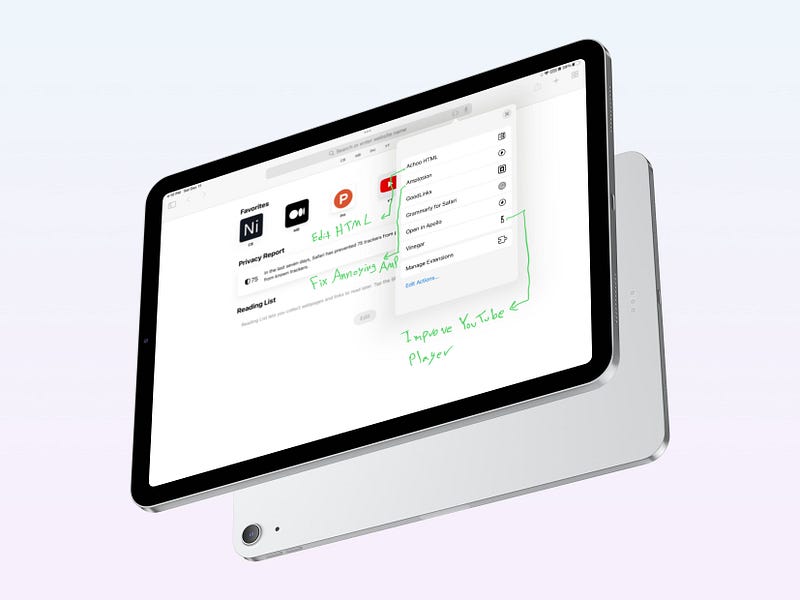
Screenshot of Safari extensions on iPadOS 15 on an iPad Pro

Safari is the best browser for Mac users. It provides the most minimal browsing experience, and I enjoy its clean design. An essential factor in a browser is its performance, and Safari does not disappoint. It is fast, easy on memory, and supports modern web technologies.

On iOS 15 and iPadOS 15, Apple brought tons of useful new features which are phenomenal. On the iPad Pro, which is my primary computer, I use Safari because of two reasons:

  1. Extension support
  2. Desktop browsing mode

The fact that my iPad can now use an extension to alter the behavior of some websites makes my browsing experience much better.

In this story, I will introduce five extensions that will improve your privacy,

1. 1Blocker
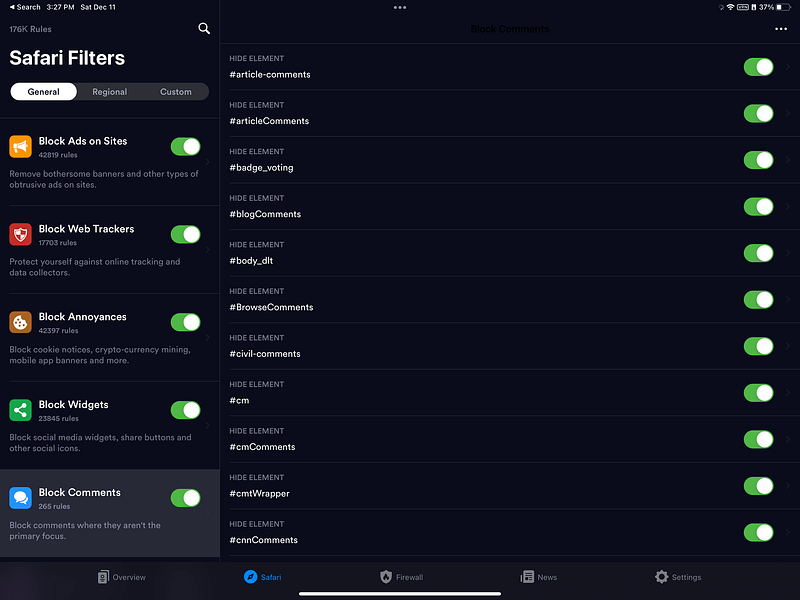
Screenshot of 1Blocker on the iPad Pro

Nowadays, ads are a large problem. Despite them providing financial support for business owners, they are intrusive and annoying. I’m all in for supporting businesses, but if that means having them invade my privacy, I would instead support individuals by donations and other safe means.

One of the best ad-blocking extensions is 1Blocker which doesn’t take a toll on memory and brings a safer, cleaner experience of surfing the web. After you enable this extension, most websites you visit will look cleaner, with less digital clutter.

1Blocker comes with features besides adblocking. Things like the firewall, blocking social media widgets, hiding comments, and blocking cookies are many features within this app.

If you are looking for a peaceful browsing experience, give 1Blocker a try, you won’t believe how transformational the changes are.

🔐 Privacy: No personal data collection

💳 Price: $14.99

✓ Compatibility: 📱iPhone, 📱iPad, 💻 Mac

🧩 Design: Decent looking

⭐️ Rating: 4.6 out of 5 (5832 ratings)

🔗 Download: AppStore

🌐 Research: Website

2. Hush
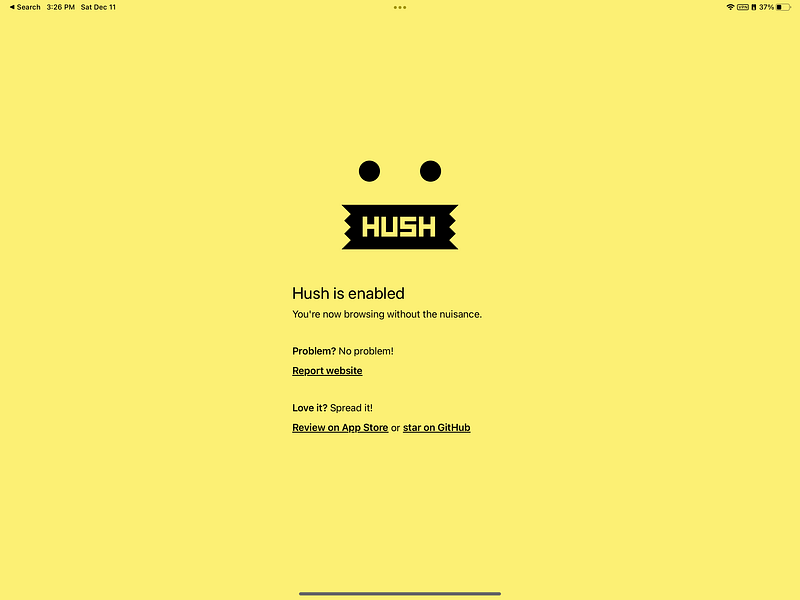
Screenshot of Hush on the iPad Pro

Browsing the web should be a hassle-free experience, yet most websites annoy their users by forcing them to accept cookies that are privacy-invasive.

Hush is one of those extensions that you won’t notice having it, yet miss it once you are using Safari without it. The app is highly privacy-friendly and doesn’t collect any data.

If you like to browse the web without any cookie annoyances from most websites, give Hush a try. It is worth it.

🔐 Privacy: No data collection

💳 Price: Free!

✓ Compatibility: 📱iPhone, 📱iPad, 💻 Mac

🧩 Design: Aesthetically pleasing

⭐️ Rating: 4.7 out of 5 (322 ratings)

🔗 Download: AppStore

🌐 Research: GitHub

3. Amplosion
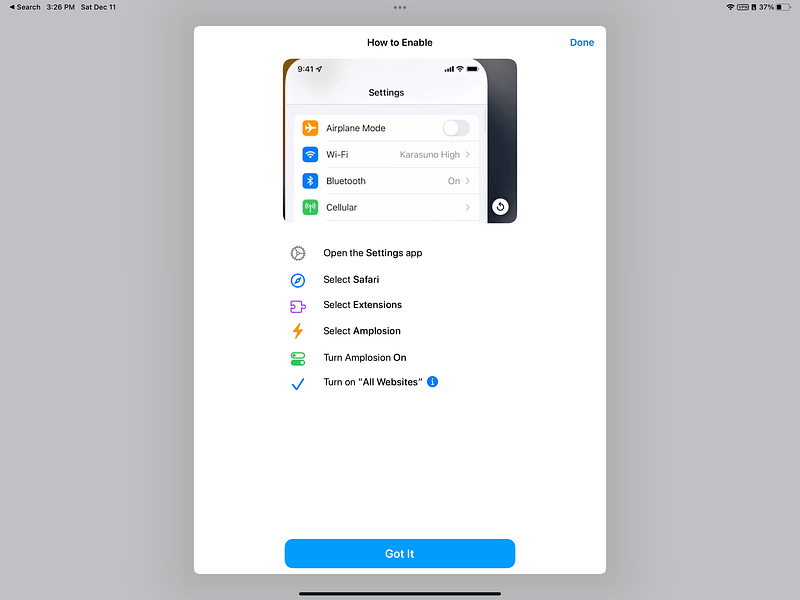
Screenshot of Amplosion on the iPad Pro

AMP or Accelerated Mobile Pages is an open-source technology that Google made to improve the speed of loading websites on mobile devices using cellular data. At first, It was a good idea because cellular connections were slow, but as more people upgrade from 3G to 4G and then LTE connections, loading websites was no longer a problem. AMP, a technology that saved time, loading optimized versions of websites became a hassle for developers who optimized and developed their versions of their websites.

Amplosion does one job. Once you search for something on Google and click on a link, it forces Google to load the whole website rather than the AMP version. By enabling Amplosion, your experience using Safari and searching Google will elevate. That is because you get the real view of the website you want to browse.

If you have a decent internet connection, give Amplosion a try. It changes how you surf the web by providing better versions of most websites.

🔐 Privacy: No data collection

💳 Price: $2.99

✓ Compatibility: 📱iPhone, 📱iPad

🧩 Design: Decent looking

⭐️ Rating: 4.9 out of 5 (1022 ratings)

🔗 Download: AppStore

🌐 Research: Website

4. Vinegar
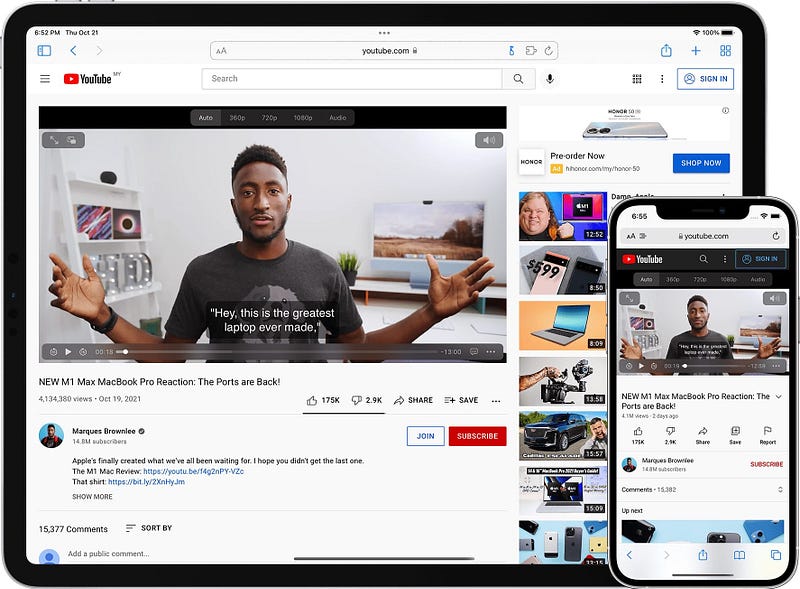
Screenshot of Vinegar on the iPad Pro

Browsing YouTube in Safari on iPadOS and iOS is not a great experience. What’s worst is watching a YouTube video with its default player. In addition, YouTube wants you to install their app, and I don’t want to do that because I care about my privacy.

Vinegar is an excellent extension for Safari that replaces YouTube’s default control with a native HTML5 media player. So what changes?

  • No advertisements
  • Native control over media playback
  • Restore picture-in-picture support
  • Background media playback

This extension came out almost a month ago and still has some minor issues, but it is great, and I recommend it to anyone who uses YouTube on Safari.

🔐 Privacy: No data collection

💳 Price: $1.99

✓ Compatibility: 📱iPhone, 📱iPad, 💻 Mac

🧩 Design: Decent looking

⭐️ Rating: 4.4 out of 5 (122 ratings)

🔗 Download: AppStore

🌐 Research: Website

5. Achoo HTML
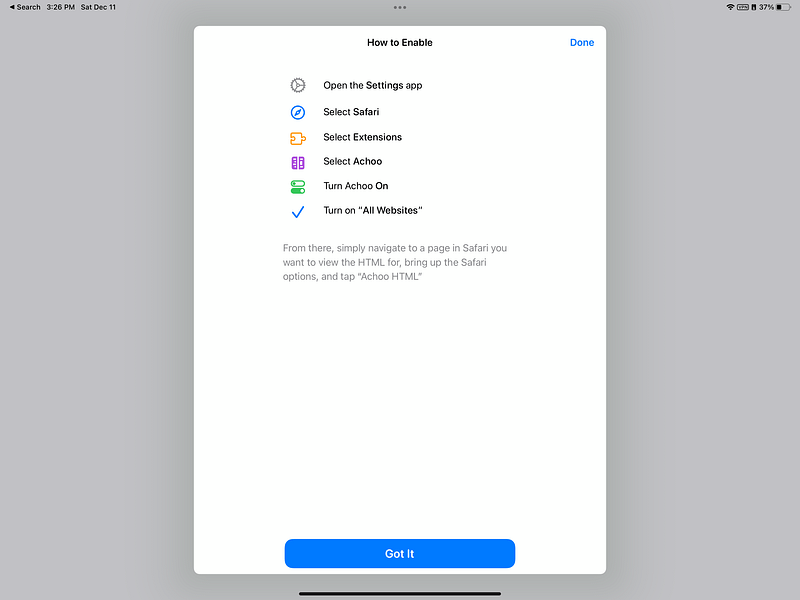
Screenshot of Achoo HTML on the iPad Pro

One of the great features of Safari on Mac is its developer feature which allows you to inspect each HTML element on a webpage and change their CSS and HTML properties without having to refresh the page. Unfortunately, iOS and iPadOS don’t have those features; that is why I’m recommending Achoo HTML.

It is a great lightweight extension to help you edit any element on any website to your liking. If you are a web developer or a full-stack designer, this extension will help you alter the view of a website without making any permanent changes.

Christian Selig developed Achoo HTML. He also made Amplosion and Apollo, which is a Reddit client. If you like his apps, give this one a try and support the developer. He is a wonderful human being.

🔐 Privacy: No data collection

💳 Price: $0.99

✓ Compatibility: 📱iPhone, 📱iPad

🧩 Design: Decent looking

⭐️ Rating: 4.5 out of 5 (100 ratings)

🔗 Download: AppStore

🌐 Research: Website

Thank you for reading this story. I use Safari as my default browser. Each update on Safari and its extensions shines my day. I hope the extensions I introduced help you browse a safer and better version of the internet.

If you enjoyed using these extensions, please support me by following me and giving this story 50 claps.

I would appreciate it if you support me by becoming a Medium member using the link below:

Here are the previous Mac stories you might find interesting:

Browsers
Tech
Technology
Apple
Safari
Recommended from ReadMedium