avatarNikhil Vemu

Free AI web copilot to create summaries, insights and extended knowledge, download it at here

4392

Abstract

at-would-never-let-you-ditch-it-d2606ff9824d"> <div> <div> <h2>7 Features Of Apple Notes That Would Never Let You Ditch It</h2> <div><h3>Seemingly simple, yet great functionality</h3></div> <div><p>medium.com</p></div> </div> <div> <div style="background-image: url(https://miro.readmedium.com/v2/resize:fit:320/0*Es3vq2Aqmk78FssT)"></div> </div> </div> </a> </div><h1 id="4611">#4. Call forwarding and Conference calls 📞</h1><figure id="4f59"><img src="https://cdn-images-1.readmedium.com/v2/resize:fit:800/1*twB0OkBs7_cdb_jfKdgAeg.png"><figcaption>Screenshot by the author</figcaption></figure><p id="2169">The Apple Watch doesn’t have call forwarding option. So, I couldn’t forward the delivery guy’s calls to my dad at home, like I do with my iPhone. I myself have to guide him to receive the courier.</p><p id="8857">Also, the Apple Watch doesn’t have call conferencing option. This way, I always have to tell the other person to do it for me.</p><p id="f2cb">If he doesn’t have the number, I have to cut the call, send him the contact card, and get on-line again. <i>Too tedious. </i>Because I couldn’t browse my Apple Watch while on a call.</p><h1 id="fa9c">#5. Automations 🔄</h1><figure id="6518"><img src="https://cdn-images-1.readmedium.com/v2/resize:fit:800/1*xSL2t8s4z-5Y7qfo57oceg.jpeg"><figcaption>Screenshot by the author</figcaption></figure><p id="01cf">If Shortcuts are possible, automations are also possible. It’s just triggering the same shortcut at a time or event, right?</p><p id="23a8">As a person having multiple automations throughout the day, I feel more comfortable if they work even on my Apple Watch.</p><p id="27a4">Hopefully, they might come in WatchOS 9, as it isn’t a big deal for Apple.</p><h1 id="f117">#6. Emergency SOS in Airplane mode ✈️</h1><figure id="9704"><img src="https://cdn-images-1.readmedium.com/v2/resize:fit:800/1*RKivYyXou5gJWzyCpH8bsA.png"><figcaption>Screenshot by the author</figcaption></figure><p id="3e01">I’ve made a series of experiments the day I bought my Apple Watch. One is notifying emergency contacts while the watch is on Airplane mode.</p><p id="0af9">It didn’t happen.</p><p id="2496">Now, what would be the case if a person has taken a hard fall, and is unable to move, and his Apple Watch is on Airplane mode? Why doesn’t it turn off Airplane mode, call SOS and notify emergency contacts by itself?</p><p id="fc5f">It should also happen if someone opens the Medical ID and tries to call emergency contacts. <b><i>This would save lives.</i></b></p><h1 id="27ae">#7. Being standalone for location services and fitness 📍🏃‍♂️</h1><p id="7e8b">As I already mentioned, I don’t carry my iPhone wherever I go. The Apple Watch is my best companion.</p><p id="5ba0">Also, I don’t like keeping all the fitness related settings turned on always. They drain my watch’s battery. However, in case if I need ‘Fitness Tracking’ on, it says I need my iPhone for it. I don’t understand why.</p><figure id="82a8"><img src="https://cdn-images-1.readmedium.com/v2/resize:fit:800/1*P7eggdiXuAPmDH6RLRCS7w.jpeg"><figcaption><b>Why couldn’t I toggle it on the Apple Watch directly? </b>(Screenshot by the author)</figcaption></figure><p id="be5e">It also happens with location services. They only mirror my iPhone and I couldn’t change them separately.</p><figure id="1726"><img src="https://cdn-images-1.readmedium.com/v2/resize:fit:800/1*C35pKv7hj6eN-YekZgkHPQ.jpeg"><figcaption><b>They always stay greyed out like this </b>(Screenshot by the author)</figcaption></figure><h1 id="b976">#8. ECG for family ⚕️</h1><figure id="a207"><img src="https://cdn-images-1.readmedium.com/v2/resize:fit:800/1*9zOtRDdJVFuD1BVR77lRWQ.jpeg"><figcaption>Screenshot by the author</figcaption></figure><p id="c660">When I first tried to set up ECG in my Apple Watch, it asked for my DOB. As I’m below 22, it said I’m not supposed to use it. So, I’ve typed my father’s DOB as he wanted to take his ECG readings.</p><p id="20a2">Later, I couldn’t change it. There was no provision for it.</p><p id="b87e">I had a call with Apple support, and all they said was — <b><i>ECG on Apple Watch is meant only for its user, not for his family</i></b>. In that case, do everyone in the family have to own sepa

Options

rate Apple Watches? <i>Damn.</i></p><p id="b6a2">I don’t understand why this is so. While I could track steps, heart rate, and blood oxygen of anyone with my little device, why couldn’t I use it for ECG for anyone?</p><h1 id="eddf">#9. iCloud sync for screenshots ☁️</h1><p id="a4b6">You might have already known this — Screenshots on the Apple Watch aren’t stored locally. As soon as you take a screenshot, the Apple Watch tries to send them to the connected iPhone via Wi-Fi and Bluetooth.</p><p id="da67">For better functionality, I feel the screenshots should have the provision to be stored locally, and to iPhone optionally. And could be uploaded via cellular network to iCloud.</p><p id="8f9d">This way, you don’t need to connect your iPhone and Apple Watch every time you want to transfer screenshots.</p><h1 id="51e6">#10. Mail attachment opening capability ✉️ 📎</h1><figure id="faaa"><img src="https://cdn-images-1.readmedium.com/v2/resize:fit:800/1*ze7rEhpRAjMr-1x26p-Nsw.jpeg"><figcaption>Screenshot by the author</figcaption></figure><p id="2b98">Apple has compressed the Mail app well to the little device’s screen size. It nicely helps me not miss out from my university emails.</p><p id="cd6e">However, I couldn’t open the mail attachments. I always need my iPhone for it. Better, if Apple includes at least view-only capability for them, it’d be more nifty.</p><h1 id="0b2e">Other possible features that still don’t exist</h1><h2 id="397d">#11. Calendar events without Siri 📆</h2><p id="9408">The Apple Watch doesn’t allow you to create calendar events manually. If you really want, you have to ask Siri. “Hey Siri! Create an appointment.” However, I sometimes like to do it manually.</p><h2 id="5c55">#12. Change call volume when locked 🔈</h2><p id="3d9f">The call volume up function with digital crown doesn’t work when the Apple Watch is locked. That case, I had to cut the call, unlock, call them again, and then raise it.</p><p id="f1ee">As volume isn’t a privacy concern, Apple should consider enabling the feature even when the Apple Watch is locked.</p><h2 id="a807">#13. Option to turn off cellular data and still receive calls and messages 🗼</h2><p id="aa10">This could save lots of battery.</p><h1 id="d817">Conclusion</h1><p id="5b48">Every device yet, has a couple of possible features still lacking. The Apple Watch just has more of them. By the rumours, the WatchOS 9 would be the biggest major update for the Apple Watch.</p><p id="60cf">Let’s hope we get many possible features then.</p><h2 id="db67">Which of these features do you really need?</h2><p id="c363"><b>If you liked this story, you might also like:</b></p><div id="62ac" class="link-block"> <a href="https://readmedium.com/how-to-clear-your-iphone-ram-in-5-seconds-or-less-c816084eab6a"> <div> <div> <h2>How to Clear your iPhone RAM in 5 Seconds — or Less</h2> <div><h3>Simple tips that actually work</h3></div> <div><p>medium.com</p></div> </div> <div> <div style="background-image: url(https://miro.readmedium.com/v2/resize:fit:320/0*mlOgw0NEHxGx8-KL)"></div> </div> </div> </a> </div><div id="b28f" class="link-block"> <a href="https://readmedium.com/7-useful-things-your-apple-watch-can-do-without-your-iphone-nearby-c151f5c94089"> <div> <div> <h2>7 Useful Things Your Apple Watch Can Do Without Your iPhone Nearby</h2> <div><h3>This might make you bold enough to leave your iPhone at home</h3></div> <div><p>medium.com</p></div> </div> <div> <div style="background-image: url(https://miro.readmedium.com/v2/resize:fit:320/0*vXpFnm-STnFwBD1X)"></div> </div> </div> </a> </div><p id="ff93"><a href="https://nikhilvemu.medium.com/subscribe"><b><i>Get notified</i></b></a><i> via email whenever I publish. Join 45+ others!</i></p><p id="5f95"><i>Not a Medium member yet? To get unlimited access to all the great stories on Medium, <a href="https://nikhilvemu.medium.com/membership"><b>Sign up</b></a> now!</i></p><p id="c5b1"><i>(It’s an affiliate link so I receive a portion of your payment, with zero extra cost for you.)</i></p></article></body>

10 Possible Features I Desperately Need On My Apple Watch

It feels terribly incomplete without them
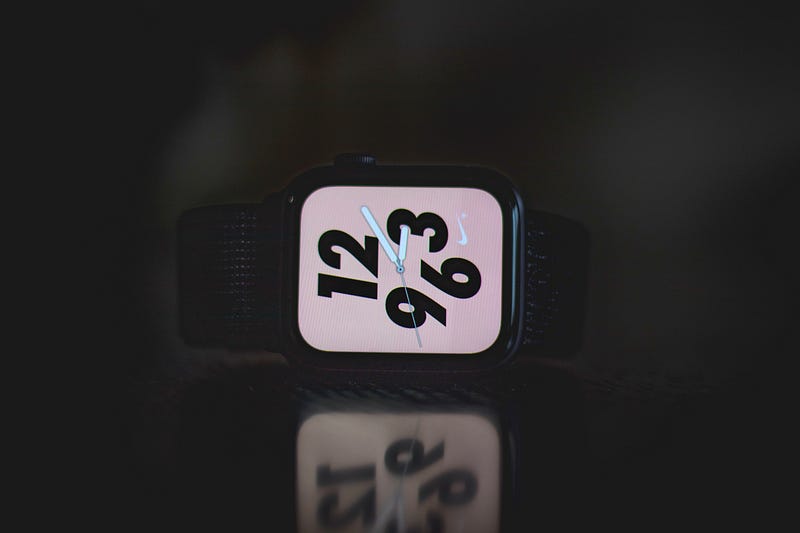
Photo by Nadine Shaabana on Unsplash

The Apple Watch is such a useful and standalone device, that I could even survive a week only with it.

Even without my iPhone, I’m not away from making calls, texting pals, sending emails, and sharing my location with family. However, after a month of using it, I’ve found 10 possible features my Apple Watch still doesn’t have.

If Apple brings them in WatchOS 9, the Apple Watch becomes oh so standalone and handier. Here they are:

#1. A browser I could play with 🧭

Screenshot by the author

While Android watches have already got a browser in Wear OS 3, the Apple Watch still lacks it.

While it has a browser, it only opens up when you click on a link from a mail or message. Thereafter, you can’t type in a web address to get redirected. Also, it couldn’t play audio or video from a webpage — they say, “Use a compatible browser”.

Some pages only keep loading forever (like the one in the above screenshot).

And… Keychain with verification codes 🔑

It’d be better if Apple also adds Keychain in Settings that could provide verification codes.

#2. Listen content without AirPods 🎧
Screenshot by the author

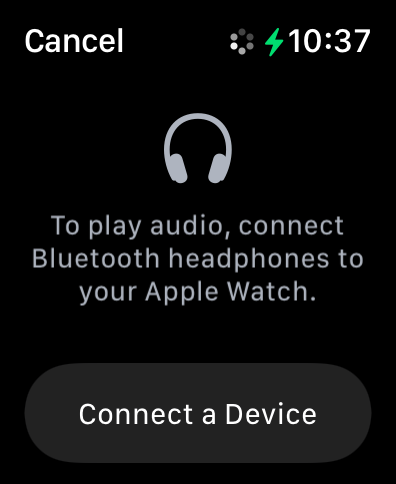
This thing annoys me —

Why doesn’t Apple allow me to listen to music, podcasts, and audiobooks without AirPods or any other bluetooth audio device, while it allows calls through speaker?

See, I’m personally allergic to EMF signals. I don’t know why.

I get headache if I stay for five minutes near a Wi-Fi router or wear wireless earphones. Hence, I don’t own AirPods. This makes me miss using my Apple Watch for listening audio content, so I couldn’t use it to its fullest potential.

I’m fortunate it atleast allows me to make calls with speaker. Else, I wouldn’t even have bought it.

#3. Notes app 📝

Why doesn’t the Notes app exist on the Apple Watch?

With my former smartphone addiction, I stopped carrying my iPhone wherever I go. I only carry my Apple Watch, which is pretty much sufficient.

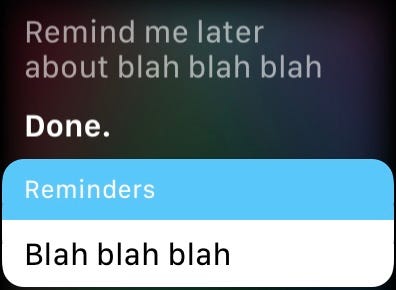
However, if a brilliant idea pops up in my head, I don’t have the Notes app in the Apple Watch to immediately jot it down. I always had to tell Siri to remind the idea at a later point.
Screenshot by the author

Hence, I desperately need the Notes app in this little device. No need of the nice formatting tools, only the simple Notes app suffices, Apple.

#4. Call forwarding and Conference calls 📞
Screenshot by the author

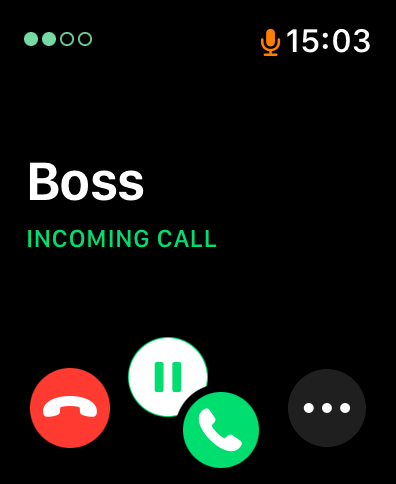
The Apple Watch doesn’t have call forwarding option. So, I couldn’t forward the delivery guy’s calls to my dad at home, like I do with my iPhone. I myself have to guide him to receive the courier.

Also, the Apple Watch doesn’t have call conferencing option. This way, I always have to tell the other person to do it for me.

If he doesn’t have the number, I have to cut the call, send him the contact card, and get on-line again. Too tedious. Because I couldn’t browse my Apple Watch while on a call.

#5. Automations 🔄

Screenshot by the author

If Shortcuts are possible, automations are also possible. It’s just triggering the same shortcut at a time or event, right?

As a person having multiple automations throughout the day, I feel more comfortable if they work even on my Apple Watch.

Hopefully, they might come in WatchOS 9, as it isn’t a big deal for Apple.

#6. Emergency SOS in Airplane mode ✈️
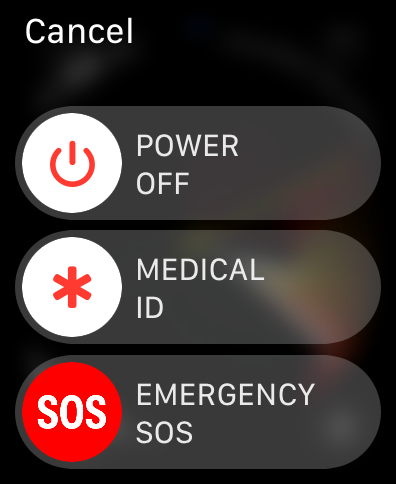
Screenshot by the author

I’ve made a series of experiments the day I bought my Apple Watch. One is notifying emergency contacts while the watch is on Airplane mode.

It didn’t happen.

Now, what would be the case if a person has taken a hard fall, and is unable to move, and his Apple Watch is on Airplane mode? Why doesn’t it turn off Airplane mode, call SOS and notify emergency contacts by itself?

It should also happen if someone opens the Medical ID and tries to call emergency contacts. This would save lives.

#7. Being standalone for location services and fitness 📍🏃‍♂️

As I already mentioned, I don’t carry my iPhone wherever I go. The Apple Watch is my best companion.

Also, I don’t like keeping all the fitness related settings turned on always. They drain my watch’s battery. However, in case if I need ‘Fitness Tracking’ on, it says I need my iPhone for it. I don’t understand why.
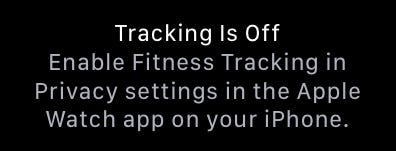
Why couldn’t I toggle it on the Apple Watch directly? (Screenshot by the author)

It also happens with location services. They only mirror my iPhone and I couldn’t change them separately.
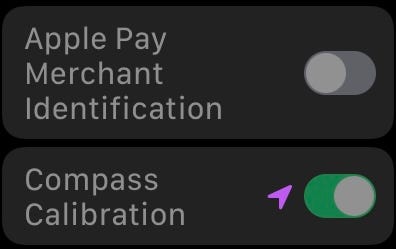
They always stay greyed out like this (Screenshot by the author)

#8. ECG for family ⚕️

Screenshot by the author

When I first tried to set up ECG in my Apple Watch, it asked for my DOB. As I’m below 22, it said I’m not supposed to use it. So, I’ve typed my father’s DOB as he wanted to take his ECG readings.

Later, I couldn’t change it. There was no provision for it.

I had a call with Apple support, and all they said was — ECG on Apple Watch is meant only for its user, not for his family. In that case, do everyone in the family have to own separate Apple Watches? Damn.

I don’t understand why this is so. While I could track steps, heart rate, and blood oxygen of anyone with my little device, why couldn’t I use it for ECG for anyone?

#9. iCloud sync for screenshots ☁️

You might have already known this — Screenshots on the Apple Watch aren’t stored locally. As soon as you take a screenshot, the Apple Watch tries to send them to the connected iPhone via Wi-Fi and Bluetooth.

For better functionality, I feel the screenshots should have the provision to be stored locally, and to iPhone optionally. And could be uploaded via cellular network to iCloud.

This way, you don’t need to connect your iPhone and Apple Watch every time you want to transfer screenshots.

#10. Mail attachment opening capability ✉️ 📎

Screenshot by the author

Apple has compressed the Mail app well to the little device’s screen size. It nicely helps me not miss out from my university emails.

However, I couldn’t open the mail attachments. I always need my iPhone for it. Better, if Apple includes at least view-only capability for them, it’d be more nifty.

Other possible features that still don’t exist

#11. Calendar events without Siri 📆

The Apple Watch doesn’t allow you to create calendar events manually. If you really want, you have to ask Siri. “Hey Siri! Create an appointment.” However, I sometimes like to do it manually.

#12. Change call volume when locked 🔈

The call volume up function with digital crown doesn’t work when the Apple Watch is locked. That case, I had to cut the call, unlock, call them again, and then raise it.

As volume isn’t a privacy concern, Apple should consider enabling the feature even when the Apple Watch is locked.

#13. Option to turn off cellular data and still receive calls and messages 🗼

This could save lots of battery.

Conclusion

Every device yet, has a couple of possible features still lacking. The Apple Watch just has more of them. By the rumours, the WatchOS 9 would be the biggest major update for the Apple Watch.

Let’s hope we get many possible features then.

Which of these features do you really need?

If you liked this story, you might also like:

Get notified via email whenever I publish. Join 45+ others!

Not a Medium member yet? To get unlimited access to all the great stories on Medium, Sign up now!

(It’s an affiliate link so I receive a portion of your payment, with zero extra cost for you.)

Technology
Wearables
Apple
Innovation
Art
Recommended from ReadMedium