
Apple’s (Hidden) Authenticator App
Google and Microsoft killed my inner minimalist
Hands-down, you already know what authenticator apps are, and what they do. When I asked my Apple pals to list few such apps, they said:
- Google Authenticator,
- Microsoft Authenticator.
That's it. The rare few said Salesforce Authenticator though.
Almost everyone had those third-party apps installed in their iPhones for rapidly changing 2-FA codes that give extra security for their accounts.
“We’re sacrificing minimalism”, they told me.
I asked them why they had to. “You guys have the in-built ‘Apple Authenticator’ right?”
“Wha-a-t? Apple Authenticator?”. They began searching the App Store for it, but none could find it.
“Don’t search. It’s there in the Keychain.”, I stopped them.
I explained them how to set up like this.
For example, say Google
Make sure you already have your Google account password saved in iCloud Keychain.
- Go to any Google-owned website.
- Click on your profile picture on the top-right corner, and then on
’Manage your Google Account’. - Go to
’Security’tab and scroll down the page. - Turn on
’2-Step Verification’and click on’Authenticator App’on the same page. - Click on
’iPhone’. Now you’ll get a QR-code. - Haptic press on it (i.e., press and hold).
- Now click on
’Add Verification Code in Passwords’.
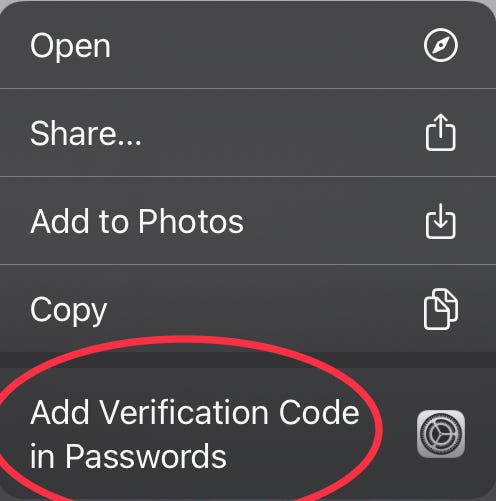
- Now click on the Google account you opened previously.
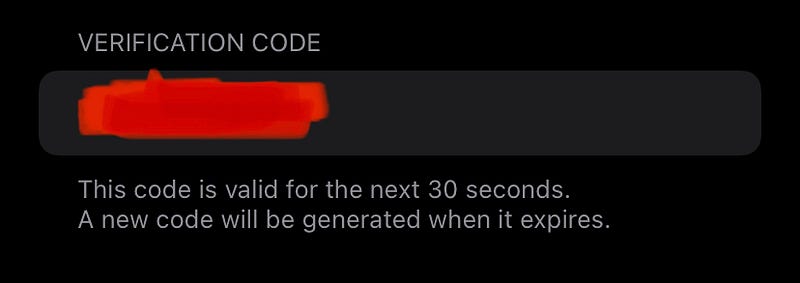
- You’re almost done. Just let Google know it by typing the 2-FA code in the prompt. Your Apple keyboard offers to enter it for you.
“Now delete the Google or Microsoft Authenticator app, my minimalistic pals.” I told them.
Sadly, even I was late for the epiphany. I wish I knew this much earlier.
You can repeat the same process for every other website you’ve enabled 2-FA authentication. For websites that don’t offer QR-codes, you can enter the “Setup key”.
Then your iPhone keeps generating a new 2-FA code every 30 seconds. Treat it like your password, that’s always changing.
Your iPhone can generate 2-FA codes even while it’s offline. They’re actually generated by Google-Apple mutually understood complex cryptographic equations, probably.
Though this feature doesn’t entirely change your life, it at least does save some space on your iPhone, as you’ve gleefully deleted third-party authenticators.
Agree?
If you liked this story, you might also like:
Get notified via email whenever I publish.
Not a Medium member yet? Me too. But if you consider signing up for it, Sign up now!
(It’s an affiliate link so I receive a portion of your payment, with zero extra cost for you.)


