
You Should Choose Vite Over CRA for React Apps, Here’s Why

For many beginners, intermediate and even for some expert programmers, Create React App is the key tool to start and maintain a React project because it provides many useful features such as HMR (Hot Module Replacement) and development server. However, it has a big drawback which is poor performance.
For almost two years, I used CRA for my React applications and I was happy because there were no configuration files and the build times were not a big deal for me because I was working on simple projects that contains 5,000 to 10,000 lines of code. However, when I tried to build something massive, like 25,000 lines of code, I started to get tired of waiting because when I started my project, the development server was getting ready in almost 5 minutes, and whenever I made a change in my code, I had to wait for almost 5 to 10 seconds to see the effects. These times are pretty huge when you are working a real-life project. I knew that it was not about my computer but CRA. That’s when I searched for some alternatives for CRA and found Vite.
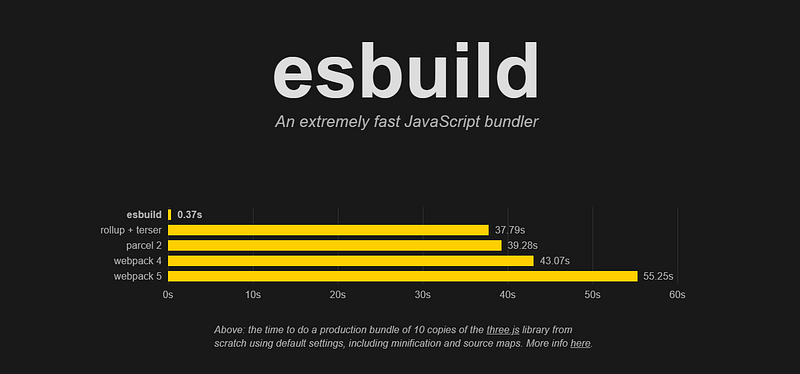
Under the hood, CRA uses Webpack which is a popular asset bundler that helps us develop and build a web app. The Webpack was fine until 2–3 years ago but today, we have almighty Esbuild.
Formerly people were thinking that the tools to use for JavaScript should be written in JavaScript as Webpack written. Since JavaScript is an interpreted language and therefore it is kind of slow, it is not suitable for processing tools or programs. However, the perspective of the developers has changed and they tried to write a JavaScript tool using other low-level languages like Go. That’s how Esbuild was created. It is a JavaScript build tool that is written in Go and thus, it is lightning fast.
So, What’s Vite?
Vite, pronounced as /vit/, is a next generation frontend build tool built on top of Esbuild. It is created by Evan You who is the creator of Vue.js. It has a solid CLI that eases the process of project setup amazingly. It works really fast and it has many great features that CRA provides. Moreover, there are plugins that can be added and make development process more straightforward.
When CRA and Vite is compared there are plenty of differences in terms of experience and build times. In CRA, there is literally no configuration file for the build process, everything is super-simple. This makes life easy for small projects but when the project gets bigger, the build process should be configured according to the needs of the project. In contrast, Vite provides a vite.config.js file that contains some additional configurations for projects and it is really simple and easy to configure. The other difference between these two is the build times and process. While bundling the app for development, CRA rebundles the whole app whenever there is a change in the code. In contrast, Vite bundles whole app in the beginning and rebundles only the files those are changed. This makes building process faster and faster.
Let’s see both CRA and Vite in action.
Firstly, I will create an app both in Vite and CRA to see which one will be created first. To create a Vite app, simply write npm init @vitejs/app. Then name the project and choose the framework as React.
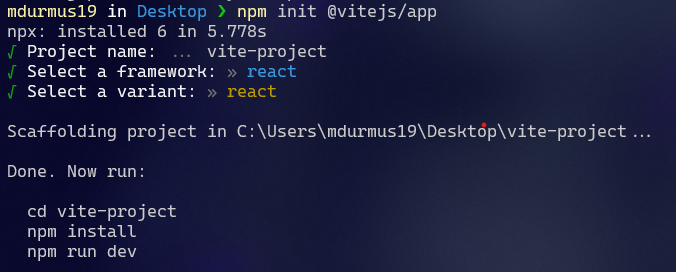
Apart from npx installation, the project is setup in 4 seconds. Afterwards I ran npm install to install dependencies. This took 15 seconds. So, all in all, the project is setup in almost 20 seconds.
In CRA, after typing npx create-react-app apart from npx installation, it took almost 180 seconds which is pretty long time to just setup the project. In the screenshot below, you can see a portion of log while setup in CRA.

The Weak Sides of Vite
Yes, like every beautiful thing in world, Vite has some weak points. But I should say that it is not too much and fortunately, all of them are fixable. The first point that is different and weak from CRA is the importance of React in every JSX file. As you know, with CRA version 17, the importance of React is handled by CRA which means you don’t have to import React in every file. Unfortunately, in Vite, you still should import React in every JSX file. The path to handle this issue goes directly into vite.config.js file.
When you open the vite.config.js file, you will see that there is a preconfigured React plugin for Vite named reactRefresh. This plugin handles HMR updates in React apps but there is one more plugin that provides HMR and some more features like auto-importance of React in every JSX file. Install the plugin using npm install --save-dev vite-preset-react command. And then replace the previous plugin with this one as follows:
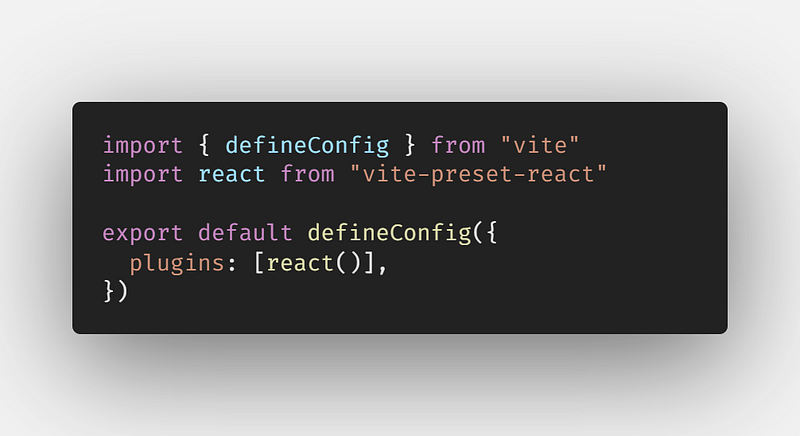
After that, you don’t have to write import React from 'react' to every file.
The other issue I encountered was about the SVG files. While using CRA, I was able to import SVG files as React component using import {ReactComponent as Pic from '../path'. However, this is not the case for Vite but again, there is a way to overcome this. We should install one more plugin named vite-plugin-svgr. Install it using npm install --save-dev vite-plugin-svgr command. And then call it inside plugins array as follows:
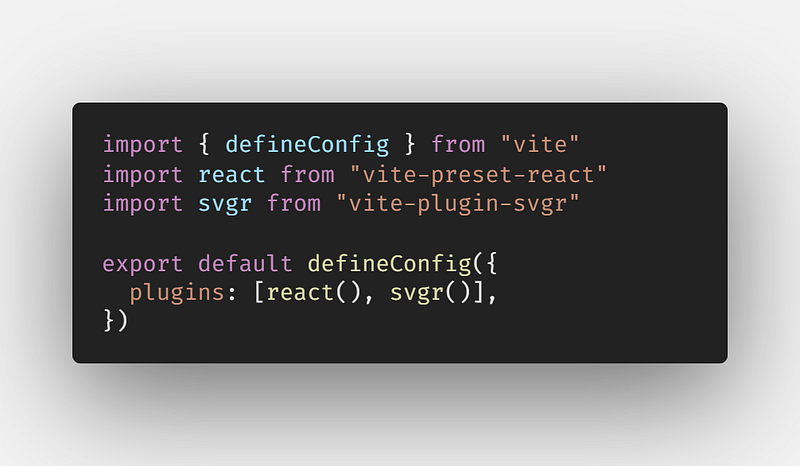
Now you can use the exact syntax to import SVGs as CRA.
And that’s it! There are no more weak points. Everything works fast and seamlessly in Vite. I think you should give it a try Vite and experience the speed. You can find further info here.

Thank you for reading. If you liked it, make sure you clap, and if you have anything to say about the article, leave a response. See you in the next article.
Further Reading