avatarCan Durmus

Free AI web copilot to create summaries, insights and extended knowledge, download it at here

5135

Abstract

<div> <div>
            <iframe class="gist-iframe" src="/gist/XenoverseUp/94bae2ca1210afdddd1a197199b8084a.js" allowfullscreen="" frameborder="0" height="undefined" width="undefined">
          </div>
        </div>
    </figure></iframe></div></div></figure><h1 id="44af">2. Let Me Out, I’m In An Infinite Loop</h1><p id="07a0">In one of my projects, I was dealing with the <a href="https://en.wikipedia.org/wiki/Atomic_mass">atoms’ weight</a> and you know that they are so small and light. Something like 2 to the power of -324 kg (I know that is not the real weight). And at some point, I had to add the mass of an atom to 5 and create a while loop around it.</p>
    <figure id="7efe">
        <div>
          <div>
            
            <iframe class="gist-iframe" src="/gist/XenoverseUp/32b4e38fde66eae12480bfab1d742295.js" allowfullscreen="" frameborder="0" height="undefined" width="undefined">
          </div>
        </div>
    </figure></iframe></div></div></figure><p id="0045">I pass a value to <code>massOfAnAtom</code> using <a href="https://stackoverflow.com/questions/27151311/how-to-use-scientific-notation-in-js">scientific notation</a>, which is basically an easier way to write powers of 10. In the loop body, I add the mass of the atom to the main mass. I expected the <code>while</code> loop to run only once because in the first iteration, we add another number to 5 and the condition isn’t satisfied anymore; <code>mainMass</code> is bigger than 5, now.</p><p id="a54f">However, instead, I get an infinite loop that logs 5 over and over.</p><figure id="7554"><img src="https://cdn-images-1.readmedium.com/v2/resize:fit:800/1*BmE2sw_SxDu9R40sr4ee3A.png"><figcaption>The snippet logs <code><b>5</b></code> over and over until I exit the program manually.</figcaption></figure><p id="c20d">What’s wrong with this code?</p><h2 id="5a06">Explanation</h2><p id="c178">The arithmetic of computers is quite different from our world. We have 10 figures (0–9) to represent any number but in the machine world, there are only 0 and 1. So, everything we write in the code should be converted to 0s and 1s.</p><p id="cab2">Besides, unlike us, computers have limited memory for each variable. For instance, computers can <a href="https://indepth.dev/posts/1139/here-is-what-you-need-to-know-about-javascripts-number-type#:~:text=There%20are%20also%20separate%20data,where%20this%20name%20comes%20from.">allocate</a> 4 bytes of memory for a <code>Number</code>. That’s why there’s a max and min value that can be parsed by the interpreter. You can access these values with <code>Number.MAX_VALUE</code> and <code>Number.MIN_VALUE</code>.</p><p id="a904">In the code above, <code>2e-324</code> is such a small number that it cannot be expressed as 0s and 1s using allocated memory, which is called underflow. So, JavaScript simply converts it to 0, and in the while loop, it simply adds 0s to 5. Consequently, this causes an infinite loop.</p><p id="cc14">You would think that it is a bad thing that JavaScript converts a meaningful number to 0. However, it is not; that only shows that JavaScript is a safe language because if the number causes underflow or overflow, this would lead to <a href="https://www.i-programmer.info/news/149-security/8548-reboot-your-dreamliner-every-248-days-to-avoid-integer-overflow.html">horrible scenarios</a>.</p><h1 id="b67d">3. All I Want Is An Object In Return</h1><p id="5cb3">Here’s the last snippet of this article and I think this is the most common one among others.</p><p id="1a36">I created a function named <code>createPerson</code> and all it should do is to give me an object created using the parameters I passed to the function.</p>
    <figure id="c82f">
        <div>
          <div>
            
            <iframe class="gist-iframe" src="/gist/XenoverseUp/4e475ffacb0645395e6cbc58cae0479d.js" allowfullscreen="" frameborder="0" height="undefined" width="undefined">
          </div>
        </div>
    </figure></iframe></div></div></figure><p id="2d35">In the arrow functions, when a value is directly written right after the arrow, that means it is returned implicitly. In the code above, I did the exact same thing. I wrote the object I want to return, immediately. So, I should see the object created in the log.</p><p id="5e11">However, the terminal shouts to me to correct my code and come again.</p><figure id="f081"><img src="https://cdn-images-1.readmedium.com/v2/resize:fit:800/1*AWAR63MXe9jEefX_4xOTqQ.png"><figcaption>It says it didn’t expect a colon in there, but how can I create an object without colons?</figcaption></figure><p id="b6e2">What’s wrong with this code?</p><h2 id="5b85">Explanation</h2><p id="246c">Let’s assume you don’t return an object from that function but rather do some other funky stuff with it. How would the syntax change?</p>
    <figure id="97d2">
        <div>
          <div>
            
            <iframe class="gist-iframe" src="/gist/XenoverseUp/b6605b1c46b335d9f08825891b220be6.js" a

Options

llowfullscreen="" frameborder="0" height="undefined" width="undefined"> </div> </div> </figure></iframe></div></div></figure><p id="89fb">As you see, we again used the curly braces in the same spot as the previous one. And now, there’s no error with the code above. Because curly braces, apart from creating objects, define code blocks and the bodies of the function. So, when you put curly braces right after the arrow, it is interpreted as the body of the arrow function, not an object you want to return. Consequently, putting colons and commas, JavaScript threw an error.</p><p id="781a">To return an object from an arrow function, you can either use regular explicit return or implicit return with parentheses so that curly braces are interpreted correctly.</p> <figure id="9729"> <div> <div>

            <iframe class="gist-iframe" src="/gist/XenoverseUp/2d3f777e33b180569c99e2391c91ed24.js" allowfullscreen="" frameborder="0" height="undefined" width="undefined">
          </div>
        </div>
    </figure></iframe></div></div></figure><p id="cfa0">Now, the code is fixed and works as intended.</p><h1 id="09eb">Conclusion</h1><p id="da49">For us, developers, dealing with the bugs is much more time-consuming than writing the buggy code. Sometimes we have to constantly stare at the same code snippet for hours and keep 34 Chrome tabs open. However, learning the weak points that could cause bugs saves us invaluable time so that we can deal with other bugs.</p><p id="a6a2">In the response section, write how many bugs you spotted without looking at the explanation.</p><figure id="b261"><img src="https://cdn-images-1.readmedium.com/v2/resize:fit:800/1*TtX3EIdGpUqGCOW6LtO42Q.png"><figcaption>Subscribe to get <b>free subscriber-exclusive</b> content.</figcaption></figure><p id="0ab0">Hope you liked this story. If so, make sure you clapped. This means the world to me. See you in the next story.</p><p id="54c2">Enjoy reading stories like these and want to support me as a writer? Consider <a href="https://candurmuss.medium.com/membership">signing up to become a Medium member</a>. It’s $5 a month, giving you unlimited access to stories on Medium. If you <a href="https://candurmuss.medium.com/membership">sign up using my link</a>, I’ll earn a small commission.</p><div id="bfc5" class="link-block">
      <a href="https://candurmuss.medium.com/membership">
        <div>
          <div>
            <h2>Join Medium with my referral link - Can Durmus</h2>
            <div><h3>As a Medium member, a portion of your membership fee goes to writers you read, and you get full access to every story…</h3></div>
            <div><p>candurmuss.medium.com</p></div>
          </div>
          <div>
            <div style="background-image: url(https://miro.readmedium.com/v2/resize:fit:320/0*fGrTXYbb6oqcjqmR)"></div>
          </div>
        </div>
      </a>
    </div><h2 id="0f58">Related</h2><div id="3ed6" class="link-block">
      <a href="https://readmedium.com/real-life-experience-on-jetbrains-new-ide-fleet-5dde41b90a75">
        <div>
          <div>
            <h2>Real-Life Experience On JetBrains’ New IDE: Fleet</h2>
            <div><h3>JetBrains tries to keep up the competition against VS Code, with Fleet. Will it succeed or will it be forgotten under…</h3></div>
            <div><p>medium.com</p></div>
          </div>
          <div>
            <div style="background-image: url(https://miro.readmedium.com/v2/resize:fit:320/1*LQrpdw04gWPgmvAzmpxMwA.png)"></div>
          </div>
        </div>
      </a>
    </div><div id="9cb1" class="link-block">
      <a href="https://betterprogramming.pub/did-you-know-html-thinks-chuck-norris-is-a-color-9f67edf4c34">
        <div>
          <div>
            <h2>Did You Know HTML Thinks Chuck Norris Is a Color?</h2>
            <div><h3>Weird, isn’t it? Here’s why</h3></div>
            <div><p>betterprogramming.pub</p></div>
          </div>
          <div>
            <div style="background-image: url(https://miro.readmedium.com/v2/resize:fit:320/1*OGnLYvJgLpaW5tGWdzHOLw.png)"></div>
          </div>
        </div>
      </a>
    </div><div id="5211" class="link-block">
      <a href="https://readmedium.com/3-more-extremely-useful-react-tricks-to-speed-up-development-process-45118cefe8d8">
        <div>
          <div>
            <h2>3 More Extremely Useful React Tricks To Speed Up Development Process</h2>
            <div><h3>In today’s standards, React or a React-based framework is a go-to tool for most developers from beginners to all the…</h3></div>
            <div><p>medium.com</p></div>
          </div>
          <div>
            <div style="background-image: url(https://miro.readmedium.com/v2/resize:fit:320/1*l1xqlmebyFSn95uoOGyrcw.png)"></div>
          </div>
        </div>
      </a>
    </div></article></body>

JavaScript Mastery

Can You Spot The Bug?

Do you trust your JavaScript skills? Then come and try whether you can find the bugs in these snippets.

The Holy Insect | Julie Keeler on Dribbble, Edited by Author

JavaScript is a kind of programming language that is pretty easy to pick up but extremely hard to master. That’s because of the inconsistencies across the language. For instance, something that works in a normal function can cause a bug in arrow functions. Since the web is, as its name states, a node web that contains tens of thousands of interconnected nodes, changing a feature that is implemented 10 years ago in the core of the web, which is JavaScript, would cause millions of websites to crash. Consequently, this backward compatibility issue let the inconsistencies survive for many years.

In this story, I will show you 3 JavaScript code snippets that hide a bunch of bugs inside, very well. Try yourself and find them without looking at the explanation right below the snippet. Let’s see whether you are a real JavaScript ninja.

1. Indeed, I Initialized It

Here’s the first buggy code snippet and I think if you have a long-term relationship with JavaScript, you’ll notice the issue immediately.

What I am trying to do is to log not and buggy variables one by one. Since I am too lazy to write one more line, I put them in an array and use forEach to log them out.

However, when I run this code interpreter shouts that I tried to access the buggy variable before initialization. But I apparently didn't.
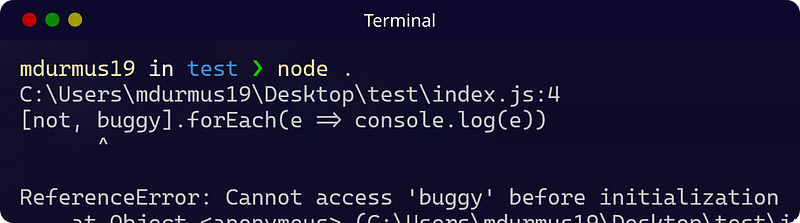
The interpreter says `ReferenceError: Cannot access ‘buggy’ before initialization`

What’s wrong with this code?

Explanation

The first thing every newbie learns in JavaScript is that semicolons (;) are optional. You can use them if you want but it is not a problem if you prefer not to.

Well, I am the one who prefers not to use them because they make the code look cluttered. For 99% of the time, not using semicolons is not a problem, at all. However, this snippet is in the 1%. By looking at the code, we see no issue because we separate each statement line by line. This is not the case for the interpreter.

You know that you can access individual characters of a string using brackets ([]) and an index number, as you do in arrays. In the buggy code snippet above, if you scan one more time, you’ll see that after the string buggy, I used brackets to create an array of variables, at least that was what I intended. But the interpreter thought that I tried to access the characters of the string.

So, here’s the same code from the interpreter's point of view.

Since I try to use buggy in the declaration of buggy, the interpreter says I cannot access it.

So, how to fix it? It is pretty easy, you can use semicolons at the end of every line and get rid of these kinds of issues once and for all. Or you simply put a semicolon right before the array and separate it manually from the previous string.

2. Let Me Out, I’m In An Infinite Loop

In one of my projects, I was dealing with the atoms’ weight and you know that they are so small and light. Something like 2 to the power of -324 kg (I know that is not the real weight). And at some point, I had to add the mass of an atom to 5 and create a while loop around it.

I pass a value to massOfAnAtom using scientific notation, which is basically an easier way to write powers of 10. In the loop body, I add the mass of the atom to the main mass. I expected the while loop to run only once because in the first iteration, we add another number to 5 and the condition isn’t satisfied anymore; mainMass is bigger than 5, now.

However, instead, I get an infinite loop that logs 5 over and over.
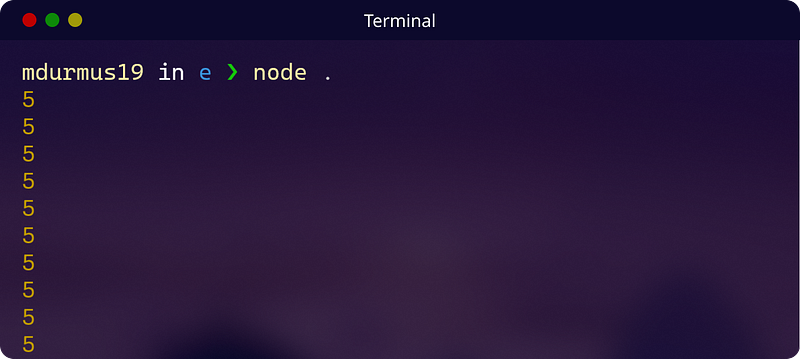
The snippet logs 5 over and over until I exit the program manually.

What’s wrong with this code?

Explanation

The arithmetic of computers is quite different from our world. We have 10 figures (0–9) to represent any number but in the machine world, there are only 0 and 1. So, everything we write in the code should be converted to 0s and 1s.

Besides, unlike us, computers have limited memory for each variable. For instance, computers can allocate 4 bytes of memory for a Number. That’s why there’s a max and min value that can be parsed by the interpreter. You can access these values with Number.MAX_VALUE and Number.MIN_VALUE.

In the code above, 2e-324 is such a small number that it cannot be expressed as 0s and 1s using allocated memory, which is called underflow. So, JavaScript simply converts it to 0, and in the while loop, it simply adds 0s to 5. Consequently, this causes an infinite loop.

You would think that it is a bad thing that JavaScript converts a meaningful number to 0. However, it is not; that only shows that JavaScript is a safe language because if the number causes underflow or overflow, this would lead to horrible scenarios.

3. All I Want Is An Object In Return

Here’s the last snippet of this article and I think this is the most common one among others.

I created a function named createPerson and all it should do is to give me an object created using the parameters I passed to the function.

In the arrow functions, when a value is directly written right after the arrow, that means it is returned implicitly. In the code above, I did the exact same thing. I wrote the object I want to return, immediately. So, I should see the object created in the log.

However, the terminal shouts to me to correct my code and come again.
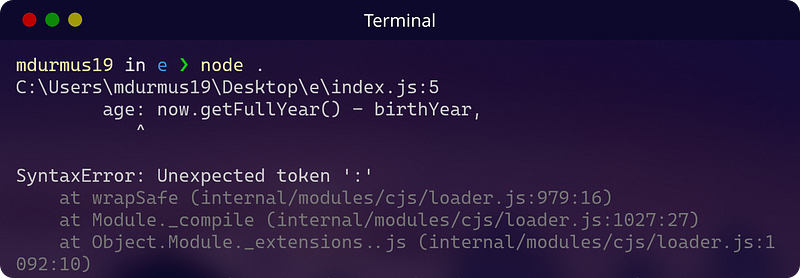
It says it didn’t expect a colon in there, but how can I create an object without colons?

What’s wrong with this code?

Explanation

Let’s assume you don’t return an object from that function but rather do some other funky stuff with it. How would the syntax change?

As you see, we again used the curly braces in the same spot as the previous one. And now, there’s no error with the code above. Because curly braces, apart from creating objects, define code blocks and the bodies of the function. So, when you put curly braces right after the arrow, it is interpreted as the body of the arrow function, not an object you want to return. Consequently, putting colons and commas, JavaScript threw an error.

To return an object from an arrow function, you can either use regular explicit return or implicit return with parentheses so that curly braces are interpreted correctly.

Now, the code is fixed and works as intended.

Conclusion

For us, developers, dealing with the bugs is much more time-consuming than writing the buggy code. Sometimes we have to constantly stare at the same code snippet for hours and keep 34 Chrome tabs open. However, learning the weak points that could cause bugs saves us invaluable time so that we can deal with other bugs.

In the response section, write how many bugs you spotted without looking at the explanation.

Subscribe to get free subscriber-exclusive content.

Hope you liked this story. If so, make sure you clapped. This means the world to me. See you in the next story.

Enjoy reading stories like these and want to support me as a writer? Consider signing up to become a Medium member. It’s $5 a month, giving you unlimited access to stories on Medium. If you sign up using my link, I’ll earn a small commission.

Related

Programming
Software Development
Technology
JavaScript
Data Science
Recommended from ReadMedium