
Web Development Tips
Real-Life Experience On JetBrains’ New IDE: Fleet
JetBrains tries to keep up the competition against VS Code, with Fleet. Will it succeed or will it be forgotten under the dust?

A few months ago, JetBrains announced its brand new Visual Studio Code competitor because day by day, the community and the users of VS Code keeps growing and even some long-term JetBrains users abandon the IDEs.
Even though VS Code is not an IDE, with its plugin ecosystem, it is possible to develop almost anything seamlessly on VS Code. Besides, VS Code takes the advantage of not being an IDE and works way faster than JetBrains’ IDEs.
However, VS Code is dead now — at least this is what JetBrains desires. They noticed that shipping so many features at the same time cannot compete with the speed and the lightness of VS Code. So, here they are with their brand new product: Fleet. It is a minimal text editor very similar to VS Code but with an integrated IDE that can be turned on and off based on usage purposes.
I have introduced Fleet in the story down below with its new features and what it offers to developers. To learn what is Fleet, make sure you checked it out.
A few weeks ago, I was finally able to try it on my workstation and I want to share my hands-on experience with you in this story.
First Impressions
When I download the preview build, I was expecting to wait a bit for IDE to load all resources because on the official website, JetBrains call Fleet an IDE. I’ve experienced the heaviness of IDEs many and many times. However, with the first click, all of my hesitations were simply gone. JetBrains was right about the speed, Fleet launched immediately, even faster than VS Code, thanks to launching only the text editor of the IDE.
In the Fleet, JetBrains tries to recreate the UI from scratch, independently from the other products. So, it does look different from the other JetBrains IDEs. It looks just a bit lightweight and less complex. However, here’s the disappointing part: It is not unique. When you take a look at it, you see that it hasn't decided what it tries to be yet. You see both JetBrains and VS Code influences on UI but it is none of them. This incompleteness breaks reliability on Fleet, a little.
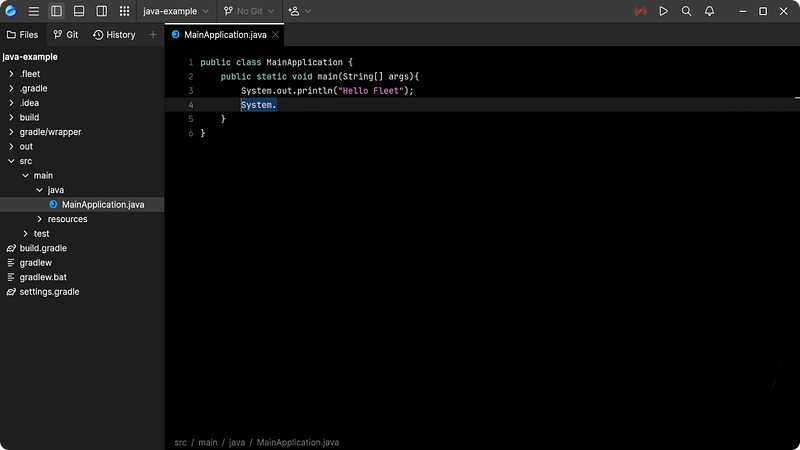
When you start to use Fleet in editor mode, it is not so different than Notepad++, which is pretty basic, fast, and plain. It has basic syntax highlighting for mainstream languages but lacks autocomplete that even Notepad++ has, in a sense. All in all, it is not that impressive in the first look but let’s keep our hopes and start the Smart mode.
The Bigger Concerns
Now that we know what we can do in the editor mode, it’s time to power up the engines by pushing the signal-like icon in the corner. Pushing this button, an IntelliJ-Code based engine will power up in the background and check the code across the whole codebase to provide useful features like autocompletion, refactoring tools, auto imports, and more…
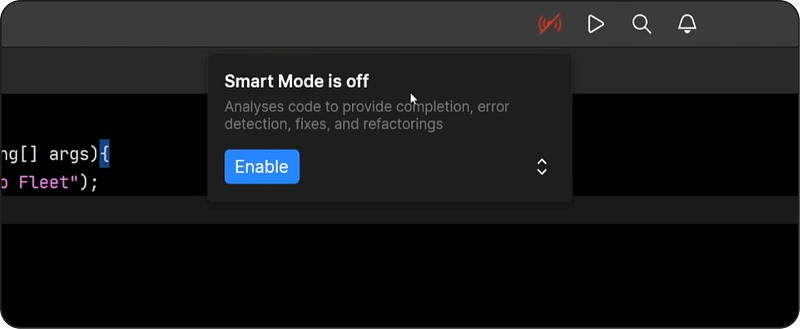
After clicking the button, it takes almost 3 seconds to start the IntelliJ instance which is almost the same for other JetBrains IDEs. However after these 3 seconds, Fleet starts to use its brain to help you code out by providing auto-completion and debug tools.
At this point, the first thing coming to my mind is that Fleet is so different than VS Code, in terms of the way it works. VS Code is still a text editor with additional Intellisense and plugins which work instantly and without whole lots of processing. In contrast, once you activate the Smart mode on Fleet, it is no more a text editor but a fully functional IDE. For instance, when you type, you have to wait for a few hundred milliseconds to get autocompletion due to the code processing in the background.
Conclusion
The main reason I, and probably most others, prefer VS Code over an IDE is the speed of it. When I first launched Fleet, I got excited because finally there was a product that has the potential to replace VS Code. However the features it offers in the Edit mode are way too scarce and I still don’t want to use a heavy IDE for my simple autocompletion. That’s why Fleet will mesmerize developers already using IDEs but not the ones that are used to VS Code because they’re completely different in terms of development experience.
Nevertheless, I think it’ll get better and better as time goes by and Fleet matures. It is still in the closed preview stage and contains many bugs and unoptimized features. So, let’s wait and see what will JetBrains come up with.
Thank you for reading. If you liked it, make sure you clap, and please share your ideas about Fleet in the response section. See you in the next story.
Enjoy reading stories like these and want to support me as a writer? Consider signing up to become a Medium member. It’s $5 a month, giving you unlimited access to stories on Medium. If you sign up using my link, I’ll earn a small commission.


