
MEDIUM | WRITER’S TIP | IMAGE & SOURCE CITATIONS
Writer’s Tip: Citations on Medium to Images, Authorities, And Sources
When writing on the internet and citing Image or internet sources, there are certain formats one should use.
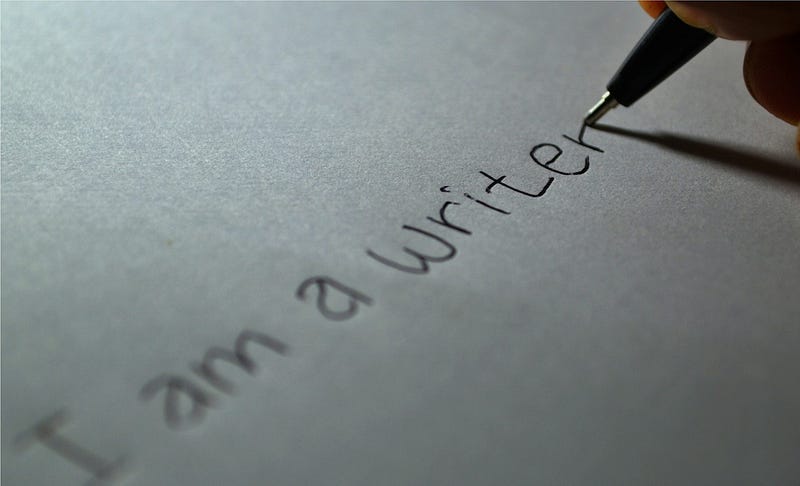
Note: If you find the figures below too small to read the information, use your browser’s zoom feature to enlarge the display.
Crediting Images
You can see the method I’ve developed for myself in the caption of the featured image above. It’s in this format:
| credited:
Text enclosed in <> is a hyperlink. Image Name is the name I choose to give the image. In my use, it relates in some fashion to the story or article I’m writing. is a link to the image itself.
Text in [] is a place holder. In the case above, it will be replaced by one of the following
● “under license” OR “reproduced under license” ● “Creative Commons License” OR “CCL”²
Use “under license” when the image creator has sold or given you the right to use the image.
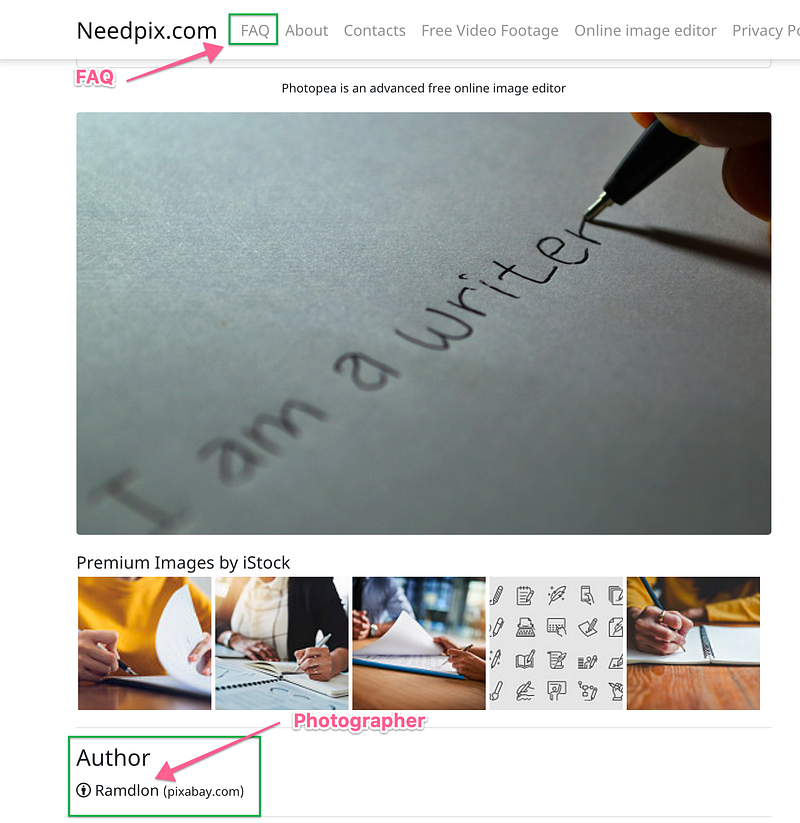
Note: The image caption for the featured image above lists the photographer as “Ramdion on Pixabay.” Find this information for this image in the small print at the left below the image under the term “Author.” With this, as with any other image, you may have to search diligently for the photographer’s name. So too for the CCL license applicable to the image. In this instance, find it in the FAQ for which there is a link in the NeedPix menu bar at the top of the screen. Figure A.
The author’s name was not a hyperlink, so it is not in the caption. I didn’t go looking for him on Pixabay, figuring that the reader can find him just as easily as I if he’s interested. But, where there is already a link, I would include it in the caption. It’s minimal work for you, and it may prove a great help to your reader.
Image Sources
If you use a source like Unsplash, Pexels, Pixabay, or NeedPix, you are free to use the image because the source paid the photographer for the rights to disseminate the image gratis. In this case, for [license rights], use either “CCL” or “Creative Commons License.” But be certain to find the CCL for your image and list it in the caption correctly. In the featured image above, the correct designation is “Creative Commons Zero license,” or just “CC Zero L.”
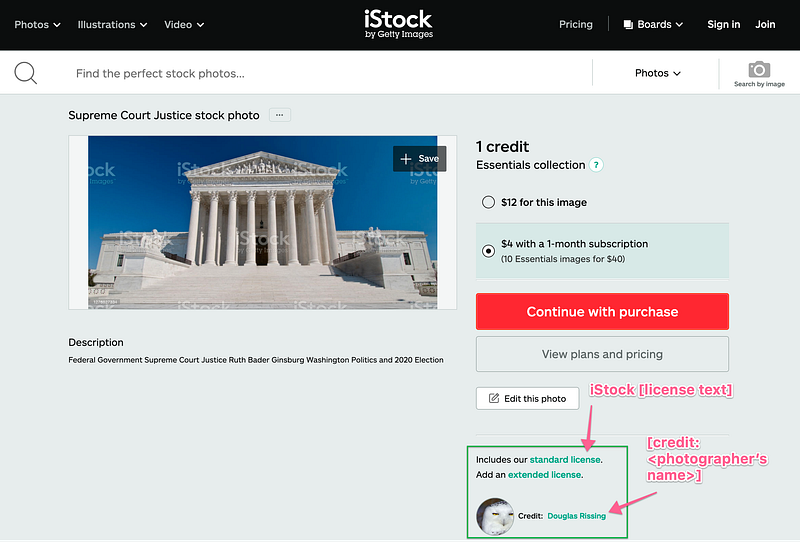
If you use a source like iStock, to whom you have paid a membership or subscription fee, use “under standard license” or “reproduced under standard license” for the [license rights] text. Figure B.
An example of a photo caption for which you have paid the photographer directly is this caption.
Castro Clones Cruising (Sept. 1977) | credit: Richard Dworkin | © Richard Dworkin (reproduced under license)
which is the fourth photo down in this story. I discovered it plastered all over the net, including on Pinterest. Just because everyone else on Pinterest had used it didn’t mean I had the right to use it. I undertook a long search for the photographer. It took several days, but I found him. I emailed him, asking for permission to use the photo in the story. I gave him a link to the story so he could see how and where I intended to use his work. The image was perfect for the story. I wanted it badly enough that I paid him $100 for its use.
Medium expects that if one is going to use an image, one has the right to do so.
Medium suggests a different citation form:
[Image Name] Photo by <photographer’s name> on <source website>
Note that under Medium’s format, the [Image Name] is not a hyperlink but plain text, leaving the reader the task of ferreting out the image if he desires it for himself.
Citing Sources
There are several ways to cite sources in internet articles.
The simplest is in the form
[some sentence text]
We’ve seen an example of that above:
Medium suggests a different citation form.
You will be tempted to use something like this
Find Medium’s method here.
Do not. It’s the lazy writer’s way out. It’s common. It’s de passe.
Another way is to create a superscripted footnote, which is itself a hyperlink to the source article.
Medium suggests¹ a different citation form.
Finally, the full, formal way to cite sources in an internet article is
[Sentence.]
Such a formal, long-form citation might look like this
William Henry Kibby, VC (15 April 1903–31 October 1942) was a British-born Australian recipient of the Victoria Cross during World War II, the highest award for gallantry in the face of the enemy that could be awarded to a member of the Australian armed forces at the time. World War II— Bill Kibby | Wikiwand (31 October 2020, retrieved 2020.10.31)
Bibliography
For the most part, a bibliography is undesired in Medium articles. One typically uses a bibliography in academic research papers.
There are several reasons why we use bibliographies. The first major reason for using a bibliography is to inform your reader on how widely you researched the topic on which you’re writing. While you may cite only seven or eight sources within a paper, you may have read 25, 50, or even 100 different books, journal articles, or scholarly websites in finding those sources. Showing just how widely you researched your topic provides more credence and credibility to your work.
Another use for a bibliography is to allow your reader to know if you considered a work but chose not to include it within your piece, or if you didn’t consult a particular author at all. What Is a Bibliography and When Should I Write One? (undated, retrieved 2020.10.31).
Another instance would be when you are first writing a paper that you’ve researched,
you may not initially utilize a source that you consulted. However, after you’ve done some rewriting and reworking of your paper, you may find that you really did need to include a source after all. Having a bibliography, it would be much easier for you to find the source information; you don’t have to start all over again …. Ibid.
To learn how to write a formal bibliography, see How to Write a Bibliography.
Conclusion
Follow these guidelines in your articles on Medium. You will create professional-looking articles with appropriate image and source citations. In your serious articles or articles that you want to be formally correct, use the long-form source citation. It is the proper way to cite internet sources.
If you are writing an academic article, consider using a bibliography. Even if you intend not to use a bibliography as your source citation method, you may find it advantageous to create one in a separate Medium document. Put every source you consulted in the bibliography. You will have a permanent record of all your research. You may find it useful if you ever have to revisit the article or need the sources in another article.
Footnotes
¹Create eMail Links
Follow these directions to create a link that invokes your default email app and generates an email with a specific email address in the To: field.
Select the text that you want to be the link to the email address. Click on the link icon in the popup editing bar. In the field, type, for example,
mailto:[email protected]
and hit enter. Note that there are no spaces in the mailto: text. Any space will break the command, and it will not work.
To create a more complex email with predetermined text in, for example, the Subject: field and body, see the Medium article Creating mailto: links that actually work.
²Citing Creative Commons Licenses
I substantially edited and expanded this footnote due to a comment from James Finn, whom I thank for noticing.
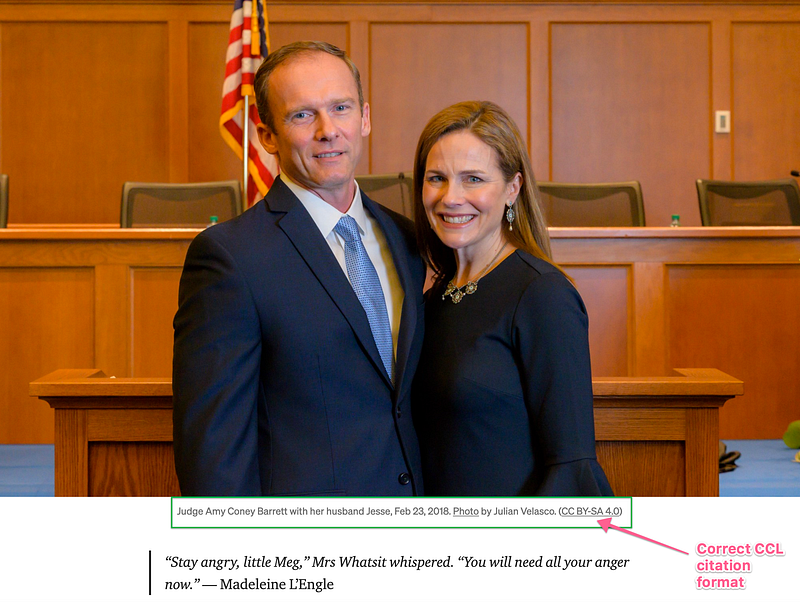
When using a CCL image, many authors don’t cite the particular CCL involved. To comply fully with the usage requirements, one should. Figure 1 is an example by James Finn, publisher of Prism & Pen, in his article Amy Coney Barrett Made Me Cry.
Note the image caption: “Judge Amy Coney Barrett with her husband Jesse, Feb 23, 2018. Photo by Julian Velasco. (CC BY-SA 4.0)” The photographer and CCL standard will be different from image to image.
So, now we embark on a search for the Holy Grail, a relevant image together with its CCL standard and photographer’s name.
In the text below, both the designations “Figure n” (except for Figure 4) and the images themselves are hyperlinks that will open a browser tab to the particular page shown.
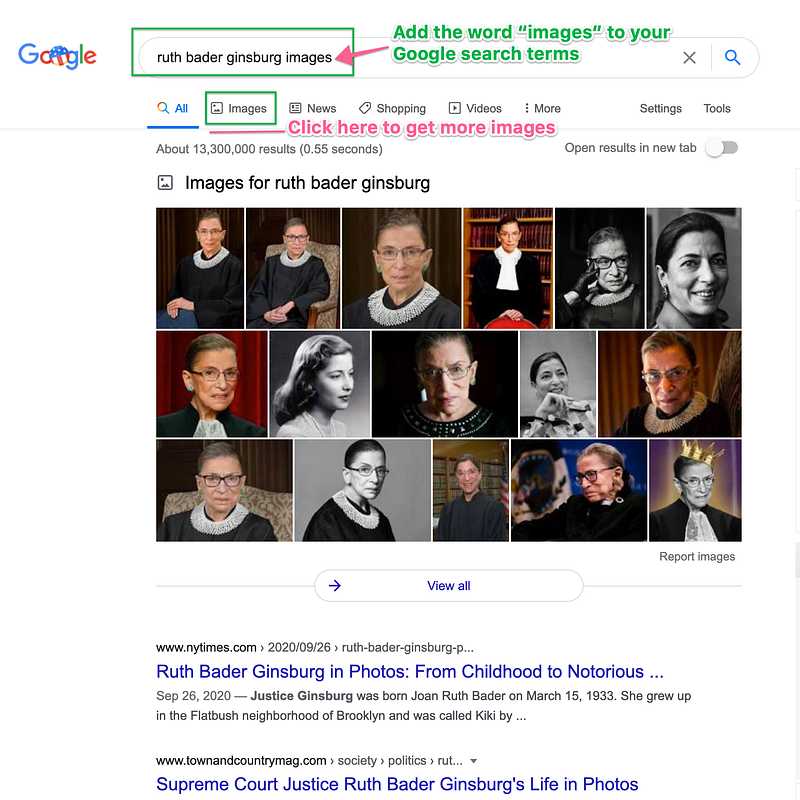
You can find free images and their particular CCLs by searching with Google. For example, search on the terms “ruth bader ginsburg images.” Figure 2 shows what you will see.
Note the word “images” in the Google Tab Row. Click that to get a larger collection of images from all across the internet.
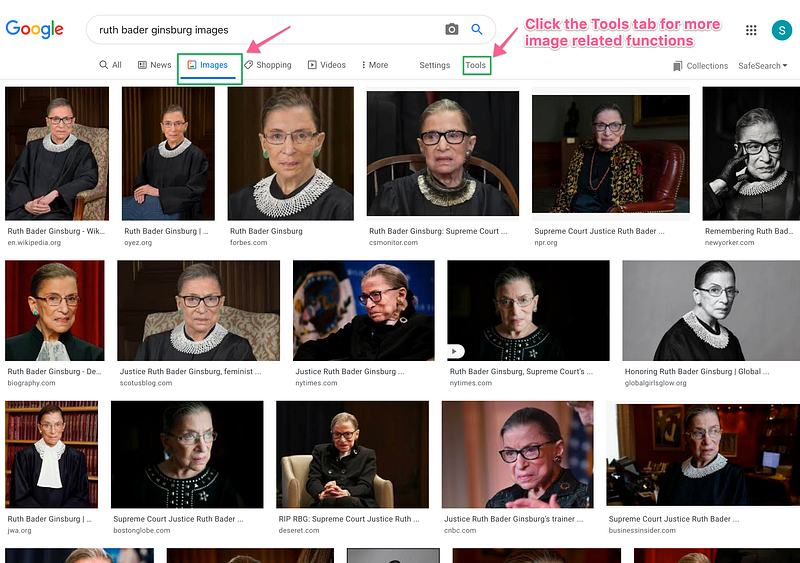
Here we see dozens of related images. Note the “Tools” tab to the far right of the Google Tab Bar. Figure 3. Clicking it will make further image selection tools available.
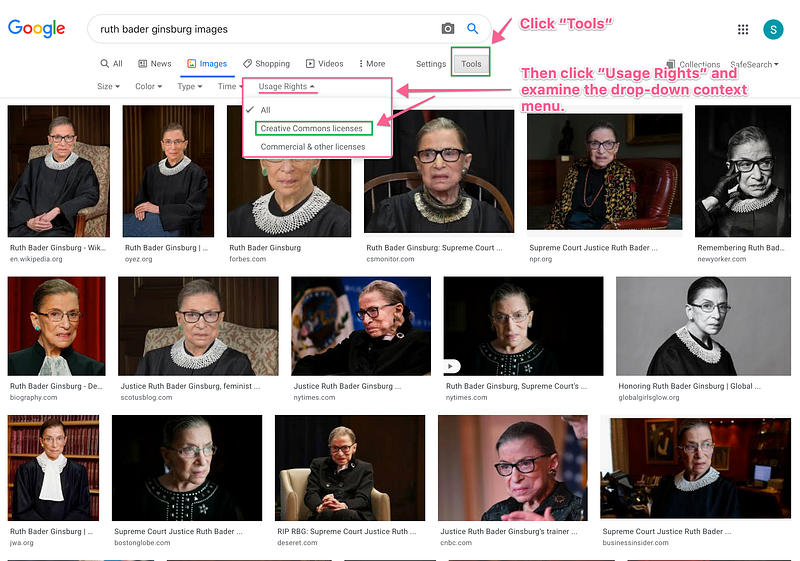
Among those tools is the Usage Rights sub-tab. Clicking it will reveal a context menu listing “All,” “Creative Commons licenses,” and “Commercial & other licenses” selections. “All” is checked by default. Figure 4. Select “Creative Commons licenses” to filter the search results for only images that are free to use.
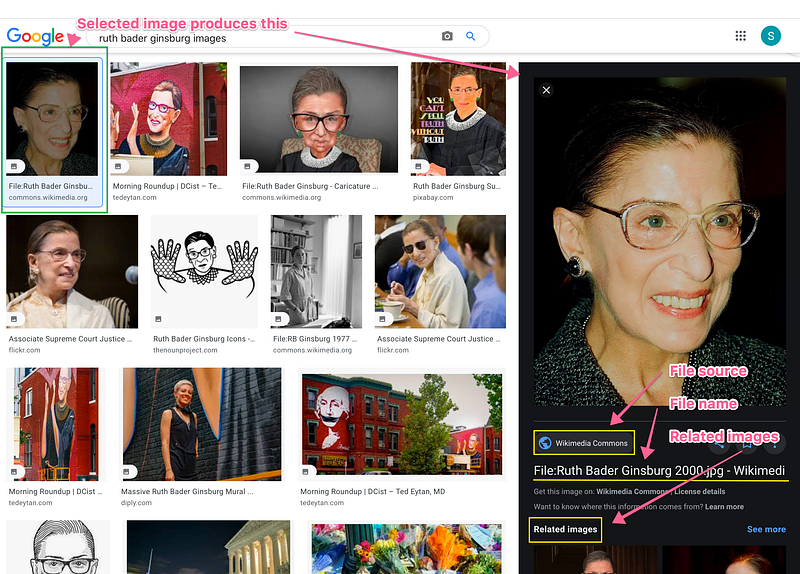
Click on the first image on the resulting screen. You will get the results shown in Figure 5.
Note the File Source Repository name, the File name, and the link to Related Images in the lower right of the screen.
This particular image is from Wikimedia Commons, a repository of tens of thousands of images free to anyone to use under Creative Commons licenses.
Click on the enlarged image in the block at screen-right.
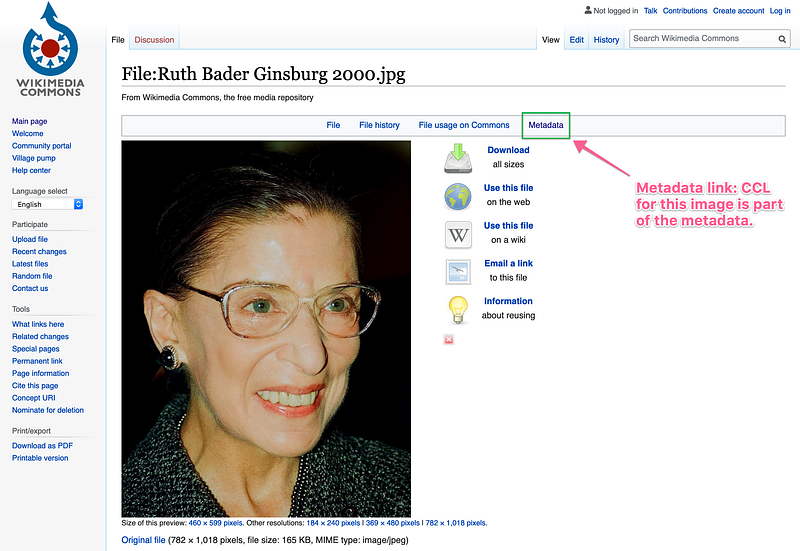
On this page, there are links to download the image, to instructions on how to use it on the web or a wiki, to an email share link, and to licensing information.
In particular, at the right of the file Menu Bar is a link to “metadata.” Figure 6.
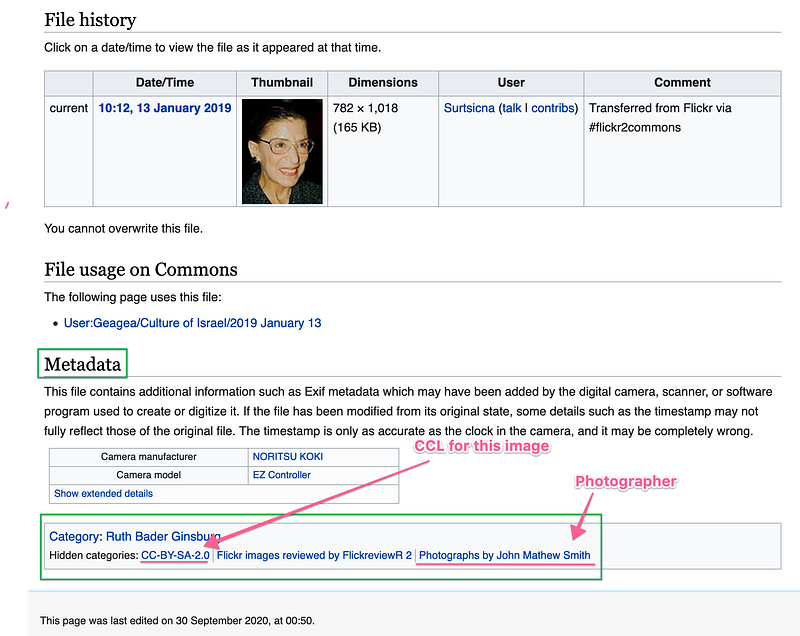
There, one will find the Holy Grail we’ve been searching for, the particular CCL rights designation for the file along with the photographer’s name. Figure 7.
Conclusion:
It’s a lot of clicking, but once you’ve done it a couple of times, it will become second nature. You will have a professional look to your photo captions and will not run afoul of photo usage licensing law.


