avatarNayanika Saikia

Free AI web copilot to create summaries, insights and extended knowledge, download it at here

3617

Abstract

d pretty and approachable, they’ll end up navigating the entire site anyway.</li><li>Another benefit is that when you make your own Landing Page, you can customize it in any way you want. You can add cute pictures, gifs, or any background as you desire — none of which can be modified in the other platforms.</li><li>Yet another benefit is you can keep on editing it. Published a new article? Include the link! Uploaded a new video? Include the link! Want to promote a company or a friend? Go on and include their links too!</li></ul><p id="9c5c">I have made sure to share pictures of my latest updated landing page so you will be able to see how I have incorporated it all!</p><h1 id="219b">Using Linktree</h1><p id="c17e">Here’s how using a Linktree URL on your Instagram bio looks like:</p><figure id="57cc"><img src="https://cdn-images-1.readmedium.com/v2/resize:fit:800/1*gzdfREqCrZjekk3zJi090w.jpeg"><figcaption>Photo by the author</figcaption></figure><p id="406a">And as you can see, it leads to a pretty simple list of your personal links. Note how my own website/blog is still one click away.</p><figure id="8240"><img src="https://cdn-images-1.readmedium.com/v2/resize:fit:800/1*dL2VeID-X4avlWKh3td9JA.jpeg"><figcaption>Photo by the author</figcaption></figure><p id="eda2">So basically, while we cannot deny that Linktree has been very useful, it does not let the traffic land on YOUR page directly. So today, let me tell you about a better self-sustaining alternative.</p><p id="6571"><i>Please note that using Bio.fm works in a pretty much similar way.</i></p><h1 id="8dc4">Making Your Own Landing Page on Website</h1><p id="6072">The aim of adding a link in the bio on Instagram is to lead the visitor to your, say, website. And if you have only one such link to add (only website, or only a Facebook page, etc), then it is feasible to add just that one direct link in the bio.</p><p id="decf">How I do this, is simply by creating a <b>Contact Me/Reach Me/My Links </b>page on my website. Most of the time, anyway, whenever you even create a new blog or website, there are a few pages that come by default, and the <b>Contact Me </b>page is one of them.</p><p id="276c">Simply customize this already available page into including your links and then, add the URL of this page in the Instagram bio. As simple as that! You can design it and add your brand style to it and make it your own. Here’s what I do on my <a href="https://www.instagram.com/pretty_little_bibliophile/">Instagram page’s</a> bio:</p><figure id="5fad"><img src="https://cdn-images-1.readmedium.com/v2/resize:fit:800/1*24aQNGggNNbIsa-BR8FYRg.jpeg"><figcaption>Photo by the author</figcaption></figure><p id="6b57">And it leads to a page on my own website:</p><figure id="e8b2"><img src="https://cdn-images-1.readmedium.com/v2/resize:fit:800/1*_LmNlFWSXuxGLbLV4xL9ow.jpeg"><figcaption></figcaption></figure><figure id="4049"><img src="https://cdn-images-1.readmedium.com/v2/resize:fit:800/1*JlEIS9g0IEBV3gLnsZRb-A.jpeg"><figcaption></figcaption></figure><figure id="aad3"><img src="https://cdn-images-1.readmedium.com/v2/resize:fit:800/1*H0O8kZoPYfEQnOnW6lCRWw.jpeg"><figcaption>Photo by the author</figcaption></figure><p id="9649">The most obvious benefit is a SPIKE in your blog hits!</p><h1 id="a8bb">Making Your Own Landing Page on Medium</h1><p id="c642">Another alternative (if you do not have a Website or blog), is to create a Landing page on Medium itself! Before I explain more, here is a link to my own page here. It is quite well made if I dare say so myself!</p><div id="72d4" class="link-block"> <a href="https:

Options

//nayanikasaikia.medium.com/my-links-6a9876d06b3b"> <div> <div> <h2>My Links</h2> <div><h3>A list of my most popular content, and social media links!</h3></div> <div><p>nayanikasaikia.medium.com</p></div> </div> <div> <div style="background-image: url(https://miro.readmedium.com/v2/resize:fit:320/1*I5qz2rz7nPTA_jWzJC_D2A.png)"></div> </div> </div> </a> </div><h2 id="8bf7">Benefits</h2><ol><li>When you go to this page, you will see that I have divided all of my articles here under specific categories.</li><li>Moreover, I also have a dedicated portion to my social media links at the bottom.</li><li>I have also added ways for the public to go visit my YouTube with just one click.</li><li>Ditto for my Amazon Wishlist!</li><li>However, the best thing I would say, is that I have made it all look aesthetic as well. So, at the very beginning of the page itself, I have added links via the images — you click on the image representing the section you want to visit and you will be scrolled down to that portion automatically.</li><li>So what this does is that it gives the audience an overview of what is there on the whole page — a list of contents, in a manner of speaking.</li></ol><p id="ec5b">You can do it too. I would suggest visiting my Landing Page first to get an idea. After that, you can make use of these two articles to help you do the intra-page linking, for the Contents List.</p><div id="e846" class="link-block"> <a href="https://readmedium.com/how-to-add-text-links-to-paragraphs-headings-within-a-medium-article-cd222daa5578"> <div> <div> <h2>How To Add Text Links to Paragraphs/Headings Within a Medium Article</h2> <div><h3>An easy and simple step-by-step guide for the non-coders out there!</h3></div> <div><p>medium.com</p></div> </div> <div> <div style="background-image: url(https://miro.readmedium.com/v2/resize:fit:320/0*4ebP8jEGV4wEDHXG)"></div> </div> </div> </a> </div><div id="303e" class="link-block"> <a href="https://readmedium.com/how-to-add-picture-links-to-paragraphs-headings-within-a-medium-article-3a458317dcf8"> <div> <div> <h2>How To Add Picture Links to Paragraphs/Headings Within a Medium Article</h2> <div><h3>An easy and simple step-by-step guide for the non-coders out there!</h3></div> <div><p>medium.com</p></div> </div> <div> <div style="background-image: url(https://miro.readmedium.com/v2/resize:fit:320/0*L2-X-W4KUHOIP0CT)"></div> </div> </div> </a> </div><p id="9a66">I hope you all found this blog post helpful and informative as to why you should have your own independent landing page! I hope you try it out and see the increase in your blog hits and the increased traffic!</p><p id="7821"><i>Nayanika Saikia graduated summa cum laude with a Bachelor’s degree in English Literature and was also a Dean’s List student. She is currently pursuing her Master’s degree. At the moment, she is working as a Booktuber, blogger, and reviewer with various national and international publishers. She can often be found on her Instagram account <a href="https://www.instagram.com/pretty_little_bibliophile/">Pretty Little Bibliophile</a>.</i></p></article></body>

Make Your Own Landing Page

Stop Using Linktree or Bio.Fm

(Why using Linktree/Bio.fm is not feasible in the long run compared to an independent self-sustaining alternative route to your own website!)

Photo by NeONBRAND on Unsplash

“The greatest thing in the world is to know how to belong to oneself.” ― Michel de Montaigne, ‘The Complete Essays’

Being a business or an influencer on Instagram means that you probably have quite a few links you want to share with the world. And knowing how Instagram lets you add only one link in your bio, is, therefore, a problem. This is where platforms like Linktree and Bio.fm came in.

Contents

What are Linktree and Bio.fm?

Why can’t we just use these platforms?

Benefits of Making Your Own Landing Page

Using Linktree

Making Your Own Landing Page on Website

Making Your Own Landing Page on Medium

What are Linktree and Bio.fm?

  • Linktree and Bio.fm are digital services that let you make a list of ALL the links you want to share with your followers.
  • As opposed to Instagram’s single link in the bio, these let you form just one link/URL, clicking on which leads the audience to the abovementioned list.
  • This list is what’s called a landing page and in all fairness, this is really helpful for all of us.

Why can’t we just use these platforms?

I mean, technically, you can!

However, the main issue is that you are still one click away from your own sites. It is not a direct route, but rather a bypass.

For example, the audience might click on this URL on your Instagram link. Then they will be led to this landing page. If they are interested, they will click on the link they want to visit.

But, we all know how short the human concentration span is. In today’s digital world, such a long pathway to visiting a site they want to visit may actually deter them! And therefore, they’ll just back away. And your stats will remain the same!

Benefits of Making Your Own Landing Page

In the long run, don’t you think it is better to depend on yourself? What if the service you are using (Linktree, for example) to make the landing page, crashes one day (as Linktree has done previously)? What if, for whatever reason, that site just gets brought down? Where will you be then?

This is where your independent landing page comes in. This is what I do and what I would advise you all to do, too. Instead of making a Linktree landing page, make your own!

  • Since this link is actually of a page YOU MAKE ON YOUR OWN BLOG, the first benefit is going to be an increase in the hit numbers! Whether the audience will click on the links you provide on the landing page is a different matter here. They decided to visit your landing page and therefore, at least your blog will benefit! And to be fair, if it's aesthetic and pretty and approachable, they’ll end up navigating the entire site anyway.
  • Another benefit is that when you make your own Landing Page, you can customize it in any way you want. You can add cute pictures, gifs, or any background as you desire — none of which can be modified in the other platforms.
  • Yet another benefit is you can keep on editing it. Published a new article? Include the link! Uploaded a new video? Include the link! Want to promote a company or a friend? Go on and include their links too!

I have made sure to share pictures of my latest updated landing page so you will be able to see how I have incorporated it all!

Using Linktree

Here’s how using a Linktree URL on your Instagram bio looks like:
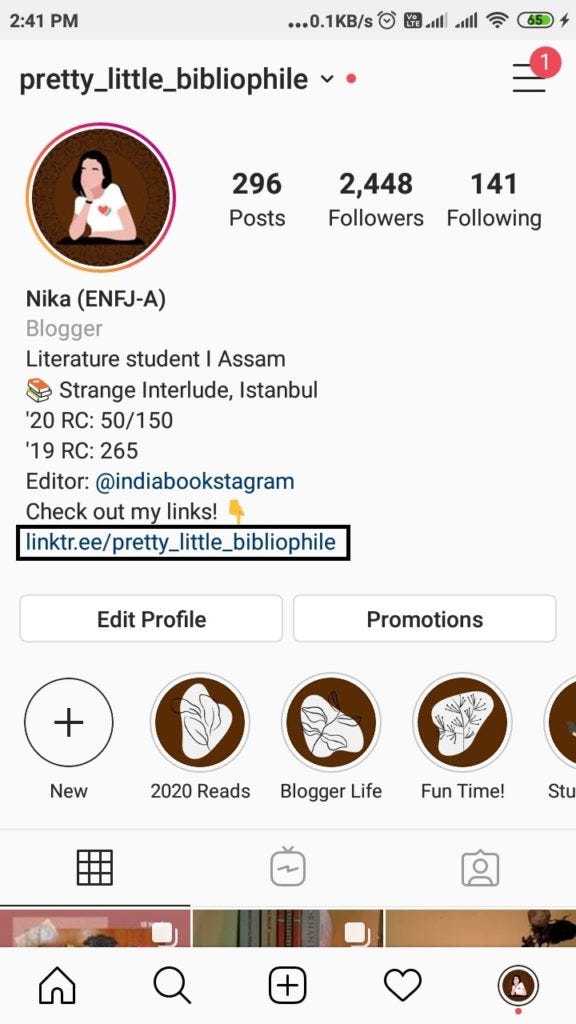
Photo by the author

And as you can see, it leads to a pretty simple list of your personal links. Note how my own website/blog is still one click away.
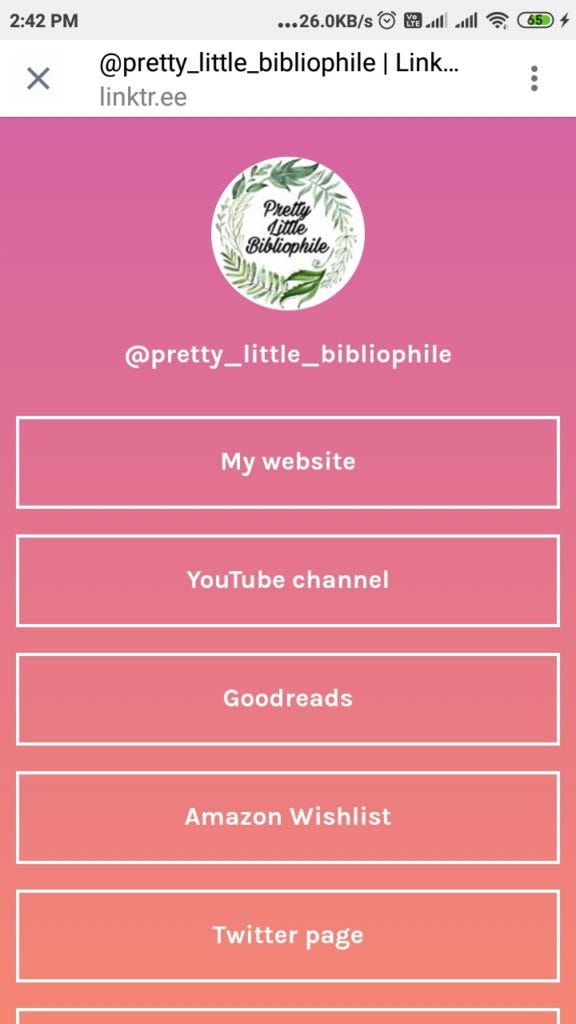
Photo by the author

So basically, while we cannot deny that Linktree has been very useful, it does not let the traffic land on YOUR page directly. So today, let me tell you about a better self-sustaining alternative.

Please note that using Bio.fm works in a pretty much similar way.

Making Your Own Landing Page on Website

The aim of adding a link in the bio on Instagram is to lead the visitor to your, say, website. And if you have only one such link to add (only website, or only a Facebook page, etc), then it is feasible to add just that one direct link in the bio.

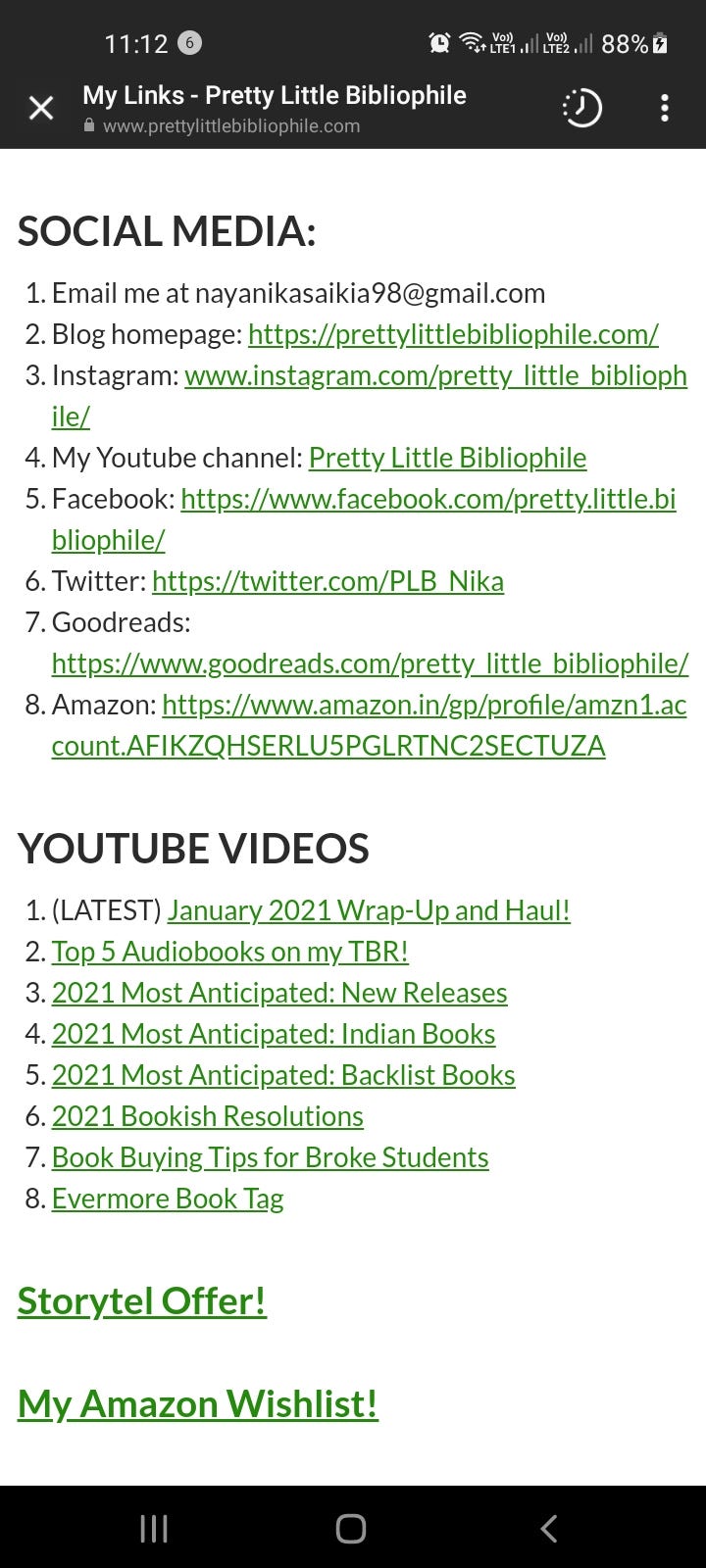
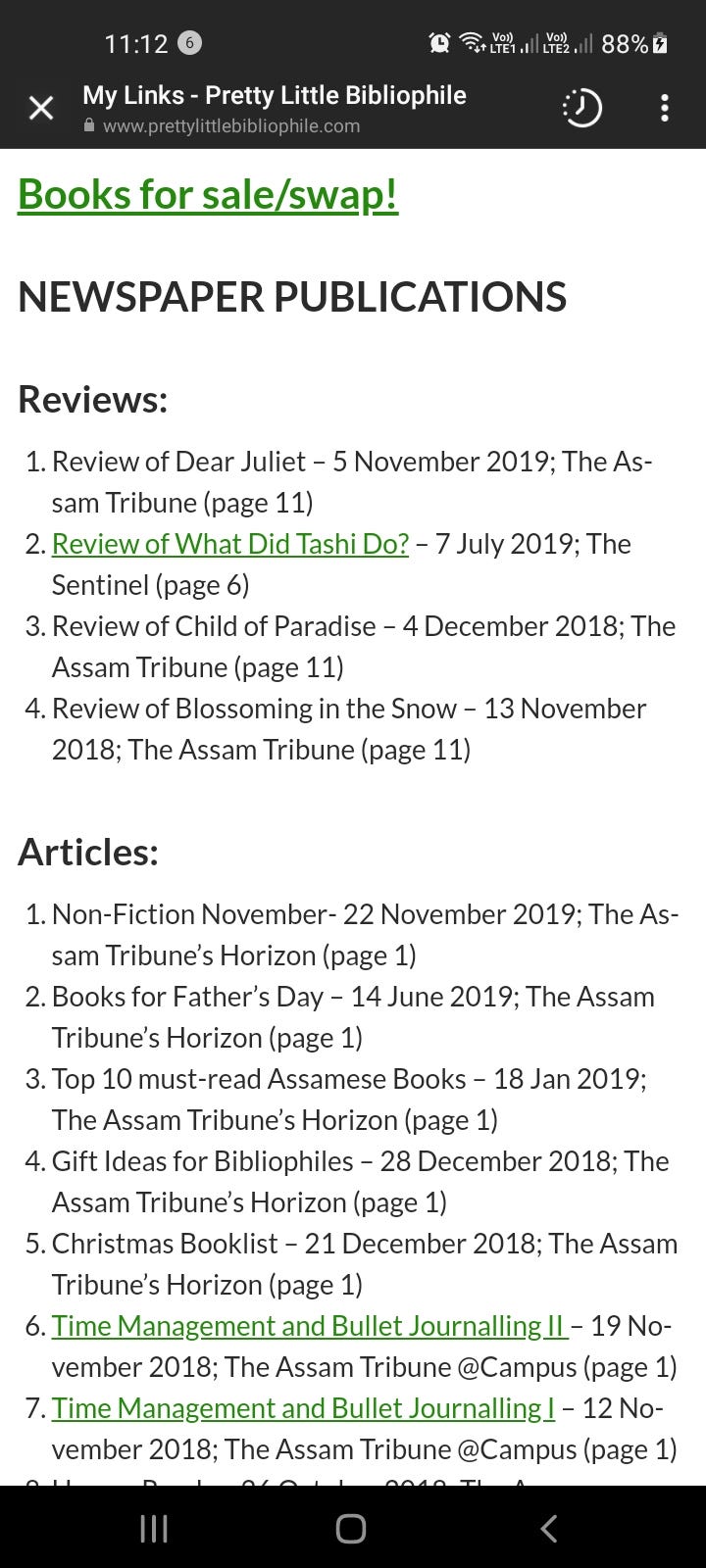
How I do this, is simply by creating a Contact Me/Reach Me/My Links page on my website. Most of the time, anyway, whenever you even create a new blog or website, there are a few pages that come by default, and the Contact Me page is one of them.

Simply customize this already available page into including your links and then, add the URL of this page in the Instagram bio. As simple as that! You can design it and add your brand style to it and make it your own. Here’s what I do on my Instagram page’s bio:
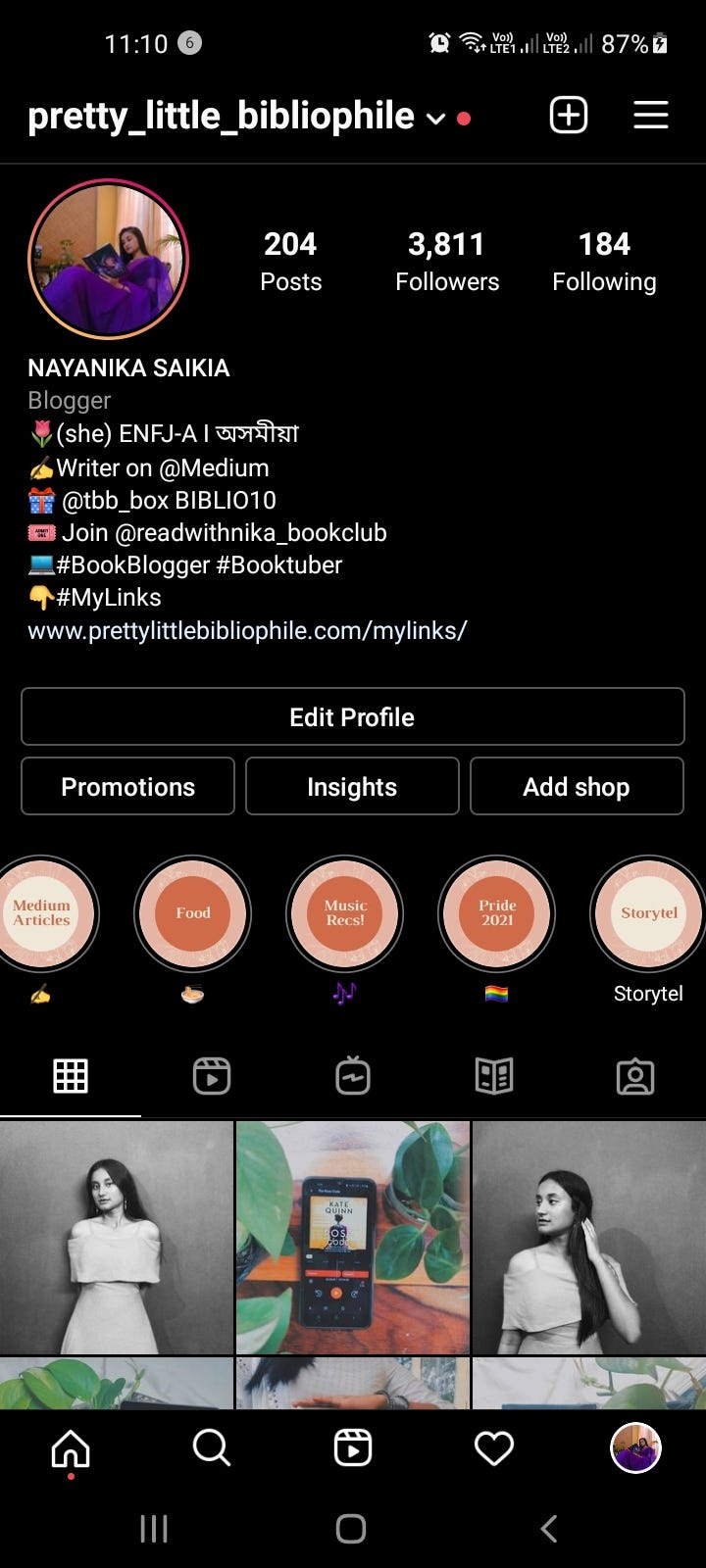
Photo by the author

And it leads to a page on my own website:
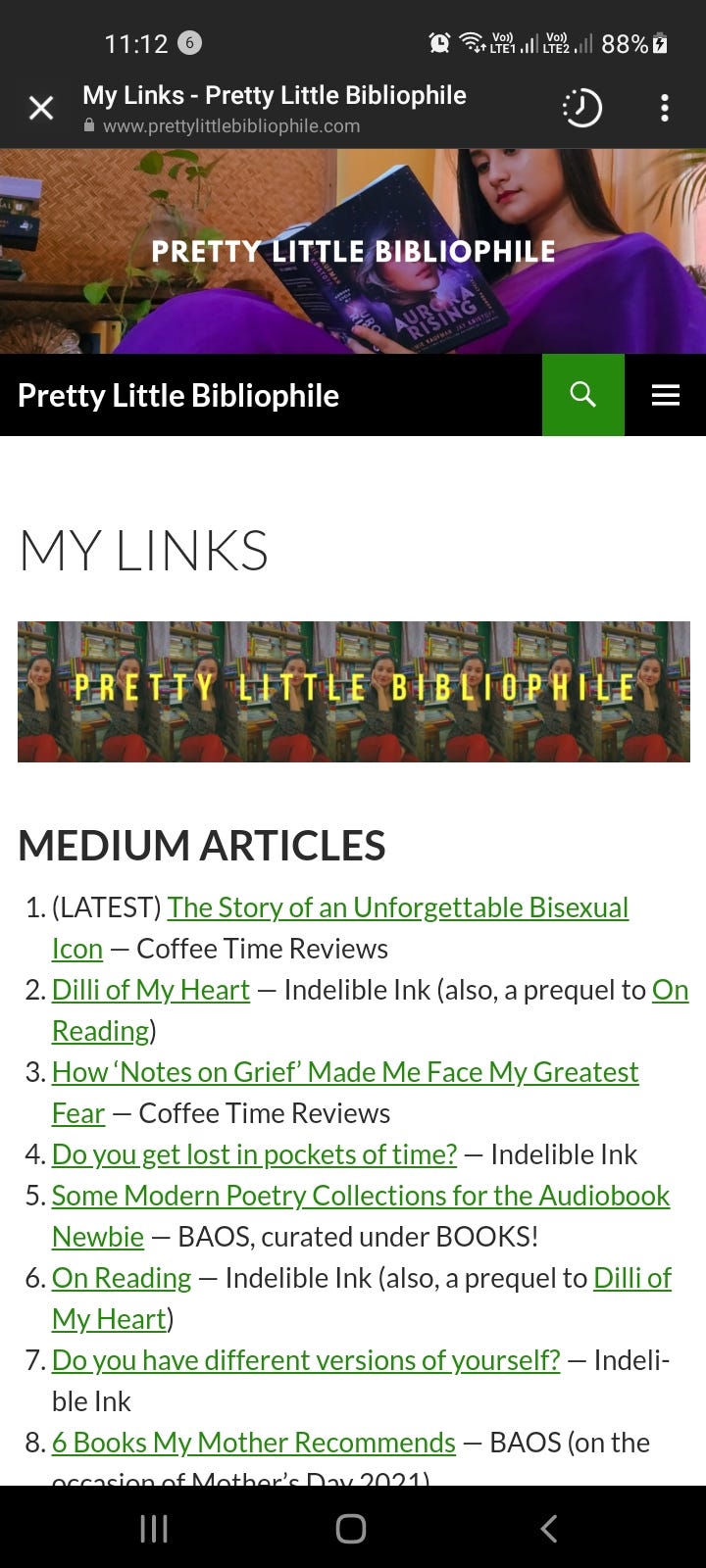
Photo by the author

The most obvious benefit is a SPIKE in your blog hits!

Making Your Own Landing Page on Medium

Another alternative (if you do not have a Website or blog), is to create a Landing page on Medium itself! Before I explain more, here is a link to my own page here. It is quite well made if I dare say so myself!

Benefits

  1. When you go to this page, you will see that I have divided all of my articles here under specific categories.
  2. Moreover, I also have a dedicated portion to my social media links at the bottom.
  3. I have also added ways for the public to go visit my YouTube with just one click.
  4. Ditto for my Amazon Wishlist!
  5. However, the best thing I would say, is that I have made it all look aesthetic as well. So, at the very beginning of the page itself, I have added links via the images — you click on the image representing the section you want to visit and you will be scrolled down to that portion automatically.
  6. So what this does is that it gives the audience an overview of what is there on the whole page — a list of contents, in a manner of speaking.

You can do it too. I would suggest visiting my Landing Page first to get an idea. After that, you can make use of these two articles to help you do the intra-page linking, for the Contents List.

I hope you all found this blog post helpful and informative as to why you should have your own independent landing page! I hope you try it out and see the increase in your blog hits and the increased traffic!

Nayanika Saikia graduated summa cum laude with a Bachelor’s degree in English Literature and was also a Dean’s List student. She is currently pursuing her Master’s degree. At the moment, she is working as a Booktuber, blogger, and reviewer with various national and international publishers. She can often be found on her Instagram account Pretty Little Bibliophile.

Blogging Tips
Blogging
Blogs And Blogging
Website
Recommended from ReadMedium