
When Storybook Meets Fetch Mock
Storybook examples with CSF3 + react-storybook-fetch-mock

Storybook is a tool for UI development. It makes development faster and easier by isolating components. This allows us to work on one component at a time. It streamlines UI development, testing, and documentation.
Storybook 7 was released on April 3, 2023. As the first major release in over two years and by far the largest ever, it brings a lot of features, including writing stories in Component Story Format 3 (CSF3), an improved version of CSF2 that requires writing stories with objects.
fetch-mock is a popular way to mock HTTP requests made with fetch. We have shown how to use fetch-mock to mock APIs in Storybook. The Storybook’s addon, storybook-addon-fetch-mock, makes it even easier.
In this article, we are going to see some examples with CSF3 + react-storybook-fetch-mock.
Set Up Storybook in Create React App
We set up Create React App working environment to explore Storybook. The following command creates a React project:
% yarn create react-app react-storybook-fetch-mock
% cd react-storybook-fetch-mock
Type one command, npx sb init, and Storybook is installed.
% npx sb init
Need to install the following packages:
  sb@7.0.26
Ok to proceed? (y) y

 storybook init - the simplest way to add a Storybook to your project.

 • Detecting project type. ✓
 • Adding Storybook support to your "Create React App" based project
  ✔ Getting the correct version of 12 packages
✔ We have detected that you're using ESLint. Storybook provides a plugin that gives the best experience with Storybook and helps follow best practices: https://github.com/storybookjs/eslint-plugin-storybook#readme

Would you like to install it? … yes
    Configuring eslint-plugin-storybook in your package.json
  ✔ Installing Storybook dependencies
. ✓
 • Preparing to install dependencies. ✓


yarn install v1.22.10
warning ../package.json: No license field
[1/4] 🔍  Resolving packages...
success Already up-to-date.
✨  Done in 0.53s.
. ✓

For more information visit: https://storybook.js.org

To run your Storybook, type:

   yarn storybook


attention => Storybook now collects completely anonymous telemetry regarding usage.
This information is used to shape Storybook's roadmap and prioritize features.
You can learn more, including how to opt-out if you'd not like to participate in this anonymous program, by visiting the following URL:
https://storybook.js.org/telemetry
After installation, Storybook 7 becomes part of devDependencies in package.json:
"devDependencies": {
  "@storybook/addon-essentials": "^7.0.26",
  "@storybook/addon-interactions": "^7.0.26",
  "@storybook/addon-links": "^7.0.26",
  "@storybook/blocks": "^7.0.26",
  "@storybook/preset-create-react-app": "^7.0.26",
  "@storybook/react": "^7.0.26",
  "@storybook/react-webpack5": "^7.0.26",
  "@storybook/testing-library": "^0.0.14-next.2",
  "babel-plugin-named-exports-order": "^0.0.2",
  "eslint-plugin-storybook": "^0.6.12",
  "prop-types": "^15.8.1",
  "storybook": "^7.0.26",
  "webpack": "^5.88.1"
}
Execute yarn storybook, Storybook is launched. The following screenshot shows the Primary Button story:
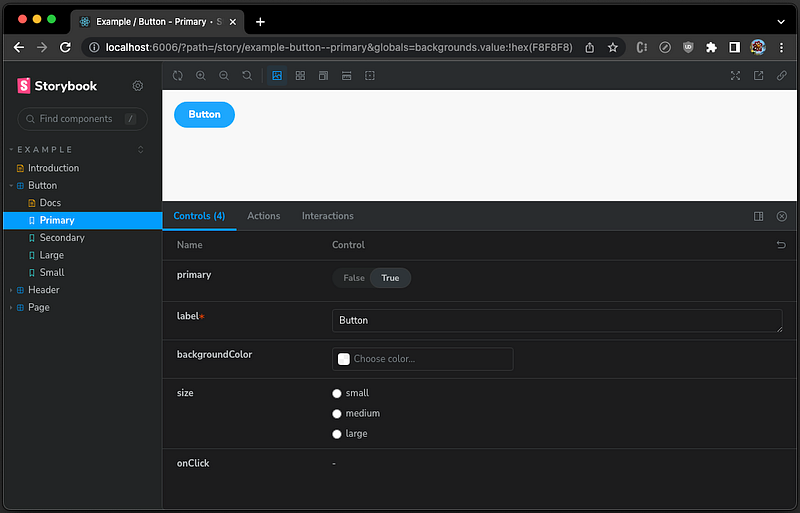
CSF3 Storybook
From Storybook 7, writing stories in CSF3, an improved version of CSF2 that requires writing stories with objects, is recommended. It trims boilerplate code and improves ergonomics. This makes stories more concise and faster to write.
The following src/stories/Button.stories.js has a list of Button stories:
import { Button } from './Button';

// the default export
export default {
  title: 'Example/Button',
  component: Button,
  tags: ['autodocs'],
  argTypes: {
    backgroundColor: { control: 'color' },
  },
};

// single story of Primary
export const Primary = {
  args: {
    primary: true,
    label: 'Button',
  },
};

// single story of Secondary
export const Secondary = {
  args: {
    label: 'Button',
  },
};

// single story of Large
export const Large = {
  args: {
    size: 'large',
    label: 'Button',
  },
};

// single story of Small
export const Small = {
  args: {
    size: 'small',
    label: 'Button',
  },
};
The default export
The default export metadata controls how Storybook lists the story and provides information used by addons. It declares the component with title, component, tags, argTypes, parameters, decorators, etc.
export default {
  title: 'Example/Button',
  component: Button,
  tags: ['autodocs'],
  argTypes: {
    backgroundColor: { control: 'color' },
  },
};component: It is the required field for a specific component.
title: It determines where a story shows up in the navigation hierarchy in the UI. Example/Button indicates that it is under Example/Button.
When title is not specified, it will be automatically generated based on the file’s location relative to the root. If .storybook/main.js sets stories path as follows, the generated title for src/stories/Button.stories.js will be Stories/Button.
module.exports = {
  stories: ['../src']
  // or more customized with directory, file pattern, and prefix
  // stories: [
  //   { directory: '../src', files: '*.story.tsx', titlePrefix: 'foo' }
  // ]
};tags: It defines special tags of the story. The value, ['autodocs'], will create docs for the story file if main.ts sets autodocs to 'tag'.
module.exports = {
  docs: {
    autodocs: 'tag',
  }
};
If autodocs is set to true, it automatically creates docs for every story file. If autodocs is set to false, it never creates docs.
argTypes: It specifies the behavior of arguments. For example, backgroundColor: { control: 'color' } uses a color picker to define the Button color.
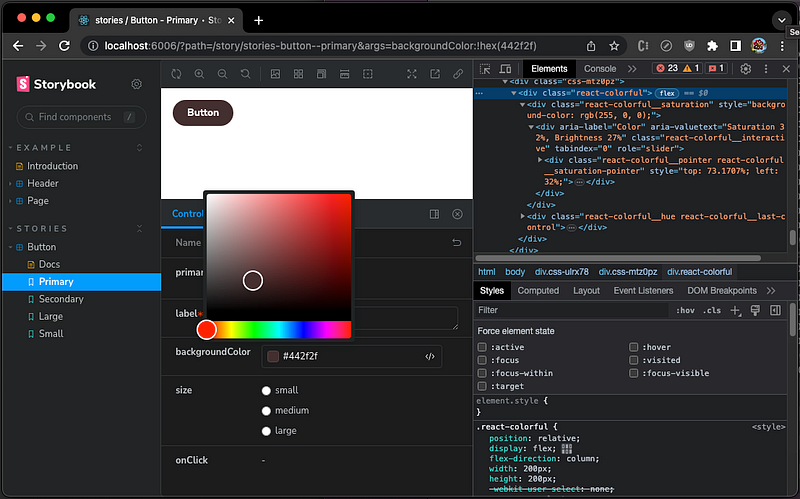
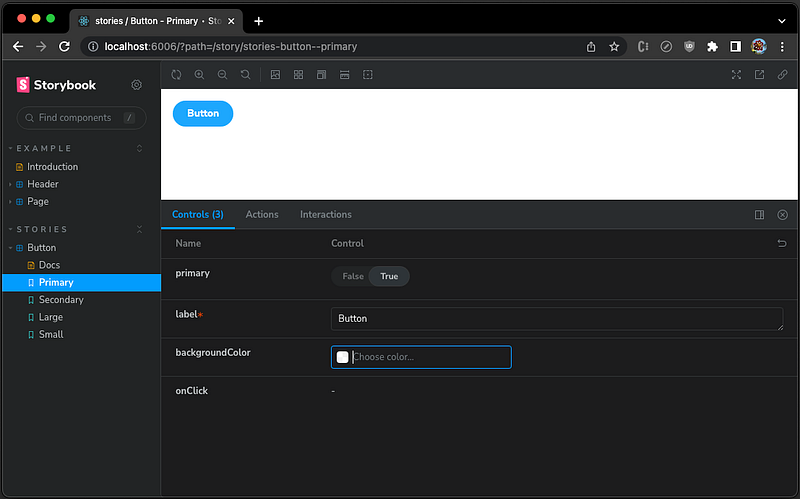
argTypes can also hide a specific control. For example, the size control can be hidden with the following setting:
argTypes: {
  size: { // hide the size control
    table: {
      disable: true,
    },
  },
}
The single story’s export
The Button component has four stories, Primary, Secondary, Large, and Small. Each story is an exported object similar to the following:
export const Primary = {
  args: {
    primary: true,
    label: 'Button',
  },
};
The default render function is render: (args) => <Button {…args} />, which can be omitted for brevity. Most of the time, writing a story is just passing some inputs in a standard way, such as primary: true and label: 'Button'.
However, render can be configured to be a component with more functionality:
export const Primary = {
  render: (args) => {
    // e.g. configure mocks
    fetchMock.restore().mock(...);
    return <Button {...args}/>;
  },
  args: {
    primary: true,
    label: 'Button',
  },
};
parameters is another frequently used property that controls the behavior of Storybook features and add-ons.
If parameters is specified in the default export, it will be applied to all stories in that file. But, if needed, it can be overridden by each story.
export default {
  ...
  parameters: { /* ... */ },
};
If parameters is specified inside a single story’s export, it will be applied to just that story:
export const Primary = {
  ...
  parameters: { /* ... */ },
};
The Fetch Action
The original Button story, src/stories/Button.jsx, has no action. For a common use case, we add handleClick to fetch JSON data from a remote server, upon clicking the button.
import React, { useState } from 'react';
import PropTypes from 'prop-types';
import './button.css';

/**
 * Primary UI component for user interaction
 */
export const Button = ({ primary, backgroundColor, size, label, onClick, ...props }) => {
  const [data, setData] = useState();
  const mode = primary ? 'storybook-button--primary' : 'storybook-button--secondary';

  // fetch JSON data from a remote server
  const handleClick = async () => {
    const response = await fetch('http://myServer.com/data.json');
    const data = await response.json();
    setData(data);
  };

  return (
    <>
      <button
        type="button"
        className={['storybook-button', `storybook-button--${size}`, mode].join(' ')}
        style={backgroundColor && { backgroundColor }}
        {...props}
        onClick={handleClick} // callback upon clicking the button
      >
        {label}
      </button>
      {data && <div>{JSON.stringify(data)}</div>} // display the JSON data
    </>
  );
};

Button.propTypes = {
  /**
   * Is this the principal call to action on the page?
   */
  primary: PropTypes.bool,
  /**
   * What background color to use
   */
  backgroundColor: PropTypes.string,
  /**
   * How large should the button be?
   */
  size: PropTypes.oneOf(['small', 'medium', 'large']),
  /**
   * Button contents
   */
  label: PropTypes.string.isRequired,
  /**
   * Optional click handler
   */
  onClick: PropTypes.func,
};

Button.defaultProps = {
  backgroundColor: null,
  primary: false,
  size: 'medium',
  onClick: undefined,
};
Execute yarn storybook, and click the Primary Button.
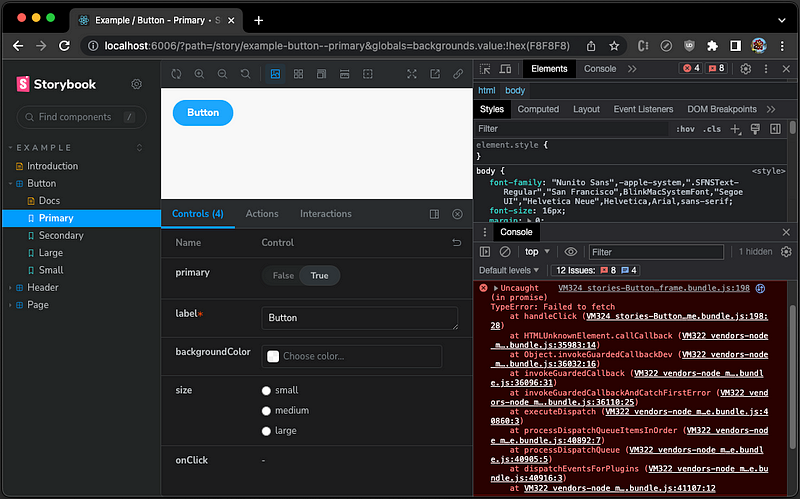
Since the Button component is not used in an application environment, the fetch call cannot reach the actual server. The story shows an exception on the console upon clicking the button:
Uncaught (in promise) TypeError: Failed to fetch
    at handleClick (VM324 stories-Button-stories.iframe.bundle.js:198:28)
    at HTMLUnknownElement.callCallback (VM322 vendors-node_modules_pmmmwh_react-refresh-webpack-plugin_client_ErrorOverlayEntry_js-node_mod-3d8a67.iframe.bundle.js:35983:14)
    at Object.invokeGuardedCallbackDev (VM322 vendors-node_modules_pmmmwh_react-refresh-webpack-plugin_client_ErrorOverlayEntry_js-node_mod-3d8a67.iframe.bundle.js:36032:16)
    at invokeGuardedCallback (VM322 vendors-node_modules_pmmmwh_react-refresh-webpack-plugin_client_ErrorOverlayEntry_js-node_mod-3d8a67.iframe.bundle.js:36096:31)
    at invokeGuardedCallbackAndCatchFirstError (VM322 vendors-node_modules_pmmmwh_react-refresh-webpack-plugin_client_ErrorOverlayEntry_js-node_mod-3d8a67.iframe.bundle.js:36110:25)
    at executeDispatch (VM322 vendors-node_modules_pmmmwh_react-refresh-webpack-plugin_client_ErrorOverlayEntry_js-node_mod-3d8a67.iframe.bundle.js:40860:3)
    at processDispatchQueueItemsInOrder (VM322 vendors-node_modules_pmmmwh_react-refresh-webpack-plugin_client_ErrorOverlayEntry_js-node_mod-3d8a67.iframe.bundle.js:40892:7)
    at processDispatchQueue (VM322 vendors-node_modules_pmmmwh_react-refresh-webpack-plugin_client_ErrorOverlayEntry_js-node_mod-3d8a67.iframe.bundle.js:40905:5)
    at dispatchEventsForPlugins (VM322 vendors-node_modules_pmmmwh_react-refresh-webpack-plugin_client_ErrorOverlayEntry_js-node_mod-3d8a67.iframe.bundle.js:40916:3)
    at VM322 vendors-node_modules_pmmmwh_react-refresh-webpack-plugin_client_ErrorOverlayEntry_js-node_mod-3d8a67.iframe.bundle.js:41107:12
We need to mock the fetch API to make the component work without the actual working environment.
The Add-on, storybook-addon-fetch-mock
fetch-mock is a popular way to mock HTTP requests made with fetch. The Storybook’s addon, storybook-addon-fetch-mock, makes it even easier.
Run the following command:
% yarn add -D storybook-addon-fetch-mockstorybook-addon-fetch-mock is installed as one of the devDependencies in package.json:
"devDependencies": {
  "storybook-addon-fetch-mock": "^1.0.1"
}
We modify .storybook/main.js to include the addon, storybook-addon-fetch-mock:
/** @type { import('@storybook/react-webpack5').StorybookConfig } */
const config = {
  stories: ["../src/**/*.mdx", "../src/**/*.stories.@(js|jsx|ts|tsx)"],
  addons: [
    "@storybook/addon-links",
    "@storybook/addon-essentials",
    "@storybook/preset-create-react-app",
    "@storybook/addon-interactions",
    "storybook-addon-fetch-mock",
  ],
  framework: {
    name: "@storybook/react-webpack5",
    options: {},
  },
  docs: {
    autodocs: "tag",
  },
  staticDirs: ["../public"],
};
export default config;
If parameters is specified in the default export, it will be applied to all stories in that file.
export default {
  // title: 'Example/Button',
  component: Button,
  tags: ['autodocs'],
  argTypes: {
    backgroundColor: { control: 'color' },
    size: { // hide specific controls
      table: {
        disable: true,
      },
    },
  },
  parameters: {
    fetchMock: {
      mocks: [{
        matcher: {
          url: 'http://myserver.com/data.json'
        },
        response: {
          status: 200,
          body: {
            'type': 'boolean',
            'value': "true",
          }
        }
      }]
    }
  }
};
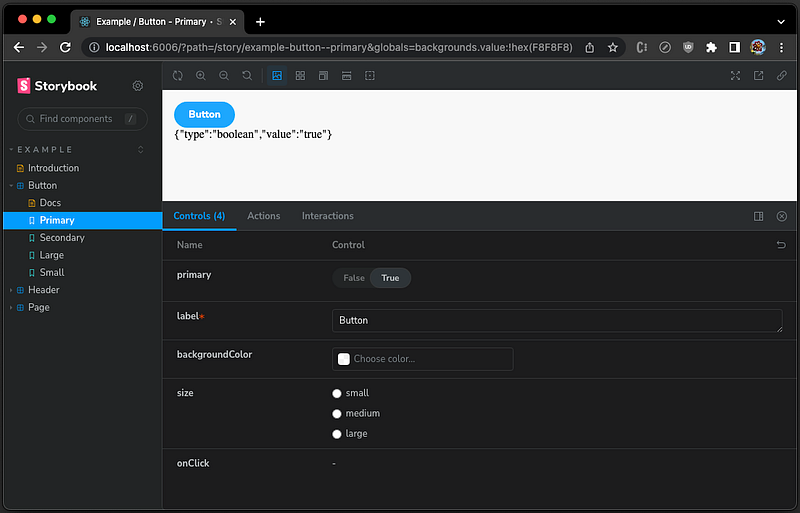
Execute yarn storybook, and click the Primary Button. It displays the response data:
Each mock in parameters.fetchMock is an object containing the following possible keys:
matcher(required): Each mock’smatcherobject has one or more criteria that are used to match. If multiple criteria are included in thematcher, all of the criteria must match for the mock to be used.response(optional): Once the match is made, the matched mock’sresponseis used to configure thefetch()response.- If the mock does not specify a
response, thefetch()response will use an HTTP 200 status with no body data. - If the
responseis an object, those values are used to create thefetch()response. - If the
responseis a function, the function should return an object whose values are used to create thefetch()response. options(optional): Further options for configuring mocking behavior.
Here’s the full list of possible keys for matcher, response, and options:
const exampleMock = {
  // Criteria for deciding which requests should match this
  // mock. If multiple criteria are included, all of the
  // criteria must match in order for the mock to be used.
  matcher: {
    // Match only requests where the endpoint "url" is matched
    // using any one of these formats:
    // - "url" - Match an exact url.
    //     e.g. "http://www.site.com/page.html"
    // - "*" - Match any url
    // - "begin:..." - Match a url beginning with a string,
    //     e.g. "begin:http://www.site.com"
    // - "end:..." - Match a url ending with a string
    //     e.g. "end:.jpg"
    // - "path:..." - Match a url which has a given path
    //     e.g. "path:/posts/2018/7/3"
    // - "glob:..." - Match a url using a glob pattern
    //     e.g. "glob:http://*.*"
    // - "express:..." - Match a url that satisfies an express
    //     style path. e.g. "express:/user/:user"
    // - RegExp - Match a url that satisfies a regular
    //     expression. e.g. /(article|post)\/\d+/
    url: 'https://example.com/endpoint/search',

    // If you have multiple mocks that use the same "url",
    // a unique "name" is required.
    name: 'searchSuccess',

    // Match only requests using this HTTP method. Not
    // case-sensitive.
    method: 'POST',

    // Match only requests that have these headers set.
    headers: {
      Authorization: 'Basic 123',
    },

    // Match only requests that send a JSON body with the
    // exact structure and properties as the one provided.
    // See matcher.matchPartialBody below to override this.
    body: {
      unicornName: 'Charlie',
    },

    // Match calls that only partially match the specified
    // matcher.body JSON.
    matchPartialBody: true,

    // Match only requests that have these query parameters
    // set (in any order).
    query: {
      q: 'cute+kittenz',
    },

    // When the express: keyword is used in the "url"
    // matcher, match only requests with these express
    // parameters.
    params: {
      user: 'charlie',
    },

    // Match if the function returns something truthy. The
    // function will be passed the url and options fetch was
    // called with. If fetch was called with a Request
    // instance, it will be passed url and options inferred
    // from the Request instance, with the original Request
    // will be passed as a third argument.
    functionMatcher: (url, options, request) => {
      return !!options.headers.Authorization;
    },

    // Limits the number of times the mock can be matched.
    // If the mock has already been used "repeat" times,
    // the call to fetch() will fall through to be handled
    // by any other mocks.
    repeat: 1,
  },

  // Configures the HTTP response returned by the mock.
  response: {
    // The mock response’s "statusText" is automatically set
    // based on this "status" number. Defaults to 200.
    status: 200,

    // By default, the optional "body" object will be converted
    // into a JSON string. See options.sendAsJson to override.
    body: {
      unicorns: true,
    },

    // Set the mock response’s headers.
    headers: {
      'Content-Type': 'text/html',
    },

    // The url from which the mocked response should claim
    // to originate from (to imitate followed directs).
    // Will also set `redirected: true` on the response.
    redirectUrl: 'https://example.com/search',

    // Force fetch to return a Promise rejected with the
    // value of "throws".
    throws: new TypeError('Failed to fetch'),
  },

  // Alternatively, the `response` can be a function that
  // returns an object with any of the keys above. The
  // function will be passed the url and options fetch was
  // called with. If fetch was called with a Request
  // instance, it will be passed url and options inferred
  // from the Request instance, with the original Request
  // will be passed as a third argument.
  response: (url, options, request) => {
    return {
      status: options.headers.Authorization ? 200 : 403,
    };
  },

  // An object containing further options for configuring
  // mocking behaviour.
  options: {
    // If set, the mocked response is delayed for the
    // specified number of milliseconds.
    delay: 500,

    // By default, the "body" object is converted to a JSON
    // string and the "Content-Type: application/json"
    // header will be set on the mock response. If this
    // option is set to false, the "body" object can be any
    // of the other types that fetch() supports, e.g. Blob,
    // ArrayBuffer, TypedArray, DataView, FormData,
    // URLSearchParams, string or ReadableStream.
    sendAsJson: false,

    // By default, a Content-Length header is set on each
    // mock response. This can be disabled when this option
    // is set to false.
    includeContentLength: false,
  },
};
The global parameters for all stories can be configured in preview.js:
// .storybook/preview.js
export const parameters = {
  fetchMock: {
    // When the story is reloaded (or you navigate to a new
    // story, this addon will be reset and a list of
    // previous mock matches will be sent to the browser’s
    // console if "debug" is true.
    debug: true,

    // Do any additional configuration of fetch-mock, e.g.
    // setting fetchMock.config or calling other fetch-mock
    // API methods. This function is given the fetchMock
    // instance as its only parameter and is called after
    // mocks are added but before catchAllMocks are added.
    useFetchMock: (fetchMock) => {
      fetchMock.config.overwriteRoutes = false;
    },

    // After each story’s `mocks` are added, these catch-all
    // mocks are added.
    catchAllMocks: [
      { matcher: { url: 'path:/endpoint1' }, response: 200 },
      { matcher: { url: 'path:/endpoint2' }, response: 200 },
    ],

    // A simple list of URLs to ensure that calls to
    // `fetch( [url] )` don’t go to the network. The mocked
    // fetch response will use HTTP status 404 to make it
    // easy to determine one of the catchAllURLs was matched.
    // These mocks are added after any catchAllMocks.
    catchAllURLs: [
      // This is equivalent to the mock object:
      // {
      //   matcher: { url: 'begin:http://example.com/' },
      //   response: { status: 404 },
      // }
      'http://myServer.com/',
    ],
  },
};
With the addon, storybook-addon-fetch-mock, the Storybook components work properly with mocks.
Conclusion
We have walked through Storybook stories in CSF3, an improved version of CSF2 that requires writing stories with objects. After installing storybook-addon-fetch-mock, we have shown how to configure parameters.fetchMock as an object to mock HTTP requests made with fetch. The mock can be configured for the default export or a single story’s export. The global parameters for all stories can be configured in preview.js.
With CSF3 + react-storybook-fetch-mock, the Storybook components work properly with mocks.
Thanks for reading.
Thanks, Sushmitha Aitha and S Sreeram, for working with me on Storybook.
Want to Connect?

If you are interested, check out my directory of web development articles.


