
Setting Up Mocks for React Development, Storybook, and Testing
An introduction to the fetch-mock JavaScript library

A web application is software that runs on a web server and is accessed by users through web browsers. A user interface (UI) produces an environment to perform a series of operations, such as viewing a shopping list or adding or removing items into a shopping cart.
As UI is a tactile and visual component, the business logic is empowered by the backend. It is typical for a UI to make async calls, using fetch, axios, or GraphQL, etc.
During the UI development, the backend may not be available for a while. It would be a good approach to mock APIs to parallel work with APIs.
fetch-mock is a popular way to mock HTTP requests made with fetch. We found that it is effective to use mock for UI development, storybook, and testing.
fetch-mock supports most JavaScript environments, including Node.js, web workers, service workers, and any browser that supports fetch. In this article, we use React as an example to explore its capability to mock CRUD operations.
HTTP Methods for CRUD Operation
CRUD is an acronym for the four operations that are considered necessary to implement RESTful Services: create, read, update and delete. HTTP supports a number of methods for CRUD operations. These are commonly used methods:
- GET: It is a read operation that is used to retrieve a representation of a resource. For example:
GET http://myserver.com/v2/users. If the operation is successful, GET returns a representation in XML or JSON with a status code of 200 (OK). In an error case, it returns an error code, such as 401 (Unauthorized), 403 (Forbidden), etc. - POST: It is typically a create operation that is used to create a new resource. For example:
POST http://myserver.com/v2/user. If the operation is successful, POST returns the creation content with a status code of 201 (Created). In an error case, it returns an error code, such as 409 (Conflict), 500 (Internal Server Error), etc. - PUT: It is typically an update operation that is used to update a resource. For example:
PUT http://myserver.com/v2/user. If the operation is successful, PUT returns the updated content with a status code of 200 (OK), or no content with a status code of 204 (No Content). In an error case, it returns an error code, such as 405 (Method Not Allowed), 501 (Not Implemented), etc. It is recommended to make PUT requests idempotent. - DELETE: It is a delete operation that is used to delete a resource. For example:
DELETE http://myserver.com/v2/user/:userId. If the operation is successful, DELETE returns the deleted content with a status code of 200 (OK), or no content with a status code of 204 (No Content). In an error case, it returns an error code, such as 404 (Not Found), 410 (Gone), etc.
Set Up React Working Environment
Install the Create React App:
npx create-react-app react-mock
cd react-mock
Run the following command:
npm install --save-dev fetch-mockfetch-mock is installed as a devDependencies in package.json:
"devDependencies": {
  "fetch-mock": "^9.11.0"
}
We modify src/App.js as follows:
The above code fetches a user list at the endpoint, /v2/users (lines 6–11), and displays it on the browser (line 13).
It works, except that the endpoint is still under construction.
Mock CRUD Operations
We can mock the GET method if the endpoint is not available.
Line 2 imports fetchMock.
Lines 5–7 define the mock function, callMocks. It mocks the GET method for the endpoint,/v2/users, to respond to a name list, which is defined at line 4. This mock response is an array reference, serverNameList.
Lines 12–14 invoke the mock function, callMocks.
With the mock, we can implement and tune UI without the actual APIs.
Here is the UI output:
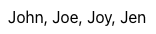
We have mocked the GET method. Other methods, such as POST and DELETE, can be mocked as well.
For the UI, we add two functionality:
- Delete the last one on the name list. It calls the DELETE method at the endpoint,
/v2/user/:userId. - Add a new name at the random index. It calls the POST method at the endpoint,
/v2/user, with the body,body: {id: number; name: string}.
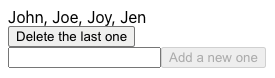
Here is the code that mocks these two additional endpoints:
Lines 9–15 mock the POST method for the endpoint,/v2/user, to create a user, with the specified name and insertion index (id). The mock response is a function that returns a processed value.
Lines 16–20 mock the DELETE method for the endpoint,/v2/user/:id, to delete a name, with the specified index (id). :id is a path to the specific resource. Line 16 uses express: to indicate the URL matcher would consider :id as an express style match. The mock response is a function that returns a processed value.
Mocks can be chained, but it is important to put more specific URL matchers in the front since it exits as soon as matching the first URL matcher.
message is defined at line 25. If there is a successful operation, message is updated, which triggers refetching (line 36).
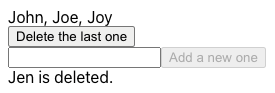
Lines 41–54 define the delete UI. It is a button to delete the last one on the name list. By onClick, it triggers the operation of DELETE /v2/user/:userId.
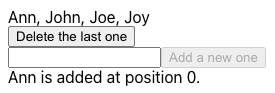
Lines 56–79 define the create UI. It is an input field for a new name and a button to create a new user on the server list. It uses Lodash’s function, capitalize (line 70), to capitalize the input. By onClick, it triggers the operation of POST /v2/user/, with a body (lines 68–71).
Lines 80 displays the most recent message.
Here is the UI after clicking the delete button:
Here is the UI after adding a name:
Mock Error Handling
It is cool that we can mock async calls. But what if there is an error in the server operation?
When mock responses are defined as functions, we can throw exceptions as needed.
Lines 13–15 throws an exception if the new name already exists.
Line 24 adds a glob URL matcher for all unhandled cases. We put it here to show how to use a wild card for URL. For unhandled URL, there is a builtin function, catch. Line 24 is equivalent to .catch(e => ({ throws: `Unhandled call at ${e}.` })).
There is another way to deal with the unhandled calls. fetchMock.config is a static configuration. fallbackToNetwork is one of the options. By default, it is set to 'always', and all calls fall through to the network, effectively disabling fetch-mock.
We can set fetchMock.config.fallbackToNetwork = false, then an unmatched call, POST /v2/unknown, will throw an error:
The following code defines the options in fetchMock.config:
Fetch-Mock for Storybook and Testing
We have shown how to use fetch-mock to mock async calls during development. It can be used in storybook as well. The key is to invoke mocks before rendering the component.
If the function, callMocks, is called for multiple stories with different mocks, it should call restore() before chaining mocks. With restore (an alias for reset), everything resets to its un-stubbed state, and all data recorded for its previous calls are cleared.
fetchMock.restore().get(...).get(...).get(...).post(...)...There is a Storybook’s addon, storybook-addon-fetch-mock, makes it even easier. It allows a declarative way to configure the fetchMock property.
Jest is a JavaScript testing framework to ensure the correctness of any JavaScript codebase. We can use jest.fn() to mock fetch calls, which is a similar idea as fetch-mock. By reusing callMocks, we may not need to mock every async call.
fetch-mock has a wrapper for Jest, jest-fetch-mock. It provides similar functionality as jest.fn().
Conclusion
We have used fetch-mock in our projects. In a real project, it happens all the time that some APIs are under construction. As long as interfaces are defined, we can mock them to work on UI features simultaneously. fallbackToNetwork by default is set to 'always'. It allows us to mix using the existing APIs and some mocks.
These mocks can be reused in storybook. It allows us to build stories for components with async calls.
These mocks can also be reused in testing cases. It may not replace all Jest mocks, but some basic cases are covered nicely without much extra effort.
After all, fetch-mock is a useful helper in a project.
Thanks for reading.
Want to Connect?

If you are interested, check out my directory of web development articles.


