
What is the ~= Operator in Swift?
Search for a value in a range

Today we’ll learn about a not-so-well-known operator in Swift, looking at some real-life examples: ~=.
In short, we use this operator when we want to check if a range contains a certain value.
Let’s Start
Consider the following common case: We want to launch a network request and print out data if we don’t encounter any errors, so we create a URLSessionDataTask, like this:
We can see how we use the ~= to check whether the status code integer value lies between 200 and 300 (not inclusive), meaning that the result is successful. Otherwise, we print an error message.
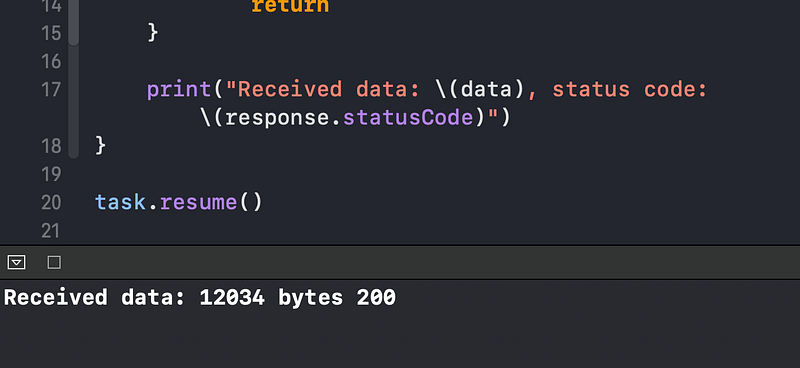
If we change the print statement and launch the task, we see that, indeed, we have a valid response and the status code is 200:
Let’s look at another example of the ~= operator in use behind the scenes. Say we have a simple Coordinate struct and instantiate it like this:
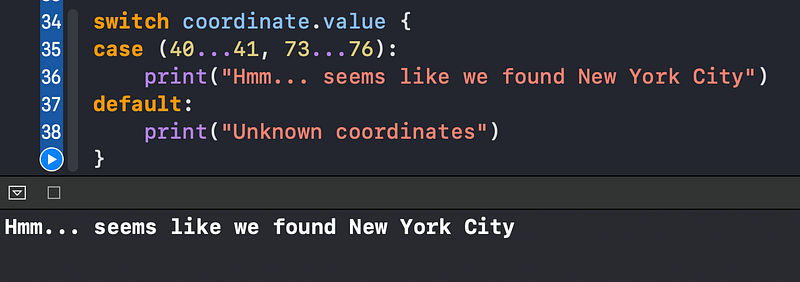
We want to check if this coordinate lies in New York City’s coordinates range (this example is simplified). So we use the switch statement:
We specify ranges for both latitude and longitude values. Under the hood, the ~= operator compares each value in a range to our coordinate’s value using the == operator:
Wrapping Up
Interested in more lesser-known features of Swift? Feel free to check out my other relevant articles:
- What is the ExpressibleByIntegerLiteral Protocol in Swift?
- What Is the Value-Binding Pattern in Swift?
- What Is the vDSP Framework in Swift?
- What is the CustomStringConvertible Protocol in Swift?
- What Is the Difference Between Class and Static in Swift?
Thanks for reading!


