What is Quartz Scheduler and how to use it with Spring Boot to schedule Jobs?

Hello everyone. Job Scheduling is one of the important things to know for every developer. In this article, we are going to see an introduction to Job Scheduler and then see about the Quartz Job scheduler framework along with its features.
We will dive deep into the architecture of the Quartz framework and explore its various components. Later, we will see step-by-step how to set up Quartz in Spring Boot. Then we will see code examples of Quartz in Spring Boot. We will also briefly see about Spring Scheduler and conclude this article by comparing Quartz Scheduler with the Spring Scheduler. Let's get started.
What is a Job Scheduler?
Job Scheduling is the processing of running scheduled Jobs in an application to automate things and reduce manual intervention. Most of the companies schedule the Jobs usually in the wee hours when the servers are generally idle and hence it won't impact the performance of the application.
Job Scheduled is achieved using programs called Job Schedulers. The Job Scheduler provides scheduling and can even track computer batch jobs. They have the ability to start and control jobs automatically by running prepared job-control-language statements.
A Job Scheduler can be used for the following use cases but is not limited to
- Audit trails meant for regulation compliance purposes and generate reports
- Continuous automatic monitoring of jobs and completion notification
- Event-driven job scheduling
- Performance monitoring
- Report scheduling
- Automated restart and recovery in case of failures
- Generating reports of incidents
What is Quartz?
There are a lot of Job Scheduler frameworks out there and Quartz is the widely used one for Java applications. It is an open-source scheduling framework written in Java and developed by a company called Terracotta. Quartz can run tens of thousands of tasks and supports complex scheduling in simple interval formats or using Cron expressions.
Quartz provides great flexibility in scheduling jobs for uses cases like
1. We can specify what to do every Friday at 1:30 am — eg: daily activity report
2. What to do on the last day of the month — eg: Payroll processing
3. What to do 1 hour before a specific time — eg: Reminder notification to users
Quartz has a rich set of features that can be easily integrated into our Java applications be it a stand-alone application or the largest e-commerce system in a distributed environment.
These are the following uses of the Quartz scheduler in Java:
- A quartz scheduler allows an enterprise to schedule a job at a specified date and time.
- It allows us to perform the operations to schedule or unscheduled the jobs.
- It provides operations to start or stop or pause the scheduler.
- It also provides reminder services.
Features of Quartz
The Quartz framework provides various features as shown below
1) Runtime Environment
2) Job Scheduling
3) Job execution
4) Job Persistence
5) Transaction
6) Clustering and Load Balancing
7) Fail-over and random load distribution
The architecture of Quartz Framework
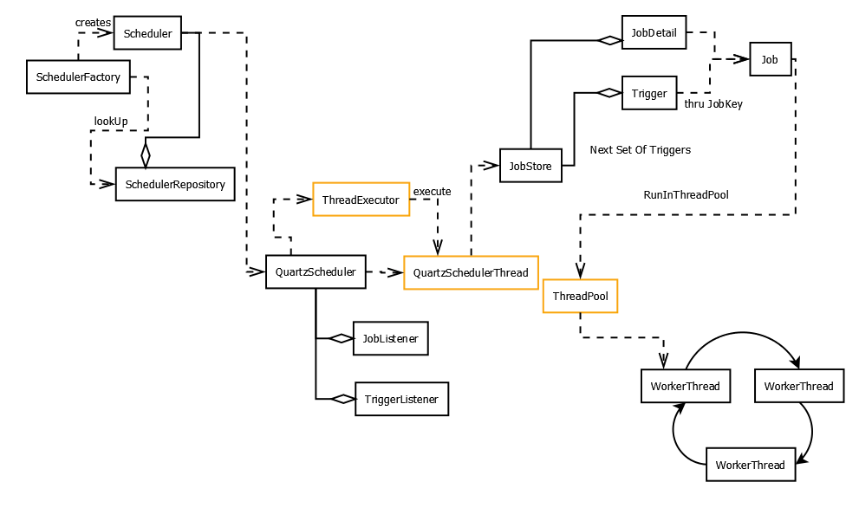
Let us look at the architecture of the Quartz and see about its components. This will help you to understand the Quartz framework easily and the coding section which is coming after this.
The Scheduler is the backbone of the Quartz framework as it is responsible for managing the runtime environment for the application. To ensure scalability, Quartz is based on a multi-threaded architecture and hence you can use multiple threads to run the jobs. The thread settings are configurable as well.
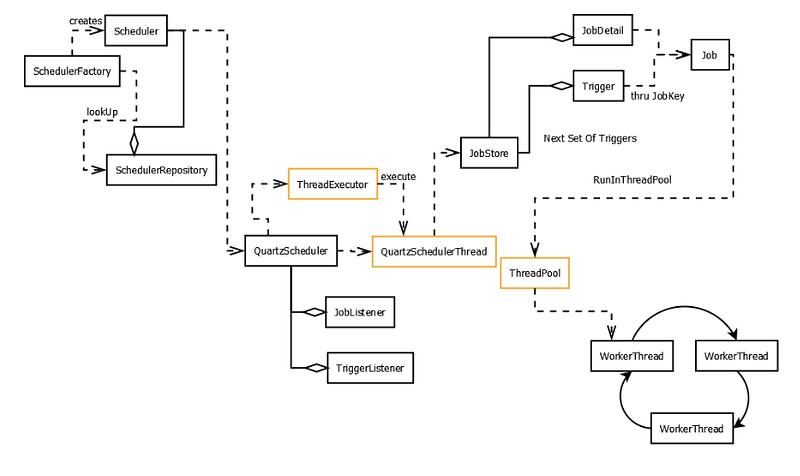
The components of the Quartz framework are as follows
- Scheduler — It manages everything like scheduling jobs, managing listeners, clustering, transactions, and Job persistence. It provides a primary API for interacting with the scheduler of the framework for scheduling, unscheduling, adding, and removing jobs.
- SchedulerFactory: It’s a factory Interface for creating a scheduler instance. The environment can be configured through the properties of the application
- Scheduler Repository: Holds references to Scheduler instances to ensure uniqueness, and preventing garbage collection, and allow ‘global’ lookups — all within a ClassLoader space.
- Job — An interface to be implemented by components that we wish to have executed. It has a single method called execute() on which we need to provide the details to be performed by the Job
- JobDetail — It is an instance of the Job. It contains additional data called JobDataMap to pass to the Job when it is executed. The JobDetail is identified by a JobKey which consists of a name and group and the name must be unique within a group.
- JobBuilder: A builder pattern implementation used to create a JobDetail instance.
- Trigger — A component that determines the schedule upon which a given Job will be performed. Every Trigger is identified by the TriggerKey that has a name and group and the name must be unique within a group. Triggers can also send data to the Job
- TriggerBuilder: A builder pattern implementation to create a Trigger instance
- ThreadPool: A Pool of those threads which are reserved by Quartz to run Jobs code upon a trigger fire.
- WorkerThread: When started, the framework initializes a set of worker threads that are used by the Scheduler to execute Jobs. This is how the framework can run many Jobs concurrently.
- JobStore: A place where the scheduler keeps the information about Job/Trigger/Calendar etc. This could be an in-memory store in RAM or the Database
- DataSources: Used when using a JDBCJobSore.
- TriggerListeners — Receive events related to triggers, if configured.
- SchedulerListeners — Receive notification of events within the Scheduler itself, like addition/removal of a job/trigger, etc.
Jobs and Triggers
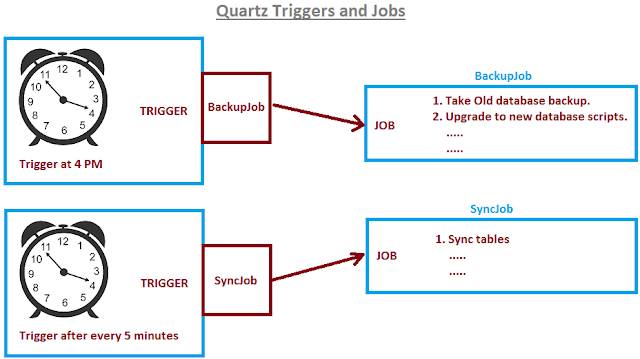
Quartz work on the concept of Jobs and Triggers.
- Job is anything that needs to be executed when an event occurs or when the scheduled time is reached
- A trigger is basically an event that contains time as to when this event should occur.
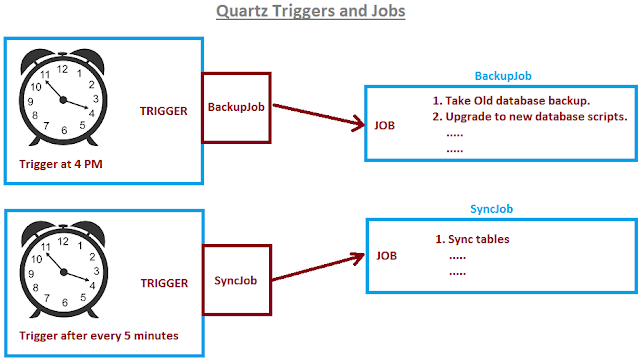
The Relationship Between Trigger and Job
- Trigger (1): Job(1) One Trigger must be designated as one Job
- Trigger (N): Job(1) One Job can be run multiple times at different times
- Trigger (1): Job(N) (X) One Trigger cannot have more than One Job
There are 2 types of triggers,
- Simple Trigger — Used if you need to execute a job exactly once at a specific moment in time, or at a specific moment in time followed by repeats at a specific interval.
- Cron Trigger — For scheduling jobs having complex times like if you need to execute a job that recurs based on calendar-like notions
Setting up Quartz in Spring Boot
Having seen in detail the components of Quartz, we will see step by step how to setup a Spring Boot project with the Quartz framework
1. Initialize the project with dependencies
The easiest way to initialize a Spring Boot is through Spring Initializr. We need the following dependencies
- Quartz
- Spring Web for REST APIs
- PostgreSQL for using a database
- Spring Data JPA for persisting jobs
- Flyway Migration for running create table scripts. This is not needed if you want to run the DB scripts manually
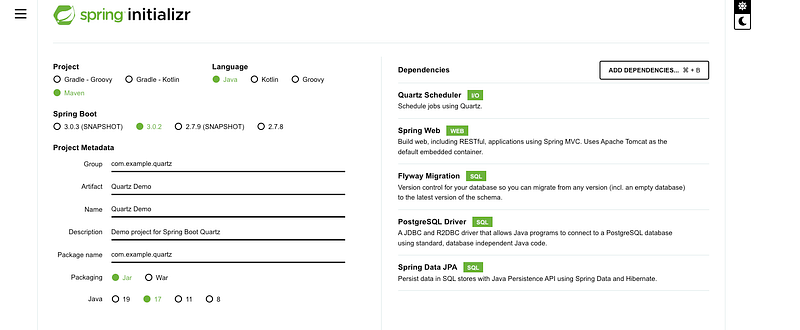
After generating the project, the pom.xml looks like below
<?xml version="1.0" encoding="UTF-8"?>
<project xmlns="http://maven.apache.org/POM/4.0.0" xmlns:xsi="http://www.w3.org/2001/XMLSchema-instance"
 xsi:schemaLocation="http://maven.apache.org/POM/4.0.0 https://maven.apache.org/xsd/maven-4.0.0.xsd">
 <modelVersion>4.0.0</modelVersion>
 <parent>
  <groupId>org.springframework.boot</groupId>
  <artifactId>spring-boot-starter-parent</artifactId>
  <version>3.0.2</version>
  <relativePath/> <!-- lookup parent from repository -->
 </parent>
 <groupId>com.example.quartz</groupId>
 <artifactId>Quartz-Demo</artifactId>
 <version>0.0.1-SNAPSHOT</version>
 <name>Quartz-Demo</name>
 <description>Demo project for Spring Boot Quartz</description>
 <properties>
  <java.version>17</java.version>
 </properties>
 <dependencies>
  <dependency>
   <groupId>org.springframework.boot</groupId>
   <artifactId>spring-boot-starter-data-jpa</artifactId>
  </dependency>
  <dependency>
   <groupId>org.springframework.boot</groupId>
   <artifactId>spring-boot-starter-quartz</artifactId>
  </dependency>
  <dependency>
   <groupId>org.springframework.boot</groupId>
   <artifactId>spring-boot-starter-web</artifactId>
  </dependency>
  <dependency>
   <groupId>org.flywaydb</groupId>
   <artifactId>flyway-core</artifactId>
  </dependency>
  <dependency>
   <groupId>org.postgresql</groupId>
   <artifactId>postgresql</artifactId>
   <scope>runtime</scope>
  </dependency>
  <dependency>
   <groupId>org.springframework.boot</groupId>
   <artifactId>spring-boot-starter-test</artifactId>
   <scope>test</scope>
  </dependency>
 </dependencies>

 <build>
  <plugins>
   <plugin>
    <groupId>org.springframework.boot</groupId>
    <artifactId>spring-boot-maven-plugin</artifactId>
   </plugin>
  </plugins>
 </build>
</project>
2. Configuration
Configuration is a very important step for any application
Here we configure the
- Server port for the Spring Boot application
- Database configuration
- Quartz configuration like JDBC data store, database driver, thread count, etc.
##Server Port
server.port = 8099

## Spring DATASOURCE (DataSourceAutoConfiguration & DataSourceProperties)
spring.datasource.url = jdbc:postgresql://localhost:5432/scheduler
spring.datasource.username = postgres
spring.datasource.password =

## QuartzProperties
spring.quartz.job-store-type = jdbc
jdbc.initialize-schema= never
spring.quartz.properties.org.quartz.jobStore.driverDelegateClass=org.quartz.impl.jdbcjobstore.PostgreSQLDelegate
spring.quartz.properties.org.quartz.threadPool.threadCount = 5
3. Flyway Script for Quartz tables creation
All tables in Quartz must start with the prefix ‘qrtz’. These are the standard set of scripts for any Java application that uses Quartz.
All these tables are required by the Quartz framework and we need to run these scripts either manually in the database or through migration scripts like Flyway or Liquibase. Once these tables are inserted, the persistence operations will be taken care of by Quartz.
CREATE TABLE qrtz_job_details
  (
    SCHED_NAME VARCHAR(120) NOT NULL,
    JOB_NAME  VARCHAR(200) NOT NULL,
    JOB_GROUP VARCHAR(200) NOT NULL,
    DESCRIPTION VARCHAR(250) NULL,
    JOB_CLASS_NAME   VARCHAR(250) NOT NULL,
    IS_DURABLE BOOL NOT NULL,
    IS_NONCONCURRENT BOOL NOT NULL,
    IS_UPDATE_DATA BOOL NOT NULL,
    REQUESTS_RECOVERY BOOL NOT NULL,
    JOB_DATA BYTEA NULL,
    PRIMARY KEY (SCHED_NAME,JOB_NAME,JOB_GROUP)
);

CREATE TABLE qrtz_triggers
  (
    SCHED_NAME VARCHAR(120) NOT NULL,
    TRIGGER_NAME VARCHAR(200) NOT NULL,
    TRIGGER_GROUP VARCHAR(200) NOT NULL,
    JOB_NAME  VARCHAR(200) NOT NULL,
    JOB_GROUP VARCHAR(200) NOT NULL,
    DESCRIPTION VARCHAR(250) NULL,
    NEXT_FIRE_TIME BIGINT NULL,
    PREV_FIRE_TIME BIGINT NULL,
    PRIORITY INTEGER NULL,
    TRIGGER_STATE VARCHAR(16) NOT NULL,
    TRIGGER_TYPE VARCHAR(8) NOT NULL,
    START_TIME BIGINT NOT NULL,
    END_TIME BIGINT NULL,
    CALENDAR_NAME VARCHAR(200) NULL,
    MISFIRE_INSTR SMALLINT NULL,
    JOB_DATA BYTEA NULL,
    PRIMARY KEY (SCHED_NAME,TRIGGER_NAME,TRIGGER_GROUP),
    FOREIGN KEY (SCHED_NAME,JOB_NAME,JOB_GROUP)
 REFERENCES QRTZ_JOB_DETAILS(SCHED_NAME,JOB_NAME,JOB_GROUP)
);

CREATE TABLE qrtz_simple_triggers
  (
    SCHED_NAME VARCHAR(120) NOT NULL,
    TRIGGER_NAME VARCHAR(200) NOT NULL,
    TRIGGER_GROUP VARCHAR(200) NOT NULL,
    REPEAT_COUNT BIGINT NOT NULL,
    REPEAT_INTERVAL BIGINT NOT NULL,
    TIMES_TRIGGERED BIGINT NOT NULL,
    PRIMARY KEY (SCHED_NAME,TRIGGER_NAME,TRIGGER_GROUP),
    FOREIGN KEY (SCHED_NAME,TRIGGER_NAME,TRIGGER_GROUP)
 REFERENCES QRTZ_TRIGGERS(SCHED_NAME,TRIGGER_NAME,TRIGGER_GROUP)
);

CREATE TABLE qrtz_cron_triggers
  (
    SCHED_NAME VARCHAR(120) NOT NULL,
    TRIGGER_NAME VARCHAR(200) NOT NULL,
    TRIGGER_GROUP VARCHAR(200) NOT NULL,
    CRON_EXPRESSION VARCHAR(120) NOT NULL,
    TIME_ZONE_ID VARCHAR(80),
    PRIMARY KEY (SCHED_NAME,TRIGGER_NAME,TRIGGER_GROUP),
    FOREIGN KEY (SCHED_NAME,TRIGGER_NAME,TRIGGER_GROUP)
 REFERENCES QRTZ_TRIGGERS(SCHED_NAME,TRIGGER_NAME,TRIGGER_GROUP)
);

CREATE TABLE qrtz_simprop_triggers
  (
    SCHED_NAME VARCHAR(120) NOT NULL,
    TRIGGER_NAME VARCHAR(200) NOT NULL,
    TRIGGER_GROUP VARCHAR(200) NOT NULL,
    STR_PROP_1 VARCHAR(512) NULL,
    STR_PROP_2 VARCHAR(512) NULL,
    STR_PROP_3 VARCHAR(512) NULL,
    INT_PROP_1 INT NULL,
    INT_PROP_2 INT NULL,
    LONG_PROP_1 BIGINT NULL,
    LONG_PROP_2 BIGINT NULL,
    DEC_PROP_1 NUMERIC(13,4) NULL,
    DEC_PROP_2 NUMERIC(13,4) NULL,
    BOOL_PROP_1 BOOL NULL,
    BOOL_PROP_2 BOOL NULL,
    PRIMARY KEY (SCHED_NAME,TRIGGER_NAME,TRIGGER_GROUP),
    FOREIGN KEY (SCHED_NAME,TRIGGER_NAME,TRIGGER_GROUP)
    REFERENCES QRTZ_TRIGGERS(SCHED_NAME,TRIGGER_NAME,TRIGGER_GROUP)
);

CREATE TABLE qrtz_blob_triggers
  (
    SCHED_NAME VARCHAR(120) NOT NULL,
    TRIGGER_NAME VARCHAR(200) NOT NULL,
    TRIGGER_GROUP VARCHAR(200) NOT NULL,
    BLOB_DATA BYTEA NULL,
    PRIMARY KEY (SCHED_NAME,TRIGGER_NAME,TRIGGER_GROUP),
    FOREIGN KEY (SCHED_NAME,TRIGGER_NAME,TRIGGER_GROUP)
        REFERENCES QRTZ_TRIGGERS(SCHED_NAME,TRIGGER_NAME,TRIGGER_GROUP)
);

CREATE TABLE qrtz_calendars
  (
    SCHED_NAME VARCHAR(120) NOT NULL,
    CALENDAR_NAME  VARCHAR(200) NOT NULL,
    CALENDAR BYTEA NOT NULL,
    PRIMARY KEY (SCHED_NAME,CALENDAR_NAME)
);


CREATE TABLE qrtz_paused_trigger_grps
  (
    SCHED_NAME VARCHAR(120) NOT NULL,
    TRIGGER_GROUP  VARCHAR(200) NOT NULL,
    PRIMARY KEY (SCHED_NAME,TRIGGER_GROUP)
);

CREATE TABLE qrtz_fired_triggers
  (
    SCHED_NAME VARCHAR(120) NOT NULL,
    ENTRY_ID VARCHAR(95) NOT NULL,
    TRIGGER_NAME VARCHAR(200) NOT NULL,
    TRIGGER_GROUP VARCHAR(200) NOT NULL,
    INSTANCE_NAME VARCHAR(200) NOT NULL,
    FIRED_TIME BIGINT NOT NULL,
    SCHED_TIME BIGINT NOT NULL,
    PRIORITY INTEGER NOT NULL,
    STATE VARCHAR(16) NOT NULL,
    JOB_NAME VARCHAR(200) NULL,
    JOB_GROUP VARCHAR(200) NULL,
    IS_NONCONCURRENT BOOL NULL,
    REQUESTS_RECOVERY BOOL NULL,
    PRIMARY KEY (SCHED_NAME,ENTRY_ID)
);

CREATE TABLE qrtz_scheduler_state
  (
    SCHED_NAME VARCHAR(120) NOT NULL,
    INSTANCE_NAME VARCHAR(200) NOT NULL,
    LAST_CHECKIN_TIME BIGINT NOT NULL,
    CHECKIN_INTERVAL BIGINT NOT NULL,
    PRIMARY KEY (SCHED_NAME,INSTANCE_NAME)
);

CREATE TABLE qrtz_locks
  (
    SCHED_NAME VARCHAR(120) NOT NULL,
    LOCK_NAME  VARCHAR(40) NOT NULL,
    PRIMARY KEY (SCHED_NAME,LOCK_NAME)
);

create index idx_qrtz_j_req_recovery on qrtz_job_details(SCHED_NAME,REQUESTS_RECOVERY);
create index idx_qrtz_j_grp on qrtz_job_details(SCHED_NAME,JOB_GROUP);

create index idx_qrtz_t_j on qrtz_triggers(SCHED_NAME,JOB_NAME,JOB_GROUP);
create index idx_qrtz_t_jg on qrtz_triggers(SCHED_NAME,JOB_GROUP);
create index idx_qrtz_t_c on qrtz_triggers(SCHED_NAME,CALENDAR_NAME);
create index idx_qrtz_t_g on qrtz_triggers(SCHED_NAME,TRIGGER_GROUP);
create index idx_qrtz_t_state on qrtz_triggers(SCHED_NAME,TRIGGER_STATE);
create index idx_qrtz_t_n_state on qrtz_triggers(SCHED_NAME,TRIGGER_NAME,TRIGGER_GROUP,TRIGGER_STATE);
create index idx_qrtz_t_n_g_state on qrtz_triggers(SCHED_NAME,TRIGGER_GROUP,TRIGGER_STATE);
create index idx_qrtz_t_next_fire_time on qrtz_triggers(SCHED_NAME,NEXT_FIRE_TIME);
create index idx_qrtz_t_nft_st on qrtz_triggers(SCHED_NAME,TRIGGER_STATE,NEXT_FIRE_TIME);
create index idx_qrtz_t_nft_misfire on qrtz_triggers(SCHED_NAME,MISFIRE_INSTR,NEXT_FIRE_TIME);
create index idx_qrtz_t_nft_st_misfire on qrtz_triggers(SCHED_NAME,MISFIRE_INSTR,NEXT_FIRE_TIME,TRIGGER_STATE);
create index idx_qrtz_t_nft_st_misfire_grp on qrtz_triggers(SCHED_NAME,MISFIRE_INSTR,NEXT_FIRE_TIME,TRIGGER_GROUP,TRIGGER_STATE);

create index idx_qrtz_ft_trig_inst_name on qrtz_fired_triggers(SCHED_NAME,INSTANCE_NAME);
create index idx_qrtz_ft_inst_job_req_rcvry on qrtz_fired_triggers(SCHED_NAME,INSTANCE_NAME,REQUESTS_RECOVERY);
create index idx_qrtz_ft_j_g on qrtz_fired_triggers(SCHED_NAME,JOB_NAME,JOB_GROUP);
create index idx_qrtz_ft_jg on qrtz_fired_triggers(SCHED_NAME,JOB_GROUP);
create index idx_qrtz_ft_t_g on qrtz_fired_triggers(SCHED_NAME,TRIGGER_NAME,TRIGGER_GROUP);
create index idx_qrtz_ft_tg on qrtz_fired_triggers(SCHED_NAME,TRIGGER_GROUP);
4. Code
Let us look at the important components to be coded in this section
a. Create a Job Class
We need to create a Job class for every Job we need to run in our application. For example, I am using a ReportJob class that will have logic to retrieve data from the Database and generate reports from that.
@Component
public class ReportJob extends QuartzJobBean{
  @Override
    protected void executeInternal(JobExecutionContext jobExecutionContext) throws JobExecutionException {
        //logic to generate report and save to the server every night
    }
}
b. Build JobDetail
We need to create JobDetail, which is an instance of Job. We create a JobDataMap and set the metadata that needs to be passed when running the Report Job. Then we create the JobDetail using JobBuilder.
 private JobDetail buildJobDetail(ScheduleReportRequest scheduleReportRequest) {
        JobDataMap jobDataMap = new JobDataMap();

        jobDataMap.put("reportname", scheduleEmailRequest.getEmail());
        jobDataMap.put("type", scheduleEmailRequest.getSubject());


        return JobBuilder.newJob(ReportJob.class)
                .withIdentity(UUID.randomUUID().toString(), "report-jobs")
                .withDescription("Send Reports")
                .usingJobData(jobDataMap)
                .storeDurably()
                .build();
    }
c. Build Trigger
After creating the JobDetail, we need to create a Trigger for the Job. We will pass the above-created JobDetail and the Scheduled time to create a Trigger by using the TriggerBuilder.
We can create multiple triggers for the same job. If we call the buildJobTrigger method by the passing same JobDetail and different scheduled times, then multiple triggers will be set for the same job but at different timings.
 private Trigger buildJobTrigger(JobDetail jobDetail, ZonedDateTime startAt) {
        return TriggerBuilder.newTrigger()
                .forJob(jobDetail)
                .withIdentity(jobDetail.getKey().getName(), "report-triggers")
                .withDescription("Send Report Trigger")
                .startAt(Date.from(startAt.toInstant()))
                .withSchedule(SimpleScheduleBuilder.simpleSchedule().withMisfireHandlingInstructionFireNow())
                .build();
d. Schedule and Cancel-Job APIs
Now let us create REST APIs to trigger the Job Schedule and Cancel
When calling the API /scheduleReportJob, the system will build the JobDetail and create a trigger for this job, then call the scheduleJob API of the framework to schedule and persist the Job in the DB. Then the API returns the response of the scheduled job like jobId, groupId, jobName, etc
For the /cancelReportJob API, if we pass the jobId and groupId, we can cancel the jobs by calling the cancel API of the Quartz framework
@RestController
public class EmailJobSchedulerController {
    private static final Logger logger = LoggerFactory.getLogger(EmailJobSchedulerController.class);

    @Autowired
    private Scheduler scheduler;

    @PostMapping("/scheduleReportJob")
    public ResponseEntity<ScheduleReportResponse> scheduleReport(@Valid @RequestBody ScheduleReportRequest scheduleReportRequest) {

            JobDetail jobDetail = buildJobDetail(scheduleEmailRequest);
            Trigger trigger = buildJobTrigger(jobDetail, dateTime);
            scheduler.scheduleJob(jobDetail, trigger);

            ScheduleReportResponse scheduleReportResponse = new ScheduleReportResponse(true,
                    jobDetail.getKey().getName(), jobDetail.getKey().getGroup(), "Report Scheduled Successfully!");
            return ResponseEntity.ok(scheduleReportResponse);
       }

    @DeleteMapping("/cancelReportJob")
    public ResponseEntity<String> cancelReportJob(String jobId, String groupId) {

            RequestMetadata requestModel = new RequestMetadata(jobId, groupId, null, null, null);
            quartzService.cancel(requestModel);
            return ResponseEntity.ok("Report Job Cancelled");
       }
}
Spring Scheduler
Spring framework in itself provides an option to schedule jobs quickly and easily. To enable the scheduling in the application, we have to use the following annotation
@Configuration
@EnableScheduling
public class SchedulerConfig {
}
Then we have to use the following Scheduled annotation on every class which we need to trigger. In this example, the job is scheduled at a fixed delay of 1000 milliseconds.
The following things must be considered when we use Scheduling in Spring
- The method that annotates with @scheduled annotation should not accept any parameter inside it.
- The methods that are annotated with @scheduled annotation should return a void type.
@Scheduled(fixedDelay = 1000)
public void scheduleFixedDelayTask() {
}
We can also schedule the Job using the cron expression as follows
@Scheduled(cron = "0 15 10 15 * ?")
public void scheduleTaskUsingCronExpression() {
}
We can also enable Aysnc in the job to run tasks in parallel
@EnableAsync
public class ScheduledFixedRateExample {
    @Async
    @Scheduled(fixedRate = 1000)
    public void scheduleFixedRateTaskAsync() throws InterruptedException {
    }
}
Quartz Scheduler vs Spring Scheduler
I wanted to touch up on this topic as there is always confusion between Quartz Scheduler and Spring Scheduler.
As seen above, Spring Scheduler is a truly lightweight implementation that will be good for simple scheduling needs. Eg: To process some database records every 15 minutes.
On the other hand, Quartz Scheduler is a full-fledged open-source library that provides great support for Job Scheduling. It's more complex than Spring Scheduler but provides a lot of support for enterprise-level features like JTA, Persistence, Clustering, etc.
In a nutshell, if you want to quickly implement job/task scheduling then Spring Scheduler will be good. On the other hand, if you need clustering as well as Job Persistence support then Quartz will be a better option.
Summary
In this article, we saw about Job Scheduler and the Quartz Job scheduler framework along with its features. We then did a deep dive into the architecture of the Quartz framework and explored its various components. Later, we saw step-by-step on how to set up Quartz Framework in Spring Boot. We also saw code examples of Quartz in Spring Boot. In the end, we explored Spring Scheduler and concluded this article by comparing Quartz Scheduler with the Spring Scheduler.
Hope you liked this article and thanks for reading this!!!
If you like to get more updates from me,
please follow me on Medium and subscribe to the email alerts.

If you are considering buying a medium membership,
please buy through my referral link