avatarVic

Free AI web copilot to create summaries, insights and extended knowledge, download it at here

5287

Abstract

g"><figcaption>In Fig.9 AES Encrypt and Decrypt with hashing code system.</figcaption></figure><p id="abee"><b>HMAC Integration with AES and SHA:</b></p><p id="121d"><b>Step 1: A</b>dd an “HMAC” algorithm and a “Text Input” into the existing workspace for encryption purposes. After that to establish a link between them as shown in Fig.10.</p><p id="afb0">Note: Set HMAC to “Md5”.</p><figure id="3be4"><img src="https://cdn-images-1.readmedium.com/v2/resize:fit:800/1*NcWJEUyTLsIB_4toov_zww.png"><figcaption>In Fig.10 To add HMAC into the workspace.</figcaption></figure><p id="809f"><b>Step 2:</b> Add a “String comparator” and establish a link between the HMAC.</p><figure id="7371"><img src="https://cdn-images-1.readmedium.com/v2/resize:fit:800/1*X-KRU5iccEr1y7snh76Etg.png"><figcaption>In Fig.11 To add a string comparator.</figcaption></figure><p id="7873"><b>Step 3: </b>Add an “HMAC” algorithm and a “Text Input” for decryption purposes.</p><figure id="e378"><img src="https://cdn-images-1.readmedium.com/v2/resize:fit:800/1*Mtv1m6eGYVw_BT3ehxdwPg.png"><figcaption>In Fig.12 Add HMAC into the decryption.</figcaption></figure><p id="f4ce"><b>Step 4: </b>To establish a link between “Stream comparator” and “HMAC”.</p><figure id="205b"><img src="https://cdn-images-1.readmedium.com/v2/resize:fit:800/1*DLBUFPBLEFxsVKuVi8FbLQ.png"><figcaption>In Fig.13 Link establishment.</figcaption></figure><p id="722f"><b>Step 5: </b>Add a “Boolean Output” and establish a link between the “Stream comparator”.</p><figure id="74d5"><img src="https://cdn-images-1.readmedium.com/v2/resize:fit:800/1*_b-yhGYYhKtWqy_4gtF-9w.png"><figcaption>In Fig.14 Boolean output linked with Stream comparator.</figcaption></figure><p id="01b7">Note: Play the simulation and check whether the boolean returns the integrity of the message.</p><figure id="6fd1"><img src="https://cdn-images-1.readmedium.com/v2/resize:fit:800/1*Oh4bFvvd7zYl9W_uWousGw.png"><figcaption>In Fig.15 Boolean returns the value.</figcaption></figure><p id="c190"><b>Step 6: </b>Add a “Gate” to the stream comparator.<b> </b>Then link the AES encryption to the Gate and Gate to AES decryption as like shown in Fig.16.</p><figure id="fba6"><img src="https://cdn-images-1.readmedium.com/v2/resize:fit:800/1*ELDVjlHzlpc-ElkgRVAXeg.png"><figcaption>In Fig.16 Gate linked with Boolean.</figcaption></figure><p id="bd5e"><b>Step 7: </b>Set the “Gate” value to “True”.</p><figure id="f893"><img src="https://cdn-images-1.readmedium.com/v2/resize:fit:800/1*WHu3KUwHjB2wl3RQm_Ts3w.png"><figcaption>In Fig.17 Set the Gate value to “true” in the trigger section.</figcaption></figure><p id="3e9d"><b>Step 8: </b>Finally, click on the “Play” button. If Cryptool run the simulation successfully. It encrypts and decrypt the plaintext and the key on the left side and display it exactly to the right side by using the HMAC system. Boolean judges the system whether the message has tampered. If they do not tamper it, pass it over the gate and gate send it to AES for decryption and final plaintext is revealed on the other side. Q.E.D.</p><figure id="8d12"><img src="https://cdn-images-1.readmedium.com/v2/resize:fit:800/1*hog31rwbs69JwgNG3xi5Qw.png"><figcaption>In Fig.18 HMAC integration result.</figcaption></figure><p id="9ff1"><b>HMAC Integration with RSA: Part 1</b></p><p id="3be7"><b>Step 1:</b> Message-based system to encrypt and decrypt messages using an RSA algorithm.</p><figure id="2006"><img src="https://cdn-images-1.readmedium.com/v2/resize:fit:800/1*tdMk1jwAIHymGSuFQWo49A.png"><figcaption>In Fig.19<b> </b>Message-based digest encryption and decryption with RSA.</figcaption></figure><p id="5cf6"><b>Step 2: </b>To integrate the HMAC system by adding a “Text Input”, “Steam comparator”, “boolean output”, and “Gate” files into the workspace and link them accordingly as shown in Fig.20.</p><figure id="1297"><img src="https://cdn-images-1.readmedium.com/v2/resize:fit:800/1*9MqtiE12bKX0-zY6DLFXdA.png"><figcaption>In Fig.20 HMAC integration and link establishment.</figcaption></figure><p id="ef14"><b>Step 3: </b>Finally, click on the “Play” button. If Cryptool run the simulation successfully. It encrypts and decrypt the plaintext and the key on the left side and display it exactly to the right side by using the HMAC system. Boolean judges the system whether the message has tampered with. If they do not tamper it, pass it over the gate and gate send it to RSA for decryption and final plaintext is revealed on the other side. Q.E.D.</p><figure id="5fae"><img src="https://cdn-images-1.readmedium.com/v2/resize:fit:800/1*FMwAdDyTgZINZomZXx5HEw.png"><figcaption>In Fig.21 HMAC integration with RSA -final result.</figcaption></figure><p id="7edc"><b>System strengths and weaknesses:</b></p><p id="844e">The strength of HMAC depends on the underlying properties of the cryptographic hash function. The key and the message in this prototype hashed separately. AES efficient key management system and computation helped us to meet the integrity and authenticity requirements effectively.</p><p id="799e"><b>Conclusion:</b></p><p id="2544">This report presents the solution for students to develop a secure data transfer system from Port Macquarie to Canberra Campus vice versa and to better the enablement of dynamic service acro

Options

ss the points. This report describes a practical algorithmic approach that applied in between the different campuses or locations or gov offices. After experimentation and extensive analysis, we made the ultimate design decision to pledge to use the AES algorithm to establish a secure Web data transfer system between the two campuses in the <a href="https://readmedium.com/what-is-an-advanced-encryption-standard-aes-in-cryptography-1b47b1ecfadb">Task1</a>. In Task 2, we used a message-based system to encrypt and decrypt the text using symmetric and asymmetric algorithms and integrated the HMAC algorithm into the prototype. This report elaborates on the cryptographic algorithm design requirements that led to this choice and presents detailed aspects of the security system and implementation method and detailed scenarios screenshot in this report. The key purpose is to ensure the integrity and authenticity of data. Exchanging keys securely is not a major issue in AES. RSA algorithm is reliable for key exchange management, but it’s not very efficient in terms of performance and cost factor. Therefore, we conclude our research report and recommend using the AES algorithm for implementation consideration.</p><blockquote id="fd35"><p><b>Don’t forget to check these Article’s </b><i>⬇️ Best in the Town </i>😉</p></blockquote><blockquote id="308a"><p><a href="https://readmedium.com/how-to-disable-your-google-search-data-activity-ad-personalization-search-history-search-e713948cf1ae"><b><i>How to disable your Google search data activity, Ad personalization, search history, search settings on your browser?</i></b></a></p></blockquote><blockquote id="1dfb"><p><a href="https://readmedium.com/microsofts-top-12-secure-software-development-lifecycle-ssdl-practices-for-software-developers-f54176667fb5"><b><i>Microsoft’s Top 12 Secure Software Development Lifecycle (SSDL) practices for software developers & security teams?</i></b></a></p></blockquote><blockquote id="0578"><p><a href="https://readmedium.com/how-can-i-permanently-turn-off-or-disable-the-microsoft-compatibility-telemetry-task-to-prevent-aa9f0a264295"><b><i>How can I permanently turn off or disable the Microsoft Compatibility Telemetry service causing High CPU usage?</i></b></a></p></blockquote><blockquote id="492d"><p><a href="https://readmedium.com/how-to-create-a-vulnerability-management-team-work-flow-chart-process-roles-and-be3eb1bad0d3"><b><i>How to create a Vulnerability management security team, roles & responsibilities in your organizations?</i></b></a></p></blockquote><blockquote id="2828"><p><a href="https://readmedium.com/top-14-owasp-secure-coding-practices-for-software-developers-5daef14734eb"><b><i>Top-14 OWASP Secure Coding Practices for software developers</i></b></a></p></blockquote><blockquote id="4233"><p><a href="https://gtmars.medium.com/how-the-department-of-homeland-security-dhs-collect-use-protect-the-pii-data-of-u-s-7776e99e2611"><b><i>How the Homeland Security (DHS), collect, Use, Protect the personal data of U.S citizens, Residents, B1/B2 visitors?</i></b></a></p></blockquote><blockquote id="457d"><p><a href="https://readmedium.com/what-is-hmac-message-authentication-system-in-cryptography-f385d1480642">What is the HMAC message authentication system in cryptography? How to deploy it on cryptool2.1 open-source software?</a></p></blockquote><blockquote id="37e1"><p><a href="https://readmedium.com/risk-management-overview-integration-of-risk-management-into-sdlc-ae48de24b743">Risk Management Overview & Integration of Risk management into SDLC</a></p></blockquote><blockquote id="0d2d"><p><a href="https://readmedium.com/employees-endpoint-security-internal-survey-template-61a16480a08">Employee’s Endpoint security Internal Survey-Template</a></p></blockquote><p id="dc8d">— — — — — — — — — — — — — -<b>THE END</b> — — — — — — — — — — — —</p><p id="ad4a"><b>Quote of the day:</b><b>You can lead a horse to water, but you can’t make him drink </b>” — English Proverb</p><p id="e520"><b>Explanation: </b>you can give someone an opportunity, but you can’t force them to take it.</p><p id="ca53">Thanks for reading! Have a pleasant day!</p><figure id="1ef4"><img src="https://cdn-images-1.readmedium.com/v2/resize:fit:800/0*Piks8Tu6xUYpF4DU"><figcaption></figcaption></figure><p id="e5d4"><b>Subscribe to <a href="https://www.faun.dev/join?utm_source=medium.com/faun&amp;utm_medium=medium&amp;utm_campaign=faunmediumprebanner">FAUN topics</a> and get your weekly curated email of the must-read tech stories, news, and tutorials </b>🗞️</p><p id="9b5e"><b>Follow us on <a href="https://twitter.com/joinfaun">Twitter</a> </b>🐦<b> and <a href="https://www.facebook.com/faun.dev/">Facebook</a> </b>👥<b> and <a href="https://instagram.com/fauncommunity/">Instagram</a> </b>📷 <b>and join our <a href="https://www.facebook.com/groups/364904580892967/">Facebook</a> and <a href="https://www.linkedin.com/company/faundev">Linkedin</a> Groups </b>💬</p><figure id="193b"><img src="https://cdn-images-1.readmedium.com/v2/resize:fit:800/1*_cT0_laE4iPcqW1qrbstAg.gif"><figcaption></figcaption></figure><h2 id="3062">If this post was helpful, please click the clap 👏 button below a few times to show your support for the author! ⬇</h2></article></body>

What is the HMAC message authentication system in cryptography? How to deploy it on cryptool2.1 open-source software?

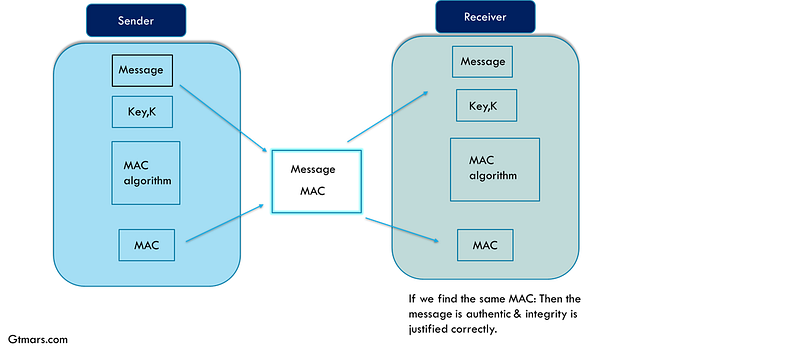
★HMAC, a popular authentication mechanism used for authenticating a message using cryptographic hash functions.
HMAC message authentication system

★HMAC, a popular authentication mechanism used for authenticating a message using cryptographic hash functions. We can use HMAC with any iterative cryptographic hash function family, in combination with a shared secret key. The strength of HMAC depends on the underlying properties of the cryptographic hash function. In today’s computing world, HMAC providing a necessary way to check the integrity of the message transmitted either stored in an unreliable medium. The mechanism used by HMAC to perform an integrity check on a shared secret key between two parties, called the Hash message authentication code (HMAC).

Design and Development:

★In this section, we use HMAC to design and develop a message-based system to encrypt and decrypt messages using an RSA algorithm. We implement and verify both the integrity and authenticity of messages between the two campuses and the required procedures such as designing, developing, testing various operations documented with cryptool open-source software.

Step 1: First, click on the left side navigation bar “NEW” icon in the Menu section as shown below in Fig1.
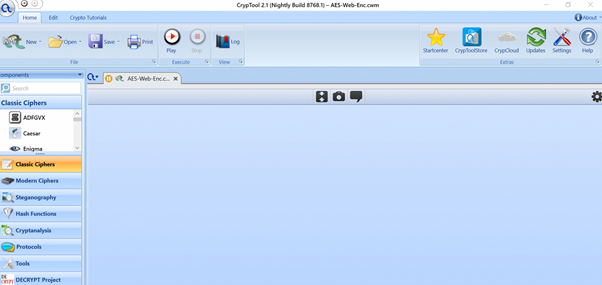
In Fig.1 To create a new project (workspace).

On the left side, CrypTool 2 (CT2) contains various classical and modern ciphers. We will use the search tool to fetch our ciphers.

Step 2: Open a “Text Input” file using the component “search” box. Find the “search” on the left side of the cryptool workspace. We will create two “Text Input” file as like shown in Fig.2.
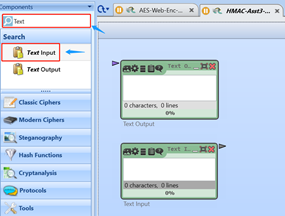
In Fig.2 To create a text input and a Key input.

Step 3: Now, we need to add an “AES” encryption algorithm to the workspace. Use the component “search” box to find AES.

Note: 1. Set Action to “Encrypt”.

2. Set Key size to “256 bit”.
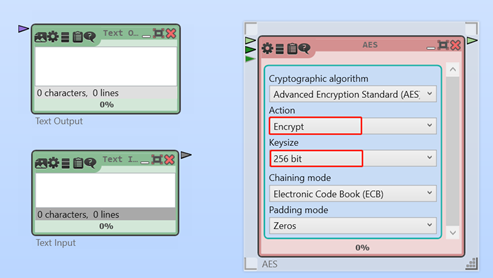
In Fig.3. To create an “AES” algorithm.

Step 4: Now, we will add an “SHA” algorithm file into the workspace and to establish a link between “Text Input”, “SHA”, and “AES” as like shown in Fig.22.

Note: 1. Set SHA function to “SHA-256”.
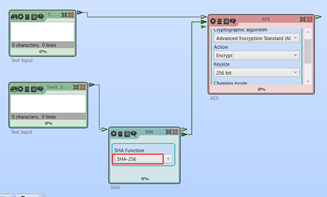
In Fig.4 To Add an “SHA” Algorithm and establish links between AES, key, SHA, and Text input files.

Step 5: Now, we need to add an “AES” for decryption purposes to the workspace. Use the component “search” box to find AES.

Note: 1. Set Action to “Decrypt”.

2. Set Key size to “256 bit”.
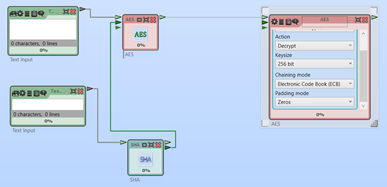
In Fig.5 To create an “AES” decryption.

Step 6: Now, we will add an “SHA” algorithm and a “Text Input” file into the workspace and also to establish a link between “Text Input”, “SHA”, and “AES” as like shown in Fig.6.

Note: 1. Set SHA function to “SHA-256”.
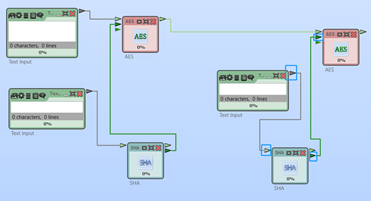
In Fig.6 Create an SHA, Text input file, and establish a link.

Step 7: Add a “String encoder” and a “Text Output” file to the workspace and to establish a link between them.
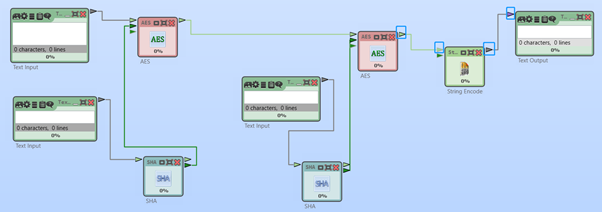
In Fig.7. To Add a string encoder and a Text output file.

Step 8: To provide the Plaintext message and pre-defined shared “key” in the “Text input” box.
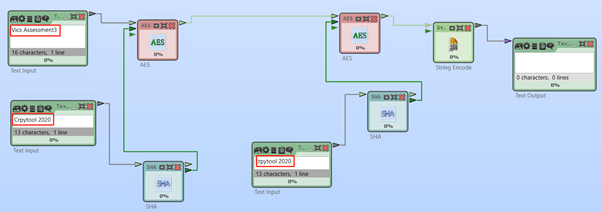
In Fig.8 Plaintext and key fed into the Text input boxes.

Step 13: Finally, click on the “Play” button. If Cryptool run the simulation successfully. It encrypt and decrypt the plaintext and the key on the left side and display it exactly to the right side by using the SHA code system. Q.E.D.
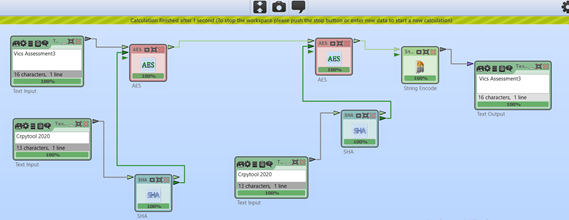
In Fig.9 AES Encrypt and Decrypt with hashing code system.

HMAC Integration with AES and SHA:

Step 1: Add an “HMAC” algorithm and a “Text Input” into the existing workspace for encryption purposes. After that to establish a link between them as shown in Fig.10.

Note: Set HMAC to “Md5”.
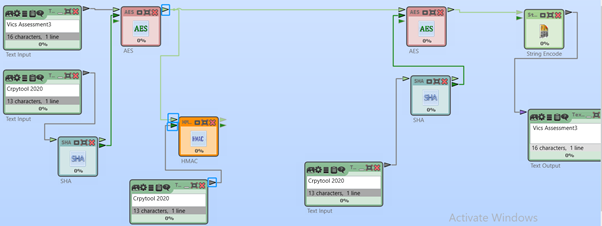
In Fig.10 To add HMAC into the workspace.

Step 2: Add a “String comparator” and establish a link between the HMAC.
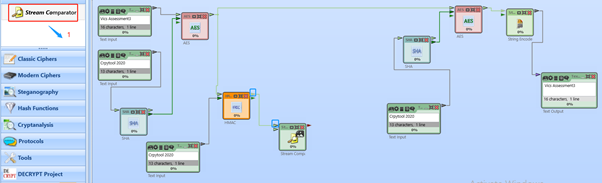
In Fig.11 To add a string comparator.

Step 3: Add an “HMAC” algorithm and a “Text Input” for decryption purposes.
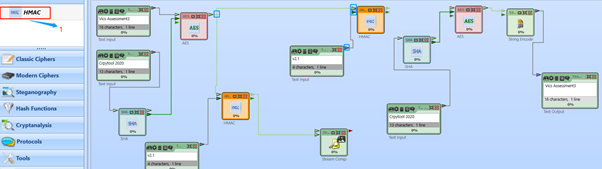
In Fig.12 Add HMAC into the decryption.

Step 4: To establish a link between “Stream comparator” and “HMAC”.
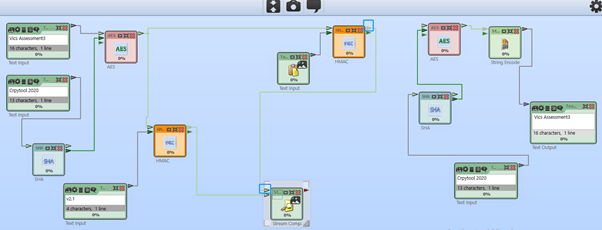
In Fig.13 Link establishment.

Step 5: Add a “Boolean Output” and establish a link between the “Stream comparator”.
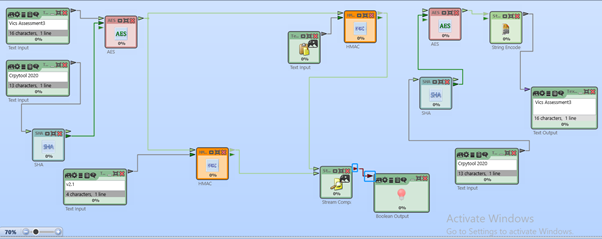
In Fig.14 Boolean output linked with Stream comparator.

Note: Play the simulation and check whether the boolean returns the integrity of the message.
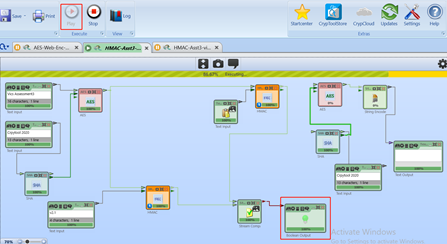
In Fig.15 Boolean returns the value.

Step 6: Add a “Gate” to the stream comparator. Then link the AES encryption to the Gate and Gate to AES decryption as like shown in Fig.16.
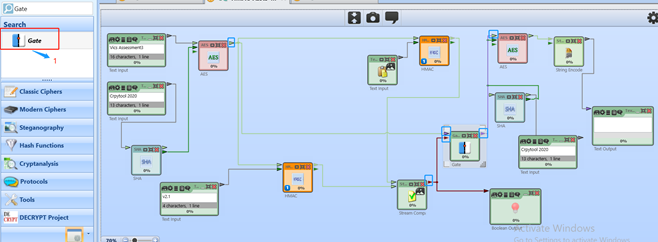
In Fig.16 Gate linked with Boolean.

Step 7: Set the “Gate” value to “True”.
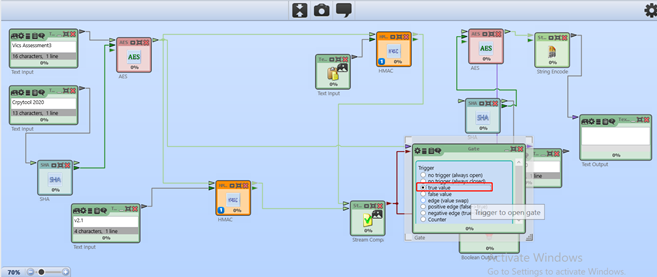
In Fig.17 Set the Gate value to “true” in the trigger section.

Step 8: Finally, click on the “Play” button. If Cryptool run the simulation successfully. It encrypts and decrypt the plaintext and the key on the left side and display it exactly to the right side by using the HMAC system. Boolean judges the system whether the message has tampered. If they do not tamper it, pass it over the gate and gate send it to AES for decryption and final plaintext is revealed on the other side. Q.E.D.
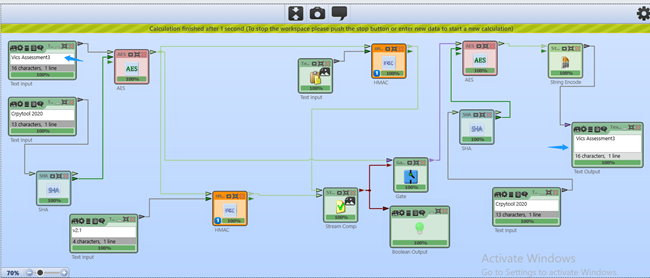
In Fig.18 HMAC integration result.

HMAC Integration with RSA: Part 1

Step 1: Message-based system to encrypt and decrypt messages using an RSA algorithm.
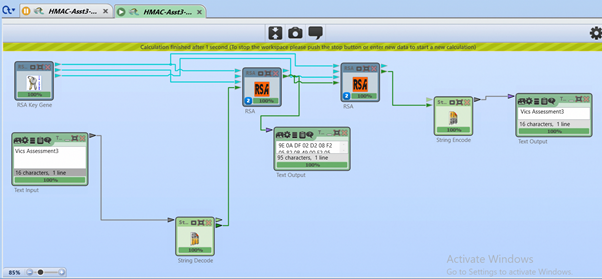
In Fig.19 Message-based digest encryption and decryption with RSA.

Step 2: To integrate the HMAC system by adding a “Text Input”, “Steam comparator”, “boolean output”, and “Gate” files into the workspace and link them accordingly as shown in Fig.20.
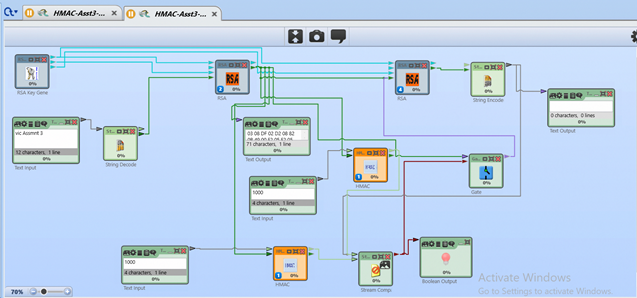
In Fig.20 HMAC integration and link establishment.

Step 3: Finally, click on the “Play” button. If Cryptool run the simulation successfully. It encrypts and decrypt the plaintext and the key on the left side and display it exactly to the right side by using the HMAC system. Boolean judges the system whether the message has tampered with. If they do not tamper it, pass it over the gate and gate send it to RSA for decryption and final plaintext is revealed on the other side. Q.E.D.
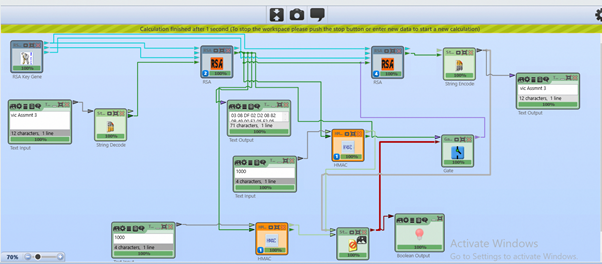
In Fig.21 HMAC integration with RSA -final result.

System strengths and weaknesses:

The strength of HMAC depends on the underlying properties of the cryptographic hash function. The key and the message in this prototype hashed separately. AES efficient key management system and computation helped us to meet the integrity and authenticity requirements effectively.

Conclusion:

This report presents the solution for students to develop a secure data transfer system from Port Macquarie to Canberra Campus vice versa and to better the enablement of dynamic service across the points. This report describes a practical algorithmic approach that applied in between the different campuses or locations or gov offices. After experimentation and extensive analysis, we made the ultimate design decision to pledge to use the AES algorithm to establish a secure Web data transfer system between the two campuses in the Task1. In Task 2, we used a message-based system to encrypt and decrypt the text using symmetric and asymmetric algorithms and integrated the HMAC algorithm into the prototype. This report elaborates on the cryptographic algorithm design requirements that led to this choice and presents detailed aspects of the security system and implementation method and detailed scenarios screenshot in this report. The key purpose is to ensure the integrity and authenticity of data. Exchanging keys securely is not a major issue in AES. RSA algorithm is reliable for key exchange management, but it’s not very efficient in terms of performance and cost factor. Therefore, we conclude our research report and recommend using the AES algorithm for implementation consideration.

Don’t forget to check these Article’s ⬇️ Best in the Town 😉

How to disable your Google search data activity, Ad personalization, search history, search settings on your browser?

Microsoft’s Top 12 Secure Software Development Lifecycle (SSDL) practices for software developers & security teams?

How can I permanently turn off or disable the Microsoft Compatibility Telemetry service causing High CPU usage?

How to create a Vulnerability management security team, roles & responsibilities in your organizations?

Top-14 OWASP Secure Coding Practices for software developers

How the Homeland Security (DHS), collect, Use, Protect the personal data of U.S citizens, Residents, B1/B2 visitors?

What is the HMAC message authentication system in cryptography? How to deploy it on cryptool2.1 open-source software?

Risk Management Overview & Integration of Risk management into SDLC

Employee’s Endpoint security Internal Survey-Template

— — — — — — — — — — — — — -THE END — — — — — — — — — — — —

Quote of the day:You can lead a horse to water, but you can’t make him drink ” — English Proverb

Explanation: you can give someone an opportunity, but you can’t force them to take it.

Thanks for reading! Have a pleasant day!

Subscribe to FAUN topics and get your weekly curated email of the must-read tech stories, news, and tutorials 🗞️

Follow us on Twitter 🐦 and Facebook 👥 and Instagram 📷 and join our Facebook and Linkedin Groups 💬

If this post was helpful, please click the clap 👏 button below a few times to show your support for the author! ⬇

Security
Technology
Computer Science
Google
Business
Recommended from ReadMedium