avatarVic

Free AI web copilot to create summaries, insights and extended knowledge, download it at here

4102

Abstract

ease ensure to follow the given below steps as shown in Figure 3.</p><figure id="6144"><img src="https://cdn-images-1.readmedium.com/v2/resize:fit:800/1*3fdTYcsugc70dzTvEOWLMA.png"><figcaption>Figure 3. Signed-out search activity is on- disable it.</figcaption></figure><p id="f65a">★Aftermath.</p><figure id="2f1a"><img src="https://cdn-images-1.readmedium.com/v2/resize:fit:800/1*G0oi5nJurIunWGa_pusH5Q.png"><figcaption>Figure 4. Signed-out search activity is on- results after disabling it.</figcaption></figure><p id="5c9b">★To disable/Turn off “<b><i>Search settings</i></b>”, please ensure to follow the given below steps as shown in Figure 5.</p><figure id="086a"><img src="https://cdn-images-1.readmedium.com/v2/resize:fit:800/1*aAx992cnvVS9QposaIo1BQ.png"><figcaption>Figure 5. Search settings.</figcaption></figure><p id="d1b9"><b>Note:</b> It’s entirely optional; it’s up to you to decide whether you want it. Perhaps for some users, it’s a great feature, while others may not find it as appealing.</p><h1 id="bb4d">Auto-complete with trending searches:</h1><p id="7cf8">By default, “show popular searches” was chosen on your behalf by google.</p><figure id="643f"><img src="https://cdn-images-1.readmedium.com/v2/resize:fit:800/1*bCYrkt0YueqGd4SdYpqTCQ.png"><figcaption>Figure 6. Do not show popular searches.</figcaption></figure><h1 id="9927">Search customization:</h1><p id="0b01">★Search activity helps give you more relevant results and recommendations by using your searches on google.com from this browser. You can turn off Search customization at any time.</p><p id="de84">★Google may use the “Region Settings” to identify your (IP, ISP, area of location, the local language) to show relevant data from that region in and around.</p><p id="aa76">★Please feel free to change it to any other country when you search on Google. Remember, search results are based on the region you choose.</p><figure id="4160"><img src="https://cdn-images-1.readmedium.com/v2/resize:fit:800/1*t1qflZHkhQDteCRdixfAYA.png"><figcaption>Figure 7. Search customization.</figcaption></figure><h1 id="6f74">Delete your Google Search activity:</h1><p id="3e66"><b><i>Step:1</i></b> When you use Google sites, apps, and services, some of your activity is saved in your web browser. You can see and disable this data activity as shown in Figure 8., and you can stop saving most of the search activity at any time.</p><figure id="ec49"><img src="https://cdn-images-1.readmedium.com/v2/resize:fit:800/1*Zla6xVPwNBn-nV9G_8tNJg.png"><figcaption>Figure 8. Your data in search.</figcaption></figure><p id="e514">★Previously, we disabled this service in the “search history” operation (figure 3). However, we have now inherited and integrated this service with search history and search activity.</p><figure id="0d9d"><img src="https://cdn-images-1.readmedium.com/v2/resize:fit:800/1*v-HOxo1QR5KkUiGKZL-YAw.png"><figcaption>Figure 10. Your search activity.</figcaption></figure><p id="a220">Step 2: To Disable Ad Personalization.</p><p id="b601">★Please, click on the “Ad Personalization” option as shown in Figure 10, It will redirect you to a new page. Now, it's time for you to “Turn off” the button on</p><blockquote id="d04d"><p><b><i>Ads personaliztion Across the web : To “Turn off”</i></b></p></blockquote><blockquote id="c806"><p><b><i>Ads personaliztion on Google search : To “Turn off”</i></b></p></blockquote><p id="6e4b">★To disable/Turn off this service, please ensure to follow the given below steps :</p><figure id="1006"><img src="https://cdn-images-1.readmedium.com/v2/resize:fit:800/1*GzgKloPT49elpKQDisbBRw.png"><figcaption>Figure 11. Google <b><i>Ads personalization.</i></b></figcaption></figure><p id="9ae2">★A pop-up will show you the following information to guide your actions on “turning it off”. Don’t fall for it; you may fall for something else, but not this time, not this one 😁. Just turn it off.</p><figure id="309b"><img src="https://cdn-images-1.readmedium.com/v2/resize:fit:800/1*yPSVoEfZ7dvPjKXdMgH8tw.png"><figcaption>Figure 12. <b><i>Ads personalization Across the web-Disable it

Options

.</i></b></figcaption></figure><figure id="03ce"><img src="https://cdn-images-1.readmedium.com/v2/resize:fit:800/1*JMFxkawNy4ak3w1KfHtIVQ.png"><figcaption>Figure 14. <b><i>Ads personalization on Google Search.</i></b></figcaption></figure><p id="3b44"><b><i>Cabin crew -Final check before landing:</i></b></p><p id="7295">★Finally, make sure you have completed the operation successfully.</p><p id="b3de"><b>BRAVO</b>! <b>Well Done</b>😜!</p><figure id="a6b9"><img src="https://cdn-images-1.readmedium.com/v2/resize:fit:800/1*E82tkJjH8_9P8xfDDp5_Bw.png"><figcaption>Figure 15. Cabin crew -Final check before landing.</figcaption></figure><p id="3a47">— — — — — — — — — — — — -<b>THE END</b> — — — — — — — — — — — —</p><p id="81ad"><b><i>Quote of the day:</i></b><i> </i>Life is what you make it.</p><p id="5cb0">— English Proverb</p><p id="e207"><b><i>Explanation:</i></b> <i>Simple words but ones that are so true. Your attitude, how you see your world, will depend on the happiness and contentment in your life. And, we are the ones who control our attitude. How we react to any situation is up to us.</i></p><p id="2b61"><b>Thanks for reading!</b></p><blockquote id="f6f5"><p><b>Don’t forget to check these Article’s </b><i>⬇️ Best in the Town </i>😉</p></blockquote><blockquote id="2639"><p><a href="https://readmedium.com/how-to-disable-your-google-search-data-activity-ad-personalization-search-history-search-e713948cf1ae"><b><i>How to disable your Google search data activity, Ad personalization, search history, search settings on your browser?</i></b></a></p></blockquote><blockquote id="983d"><p><a href="https://readmedium.com/microsofts-top-12-secure-software-development-lifecycle-ssdl-practices-for-software-developers-f54176667fb5"><b><i>Microsoft’s Top 12 Secure Software Development Lifecycle (SSDL) practices for software developers & security teams?</i></b></a></p></blockquote><blockquote id="ebd8"><p><a href="https://readmedium.com/how-can-i-permanently-turn-off-or-disable-the-microsoft-compatibility-telemetry-task-to-prevent-aa9f0a264295"><b><i>How can I permanently turn off or disable the Microsoft Compatibility Telemetry service causing High CPU usage?</i></b></a></p></blockquote><blockquote id="8548"><p><a href="https://readmedium.com/how-to-create-a-vulnerability-management-team-work-flow-chart-process-roles-and-be3eb1bad0d3"><b><i>How to create a Vulnerability management security team, roles & responsibilities in your organizations?</i></b></a></p></blockquote><blockquote id="7790"><p><a href="https://readmedium.com/top-14-owasp-secure-coding-practices-for-software-developers-5daef14734eb"><b><i>Top-14 OWASP Secure Coding Practices for software developers</i></b></a></p></blockquote><blockquote id="8381"><p><a href="https://gtmars.medium.com/how-the-department-of-homeland-security-dhs-collect-use-protect-the-pii-data-of-u-s-7776e99e2611"><b><i>How the Homeland Security (DHS), collect, Use, Protect the personal data of U.S citizens, Residents, B1/B2 visitors?</i></b></a></p></blockquote><figure id="1ef4"><img src="https://cdn-images-1.readmedium.com/v2/resize:fit:800/0*Piks8Tu6xUYpF4DU"><figcaption></figcaption></figure><p id="e5d4">👋 <a href="https://faun.dev/join"><b>Join FAUN today and receive similar stories each week in your inbox!</b></a><b> </b><b>Get your weekly dose of the must-read tech stories, news, and tutorials.</b></p><p id="32cd"><b>Follow us on <a href="https://twitter.com/joinfaun">Twitter</a> </b>🐦<b> and <a href="https://www.facebook.com/faun.dev/">Facebook</a> </b>👥<b> and <a href="https://instagram.com/fauncommunity/">Instagram</a> </b>📷 <b>and join our <a href="https://www.facebook.com/groups/364904580892967/">Facebook</a> and <a href="https://www.linkedin.com/company/faundev">Linkedin</a> Groups </b>💬</p><figure id="193b"><img src="https://cdn-images-1.readmedium.com/v2/resize:fit:800/1*_cT0_laE4iPcqW1qrbstAg.gif"><figcaption></figcaption></figure><h2 id="3062">If this post was helpful, please click the clap 👏 button below a few times to show your support for the author! ⬇</h2></article></body>

How to disable your Google search data activity, Ad personalization, search history, search settings on your browser?

The Google search engine continuously tracks you, regardless of whether you are using the Chrome browser or signed in or out of your Google accounts. They do this for analytical and research purposes, as well as for the improvement of their products. The majority of the data they collect is used for targeted advertisements.

★Due recent bills from the European Union and the U.S. Congress on the privacy and security of individual users or consumers, such as the Consumer Data Privacy and Security Act, Personal Data Privacy and Security Act, Secure Data and Privacy for Contact Tracing Act, Privacy and Security of Personally Identifiable Information, and Online Privacy Protection, multinational companies have been required to implement features that allow consumers to choose whether to “Enable” or “Disable” them while using their services.

You may or may not be aware of the hot news in the past and present regarding Google and its dealings with the European Union and the U.S. Congress.

★The European Commission has fined Google €1.49 billion (1,819,081,400 USD) for breaching EU antitrust rules. Google predominantly abused its market dominance by imposing a number of restrictive clauses in contracts with third-party websites, which prevented Google’s rivals from placing their search adverts on these websites.

★Additionally, Google was by far the strongest player in online search advertising in the European Economic Area (EEA), with a market share above 70% from 2006 to 2016. This demonstrates the considerable extent of their dominance in the market.

What’s the purpose: Google data collection?

★ It collects data from individual users to build an advertising campaign profile, generating billions of dollars in revenue via advertising platforms using various methodologies. We won’t discuss it in this post; perhaps we can address it in another one.
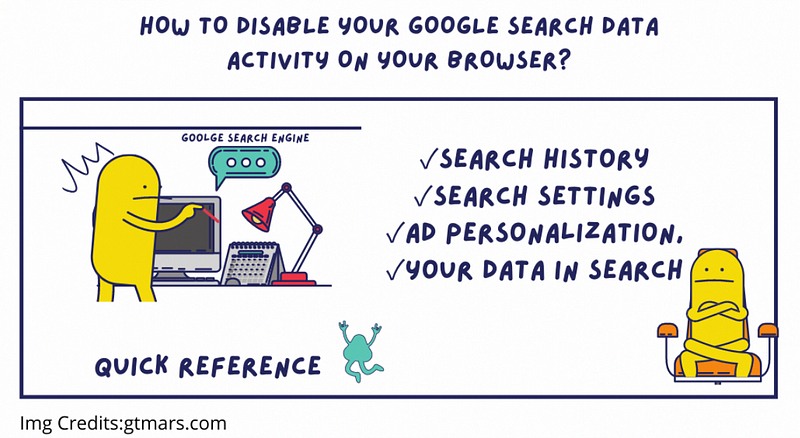
Google search Engine- data collection.

★ Search engines gather data to personalize the ads based on your past or recent search activities.

★ In this post, we will discuss a few methods to get rid of the “Google’s Search activity, Search settings, Your data in Search” your web browser, regardless of the platform (computer, Android, iPhone, iPad) versions. The methods will work on any version. Just follow the humming beats of the rhythms.

Solutions to Disable Search activity: In this post, we will learn how to disable these anonymous data collection issues with three different options. To disable/turn off this service, please ensure that you follow the steps given below:

Its applicable While you are logged out of the Gmail account.

✓Search history

✓Search settings ✓Your data in Search

Step 1:On your computer’s browser, type “google.com” and enter a random search keyword. Something will show up. Now, on the top right navigation panel, click on “Settings”. Be aware that you should go to your settings on the search engine navigation panel, as shown in Figure 1, and not the ones in your web browser’s general settings.

Figure 1. Google Search settings.

Step 2: Under “Settings” click on “Search history”.
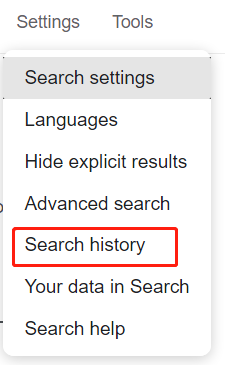
Figure 2. Search history.

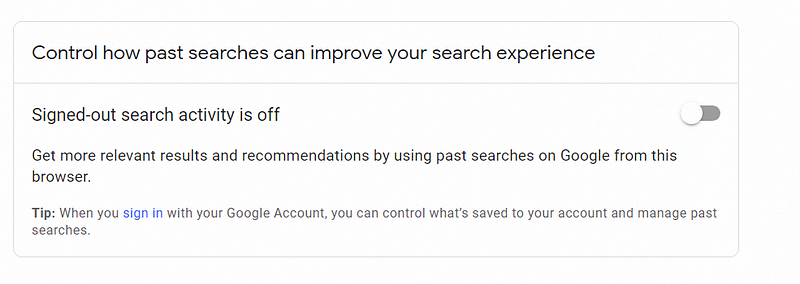
★To disable/Turn off this service, please ensure to follow the given below steps as shown in Figure 3.
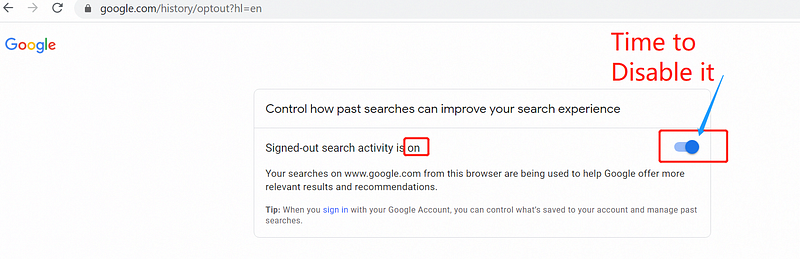
Figure 3. Signed-out search activity is on- disable it.

★Aftermath.

Figure 4. Signed-out search activity is on- results after disabling it.

★To disable/Turn off “Search settings”, please ensure to follow the given below steps as shown in Figure 5.
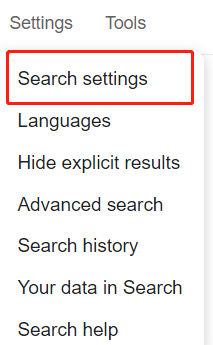
Figure 5. Search settings.

Note: It’s entirely optional; it’s up to you to decide whether you want it. Perhaps for some users, it’s a great feature, while others may not find it as appealing.

Auto-complete with trending searches:

By default, “show popular searches” was chosen on your behalf by google.
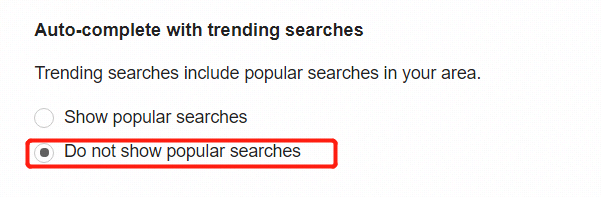
Figure 6. Do not show popular searches.

Search customization:

★Search activity helps give you more relevant results and recommendations by using your searches on google.com from this browser. You can turn off Search customization at any time.

★Google may use the “Region Settings” to identify your (IP, ISP, area of location, the local language) to show relevant data from that region in and around.

★Please feel free to change it to any other country when you search on Google. Remember, search results are based on the region you choose.
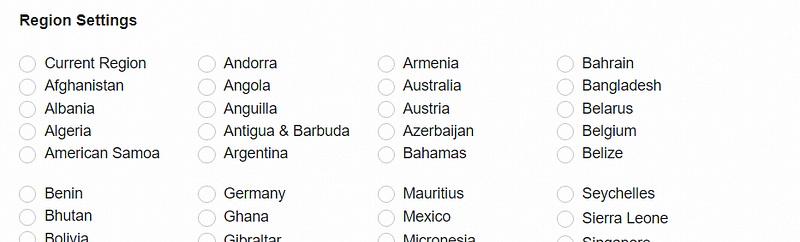
Figure 7. Search customization.

Delete your Google Search activity:

Step:1 When you use Google sites, apps, and services, some of your activity is saved in your web browser. You can see and disable this data activity as shown in Figure 8., and you can stop saving most of the search activity at any time.
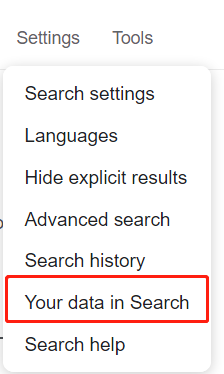
Figure 8. Your data in search.

★Previously, we disabled this service in the “search history” operation (figure 3). However, we have now inherited and integrated this service with search history and search activity.
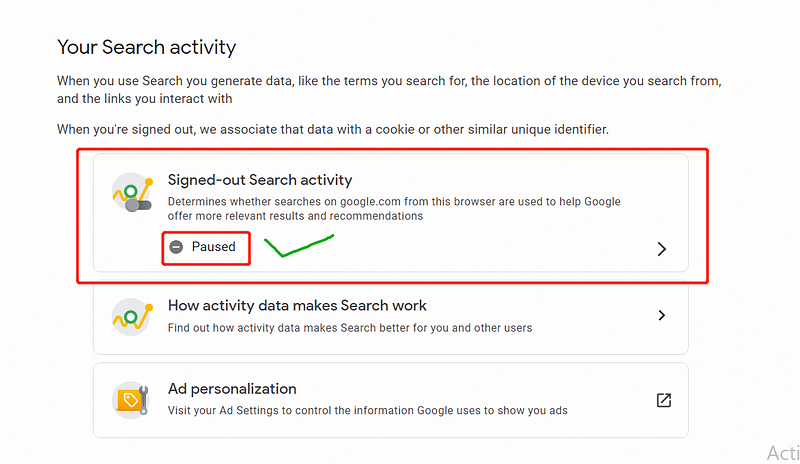
Figure 10. Your search activity.

Step 2: To Disable Ad Personalization.

★Please, click on the “Ad Personalization” option as shown in Figure 10, It will redirect you to a new page. Now, it's time for you to “Turn off” the button on

Ads personaliztion Across the web : To “Turn off”

Ads personaliztion on Google search : To “Turn off”

★To disable/Turn off this service, please ensure to follow the given below steps :
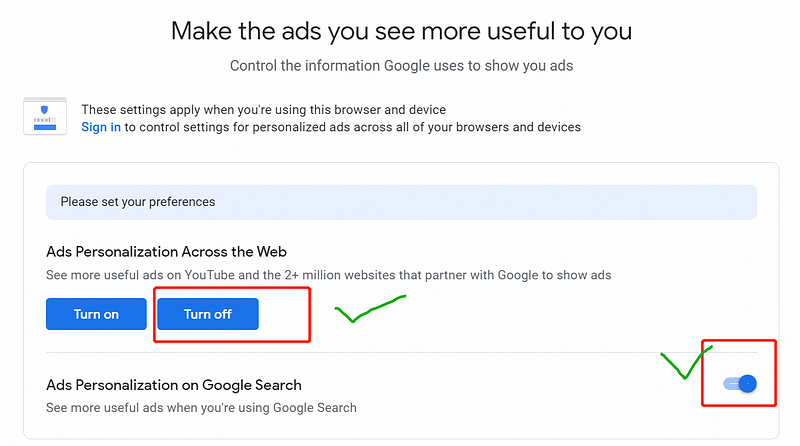
Figure 11. Google Ads personalization.

★A pop-up will show you the following information to guide your actions on “turning it off”. Don’t fall for it; you may fall for something else, but not this time, not this one 😁. Just turn it off.
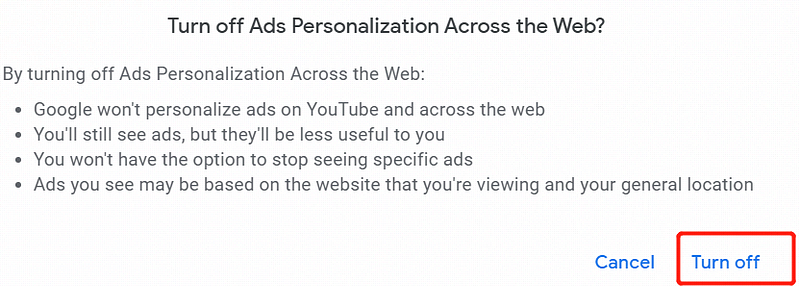
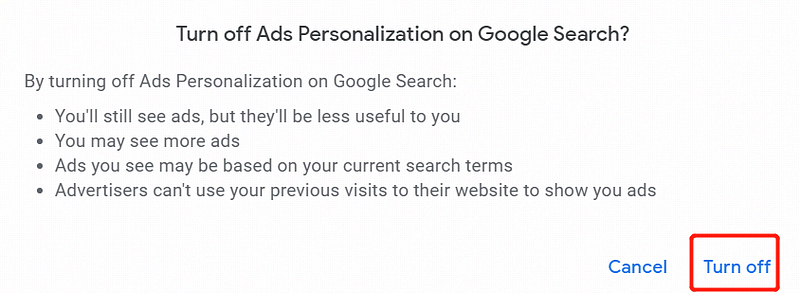
Figure 12. Ads personalization Across the web-Disable it.
Figure 14. Ads personalization on Google Search.

Cabin crew -Final check before landing:

★Finally, make sure you have completed the operation successfully.

BRAVO! Well Done😜!
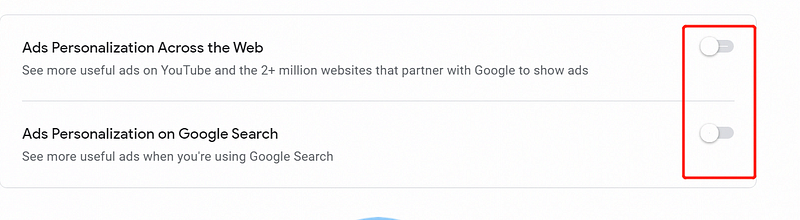
Figure 15. Cabin crew -Final check before landing.

— — — — — — — — — — — — -THE END — — — — — — — — — — — —

Quote of the day: Life is what you make it.

— English Proverb

Explanation: Simple words but ones that are so true. Your attitude, how you see your world, will depend on the happiness and contentment in your life. And, we are the ones who control our attitude. How we react to any situation is up to us.

Thanks for reading!

Don’t forget to check these Article’s ⬇️ Best in the Town 😉

How to disable your Google search data activity, Ad personalization, search history, search settings on your browser?

Microsoft’s Top 12 Secure Software Development Lifecycle (SSDL) practices for software developers & security teams?

How can I permanently turn off or disable the Microsoft Compatibility Telemetry service causing High CPU usage?

How to create a Vulnerability management security team, roles & responsibilities in your organizations?

Top-14 OWASP Secure Coding Practices for software developers

How the Homeland Security (DHS), collect, Use, Protect the personal data of U.S citizens, Residents, B1/B2 visitors?

👋 Join FAUN today and receive similar stories each week in your inbox! Get your weekly dose of the must-read tech stories, news, and tutorials.

Follow us on Twitter 🐦 and Facebook 👥 and Instagram 📷 and join our Facebook and Linkedin Groups 💬

If this post was helpful, please click the clap 👏 button below a few times to show your support for the author! ⬇

Google
Technology
Computer Science
Business
Security
Recommended from ReadMedium