
What is Canonical Link On Medium? And How To Use It Properly
Understanding “canonical link” and its benefits and then a guide of how to add a canonical link while publishing on Medium.

If you are on Medium then you might be wondering what is the canonical link, and why it is important?
In this article, we will discuss some myths and how you can actually import content to Medium. If you want to import content to Medium or running a blog where you can add your Medium story to a blog then you should know about the canonical links as it will help you in a lot of things.
What is a Canonical link?
A canonical link is a signal to the search engine crawl that this post is published somewhere else and don’t crawl it. Instead, crawl the *link* given. Duplicate content is dangerous for your blog ranking in general, and for a specific post in particular. That’s why you need to add a canonical link to your Medium story.
Using the Canonical link enables you to use your content on multiple platforms without worrying about being penalized from the search engine. You can republish your content published on one platform and republish it on other writing platforms.
What is the function of using the canonical links on your Medium stories?
Following are some of the functions of the use of the canonical links in your Medium story;
- You can republish your content on multiple platforms. This could help you reach a wider audience.
- The issue of duplicate content is solved. Google doesn’t like duplicate content and if you don’t add a canonical link, it could create an issue for you.
How to add a canonical link to your Medium stories
The following is a step-by-step process to add a canonical link on your Medium posts;
First, you can import content through two ways; if you go to stories and click on “Import a story”, now you just have to add the link of the story published and you don’t need to add a canonical link because Medium already adds it for you.
Now, if you manually want to import content to Medium from your blog then you have to follow the following process.
- Click on “New story” and copy-paste your published story from your blog.
- Add a featured image and add title and sub-title. If you have affiliate links or any other things that violate Medium policies, do remove them.
- Now, on the top-right side, there are three dots “…” click on it and click on the “More setting” option.
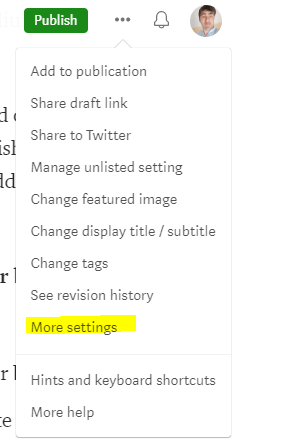
- Now, in the next process, scroll till the end of the option where you have the option of “Advanced settings” click on it and now you have an option to add the URL of the story.
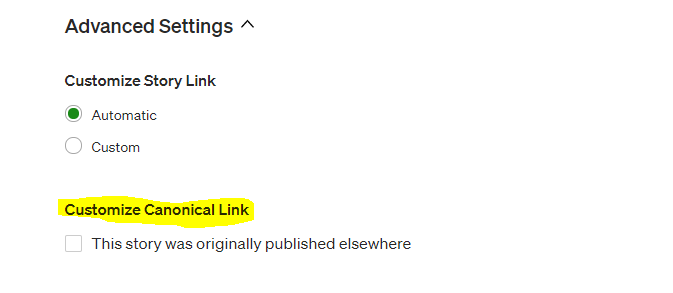
- When you tick this option “This story was originally published elsewhere” Medium will give you an option to paste the link. Paste the link there and click “Save”
- Boom! You can now submit it to a publication or self-publish it.
Can stories published elsewhere get curated or distributed?
I have spent over 2 years on Medium reading and creating content and one of the things that I have noticed is that Medium does curate or distribute content that is published elsewhere. i
If your content is published in Forbes or the Entrepreneur, then there is a high chance that your articles are distributed on Medium too. (This is my personal experience.)
Can Medium popular publications accept your work?
Yes, I have seen the big publications accepting already-published articles into their network. There are some other platforms like Vocal, and Newsbreak, that could accept your articles published on Medium, and you will be paid for your work too.
So, you can publish your Medium article on another platform, or you can republish your already-published articles on other platforms on Medium.
Read more of our stories on Illumination:
- How to consistently make $200 a month on Medium
- Why it is difficult for many Medium writers to make money on Medium?


