
What is Google BigLake?
New Functions to empower Data Lakehouses and Data Meshes

Data Warehouse, Data Lake, Data Lakehouse and now BigLake. Just one more superlative that Google offers or actually a new powerful tool on the Google Platform? Let’s dive in.
Definition
With the Data Lakehouse (click here if you don’t know) approaches that better connect Data Lake (Cloud Storage) and Data Warehouse (BigQuery), enabling the creation of Data Meshes and a data-driven enterprise, there have been before, not only in the Google Cloud. Google wants to combine and integrate the services even better by using BigLake as described in the following:
Built on years of investment in BigQuery, BigLake is a storage engine that allows organizations to unify data warehouses and lakes, and enable them to perform uniform fine-grained access control, and accelerate query performance across multi-cloud storage and open formats. — Google [1]
How it Works
Step 1: In BigQuery you first create an “External data source” as seen below:
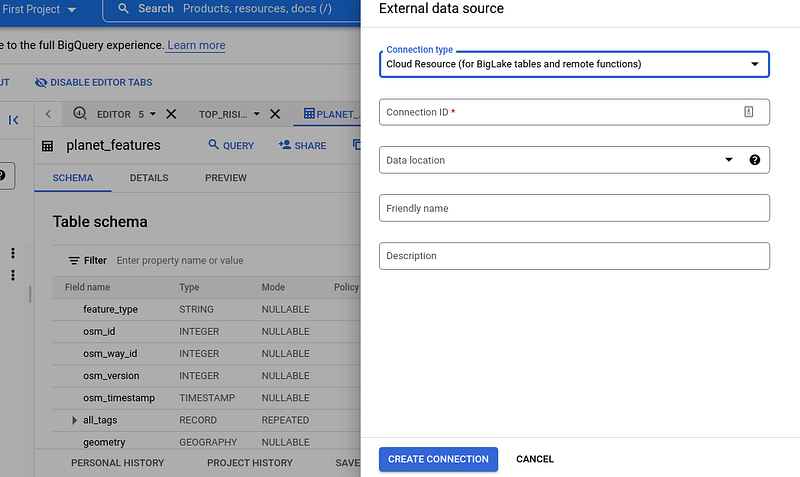
Beside BigLake tables you can also choose sources like Cloud SQL, AWS or Azure data sources. By the way: Amazing how you can also perform data analysis over different cloud platforms, right?
BigLake tables access Google Cloud Storage data using a connection resource. A connection resource can be associated with a single table or an arbitrary group of tables in the project [2].
Step 2: After you create the connection, you can then create new tables based on Cloud Storage and your external data source connection:
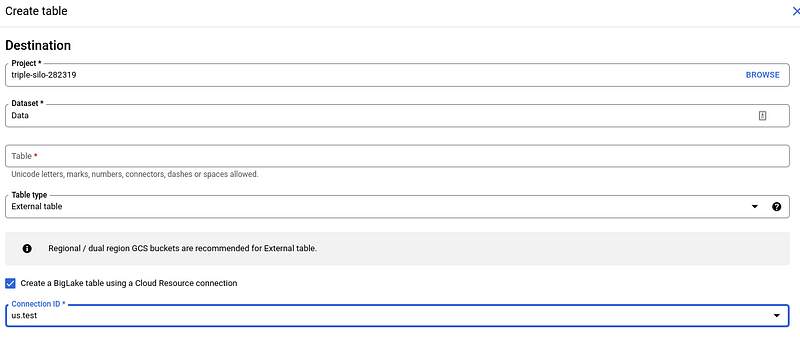
Additional Steps: Of course you should also read the official documentation, where it is also explained how to set up access control policies. Click here [2].
Benefits
With the new capabilities you and your organization will gain more power in your daily data integration and analytics processes. Here are a few benefits listed that Google BigData will provide:
Benefit 1: Better Security and Governance Controls
BigLake eliminates the need to grant file level access to end users. Apply table, row, column level security policies on object store tables similar to existing BigQuery tables [2]. You can put all your BigLake tables including Amazon S3, Azure data lake Gen 2 in your Data Catalog.
Benefit 2: Performance and Scalability
Using the performance and scalability of Google’s BigQuery to query tables on Google Cloud, AWS and Azure.
Benefit 3: Open Formats and Easy Data Control
The data stays where it is, which means less effort, no copy of the data and therefore no possible deviations due to data duplication while working with the most popular open data formats including Parquet, Avro, ORC, CSV, JSON.
Summary
The principle of Data Lakehouses as data platforms and the resulting organization as data meshes are well known. To make the result even better for the user and to make other data sources even more accessible, Google now offers the BigLake.
Sources and further Readings
[1] Google, BigLake (2022)
[2] Google, Create and manage BigLake tables (2022)


