avatarLinda Locke

Free AI web copilot to create summaries, insights and extended knowledge, download it at here

1575

Abstract

n the page.</p><h2 id="e4d5">Here’s How Google Voice Typing Works</h2><ul><li>Just open a new <b>Google Doc</b> on your <b>Google Chrome browser</b>, click on the <b>Tools</b> menu and select <b>Voice typing</b>.</li></ul><figure id="0d36"><img src="https://cdn-images-1.readmedium.com/v2/resize:fit:800/1*XUg6oV8wsS_A02zWfiO_mQ.png"><figcaption>Screenshot of Google Docs Tools Menu</figcaption></figure><ul><li>Then click on the <b>Microphone icon</b> to make it active (it will turn from black to a dark orange color) and start talking. That’s it!</li></ul><figure id="5905"><img src="https://cdn-images-1.readmedium.com/v2/resize:fit:800/1*7qbZEP-KJ6o41k4nHNJOhw.png"><figcaption>Screenshot of Google Docs Using Voice Typing</figcaption></figure><h2 id="3127">What I like about Voice Typing</h2><ol><li>It’s easy and quick to start “voice typing” with Google Docs on Chrome. You can get it set up in under a minute.</li><li>It helps you break free of writer’s block and silence the editor’s voice in your head.</li><li>It gives your creativity free rein.</li><li>It kinda feels like you’re cheating a bit — it’s so much fun.</li></ol><p id="1b86" type="7">Key Message: Now you know about this magical little tool you can give it a try to see if it works well for you.</p><h2 id="5a83">Try it out and let me know what you think in the comments. I think you’ll like it as much as I do :)</h2><p id="ea34">© <a href="https://medium.com/@lindalockeca">Linda Locke</a></p><p id="dd95"><b>Linda Locke</b> is a writer and mentor/teacher. She lives in Southern California in Ventur

Options

a County by the coast with her husband and lots and lots of books. <a href="https://payhip.com/b/Lc8Oy"><b><i>Want to become more visible as a writer on Medium? My course can help.</i></b></a></p><p id="c24c"><b><i>If you liked this story and want to see more of my work, follow me <a href="https://medium.com/@lindalockeca">here</a>.</i></b></p><div id="998d" class="link-block"> <a href="https://readmedium.com/why-i-chose-payhip-to-create-my-online-course-8f2cae6ba91e"> <div> <div> <h2>Why I Chose Payhip to Create my Online Course</h2> <div><h3>I finally found a course platform that’s just right for me.</h3></div> <div><p>medium.com</p></div> </div> <div> <div style="background-image: url(https://miro.readmedium.com/v2/resize:fit:320/1*snIn8u_g5vPfIi96MetVCw.png)"></div> </div> </div> </a> </div><div id="340e" class="link-block"> <a href="https://readmedium.com/how-to-easily-add-audio-to-your-medium-stories-6764887e2bd7"> <div> <div> <h2>How to Easily Add Audio to Your Medium Stories</h2> <div><h3>Just Hit Record!</h3></div> <div><p>medium.com</p></div> </div> <div> <div style="background-image: url(https://miro.readmedium.com/v2/resize:fit:320/0*_7TY8OX8UYNC_Y1Q)"></div> </div> </div> </a> </div></article></body>

Using Google Docs Voice Typing to Write Stories for Medium

Voice writing is magical and fun!

Image from Canva

I’m using Google Docs Voice Typing to write this story.

I’m always on the lookout for productivity tools that make it easier to write faster. I already enjoy recording my ideas using the Notes app on my iPhone, so I decided to give Google Docs Voice Typing a try to see how it measures up.

I’ve found that my ideas just flow better using dictation and it sure beats typing everything from scratch.

And since it’s also dead easy to use and it’s free with Google Docs, what’s not to like?

It’s a little like magic — you just start talking and the words magically appear on the page.

Here’s How Google Voice Typing Works

  • Just open a new Google Doc on your Google Chrome browser, click on the Tools menu and select Voice typing.
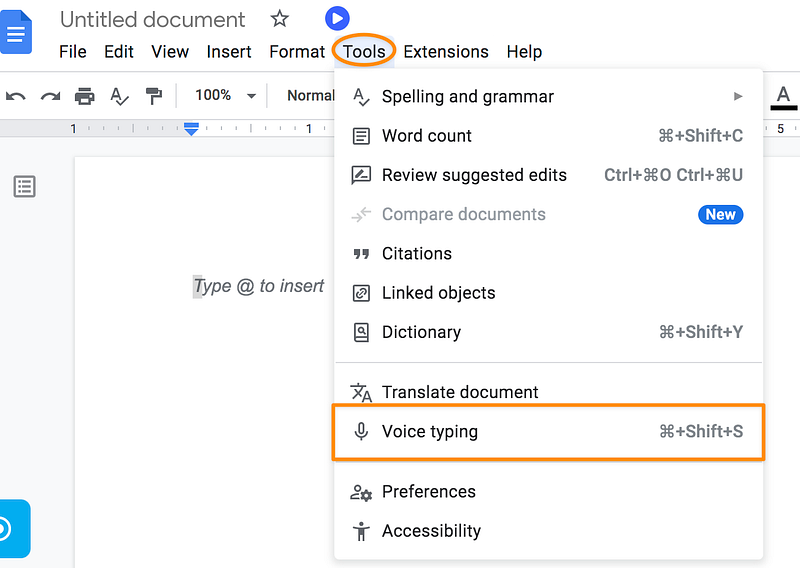
Screenshot of Google Docs Tools Menu
  • Then click on the Microphone icon to make it active (it will turn from black to a dark orange color) and start talking. That’s it!
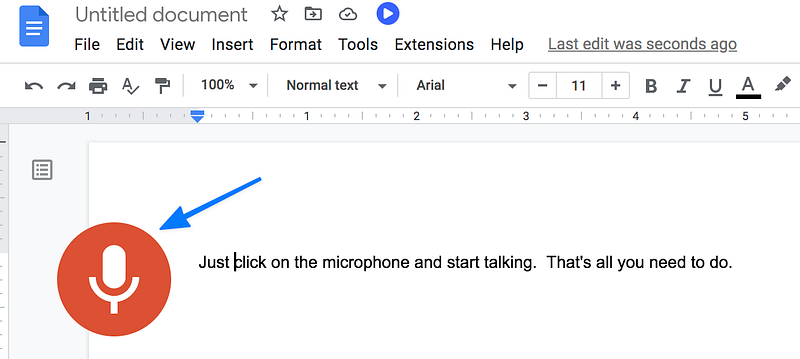
Screenshot of Google Docs Using Voice Typing

What I like about Voice Typing

  1. It’s easy and quick to start “voice typing” with Google Docs on Chrome. You can get it set up in under a minute.
  2. It helps you break free of writer’s block and silence the editor’s voice in your head.
  3. It gives your creativity free rein.
  4. It kinda feels like you’re cheating a bit — it’s so much fun.

Key Message: Now you know about this magical little tool you can give it a try to see if it works well for you.

Try it out and let me know what you think in the comments. I think you’ll like it as much as I do :)

© Linda Locke

Linda Locke is a writer and mentor/teacher. She lives in Southern California in Ventura County by the coast with her husband and lots and lots of books. Want to become more visible as a writer on Medium? My course can help.

If you liked this story and want to see more of my work, follow me here.

Writing Tips
Productivity
Tech
Recording
Women In Tech
Recommended from ReadMedium