
Using AWS Systems Manager Parameter Store with AWS Lambda
ACM.58 Creating a parameter to store our batch job session
Part of my series on Automating Cybersecurity Metrics. Lambda. Application Security. The Code.
Free Content on Jobs in Cybersecurity | Sign up for the Email List
In the last post we looked at validating Lambda function parameters to prevent security problems.
I published the architecture I’m working through a while back though I’m still adding some of the pieces at the time of this writing.
We are working on a Lambda function that starts the process to kick off a batch job. Part of that was to generate a cryptographically secure random ID for our batch jobs:
We incorporated that into a Lambda Function:
Then we started working on a way to text batch job operators but have to wait until we get our numbers or SMS on AWS:
Sending an SMS Message from a Lambda Function
ACM.54 Getting a phone number from Pinpoint
medium.com
So now we are back to what else we need to with our Lambda function. We are going to store our batch job ID in an AWS SSM Parameter.
AWS Systems Manager
If you are not familiar with AWS Systems Manager it is a collection of functionality that seems to be geared at IT administrators who are used to patching systems and running scripts on them. I am not a fan of that approach because I prefer immutable infrastructure as I am and will be showing you how to build in this blog series. Instead of patching, redeploy to get your updates.
In addition, I see a lot of security challenges with securing AWS Systems Manager. In my security classes I explain how the functionality in AWS Systems Manager could be used as a C2 channel. In fact, after that a company I know built an open source tool that does exactly that. When I saw the demo after inviting them to my AWS Meetup in Seattle (currently on hold due to logistical challenges but hopefully coming again soon but hopefully more online events coming soon) I immediately asked the developer if he was using AWS Systems Manager under the hood. Yep.
AWS Systems Manager Parameter Store vs. Secrets Manager
Although I don’t use a lot of what is in AWS Systems Manager for security reasons, I do may use of one piece of AWS Systems Manager: Parameter Store. It’s similar to AWS Secrets Manager with not quite all the functionality, and it is cheaper.
Some of the differences: AWS SSM doesn’t rotate credentials and it doesn’t have cross-account access at this time (which can be good if you want to ensure no one outside your account can see what you’re storing there through a misconfigured role.) You can store blobs of text but it doesn’t have the functionality AWS Secrets manager has to store well-defined key-value pairs. This is all not good or bad — it’s just that you need to consider your use case and choose the right solution for the job.
Also, you can’t encrypt SSM parameter values created with CloudFormation. I already showed you how to do this with AWS Secrets Manager:
Because I’m going to be potentially creating a lot of sessions I’m hoping this more cost-effective option will work in my case, but we’ll have to try it out to be sure.
If you want a bit deeper dive on the differences between AWS Secrets Manager and AWS Systems Manager Parameter Store that I wrote after digging into and implementing solutions with both of them in this series, check out this post:
You can secure AWS Systems Manager
Also — before someone gets too mad at me — you probably can secure AWS Systems Manager decently enough for a lot of use cases. It’s just more challenging to do so because some of the functionality is a bit free-form and you need to be careful what people can do with documents on systems. I have avoided the complexity myself so far and stick to immutable infrastructure. There are a few cases where you’ll need patching (databases, for example) but you can also offload that responsibility to AWS if you use a managed database service. Who knows, maybe at some point I’ll have a reason to use another feature of AWS SSM.
About the batch job ID as the parameter name…
I am going to use the batch job ID for my parameter name. Now why am I not storing the value of the batch job ID and using the name of the batch job as the name of the parameter?
Consider our use case. What if we have multiple of the same batch jobs running at the same time? We will have different batch job IDs but the batch job name will be the same. I’ve already shown you just now that we can’t add two parameters with the same name to SSM Parameter store. We need a unique value for the name of our parameter and one that a batch job can use later to retrieve the correct parameter. We’re using a batch job ID for this purpose.
The batch job ID is like a session for a particular instance of that batch job running in our account. It will be associated with a specific AWS session tied to that batch job ID and it will expire after a period of time. Because this value acts like a session ID, we will want to limit the possibility that someone could obtain it and kick off a batch job. At the moment, and if you were developing this, you could avoid doing anything risky with a batch job until this is sorted out.
Using Boto3 to create a parameter and store it in SSM
I explained what Boto3 is in the last post and we took a look at SSM documentation specifically.
We want to call the put_parameter function and looks like we need to specify a name, value, and type. Additional parameters exist but we’re skipping those for now.
Check the documentation for limitations on parameter names but the naming convention we’ve defined should be ok.
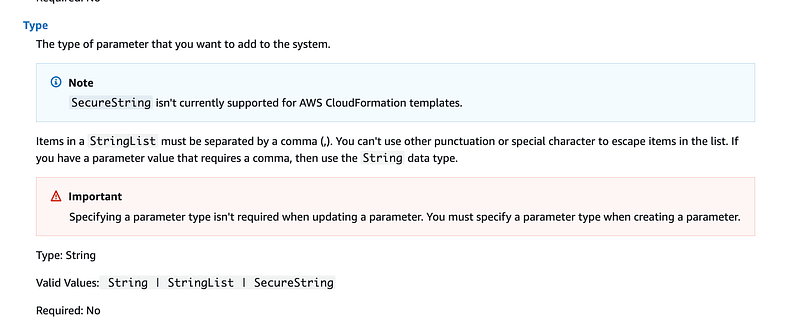
One of the things we have to specify is “type”. What are our options for type?

String would be unencrypted text.
SecureString would be encrypted. We can use the default AWS encryption or provide our own KMS key id. I’ll explain why the later is a better option in a bit.
StringList is a comma separated list. We can find out more about the StringList type in the AWS API Reference documentation for SSM PutParameter:
Back to the Boto3 documentation. There’s one note here I’d like you to notice in the Warning below:
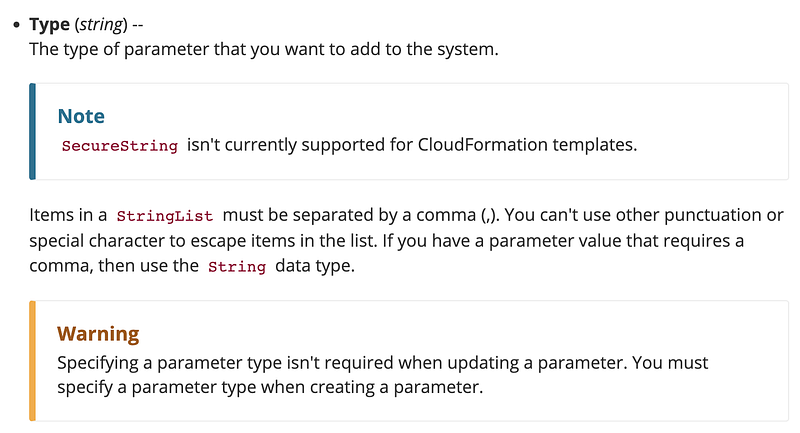
You can’t use SecureString with CloudFormation. That’s why whenever I want to use CloudFormation to store any type of value I want to be encrypted and not visible in the AWS console, logs, etc., I never use Parameter Store. I use AWS Secrets Manager.Storing a value in AWS Systems Manager
Let’s first test our code in a local Python file and execute it to test the code we’ll add to our Lambda function.
We can create a test-ssm-put-param.py file and add the following code. We’re going to start with a SecureString that uses the default AWS encryption.
#!/bin/python3import boto3
ssm = boto3.client('ssm')param_name="TestParameter"
param_value="TestValue"
param_type="SecureString"#using AWS default encrypt (type=SecureString)
ssm.put_parameter(Name=param_name,Value=param_value,Type=param_type
val = ssm.get_parameter(Name=param_name, WithDecryption=True)print(val)Double-click the file and it should add a parameter to SSM Parameter Store. Then it will retrieve and print the parameter.

You can also check the AWS Systems Manager Parameter Store console to confirm that your parameter exists.
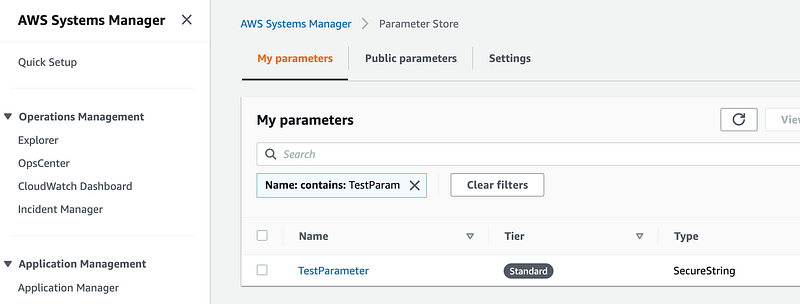
Note that if you run the test again you’ll get an error because the parameter already exists.

You can delete the parameter or add additional code to the script to delete the parameter after retrieving it.
Add the batch job name as a parameter passed to our Lambda function
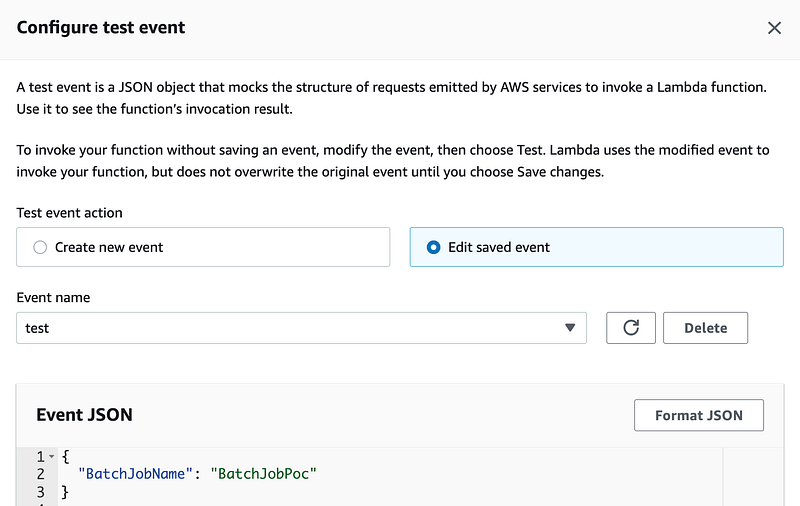
Now let’s add this to our lambda function. First, we want to pass in a batch job name. Configure the Lambda function test event the way I wrote about in the lat post. The name of the function we are working on is named: GenerateBatchJobIDLambda. You can just change the existing test event.
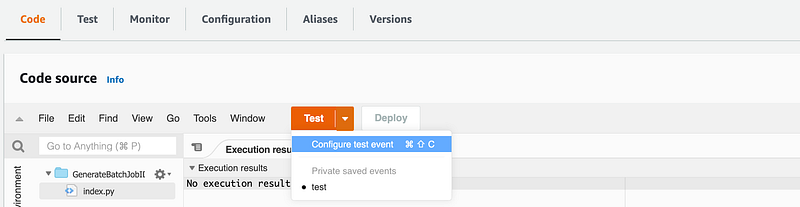
Save it:
Alter our Lambda code to read the value of the BatchJobName parameter
Update the Lambda code in our CloudFormation template to read the parameter as explained in the last post.
batch_job_name=event['BatchJobName']Note that this currently has a gaping security problem. Seem my last post on Lambda function parameters, XSS, and injection attacks. We’ll fix that in an an upcoming post.
Store the SSM Parameter
Add the code to store the SSM parameter after generating the ID. Use the ID for the name of the parameter and the batch job name for the value.
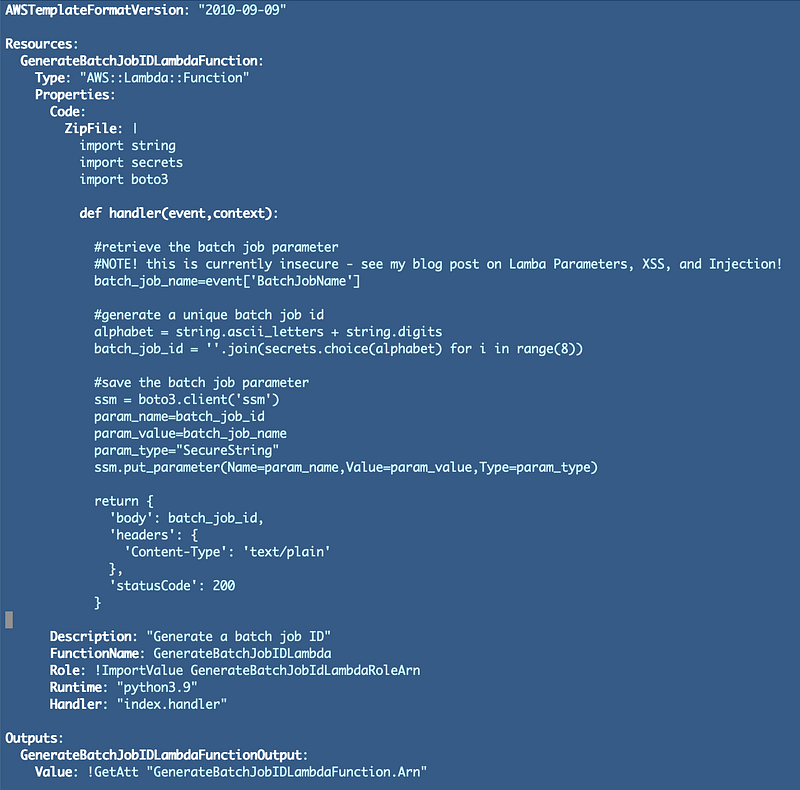
Deploy the CloudFormation to update the function using the deploy.sh file in the function folder that we created in the prior post:
./deploy.sh
Now you can test your function from the console using the new test event.
Add SSM Permission to our Lambda Role
Aha. I forgot to update the role associated with this Lambda function to allow it to call ssm::PutParameter.
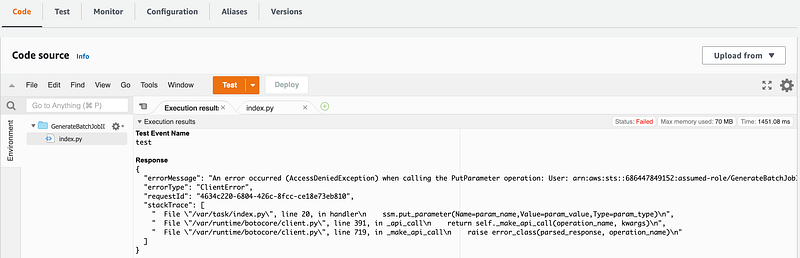
Now think about the permissions we need to give the Lambda function for a minute. Can this Lambda function add any parameter to SSM Parameter Store? We only want it to add this batch job ID parameter. We also don’t want anyone else to be able to edit our batch job ID parameters.
Let’s start by modifying the value we store in our code to the following for the parameter name to the following format:
param_name="batch-job-" + batch_job_idThat will also make it easier for us to search for and find the parameters related to our batch jobs in SSM Parameter Store.
Recall that we had a deny all statement in our Lambda function policy:
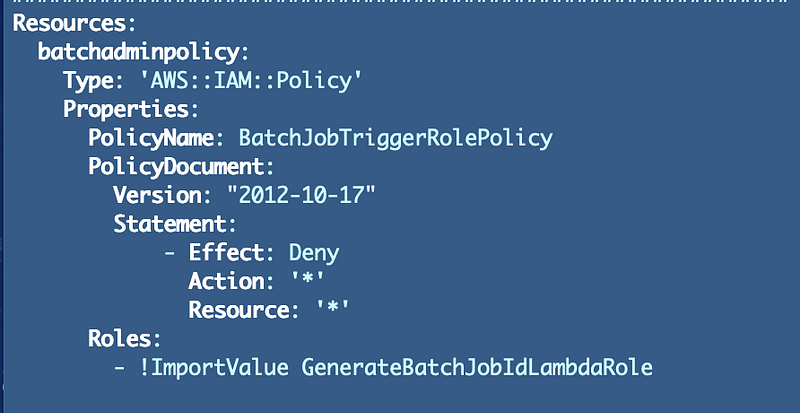
Add the permission for the Lambda function to call AWS SSM PutParameter but only for resources that start with “batch-job-”.
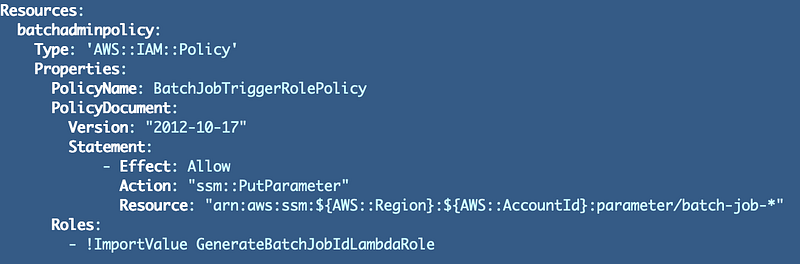
Run the deploy script again to deploy the policy change.
Note that I got this error due to the policy above. Oops. If you’ve ever seen this error, don’t forget !Sub when adding pseudo parameters. The error message could be a tad less obscure. I just got this a few days ago and I already had forgotten what caused it. That’s why I’m writing things down on posts in my bug blog:Wait a few minutes for the IAM permissions to kick in an then re-test your function. Yippee!
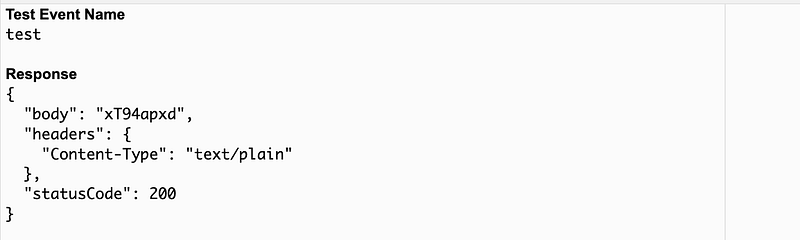
Now check to see if the parameter exists in Parameter Store. Woot!
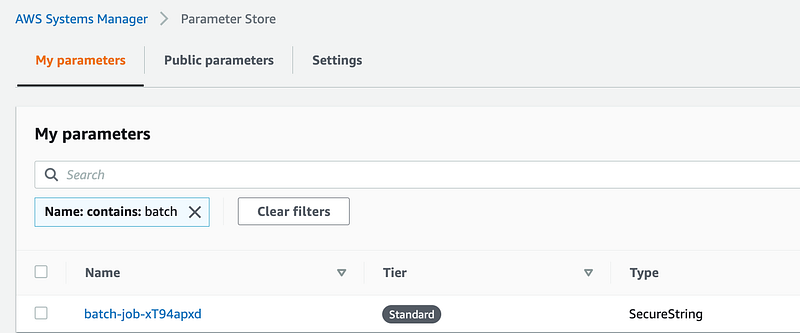
Notice that we did not need to give our Lambda function permissions to read or retrieve parameters, only to write parameters.
SSM Parameter Store Policies
Now how would we stop anyone else from reading or editing these policies? Does an SSM Parameter have a policy like an AWS KMS Key that we can use to restrict access to only the people who should access that parameter? No.
AWS Parameter Store does have something that they unfortunately named a “Policy” but it is not a resource policy that can be used to prevent access to a particular parameter. Hold that thought.
If you want to understand the difference between AWS IAM, Trust, and Resource policies I covered that here.
You also may want to check out how resource policies on a KMS key can help improve security when used correctly.
WE ARE NOT DONE.
Although I got this to “work” we are not done with this implementation. Do you know what security gaps exist when you look at this implementation? What improvements could we add to make it harder for an attacker to retrieve our parameters or the values in them?
Stay tuned….follow for updates.
Follow for updates.
Teri Radichel | © 2nd Sight Lab 2022
About Teri Radichel:
~~~~~~~~~~~~~~~~~~~~
⭐️ Author: Cybersecurity Books
⭐️ Presentations: Presentations by Teri Radichel
⭐️ Recognition: SANS Award, AWS Security Hero, IANS Faculty
⭐️ Certifications: SANS ~ GSE 240
⭐️ Education: BA Business, Master of Software Engineering, Master of Infosec
⭐️ Company: Penetration Tests, Assessments, Phone Consulting ~ 2nd Sight Lab
Need Help With Cybersecurity, Cloud, or Application Security?
~~~~~~~~~~~~~~~~~~~~~~~~~~~~~~~~~~~~~~~~~~~~~~~~~~~~~~~~~~~~~
🔒 Request a penetration test or security assessment
🔒 Schedule a consulting call
🔒 Cybersecurity Speaker for PresentationFollow for more stories like this:
~~~~~~~~~~~~~~~~~~~~~~~~~~~~~~~~~~~~~~~~~~~~~~~~~~~~~~~~~~~~~
❤️ Sign Up my Medium Email List
❤️ Twitter: @teriradichel
❤️ LinkedIn: https://www.linkedin.com/in/teriradichel
❤️ Mastodon: @teriradichel@infosec.exchange
❤️ Facebook: 2nd Sight Lab
❤️ YouTube: @2ndsightlab


