
avatarHussain Arif

Free AI web copilot to create summaries, insights and extended knowledge, download it at here

9418

Abstract

ode-mongodb-native/2.0/api/Collection.html">here</a>.</p><blockquote id="9037"><p>Note: In these examples, for brevity’s sake, the <code>createCollection</code> method, the <code>require</code> and initialization methods have not been written in the next gists as they are the same as the previous example.</p></blockquote><h1 id="cc9c">Inserting/Creating Documents</h1><p id="5a8b">We’ve connected to a database and now have built a collection. Now we need to insert documents in that collection.</p><p id="f426">There are multiple methods to insert Documents.</p><h2 id="7a6b">db.collection.insertOne</h2><p id="e51f">As the name suggests, we will only insert one Document at a time. An example is:</p><p id="797c">Here, we are adding a document with <code>name</code> and <code>age</code> fields. The <code>name</code> will be <code>Hussain</code> and <code>age</code> will be 18</p><div id="6e08"><pre>const <span class="hljs-built_in">insert</span> = <span class="hljs-function">(<span class="hljs-params">db,callback</span>)=></span>{</pre></div><div id="d3b5"><pre> db.collection(<span class="hljs-string">'HussainsCollection'</span>).insertOne({name:<span class="hljs-string">'Hussain'</span>, age: <span class="hljs-string">'18'</span>},<span class="hljs-function"><span class="hljs-params">(err,result)</span>=></span>{</pre></div><div id="af8b"><pre> <span class="hljs-built_in">if</span>(err) console<span class="hljs-selector-class">.log</span>(err) console<span class="hljs-selector-class">.log</span>(result.ops); <span class="hljs-built_in">callback</span>(); }) }</pre></div><p id="2130">The first parameter of <code>insertOne</code> is to tell what data/document to insert. If there is an error, it will be logged accordingly.The <code>result.ops</code> property will tell us what document has been inserted.</p><p id="7cce">We will add this code within our <code>createCollection</code> method with some minor modifications as follows:</p> <figure id="aa9a"> <div> <div>

            <iframe class="gist-iframe" src="/gist/HussainArif12/a7aa521421cad7f3399af7c59561cebe.js" allowfullscreen="" frameborder="0" height="undefined" width="undefined">
          </div>
        </div>
    </figure></iframe></div></div></figure><p id="9084">The output will be as follows:</p><figure id="d800"><img src="https://cdn-images-1.readmedium.com/v2/resize:fit:800/1*hPvc7_1SxOYy_vUjg3q_Jg.png"><figcaption>Output of the code</figcaption></figure><h2 id="e0a8">db.collection.insertMany</h2><p id="d850">This method is used to insert multiple documents in a given time. This will be done by passing an array of documents in the first parameter of <code>insertMany</code> .</p><div id="b1bf"><pre>const insertMany = <span class="hljs-function"><span class="hljs-params">(db,callback)</span>=&gt;</span>{</pre></div><div id="c21d"><pre>db.<span class="hljs-title function_ invoke__">collection</span>(<span class="hljs-string">'HussainsCollection'</span>).<span class="hljs-title function_ invoke__">insertMany</span>([{<span class="hljs-attr">name</span>:<span class="hljs-string">'Hussain'</span>, <span class="hljs-attr">age</span>:<span class="hljs-string">'18'</span>},{<span class="hljs-attr">name</span>:<span class="hljs-string">'Arif'</span>, <span class="hljs-attr">age</span>: <span class="hljs-number">50</span>}] ,(err,result)=&gt;{</pre></div><div id="bed7"><pre> <span class="hljs-built_in">if</span>(err) console<span class="hljs-selector-class">.log</span>(err)

console<span class="hljs-selector-class">.log</span>(result.ops); <span class="hljs-built_in">callback</span>(); }) }</pre></div><p id="b4ce">As usual, this function will be invoked within the <code>client.connect</code> callback.</p> <figure id="87a7"> <div> <div>

            <iframe class="gist-iframe" src="/gist/HussainArif12/0f4005f57c8dfd307b0f9c1a65437d59.js" allowfullscreen="" frameborder="0" height="undefined" width="undefined">
          </div>
        </div>
    </figure></iframe></div></div></figure><p id="68d3">Notice that this method is almost similar to <code>insertOne</code> . The output will be as follows:</p><figure id="1163"><img src="https://cdn-images-1.readmedium.com/v2/resize:fit:800/1*B_G_CxoPd9Rm31RM-gqinQ.png"><figcaption>Output when insertMany is run</figcaption></figure><h1 id="6e34">Reading/Finding Documents</h1><p id="e6dc">We will first use the <code>find</code> method to query the database. <code>find</code> returns a cursor which allows the user to operate on the data.</p><p id="5a01">The <code>find</code> method is defined as :</p><div id="4529"><pre>db.collection.<span class="hljs-keyword">find</span>(query,<span class="hljs-keyword">options</span>)</pre></div><p id="3fc6">This will return a <code>Cursor</code> object, with which we will invoke the <code>toArray</code> method to convert the returned results(documents) into arrays</p><div id="cb39"><pre>db.collection.<span class="hljs-built_in">find</span>(query,options).toArray(<span class="hljs-function">(<span class="hljs-params">result,documents</span>)=&gt;</span>{

<span class="hljs-comment">//code</span> })</pre></div><p id="3e5f">In this example, we will have run a query to return the documents which will have the <code>name</code> value '<code>Hussain'</code> .</p><div id="9696"><pre>const findDocument = <span class="hljs-function">(<span class="hljs-params">db,callback</span>)=></span>{ db.collection(<span class="hljs-string">'HussainsCollection'</span>).<span class="hljs-built_in">find</span>({<span class="hljs-attr">name</span>:<span class="hljs-string">'Hussain'</span>}).toArray(<span class="hljs-function">(<span class="hljs-params">err,docs</span>)=></span>{ <span class="hljs-built_in">console</span>.<span class="hljs-built_in">log</span>(docs); callback(); }) }</pre></div><p id="4117">The code will be within the <code>client.connect</code> callback</p> <figure id="1fdc"> <div> <div>

            <iframe class="gist-iframe" src="/gist/HussainArif12/465440505a869e6a65a9448e55dc4e43.js" allowfullscreen="" frameborder="0" height="undefined" width="undefined">
          </div>
        </div>
    </figure></iframe></div></div></figure><p id="7290">In my database, I have five documents having the <code>name</code> field to <code>Hussain</code> . Thus, on my program, the output will be as follows:</p><figure id="6a20"><img src="https://cdn-images-1.readmedium.com/v2/resize:fit:800/1*keFKA725ol9bI0aYLqjzfg.png"><figcaption>The output with the code</figcaption></figure><blockquote id="1ed2"><p>Note: Some of the values in <code>age</code>field are strings as I inserted string values before writing the final version of the program. In your case, the <code>age</code> field should always be integer.</p></blockquote><p id="54c9">To get all of the documents in the list, make the <code>query</code> argument as empty i.e</p><div id="abbe"><pre>db<span class="hljs-selector-class">.collection</span><span class="hljs-selector-class">.find</span>({})<span class="hljs-selector-class">.toArray</span>(...)</pre></div><h1 id="bfee">Updating Documents</h1><p id="eb2d">Updating documents has two functions, <code>updateOne</code> and <code>updateMany</code> .</p><p id="0b69">Both functions have the following arguments.</p><div id="893e"><pre>db.collection.updateX({query},{$set: {field:value}},<span class="hljs-function"><span class="hljs-params">(err,result)</span>=&gt;</span> {</pre></div><div id="8080"><pre><span class="hljs-comment">//code</span>

})</pre></div><blockquote id="ccbc"><p>Here, <code><b>X</b></code> can be either <code>One</code> or <code>Many</code></p></blockquote><p id="09c7">If any document matches the <code>query</code> then we can set its <code>field</code> value to its respective <code>value</code></p><h2 id="160c">db.collection.updateOne :</h2><p id="1374">It will update the <b>first</b> document it finds that matches the query.</p><p id="e72d">In this example, we will find any document that has the <code>name</code> of <code>Hussain</code> and will change it to <code>name</code> of <code>Ali</code> :</p><div id="6baf"><pre>const updateDocument= <span class="hljs-function">(<span class="hljs-params">db,callback</span>)=></span>{ db.collection(<span class="hljs-string">'HussainsCollection'</span>).updateOne({<span class="hljs-attr">name</span>: <span class="hljs-string">'Hussain'</span>} , {<span class="hljs-symbol">$set</span> : {<span class="hljs-attr">name</span>: <span class="hljs-string">'Ali'</span>}} , (err,result)=>{ <span class="hljs-keyword">if</span>(err) <span class="hljs-built_in">console</span>.<span class="hljs-built_in">log</span>(err) <span class="hljs-built_in">console</span>.<span class="hljs-built_in">log</span>(<span class="hljs-string">' 1 Document updated'</span>); callback() }) }</pre></div><p id="d718">Ultimately, the code will be as follows:</p> <figure id="5030"> <div> <div>

            <iframe class="gist-iframe" src="/gist/HussainArif12/d234220ebed9059db713033e8f7855db.js" allowfullscreen="" frameborder="0" height="undefined" width="undefined">
          </div>
        </div>
    </figure></iframe></div></d

Options

iv></figure><p id="b06a">The output will be as follows:</p><figure id="7e6e"><img src="https://cdn-images-1.readmedium.com/v2/resize:fit:800/1*jl3VXb8MHrugjN2ED8Lu5w.png"><figcaption>Code output</figcaption></figure><p id="64fd">As <code>updateOne</code> only updates the <b>first </b>document, thus only one document is updated each time this function is run.</p><p id="6b88">You can also update multiple fields within the <code>set</code> argument.</p><p id="c34a">You can use the <code>db.collection.find</code> to get a final list of the results after the modifications are performed.</p><h2 id="664d">db.collection.updateMany</h2><p id="663e">It is similar to the <code>updateOne</code> method, however unlike <code>updateOne</code> ,<code>updateMany</code> will update <b>all </b>documents that match the given query.</p><p id="c3b5">In this example, we will update all documents that contain the name of <code>'Hussain'</code> and change them to the name of <code>'Ali'</code></p><div id="bbf2"><pre>const updateMany = <span class="hljs-function"><span class="hljs-params">(db,callback)</span>=&gt;</span>{ db.collection(<span class="hljs-string">'HussainsCollection'</span>).updateMany({name: <span class="hljs-string">'Hussain'</span>} , {set : {name: <span class="hljs-string">'Ali'</span>}} , <span class="hljs-function"><span class="hljs-params">(err,result)</span>=></span>{</pre></div><div id="c9ff"><pre> <span class="hljs-built_in">if</span>(err) console<span class="hljs-selector-class">.log</span>(err)</pre></div><div id="b3e2"><pre> console.<span class="hljs-built_in">log</span>(<span class="hljs-literal">result</span>.<span class="hljs-literal">result</span>.nModified + ' documents have been modified');</pre></div><div id="28ae"><pre> <span class="hljs-function"><span class="hljs-title">callback</span>()</span> }) }</pre></div><p id="d4ed">This code will log the number of documents that have been altered due to this method. This property is given by the <code>result.result.nModified</code> property.</p><p id="44d5">As usual, this method is to be invoked within the <code>createCollection</code> method with the callback executing the <code>client.close</code> method.</p><p id="b751">On my machine, I had four documents matching the query given in my code. Thus the output was as follows:</p><figure id="031f"><img src="https://cdn-images-1.readmedium.com/v2/resize:fit:800/1*5YFZuTR6PDTxR9NqvSup7Q.png"><figcaption>Output if updateMany is run</figcaption></figure><p id="867d">It is possible to update several fields in one go. Let’s change both the name and age in this piece of code(illustrated by bold):</p><div id="86f2"><pre>db.collection.<span class="hljs-title function_ invoke__">updateX</span>({<span class="hljs-attr">name</span>:<span class="hljs-string">'Hussain'</span>},{<span class="hljs-variable">$set</span> : {<span class="hljs-attr">name</span>:<span class="hljs-string">'Ali'</span>,<span class="hljs-attr">age</span>:<span class="hljs-number">43</span>}},function(err,res){ <span class="hljs-comment">//code</span> })</pre></div><blockquote id="3745"><p>Here , <code>X</code> can be either <code>One</code> or <code>Many</code></p></blockquote><h1 id="46f3">Deleting Documents</h1><p id="64b8">To delete documents, we use either <code>deleteOne</code> and <code>deleteMany</code> methods</p><p id="144d"><code>deleteOne</code> and <code>deleteMany</code> are defined as follows:</p><div id="d5b7"><pre>db.collection(<span class="hljs-string">'HussainCollection'</span>).deleteX(query,<span class="hljs-function"><span class="hljs-params">(err,result)</span>=></span>{ //code })</pre></div><blockquote id="e112"><p>Here, <code><b>X</b></code> is either <code>One</code> or <code>Many</code> . They both have the same parameters.</p></blockquote><p id="f1a0">This function will delete the document/documents that match the given <code>query</code> . The <code>result</code> parameter in the callback contains information about the documents that were deleted due to this function.</p><h2 id="7056">db.collection.deleteOne</h2><p id="a6c4">Only removes the <b>first</b> occurence of the document that matches this query.</p><p id="82ef">In this example, we will delete the documents that have the <code>name</code> field to <code>Arif</code> .</p><div id="1736"><pre>const deleteDocument= <span class="hljs-function">(<span class="hljs-params">db,callback</span>)=></span>{ db.collection(<span class="hljs-string">'HussainsCollection'</span>).deleteOne({<span class="hljs-attr">name</span>: <span class="hljs-string">'Arif'</span>} , (err,result)=>{ <span class="hljs-keyword">if</span>(err) <span class="hljs-built_in">console</span>.<span class="hljs-built_in">log</span>(err) <span class="hljs-built_in">console</span>.<span class="hljs-built_in">log</span>(result.deletedCount); callback() }) }</pre></div><p id="da2a">The <code>deletedCount</code> property of <code>result</code> gives us how many documents were deleted.</p><p id="4446">Like all examples, this will be invoked within the <code>createCollection</code> function block. The output on my machine is as follows:</p><figure id="51cd"><img src="https://cdn-images-1.readmedium.com/v2/resize:fit:800/1*ZbXP0r976NlZEtnY3kGDNA.png"><figcaption>Code wen updateOne was run</figcaption></figure><h2 id="cf90">db.collection.updateMany</h2><p id="fd82">Deletes <b>all </b>documents that match the given query.</p><p id="241f">Let’s delete all documents that match the query where <code>name</code> is <code>Arif</code> .</p><div id="08a7"><pre>const deleteDocument= <span class="hljs-function">(<span class="hljs-params">db,callback</span>)=></span>{ db.collection(<span class="hljs-string">'HussainsCollection'</span>).deleteMany({<span class="hljs-attr">name</span>: <span class="hljs-string">'Arif'</span>} , (err,result)=>{ <span class="hljs-keyword">if</span>(err) <span class="hljs-built_in">console</span>.<span class="hljs-built_in">log</span>(err) <span class="hljs-built_in">console</span>.<span class="hljs-built_in">log</span>(result.deletedCount); callback() }) }</pre></div><p id="e3cd">On my machine, two documents matched the query. Thus, the output is a s follows:</p><figure id="2426"><img src="https://cdn-images-1.readmedium.com/v2/resize:fit:800/1*mwb7CJeBws5NU9WcONd1dw.png"><figcaption>Output when updateMany is run</figcaption></figure><h1 id="caf9">Summary</h1><p id="477e">For all CRUD Operations</p> <figure id="69c5"> <div> <div>

            <iframe class="gist-iframe" src="/gist/HussainArif12/d43e3582f106a846b484b9ff30143d99.js" allowfullscreen="" frameborder="0" height="undefined" width="undefined">
          </div>
        </div>
    </figure></iframe></div></div></figure><p id="0231">To connect to database and create collections:</p>
    <figure id="136f">
        <div>
          <div>
            
            <iframe class="gist-iframe" src="/gist/HussainArif12/6b52a52b62731ba084c8a97e7372f146.js" allowfullscreen="" frameborder="0" height="undefined" width="undefined">
          </div>
        </div>
    </figure></iframe></div></div></figure><ul><li>A <b>document </b>is a simple record in MongoDb</li><li>A <b>collection</b> is a set of documents.</li></ul><h1 id="249f">External Resources</h1><ul><li><a href="http://mongodb.github.io/node-mongodb-native/3.6/tutorials/main/">MongoDB Official Node.Js Tutorials Page</a></li><li><a href="https://www.w3schools.com/nodejs/nodejs_mongodb.asp">MongoDB and Node.Js — W3Schools</a></li><li><a href="https://flaviocopes.com/node-mongodb/">How to use MongoDB with Node.JS</a>-Flavio Copes</li><li><a href="https://www.guru99.com/what-is-mongodb.html">What is MongoDB? Guru99</a></li></ul><p id="0c7d">A perhaps easier alternative to using the MongoDB Native API is using <b>Mongoose API</b>. In the<a href="https://readmedium.com/how-to-use-mongoose-with-node-js-913a8073b29c"> next tutorial</a>, we will learn how to implement relational database functionality with Mongoose.</p><p id="1d28">This tutorial might seem long and incredibly tedious,but this topic is incredibly easy to wrap your head around if you apply the examples in your code. Remember, you’ll only learn when you start doing instead of just reading.</p><p id="ee27">Thank you so much for making it to then end of this tutorial! Have a great day!</p><p id="7f8d">Stay home, stay safe!</p><h2 id="6ffd">A note from Plain English</h2><p id="f12a">Did you know that we have four publications? Show some love by giving them a follow: <a href="https://medium.com/javascript-in-plain-english"><b>JavaScript in Plain English</b></a>, <a href="https://medium.com/ai-in-plain-english"><b>AI in Plain English</b></a>, <a href="https://medium.com/ux-in-plain-english"><b>UX in Plain English</b></a>, <a href="https://medium.com/python-in-plain-english"><b>Python in Plain English</b></a><b> </b>— thank you and keep learning!</p><p id="1eac">Also, we’re always interested in helping to promote good content. If you have an article that you would like to submit to any of our publications, send an email to <a href="mailto:[email protected]"><b>[email protected]</b></a><b> </b>with your Medium username and what you are interested in writing about and we will get back to you!</p></article></body>
Source: Skitterphoto on Pexels

The Fundamentals of MongoDB Native API

Use MongoDB With Node.JS

Enable Database capabilities Within Your Node.Js Application

You’ve proven your fellow peers time and again that you’re an amazing programmer who can do a splendid job in developing the backend of a web app.You skillfully use Routers in Express to handle multiple routes that the user navigates to. One day, you receive a call from your library asking you to work on the server side of their website.

However later on, the librarian throws a wrench in your works. She says that the library needs some kind of storage system in the backend, so that users can view information about their books online through a database. With additional research, you find out that one of the best database solutions is MongoDB

Introduction: What Is MongoDB

MongoDB is a document-oriented database program. It uses JSON-like documents with schema. These terms will be explained later.

It’s has several advantages. Some of them are:

  • It’s performant, fast and extremely scalable.Furthermore, it has built in replication, and is flexible.
  • Unlike mySQL or other relational databases you don’t need to map out your data structure beforehand, you don’t need to create all your tables, your columns and take the stress about deciding what data type your data is i.e VARCHAR or STRING.
  • Other than that, the MongoDB API is extremely easy to learn and supports a plethora of languages including JavaScript, so you feel right at home whenever you develop apps involving MongoDB.

Things to remember

Basic Terminology

Before we get our feet wet, there are some keywords you should keep in mind.

  • Documents : They are simple data records. It is the basic unit of storing data in a database. If you have a background in relational databases, you can think of documents as a ROW. Documents comprise of field-and-value pairs. A simple example of a document can be:
{
name: 'Hussain'
Age : 18
occupation:'Student'
}

For every field , there will be a value . For example, here , one of the fields is name and its associated value is 'Hussain'

  • Collections : A set of documents within a database. A database can have multiple collections. For relational database users, they are similar to tables.
  • Queries : They are used to specify the conditions that determine which documents need to be selected for read,update, and delete operations.

The __id field

The __id field is mandatory for every MongoDB document. It is a primary key. In other words, it is used to uniquely determine a document in the database, thus it has a unique value. Even if you don’t specify this field, MongoDB will automatically generate an __id for you.

Other than that,bear in mind that none of the field names should contain the null container.

Getting Started

To get started, first you need to navigate to the MongoDB Community download page. We are installing this software to view and create documents and collections without any code. If you are developing on Windows, it’s preferable to install an MSI installer. The download options should look like this:
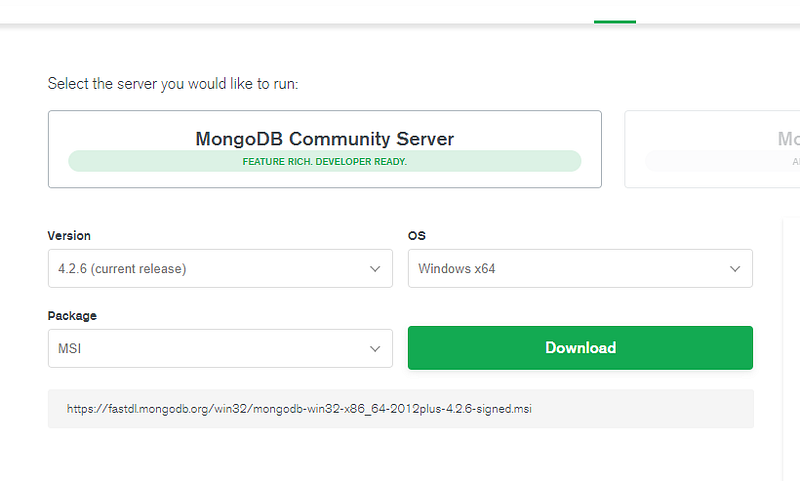
How your download options should look like in the end

In the end, the installation wizard will do the job for you.

When it’s done, verify that the installation has been done correctly by going to your command line and typing mongod
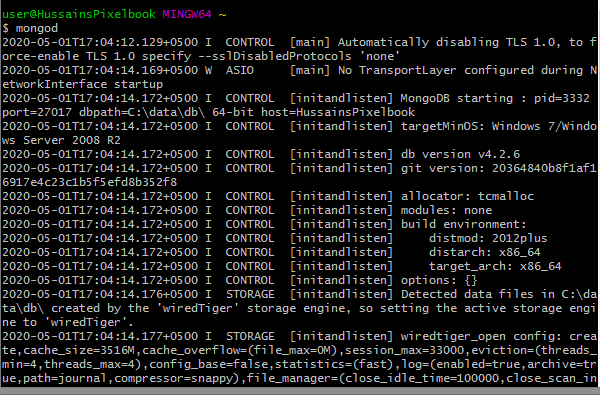
If you see this in your terminal window, your installation was done correctly.

Now, we need to create a project with mongodb module installed through NPM.

mkdir myMongoDBApp
cd myMongoDBApp
npm init -y
npm install mongodb

We’re now done! Let’s move on to create a database.

Initializing Our Database

We now need to build our database. First we need to require the mongodbmodule and then initialize an object of MongoClient:

const Mongo = require('mongodb')
const MongoClient = Mongo.MongoClient; 
const client = new MongoClient("mongodb://localhost:27017", { useUnifiedTopology: true })

In this code, we have initialized an object of Mongo.MongoClient which will give us access to the connect method, thus allowing us to create/connect to a database. The first parameter of the MongoClient constructor is the URL you want to connect to.

To connect to database, we use the client.connect method. To do so, write the following:

client.connect((err)=>{
  if(err) console.log(err)
  console.log('built database')
  const db = client.db('HussainsDatabase')
  client.close()
})

In this code, we have finally connected to a database named HussainsDatabase (illustrated by bold lines). In the end, we invoke the client.close method to close the database and its connections.

The output will be as follows:

The output when we run the code

Creating A MongoDB Collection

Now that our database has been built, we need to create a Collection to make a home for our Documents. To do so, we will utilize the db.createCollection() method

const createCollection = (db,callback)=>{
  db.createCollection('HussainsCollection',(err,results)=>{
    if(err) console.log(err)
    console.log('collection built');
    callback();
 })
}

In this code, we create a MongoDB collection named 'HussainsCollection' through the help of a Db instance .Then in the end, we execute a callback function. The presence of this callback is necessary as we will invoke client.close() as a callback function

Now that the createCollectionmethod has been created, we will invoke this function within client.connect that we’ve already used above.

Ultimately, the code will be as follows:

As stated, we have invoked client.close function as a callback to close all database connections in the end.

The output will be as follows:
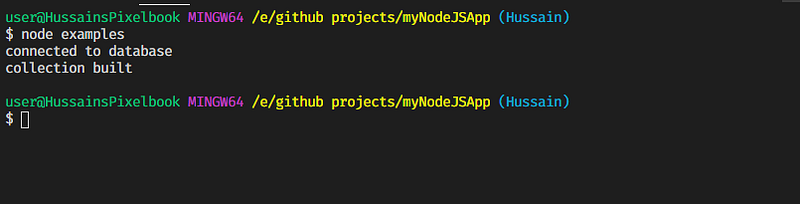
Output if the code is run

CRUD Operations in MongoDB

All of these operations are made possible via the Collection class. For more details, click here.

Note: In these examples, for brevity’s sake, the createCollection method, the require and initialization methods have not been written in the next gists as they are the same as the previous example.

Inserting/Creating Documents

We’ve connected to a database and now have built a collection. Now we need to insert documents in that collection.

There are multiple methods to insert Documents.

db.collection.insertOne

As the name suggests, we will only insert one Document at a time. An example is:

Here, we are adding a document with name and age fields. The name will be Hussain and age will be 18

const insert = (db,callback)=>{
 db.collection('HussainsCollection').insertOne({name:'Hussain', age:       '18'},(err,result)=>{
  if(err) console.log(err)
  console.log(result.ops);
  callback();
 })
}

The first parameter of insertOne is to tell what data/document to insert. If there is an error, it will be logged accordingly.The result.ops property will tell us what document has been inserted.

We will add this code within our createCollection method with some minor modifications as follows:

The output will be as follows:

Output of the code

db.collection.insertMany

This method is used to insert multiple documents in a given time. This will be done by passing an array of documents in the first parameter of insertMany .

const insertMany = (db,callback)=>{
db.collection('HussainsCollection').insertMany([{name:'Hussain', age:'18'},{name:'Arif', age: 50}] ,(err,result)=>{
 if(err) console.log(err)
 console.log(result.ops);
 callback();
 })
}

As usual, this function will be invoked within the client.connect callback.

Notice that this method is almost similar to insertOne . The output will be as follows:
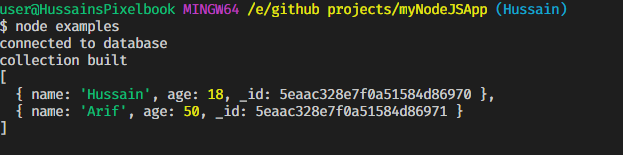
Output when insertMany is run

Reading/Finding Documents

We will first use the find method to query the database. find returns a cursor which allows the user to operate on the data.

The find method is defined as :

db.collection.find(query,options)

This will return a Cursor object, with which we will invoke the toArray method to convert the returned results(documents) into arrays

db.collection.find(query,options).toArray((result,documents)=>{
//code
})

In this example, we will have run a query to return the documents which will have the name value 'Hussain' .

const findDocument = (db,callback)=>{
   db.collection('HussainsCollection').find({name:'Hussain'}).toArray((err,docs)=>{
 console.log(docs);
 callback();
 })
}

The code will be within the client.connect callback

In my database, I have five documents having the name field to Hussain . Thus, on my program, the output will be as follows:
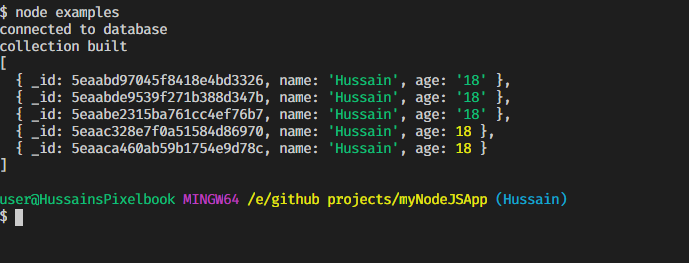
The output with the code

Note: Some of the values in agefield are strings as I inserted string values before writing the final version of the program. In your case, the age field should always be integer.

To get all of the documents in the list, make the query argument as empty i.e

db.collection.find({}).toArray(...)

Updating Documents

Updating documents has two functions, updateOne and updateMany .

Both functions have the following arguments.

db.collection.updateX({query},{$set: {field:value}},(err,result)=> {
//code
})

Here, X can be either One or Many

If any document matches the query then we can set its field value to its respective value

db.collection.updateOne :

It will update the first document it finds that matches the query.

In this example, we will find any document that has the name of Hussain and will change it to name of Ali :

const updateDocument=  (db,callback)=>{
db.collection('HussainsCollection').updateOne({name: 'Hussain'} , {$set : {name: 'Ali'}} , (err,result)=>{
if(err) console.log(err)
console.log(' 1 Document updated');
callback()
})
}

Ultimately, the code will be as follows:

The output will be as follows:

Code output

As updateOne only updates the first document, thus only one document is updated each time this function is run.

You can also update multiple fields within the $set argument.

You can use the db.collection.find to get a final list of the results after the modifications are performed.

db.collection.updateMany

It is similar to the updateOne method, however unlike updateOne ,updateMany will update all documents that match the given query.

In this example, we will update all documents that contain the name of 'Hussain' and change them to the name of 'Ali'

const updateMany =  (db,callback)=>{
  db.collection('HussainsCollection').updateMany({name: 'Hussain'} ,   {$set : {name: 'Ali'}} , (err,result)=>{
  if(err) console.log(err)
  console.log(result.result.nModified + ' documents have been     modified');
  callback()
})
}

This code will log the number of documents that have been altered due to this method. This property is given by the result.result.nModified property.

As usual, this method is to be invoked within the createCollection method with the callback executing the client.close method.

On my machine, I had four documents matching the query given in my code. Thus the output was as follows:
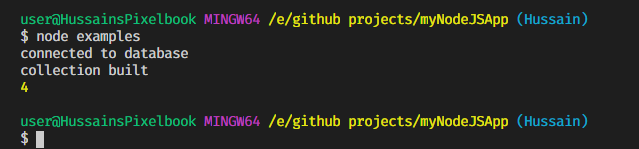
Output if updateMany is run

It is possible to update several fields in one go. Let’s change both the name and age in this piece of code(illustrated by bold):

db.collection.updateX({name:'Hussain'},{$set : {name:'Ali',age:43}},function(err,res){
//code
})

Here , X can be either One or Many

Deleting Documents

To delete documents, we use either deleteOne and deleteMany methods

deleteOne and deleteMany are defined as follows:

db.collection('HussainCollection').deleteX(query,(err,result)=>{
//code
})

Here, X is either One or Many . They both have the same parameters.

This function will delete the document/documents that match the given query . The result parameter in the callback contains information about the documents that were deleted due to this function.

db.collection.deleteOne

Only removes the first occurence of the document that matches this query.

In this example, we will delete the documents that have the name field to Arif .

const deleteDocument=  (db,callback)=>{
 db.collection('HussainsCollection').deleteOne({name: 'Arif'} ,  (err,result)=>{
  if(err) console.log(err)
  console.log(result.deletedCount);
  callback()
 })
}

The deletedCount property of result gives us how many documents were deleted.

Like all examples, this will be invoked within the createCollection function block. The output on my machine is as follows:
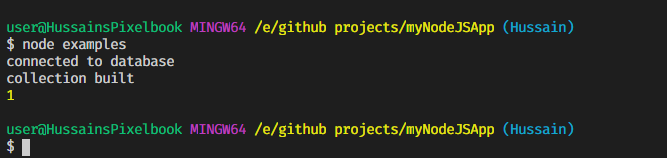
Code wen updateOne was run

db.collection.updateMany

Deletes all documents that match the given query.

Let’s delete all documents that match the query where name is Arif .

const deleteDocument=  (db,callback)=>{
db.collection('HussainsCollection').deleteMany({name: 'Arif'} , (err,result)=>{
 if(err) console.log(err)
 console.log(result.deletedCount);
 callback()
 })
}

On my machine, two documents matched the query. Thus, the output is a s follows:
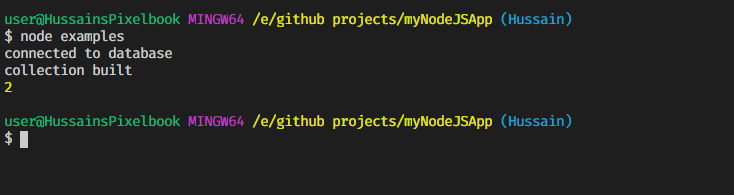
Output when updateMany is run

Summary

For all CRUD Operations

To connect to database and create collections:

  • A document is a simple record in MongoDb
  • A collection is a set of documents.

External Resources

A perhaps easier alternative to using the MongoDB Native API is using Mongoose API. In the next tutorial, we will learn how to implement relational database functionality with Mongoose.

This tutorial might seem long and incredibly tedious,but this topic is incredibly easy to wrap your head around if you apply the examples in your code. Remember, you’ll only learn when you start doing instead of just reading.

Thank you so much for making it to then end of this tutorial! Have a great day!

Stay home, stay safe!

A note from Plain English

Did you know that we have four publications? Show some love by giving them a follow: JavaScript in Plain English, AI in Plain English, UX in Plain English, Python in Plain English — thank you and keep learning!

Also, we’re always interested in helping to promote good content. If you have an article that you would like to submit to any of our publications, send an email to [email protected] with your Medium username and what you are interested in writing about and we will get back to you!

Programming
Nodejs
Mongodb
JavaScript
Web Development
Recommended from ReadMedium