Routing in Express.js
How to make our routing more organized and our code less complex

Introduction: What Is Routing?
Routing is a method that refers to determining how an application responds to a client request to a particular path and a specific HTTP request method (GET, POST, and so on).
In simple terms, routing is controlling which function gets invoked whenever the user navigates to a particular URL. In this context, URL refers to any path or route.
Defining Routing Methods
You define routing methods like so:
app.METHOD(PATH,CALLBACK)This function tells the server, “If a user navigates to PATH, then perform the following CALLBACK function and perform an HTTPMETHOD request.”
Here, the most commonly used verbs in place of METHOD are:
get: To handle GET requests (i.e. to request/GET data from a specified resource).post: To send data to a server to create/update a resource.put: To send data to a server to create/update a resource. The difference between POST and PUT requests is that the latter are idempotent. This means that PUT requests have no additional effect if they are called multiple times. In contrast, if you call a POST method more than once, your program will have side effects. Therefore, bear in mind that POST requests are not to be called more than once.delete: For removal of a specified resource.
There are more HTTP methods that can be used. Wikipedia has a full list of what can be used.
Basic Examples
1. Basic Hello World
As a basic example, let’s define an HTTP GET method and display the words “Hello World” if the user navigates to the '/' path:
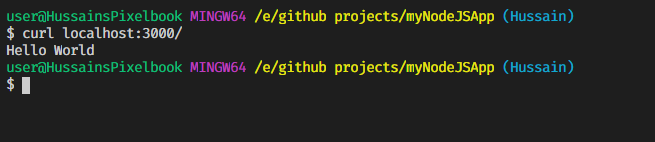
To run this code, first go to a terminal window and type node express-basic-hello-world. Then, on another terminal, type curl localhost:3000.
This will be the output on the client-side window(where cURL was used):
2. POST requests
You can perform POST requests to send data to the server. To do so:
In this code, we are sending POST requests to different paths to illustrate routing in different URLs.
We use express.text() middleware to parse text data that will come from the request body. To learn more about middleware, see my previous article.
To run the code, first use node in one terminal window.
In the second terminal window, we will use the following commands:
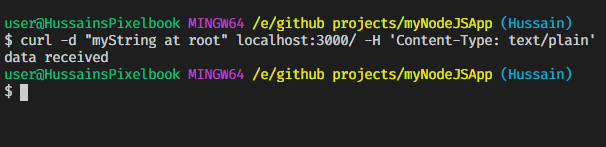
curl -d 'my String at root' localhost:3000/ -H 'Content-Type: text/plain'
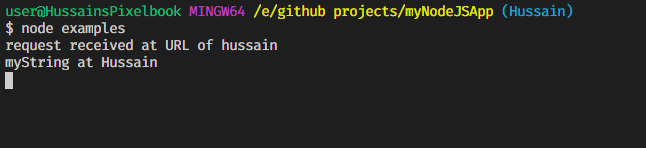
curl -d 'myString at Hussain' localhost:3000/hussain -H 'Content-Type: text/plain'
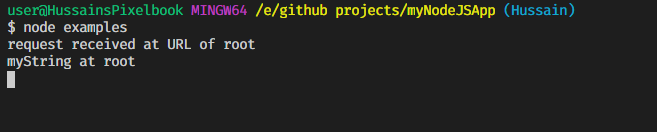
The output will be as expected.
When the first cURL command is run:
When the second cURL command is run:

Modular Routing
Imagine this scenario: You own a store that sells pets, and a customer wants to buy rabbits and cats from you.
If you use the basic routing methods defined above, the code will look like this:
Notice that we have written the same routes multiple times.
However, writing the routes over and over increases redundancy and typos. Furthermore, it is helpful to make our code more modular, as it is good practice.
As a programmer, you always want to make your code look cleaner. To make the above code easier to read, we can use two methods.
1. Using app.route
This is where app.route comes in. You will write the path once, and you can chain multiple route handlers.
You can implement app.route as follows:
app.route(PATH)
   .get(callback)
   .post(callback)
//can add more HTTP requests (.put, .delete, etc)
We can now rewrite the code :
The code looks cleaner, and you had to enter the route for each HTTP request just once.
However, there’s one more caveat: The username parameter exists in all routes. Typing username again and again still encourages typos and redundancies. What if we could make it even more modular?
2. express.Router()
We can use express.Router() to create modular, mountable route handlers. A Router instance is a complete middleware and routing system, which is why it is often referred to as a “mini-app.”
We only need to specify the starting point, and the Router instance will handle the rest for us.
To use app.Router(), we have to create a separate module, instantiate an instance of app.Router, and then use module.exports to export the instance.
For more details on using module.exports, see my previous article.
In this example, we will just handle a simple path that would contain the username and id parameters.
In routerExample.js:
We use router.route(), which is similar to app.route. The module defined says, “As long as the path will end with /:username/:id, execute the following code as defined.”
To use it, use another module, main.js:
As the comments say, we use app.use to tell routeExample.js to execute the functions that have routes starting with the first parameter. The first parameter can be termed as a starting point. Therefore, the path will be starting point + PATH defined by router.
For example, according to line 6, we will now handle GET and POST requests that start with ‘/cats’. They will have the path cats/:username/:id.
Like always, you can use different routes in the routeExample module, but the only thing you need to specify is the starting point in app.use.
To run the code, type node main in a terminal window and use cURL in another window accordingly.
Different routes in express.Router with middleware
In this example, we will navigate to the Birds homepage of our pet shop and define a middleware function, timeLog, which will output the time the respective path was requested.
birds.js:
In main.js:
var birds = require('./birds')


app.use('/birds', birds) //handle /birds and /birds/about
Use the node command to run the code, then use cURL like so:
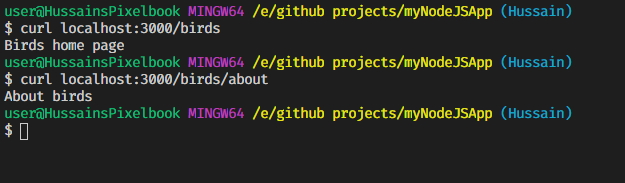
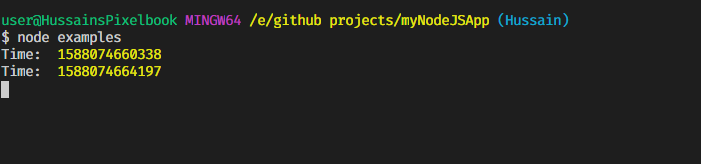
Thus, it is possible in express.Router to only execute middleware functions in specific paths.
Recap
Basic routing
app.METHOD(PATH,CALLBACK)Using app.route()
app.route(PATH)
   .METHOD(CALLBACK)
   .METHOD(CALLBACK)
//can chain more HTTP methods by adding '.METHOD(CALLBACK)'
Using express.Router()
router-example.js
const Router = express.Router()router.METHOD(PATH ,CALLBACK)//more handlers and routes definedmodule.exports = Routermain.js
const routerExample = require('./router-example')
app.use('/',routerExample)//handle route '/' + PATH
app.use('/birds',routerExample) //handle route /birds/PATH'
External Resources
- Express routing
- Express basic routing
- Express JS — Router and Route — YouTube
- Learn to use the new router in Express.4.0
Conclusion
In the next article, we will be adding persistence through databases with MongoDB.
That’s all for today. Thank you so much for making it to the end. Have a great day!
Stay home, stay safe.