avatarHussain Arif

Free AI web copilot to create summaries, insights and extended knowledge, download it at here

5621

Abstract

ide output</figcaption></figure><h2 id="e803">2. requestTime function</h2><p id="b08d">Remember when I said that middleware functions have access to <code>req</code> and <code>res</code> objects? We can add properties to these objects and then pass them on to next middleware like so:</p><p id="cabb">Here is a simple example to show date and time of when a request is sent:</p><div id="53f8"><pre><span class="hljs-selector-tag">var</span> requestTime= <span class="hljs-built_in">function</span>((req,res,next)=>{ req<span class="hljs-selector-class">.responseTime</span> = Date<span class="hljs-selector-class">.now</span>() <span class="hljs-comment">//add responseTime property to req</span> <span class="hljs-function"><span class="hljs-title">next</span><span class="hljs-params">()</span></span> })</pre></div><p id="a463">To use this function, write the code:</p> <figure id="5360"> <div> <div>

            <iframe class="gist-iframe" src="/gist/HussainArif12/926d9469db6889c118aacbdcae1172f0.js" allowfullscreen="" frameborder="0" height="undefined" width="undefined">
          </div>
        </div>
    </figure></iframe></div></div></figure><p id="3c32"><code>console.log</code> not used to there’s no output in the server side. On the client side(where <code>cURL</code> is used) the output is:</p><figure id="79e1"><img src="https://cdn-images-1.readmedium.com/v2/resize:fit:800/1*GYANntm9kcGKljJ5CGDRxA.png"><figcaption>output at client side terminal window</figcaption></figure><h2 id="bf54">validateAPIKey function</h2><p id="ef60">In this function, we will check whether there is an API key present in the URL. If it’s not, then the application will close, otherwise <code>next</code> is called(the app proceeds to next steps).</p>
    <figure id="1656">
        <div>
          <div>
            
            <iframe class="gist-iframe" src="/gist/HussainArif12/4fc6ef1f212b5b3b42b9856f17bf3bbe.js" allowfullscreen="" frameborder="0" height="undefined" width="undefined">
          </div>
        </div>
    </figure></iframe></div></div></figure><p id="0081">This way, we can even use middleware to ensure that the URL is correct. This is one common use case of middleware functions.</p><p id="068e">To run it, perform the <code>node</code> command in first terminal window, then in the second terminal window, use <code>curl</code> like so:</p><figure id="3aa1"><img src="https://cdn-images-1.readmedium.com/v2/resize:fit:800/1*tC9AonJlBsmggd8iFtnP-Q.png"><figcaption>Application proceeds only if API key is found.</figcaption></figure><h1 id="58a4">Configurable Middleware</h1><p id="677c">Let’s say your middleware function takes up many lines of code. Thus, you want it to be in another module. You can use <code>module.exports</code> . This also makes your middleware configurable. To learn about <code>module.exports</code> , click <a href="https://readmedium.com/node-js-modules-exports-80d9b1bc2acf">here</a>.</p><p id="14ac">An example of this can be:</p><p id="2b6e">In a file <code>my-middleware.js</code></p><div id="163a"><pre><span class="hljs-variable language_">module</span>.<span class="hljs-property">exports</span> = <span class="hljs-keyword">function</span> (<span class="hljs-params">options</span>) {

<span class="hljs-keyword">return</span> <span class="hljs-keyword">function</span> (<span class="hljs-params">req, res, next</span>) { <span class="hljs-comment">// Implement the middleware function based on the options object</span> <span class="hljs-title function_">next</span>() } }</pre></div><p id="ec92">In file <code>main.js</code></p><div id="e234"><pre><span class="hljs-keyword">var</span> mw = <span class="hljs-keyword">require</span>(<span class="hljs-string">'./my-middleware.js'</span>)

app.<span class="hljs-keyword">use</span>(<span class="hljs-title function_ invoke__">mw</span>({ <span class="hljs-attr">option1</span>: <span class="hljs-string">'1'</span>, <span class="hljs-attr">option2</span>: <span class="hljs-string">'2'</span> }))</pre></div><h1 id="da4c">Middleware substacks</h1><p id="6917">You can even load multiple middleware functions within <code>app.use</code> to save more time and make your program look less complex.</p><p id="3918">You can do it like so :</p> <figure id="584a"> <div> <div>

            <iframe class="gist-iframe" src="/gist/HussainArif12/eacbbebc850064159247fb7e587bdefc.js" allowfullscreen="" frameborder="0" height="undefined" width="undefined">
          </div>
        </div>
    </figure></iframe></div></div></figure><p id="9305">The output is as follows</p><figure id="76e1"><img src="https://cdn-images-1.readmedium.com/v2/resize:fit:800/1*1JnwGwLgPA2Fe4Cni9WLbw.png"><figcaption>Server side output</figcaption></figure><figure id="3d85"><img src="https://cdn-images-1.readmedium.com/v2/resize:fit:800/1*awmX1f-mRP0fe6DpGDb4uw.png"><figcaption>Client side output</figcaption></figure><h1 id="31d1">Error Handling in Middleware</h1><p id="148d">Unlike normal middleware functions which have three parameters, error handling middleware functions will have <b>four </b>parameters:</p><div id="07ff"><pre><span class="hljs-keyword">function</span> (<span class="hljs-keyword">error</span>, req, res, <span class="hljs-keyword">next</span>) {</pre></div><div id="471d"><pre> console.<span class="hljs-built_in">log</span>(<span class="hljs-built_in">error</span>) //in <span class="hljs-keyword">case</span> an <span class="hljs-

Options

built_in">error</span> has occured.</pre></div><div id="1cc9"><pre><span class="hljs-function"><span class="hljs-title">next</span><span class="hljs-params">()</span></span></pre></div><div id="2952"><pre>}</pre></div><p id="d6eb">The Express API will search through all of our middleware functions. If it finds a middleware with four parameters and not three. It will denote the middleware as an error-handling middleware i.e it will give you access to any error thrown by any of the middleware before it.</p><h1 id="6d1d">Using External Middleware</h1><p id="60b0">There are other types of middleware that are built by the programming community to make your production stage or other stages easier, or do some of the heavy lifting of logic for you. They are called <b>External Middleware</b>, or <b>Third-party Middleware</b></p><h2 id="bb83">Body-Parser</h2><p id="e392">One such is <code>body-parser</code> . I’ve used it in my previous <a href="https://readmedium.com/introduction-to-express-js-246191ec05f2">tutorial</a>. It parses the request body to json,url encoded and others. To use it, you need to install it first:</p><div id="c49f"><pre>npm install <span class="hljs-keyword">body</span>-parser</pre></div><p id="3f76">Here’s an example to parse <code>json</code> data</p> <figure id="1bd2"> <div> <div>

            <iframe class="gist-iframe" src="/gist/HussainArif12/039112d110bdc201629722703f5ec35f.js" allowfullscreen="" frameborder="0" height="undefined" width="undefined">
          </div>
        </div>
    </figure></iframe></div></div></figure><p id="0ae0">first run <code>node</code> command on one window, then on another window, use <code>curl</code> . The output is as follows</p><figure id="d93f"><img src="https://cdn-images-1.readmedium.com/v2/resize:fit:800/1*HQRiYHrS6neRr0viEg2QqQ.png"><figcaption>Client side output</figcaption></figure><figure id="2349"><img src="https://cdn-images-1.readmedium.com/v2/resize:fit:800/1*PEeR61MPvMFij8OT9ZGUzg.png"><figcaption>Server side output</figcaption></figure><p id="3fb7"><b>Note</b>: <code>-H</code> denotes that we have to specify the header. This is important otherwise <code>req.body</code> will return an empty body i.e <code>{}</code> . Therefore, denoting a header is very crucial.</p><p id="5ae4">Notice how the JSON data has been parsed by <code>body-parser</code></p><p id="9b7b">Another example of external middleware is <a href="https://www.npmjs.com/package/morgan/v/1.1.1">morgan</a>, which is used for giving concise logs about your HTTP request.</p><h1 id="3563">A Recap Of What We’ve Learnt So Far</h1><ul><li>To declare middleware:</li></ul><div id="1aa1"><pre><span class="hljs-keyword">const</span> <span class="hljs-variable constant_">myMiddleware</span> = <span class="hljs-function"><span class="hljs-keyword">function</span>(<span class="hljs-params">req,res,next</span>)=&gt;</span>{

<span class="hljs-comment">// main logic code here</span> <span class="hljs-title function_ invoke__">next</span>() <span class="hljs-comment">//absolutely necessary</span> })</pre></div><ul><li>To use it</li></ul><div id="d0b2"><pre><span class="hljs-keyword">app</span>.<span class="hljs-keyword">use</span>(myMiddleware)</pre></div><ul><li>Chain like order can be expressed in code in this way:</li></ul><div id="e9dd"><pre><span class="hljs-keyword">app</span>.<span class="hljs-keyword">use</span>(middlewareFunction1) <span class="hljs-comment">//will run first</span> <span class="hljs-keyword">app</span>.<span class="hljs-keyword">use</span>(middlewareFunction2) <span class="hljs-comment">//will run second</span> <span class="hljs-keyword">app</span>.<span class="hljs-keyword">use</span>(middlewareFunction3) <span class="hljs-comment">//will run third</span></pre></div><h1 id="8b47">Glossary</h1><p id="a302"><b>invoke- </b>Whenever a function is called, this means that the function has been <b>invoked</b>.</p><h1 id="d77e">External Resources</h1><ul><li><a href="https://expressjs.com/en/guide/writing-middleware.html">Writing Middleware</a></li><li><a href="https://expressjs.com/en/guide/using-middleware.html">Using Express Middleware</a></li><li><a href="https://expressjs.com/en/resources/middleware.html">Express Third Party Middleware</a></li><li><a href="https://www.youtube.com/watch?v=MIr1oxQ3pao">ExpressJS — What the Heck Is Middleware</a>?</li><li><a href="https://www.tutorialspoint.com/expressjs/expressjs_middleware.htm">ExpressJS- Middleware-TutorialsPoint</a></li></ul><p id="fa1d">That’s all for today. Thank you so much for making it to the end!I hope you’ve learnt a lot in this article. Have a great day!</p><p id="7301">Stay home, stay safe.</p><h2 id="4f32">A note from JavaScript In Plain English</h2><p id="3771">We have launched three new publications! Show some love for our new publications by following them: <a href="https://medium.com/ai-in-plain-english"><b>AI in Plain English</b></a>, <a href="https://medium.com/ux-in-plain-english"><b>UX in Plain English</b></a>, <a href="https://medium.com/python-in-plain-english"><b>Python in Plain English</b></a><b> </b>— thank you and keep learning!</p><p id="dec9">We are also always interested in helping to promote quality content. If you have an article that you would like to submit to any of our publications, send us an email at <a href="mailto:[email protected]"><b>[email protected]</b></a><b> </b>with your Medium username and we will get you added as a writer. Also let us know which publication/s you want to be added to.</p></article></body>

Source: Negative Space on pexels.com

How to create Middleware with Express.js

In this article, we will learn about Middleware methods in the Express.JS framework and how to apply them in our code

The Basic Idea: What's Middleware?

In layman terms, a web server is a function that inputs a request and outputs a response. Here, middlewares are functions executed in the middle after the incoming request, which then produces an output. This output could either be

  • the final output, or
  • used by the next middleware until the cycle is completed.

This in turn, means that we can have more than one middleware function and they will be executed in the order they are declared(chain-like order)

Since they are executed in a chain-like order, we can represent this diagrammatically like so:
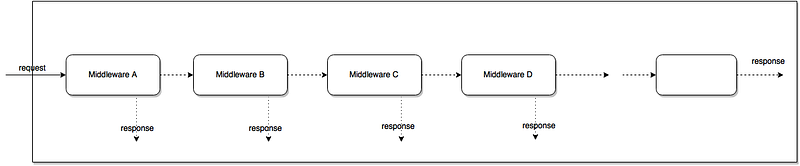
Middleware A is called first, so it will run first, then Middleware B, and so on and so forth

As they are part of express framework, they have access to the request object(req )and response object(res ), and the next function in the application response cycle. For more insight about handling requests in Express, click here.

The next function is a function in the Express which, when invoked, executes the middleware succeeding the current middleware. In short words, this means that the next function will execute the next middleware in the list.

Furthermore, bear in mind that an Express application is essentially a series of middleware calls.

Basic Declaration of Middleware

To declare a middleware function,

const MiddleWareFunction1 = function(req,res,next)=> {
//code to be executed , main logic located here, then 
next()
})

Note:Notice the call to next() . Here, this function invokes the next middleware function in the app.This function must be called, otherwise, the request will be left hanging. The next() function is not a part of the Node.JS or Express API, but is the third argument that is passed to the middleware function. You can name this function whatever you want, but by convention it is always named next .

Using Middleware

To use it, we will use the function called:

app.use(middlewareFunction)

As Express uses middleware in routing methods, we can even use it like so

app.use(route, middlewareFunction)

This means that middlewareFunction() will be called if user navigates to route path.

Chain Like order

As discussed in the starting, if middlewareA is called first, then it will execute first, after that the next middleware functions in the line will execute.

We can write this in code form like so:

app.use(middlewareFunctionA) //Will run first
app.use(middlewareFunctionB) //Will run second
app.use(middlewareFunctionC) //Will run second in line.

Examples

1. MyLogger

Here, we will print the words ‘LOGGED’ whenever a request is passed through the app.

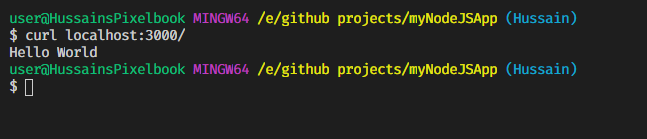
To run it, go to terminal, type : node middleware-basic and then on another terminal , type: curl localhost:3000 . This might be the output:

On client side

client side output

On the server side:

Server side output

2. requestTime function

Remember when I said that middleware functions have access to req and res objects? We can add properties to these objects and then pass them on to next middleware like so:

Here is a simple example to show date and time of when a request is sent:

var requestTime= function((req,res,next)=>{
req.responseTime = Date.now() //add responseTime property to req
next()
})

To use this function, write the code:

console.log not used to there’s no output in the server side. On the client side(where cURL is used) the output is:
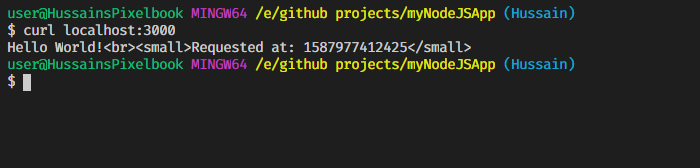
output at client side terminal window

validateAPIKey function

In this function, we will check whether there is an API key present in the URL. If it’s not, then the application will close, otherwise next is called(the app proceeds to next steps).

This way, we can even use middleware to ensure that the URL is correct. This is one common use case of middleware functions.

To run it, perform the node command in first terminal window, then in the second terminal window, use curl like so:
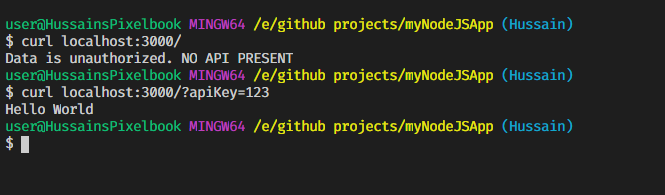
Application proceeds only if API key is found.

Configurable Middleware

Let’s say your middleware function takes up many lines of code. Thus, you want it to be in another module. You can use module.exports . This also makes your middleware configurable. To learn about module.exports , click here.

An example of this can be:

In a file my-middleware.js

module.exports = function (options) {
  return function (req, res, next) {
    // Implement the middleware function based on the options object
    next()
  }
}

In file main.js

var mw = require('./my-middleware.js')

app.use(mw({ option1: '1', option2: '2' }))

Middleware substacks

You can even load multiple middleware functions within app.use to save more time and make your program look less complex.

You can do it like so :

The output is as follows
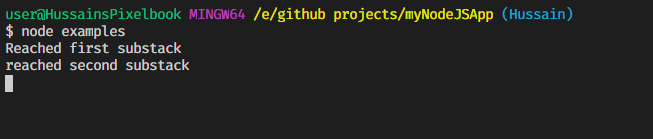
Server side output
Client side output

Error Handling in Middleware

Unlike normal middleware functions which have three parameters, error handling middleware functions will have four parameters:

function (error, req, res, next) {
 console.log(error) //in case an error has occured.
next()
}

The Express API will search through all of our middleware functions. If it finds a middleware with four parameters and not three. It will denote the middleware as an error-handling middleware i.e it will give you access to any error thrown by any of the middleware before it.

Using External Middleware

There are other types of middleware that are built by the programming community to make your production stage or other stages easier, or do some of the heavy lifting of logic for you. They are called External Middleware, or Third-party Middleware

Body-Parser

One such is body-parser . I’ve used it in my previous tutorial. It parses the request body to json,url encoded and others. To use it, you need to install it first:

npm install body-parser

Here’s an example to parse json data

first run node command on one window, then on another window, use curl . The output is as follows

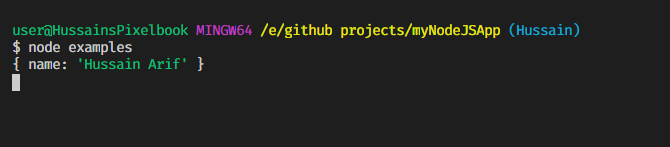
Client side output
Server side output

Note: -H denotes that we have to specify the header. This is important otherwise req.body will return an empty body i.e {} . Therefore, denoting a header is very crucial.

Notice how the JSON data has been parsed by body-parser

Another example of external middleware is morgan, which is used for giving concise logs about your HTTP request.

A Recap Of What We’ve Learnt So Far

  • To declare middleware:
const myMiddleware = function(req,res,next)=>{
// main logic code here
next() //absolutely necessary
})
  • To use it
app.use(myMiddleware)
  • Chain like order can be expressed in code in this way:
app.use(middlewareFunction1) //will run first
app.use(middlewareFunction2) //will run second
app.use(middlewareFunction3) //will run third

Glossary

invoke- Whenever a function is called, this means that the function has been invoked.

External Resources

That’s all for today. Thank you so much for making it to the end!I hope you’ve learnt a lot in this article. Have a great day!

Stay home, stay safe.

A note from JavaScript In Plain English

We have launched three new publications! Show some love for our new publications by following them: AI in Plain English, UX in Plain English, Python in Plain English — thank you and keep learning!

We are also always interested in helping to promote quality content. If you have an article that you would like to submit to any of our publications, send us an email at [email protected] with your Medium username and we will get you added as a writer. Also let us know which publication/s you want to be added to.

Coding
Programming
JavaScript
Nodejs
Expressjs
Recommended from ReadMedium