
Use Case Diagrams and How To Use Them
Business people get use cases
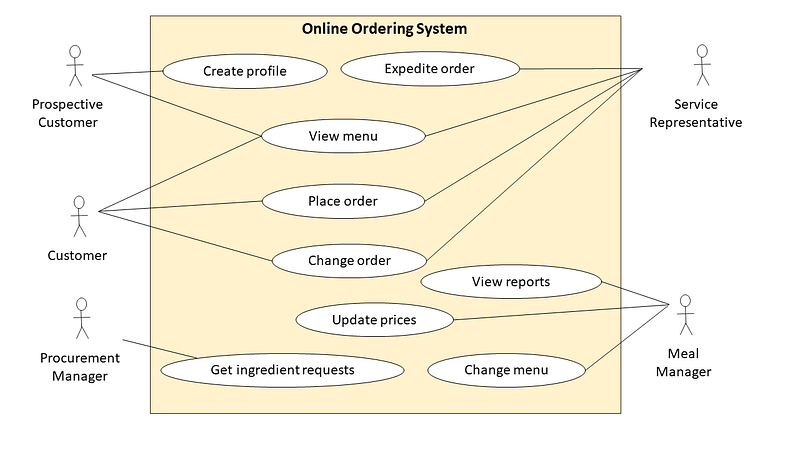
The use case diagram is not dead. At least the version that we call a “business use case diagram”.
In fact, business people love it. It’s simple and business-friendly. You don’t need special training to interpret it. To most, it’s intuitive and self-explanatory.
How to draw a business use case diagram?
You will need three elements — the boundary, the actors and the use cases.
The boundary (a labelled rectangle) depicts a system or a future solution being designed.
The stick people are the actors — the stakeholders that will use the solution. Think of the actors in terms of the roles — for example, Service Representative or Procurement Manager.
The ovals within the boundary are business use cases. They represent the needs of the actors that will be satisfied by the solution.
They will be connected by lines to the actors that have needs captured inside the ovals.
The purpose of the business use case diagram is to indicate the actors that need the solution, and what they need to use it for.
What is the difference between a business use case diagram and a system use case diagram?
Business use cases focus on business needs, use business language and are not dependent on the design or technology.
The diagram itself then is at a higher level.
System use case diagrams are more specific to the architecture and design of a particular application. System use cases represent system functions and, depending on the users of the diagram, can be quite granular.
For notation sticklers, I will note that in a classic use case diagram the oval is reserved for system use cases, and business use cases have an additional diagonal line like this:
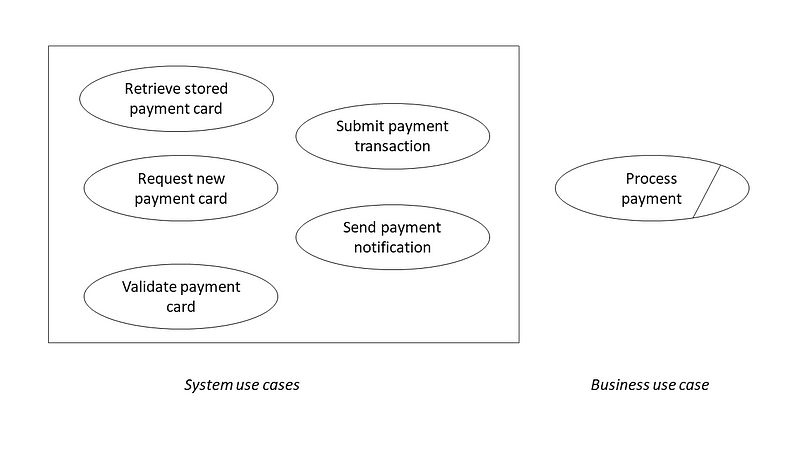
If you are only using business use case diagrams — don’t worry too much about omitting the diagonals — less clutter.
Business stakeholders that we are doing this for won’t mind.
In addition to the lines connecting actors and use cases, a system use case diagram may also indicate relationships between the use cases such as extends and includes.
For a business use case diagram created at a higher level of abstraction, I would keep things simple and leave use case relationships out.
How to name the actors?
Actors may be internal such as the roles within the company, and external — in our example, customers.
We distinguish between the roles based on what is relevant to the problem we are solving.
For example, we may distinguish between a Customer and a Prospective Customer, because we will treat them differently. Prospective Customers will not have access to some features of the solution until they sign up and become active Customers.
On the other hand, you may have many titles in your company for service representatives — junior, senior, and team lead.
If their role in the business process we are analyzing is the same, we don’t need to create separate actors for each. It will only clutter the diagram.
Just use ”Service Representative” to reflect the role.
Your rule of thumb should be to refer to the roles rather than titles. Think of all the vanity titles that may exist in the company — a VP of Product Development, a VP of Agile Transformation, and throw in a VP of Talent Management. What do they need from the solution? One generic role Executive Officer with a use case “View Dashboard” may be sufficient.
How to name the use cases?
Using simple and informative labels is crucial for a diagram as it can either make it very clear or very confusing. Here are some rules:
- Keep labels at a business level
- Use a verb + noun format (the verbs represent action or needs of actors)
- Be brief (drop the articles and non-essential adjectives)
- Focus on stakeholders’ goals — what do they need from the solution?
- Use strong and meaningful verbs
- Enforce correct terminology and use it consistently
Use case diagrams with a single boundary
A classic use case diagram has a single system boundary. The focus is on one solution or system. It may be sufficient for discussing the system itself. In real life, however, whenever we capture the scope of a solution or a system, we need to keep the context in mind. And the context usually involves other systems.
A use case diagram that focuses on one system only will leave some questions unanswered. What about other use cases that are not in the diagram? How will those be accomplished?
Many organizations manage complex landscapes of legacy systems, and new applications and COTS implementations with various degrees of interconnectedness.
In these circumstances, a use case diagram that includes several systems can help understand who does what and where. Adding more to the model can save you a lot of explaining and additional narrative.
Let’s go back to the previous example. The project is going to build a new Online Ordering System. The boundary of the new system has been defined, and use cases in scope have been captured:
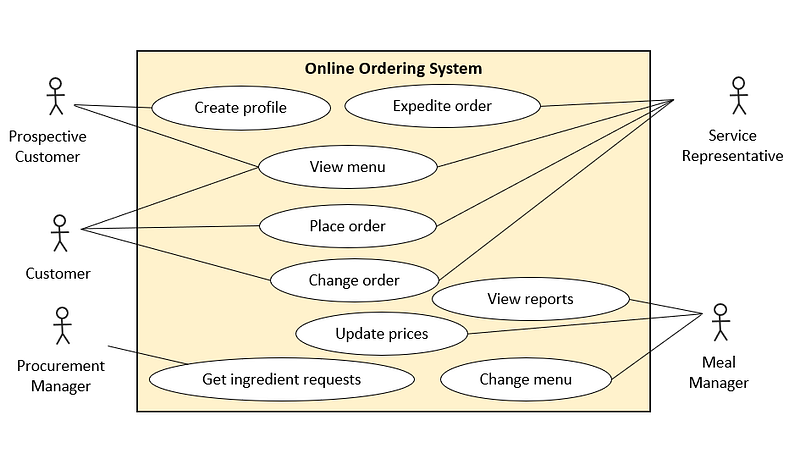
Now, do you understand how the order will be processed end-to-end? Not really, as the new system clearly deals only with a subset of use cases. What happens with the orders that are ready for delivery? How are the deliveries scheduled? Who ensures that all required ingredients are purchased?
This is where an expanded use case diagram comes in handy.
Expanded use case diagrams
In an expanded diagram, we can see other systems that are involved, and what use cases each system supports. Even without explicitly showing integrations between systems, we have more useful information about the context of the new solution.
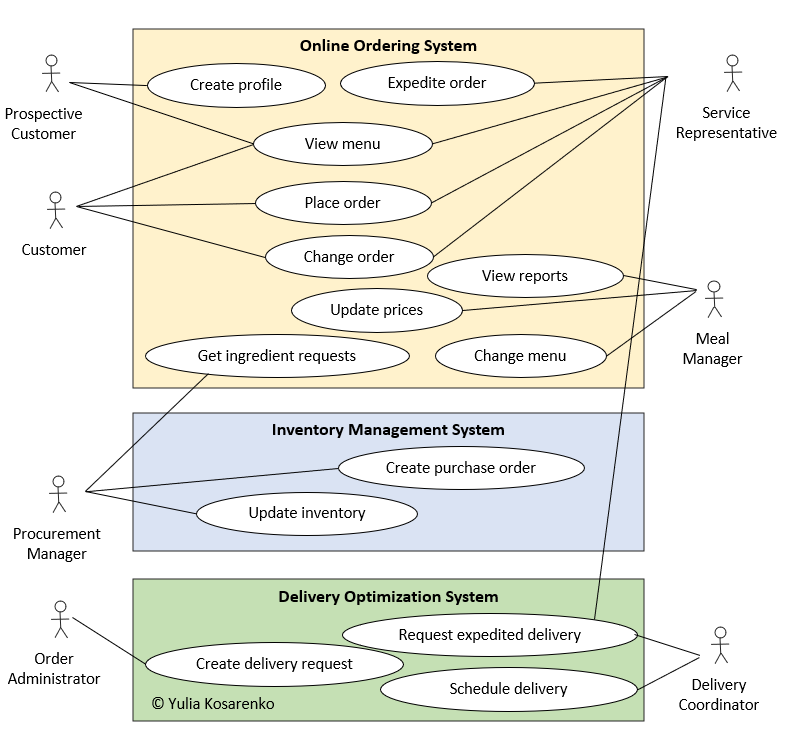
Advantages of expanded use case diagrams:
- Provide a view of use cases across the end-to-end process
- Capture multiple systems required to support the complete user experience
- Highlight actors that must use multiple systems to do their job (“swivel-chair” user experience)
- Bring attention to interfaces (automated or manual) that must exist to exchange data between systems
- Show the complexity of the system interconnections at a high level — can be used as a communication tool with business stakeholders and executive sponsors
- Remind the stakeholders that the new system will not replace all the old clunkers
A business analyst must use a variety of tools to create a shared understanding of business requirements.
A slightly unconventional diagram that helps to bring clarity is better than strict adherence to the rules in the models that the audience does not understand.
So don’t be afraid to improvise, and create engaging, clear, consistent and concise diagrams. The end goal is to build the right solution to the business problem. Visualize the solution with the right diagrams.
Check out this video to learn how to create use case diagrams step-by-step in PowerPoint, Visio or Lucidchart.
Lucidchart (an affiliate link) provides excellent free templates. If you would like to use PowerPoint or Visio, I’ve created templates that are free to download, with detailed instructions and tips to complement the video above. Enjoy!


