
Business Modelling Best Practices
How to communicate effectively with clear, consistent and concise diagrams
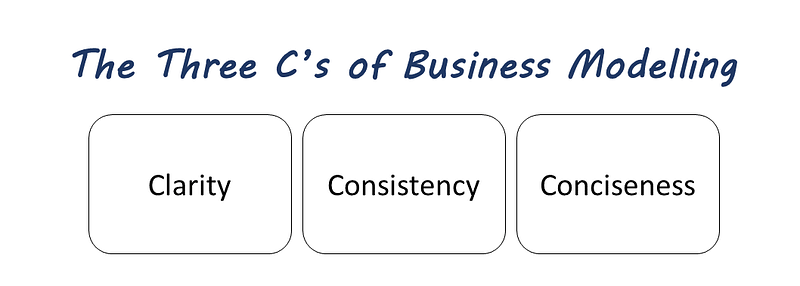
Modelling is a powerful technique for communicating the meaning, breaking down complexity, or explaining how a bicycle works. For anyone involved in architecture, analysis, or design, models are a method or condensing the understanding of systems, products, stories, and experiences into a visual form. For the business architects and analysts, visuals and diagrams are necessary for creating a shared understanding of the strategy, the value stream, and the requirements.
Modelling is not a dark art. Learning its techniques and best practices is a good investment for anyone who needs to communicate and share concepts and ideas with others.
Whenever you are in doubt about whether to create a diagram, remember that a significant part of your audience will be visual.
Best Practice: Clarity
Let’s start with an illustration. How clear is the first example? Why is the second diagram better?
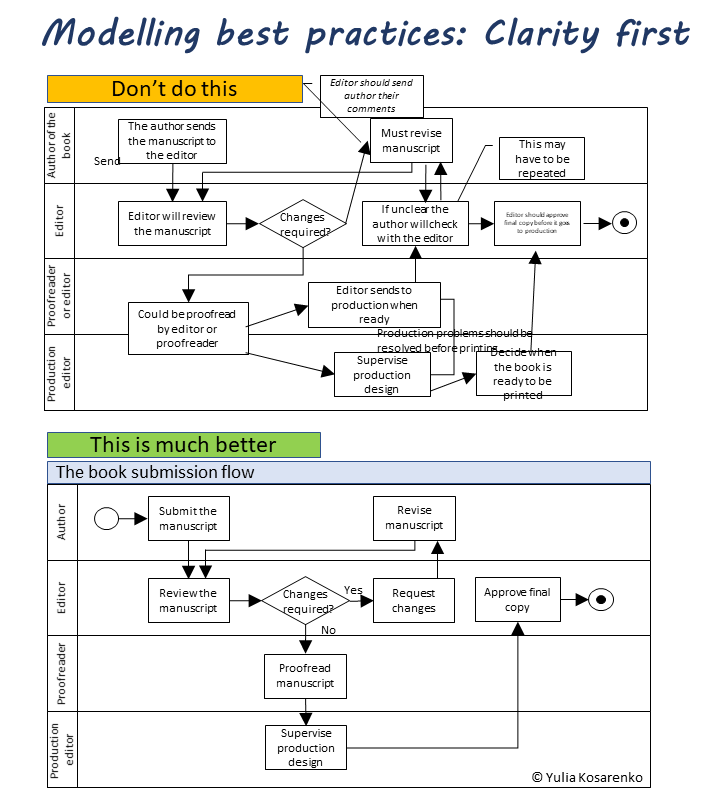
The first diagram is hard to understand — it has quite a few deficiencies in the clarity department:
- The diagram has no title
- It’s unclear where the flow starts
- The swimlane labels are ambiguous — in particular, in the third swimlane
- The lines are crossing and making the flow confusing
- Some boxes have more than one outgoing flow — without the conditions, it’s unclear which flow to follow when
- The alternate flows out of the decision diamond are not labelled
- Some fonts are too small and unreadable
- It’s unclear where do the labels outside of the boxes belong
- Some boxes look like comments or callouts, but it is unclear without a legend
- The descriptions of the activities in the boxes are confusing
We create models to clarify, illustrate, and simplify.
The elements of the model should be laid out in a way that contributes to clarity:
- Use accurate, clear and business-friendly labels
- Labels must clearly belong to objects, and each element must have a label
- Include a legend to explain the diagram elements
- If the sequence is important — make it clear e.g. lay out the elements left to right
- If elements have a hierarchy, show it clearly e.g. top-down
- Keep only the elements that are essential and add to the clarity of the message
- Be clear about the boundaries of the model
- Explicitly label all connections
- Avoid crossing the lines
- Leave enough white space to make the diagram easily readable
Best Practice: Consistency
A model is a simplified representation of something — a process, a concept, a problem, a solution. Consistency is critical to understanding and interpreting the models, whether they are created using a standard notation or unconventional means.
Nor less important, consistency reflects the professionalism of its author. Consistently inconsistent diagrams will raise a doubt in the quality of your other work.
Let’s look at the consistency in the two examples below.
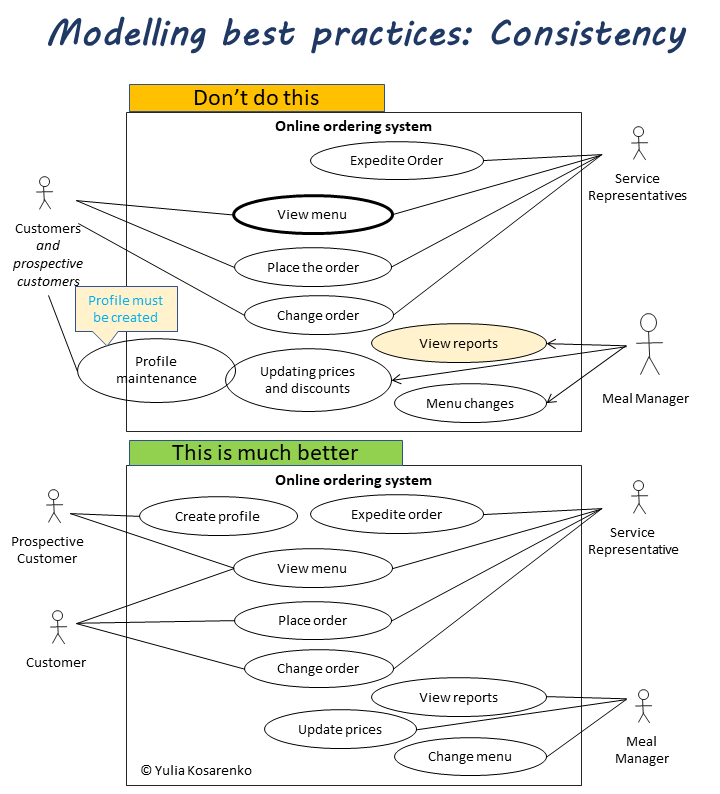
When you are creating a model, you must be ruthless in every detail. Let’s call out a few problems in the first diagram:
- A different color draws attention, but the legend is missing
- Actors are a combination of singular and plural nouns
- Different line width used without obvious reason or legend
- Fonts are not consistent
- Different shape sizes and proportions stick out
- One use case is partially outside the boundary — this is not consistent with use case diagram standards
- Two actors are combined in one stick figure
- Not all use cases follow the same verb + noun naming convention
- Connectors are not consistent (different styles for the same relationship)
- Not all connectors pointing the same actor converge in one point
- A comment is out of place — the diagram can be amended so that comments is no longer required
A good ways to achieve consistency is by using a modelling tool that supplies templates and standard shapes, such as lucid.app (affiliate link).
Be consistent and follow a standard to help the audience comprehend the models created for them:
- Your diagram is either high-level or detailed — keep it at the consistent level of abstraction
- Conform to the modelling standards such as UML, BPMN, TOGAF, or ArchiMate, or use a custom standard with consistency
- Use the same shapes for the same types of objects
- Use the same types of connectors for the same relationships
- If you use color-coding, symbols, and pictograms, they must make sense and have the same meaning in all visuals
- Use consistent labels and naming conventions, such as using verb + noun combinations for use cases and process steps
- Maintain the same style from model to model: consistent font styles, line color, and weight, shape fills, arrow style and size, symbols, headings and legends
Remember that quality matters. At a minimum, inconsistencies will distract your audience from the message and will annoy them. In the worst case, they may cause a misinterpretation that will be replicated in other diagrams, requirements, design, and ultimately in the finished product.
Best Practice: Conciseness
A model should only contain the components essential to represent the main idea.
Think of a map — to show a large area, you let go of details while focusing on what the map was meant to show — the shape, the oceans surrounding it, or the distance from other continents.
A model is concise if removing an element creates a gap in meaning.
A model is cluttered if it has superfluous details that could be moved elsewhere without impacting the overall idea. This includes obvious information that the user of the model should be able to assume without any help.
Let’s use a process flow as an example again — they tend to get cluttered most, even if with the best intentions.
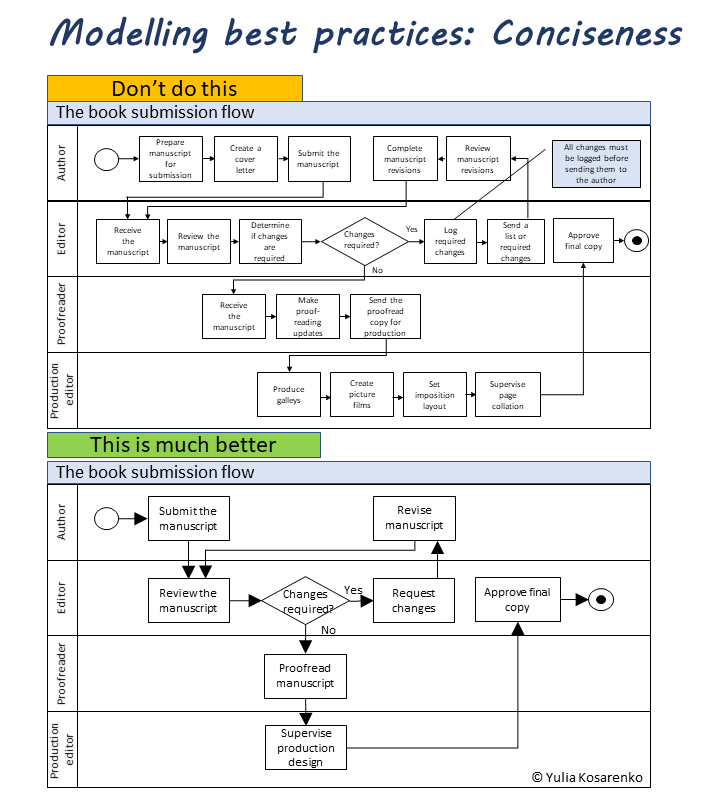
The first model looks very busy, making it hard to follow the flow. Is each box in this version adding important information?
How we can make the first version more concise?
- Include only what is essential to understand the problem or concept
- Omit the obvious
- Use the shortest words possible
- Use the least number of words: cull the articles, prepositions, and adjectives
- Don’t replicate information. For instance, if the connectors indicate who sends and who receives the information, it’s not necessary to include it as activity or comments
- Minimize linear activity sequences in process flows. If multiple steps are always executed in the same order, described it in the documentation or in a sub-flow
- Do not load the model with comments. The narrative and detailed explanations belong in the documentation that supports the model
- When a diagram becomes crowded, split it, or zoom out to a high-level model supported by more detailed visuals
- Replace adjectives and qualities with colors e.g. highlight a problem area with color instead of labeling it
You will not win the respect of your stakeholders by making grandiose, convoluted, or intimidating models. Remove anything that can be removed without taking away from the main message.
Create the model with the audience in mind — your goal is the shared understanding of requirements.
Based on the book “Business analyst: a profession and a mindset”. For more articles and free resources, sign up for my Why Change newsletter.


