
Unleash Your Creativity with ChatGPT — Generating Tweets with Ease
How to integrate ChatGPT to our Twitter account using Python
Twitter is a giant in the world of social media and a powerful tool for any individual to reach a massive audience. Using it together with the brand new OpenAI language model ChatGPT, you can leverage its power and create tweets with ease.
Simply integrate ChatGPT into your Twitter account with Python and watch your tweets come to life!
Let’s discover together how to do so 👇🏻
⚠️ Disclaimer: Natural tweets will be always better and more naturally perceived by your followers. You can always use ChatGPT to get inspiration, but do not rely completely on this model to create content for your account.
#1. Register a Twitter Developer Account and Set Up a Twitter App
To use Twitter’s API, you need to register a developer account. Go to the Twitter Developer website and sign up. After signing up, you will be given access to the Twitter API and you will be able to set up a Twitter app.
To do this, log into your Twitter account and go to the Twitter Developer Dashboard. Click on the Apps tab, then click the CREATE AN APP button. Fill out the required information and create your app.
To connect ChatGPT to Twitter, you will need to obtain your API key and access tokens. You can find how to do this in the following link:
#2. Install Required Libraries
To use the Twitter API and the ChatGPT model, you will need to install the following libraries in Python:
- Tweepy: A Python library for accessing the Twitter API.
- OpenAI: OpenAI library for Python is a platform for using pre-trained AI models, including the GPT-3 language model, in Python applications.
You can install these libraries using the following command in your terminal or command prompt:
pip install tweepy, openAI
#3. Connect ChatGPT to Twitter
Once you have your API key and access tokens, you can use the tweepy library to connect ChatGPT to Twitter. The following code demonstrates how to do this.
We first import the library, define our API and access keys and create the connection between python and our Twitter account.
#4. Generate Tweets
Now that you have connected ChatGPT to Twitter, you can generate tweets using the OpenAI language model.
To do this, you will use the openAI library to access the pre-trained model, and use the Twitter API to post tweets directly into your account.
We import the library and define our prompt. It is the most important part, as you need to explain ChatGPT what you want to get. In my case, I wrote the following prompt:
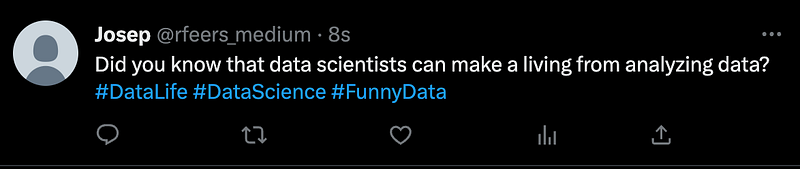
Write for my data science divulgation twitter account a tweet funny tweet about data. Write it in a natural way. Add some hashtags.
We simply generate the tweet text generating a response using the model from the OpenAI library. We can post it on Twitter simply using the Twitter API. The following code demonstrates how to generate tweets:
#6. Check the tweets
We can go to our twitter account and check if our status was updated. As we can observe in the following screenshot, the twitter was posted in my dummy account! :D
Main Conclusions
The connection of ChatGPT to Twitter allows the generation of tweets with ease using the power of the pre-trained OpenAI language model and the reach of Twitter’s massive audience. This integration can unleash creativity by producing tweets in a natural way, including hashtags, based on a user-defined prompt. The integration simplifies the process of posting tweets by automating the creation of the content and directly posting it on the Twitter account.
Data always has a better idea — trust it.
You can suscribe to my Medium Newsletter to stay tuned and receive my content. I promise it will be unique!
If you are not a full Medium member yet, just check it out here to support me and many other writers. It really helps :D
Some other nice medium related articles you should go check out! :D