
Undo Medium Article Revisions
How to view Medium story revisions and restore stories to an earlier version
Sometimes, when writing an article, you find yourself questioning the changes you have made to a draft or published piece.
You had good intentions, but somehow managed to butcher your own article in the quest for perfection.
Luckily, Medium has a built in tool, which helps in this exact scenario.
Medium’s Revision History tool allows you to view past saved versions of your article, and gives you the option to restore an earlier version.
How to Undo Medium Article Revisions
Step 1.
Click on the three dot edit icon (⋯) at the top right hand corner of your article.
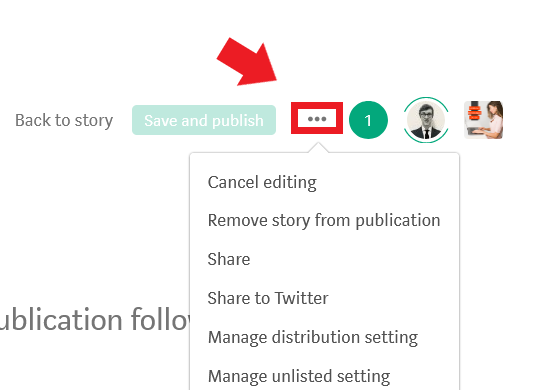
Step 2.
Click the see revision history button from the drop down menu.
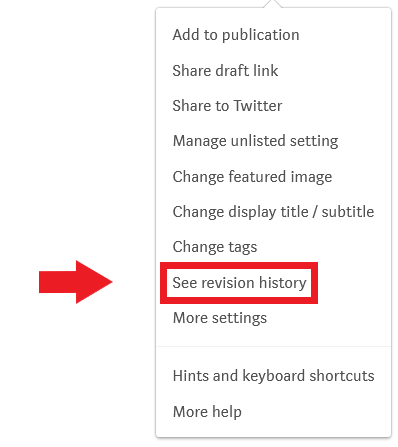
Step 3.
You will now see a list of the auto saved versions of your article. Select one.
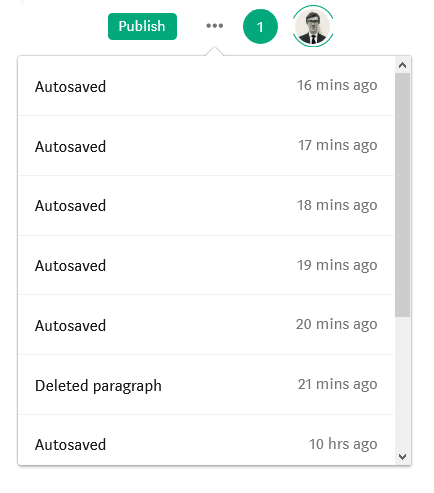
Step 4.
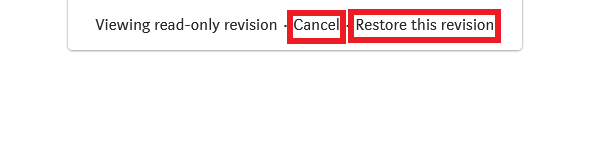
You will now see the auto-saved version of your article, in a read-only format. If this is the correct version, and you want to make this older version of your article the current version, click restore this revision. If you do not want to replace your most recent article with this older version (or you clicked on the wrong older version of your article), click cancel.
Notes About Medium’s Resorting a Revision Function
- If you are editing a currently published article, you can use the cancel editing tool to cancel any unpublished edits.
- Once you restore an older version of your article, you are effectively erasing the current version. When in doubt, copy the original version to a Word document or a new Medium draft.
- If you are looking at an old version for something specific you previously wrote, you can copy the text from the old version, press cancel to maintain the current latest version, and insert the copied text in your current article.
- Medium’s auto-save function is great. But sometimes this leads to a long list of previous versions. So you may have to look through quite a few depending upon how often you were working on the article.

Thanks for reading this article! Leave a comment below if you have any questions. Be sure to sign up for the Blogging Guide newsletter, to get the latest tips, tricks, and news about writing on Medium and to join our Facebook group, Medium Writing, to share your latest Medium posts and connect with other writers.
If you liked this article, here are some other articles you may enjoy:

Casey Botticello is a partner at Black Edge Consulting. Black Edge Consulting is a strategic communications firm, specializing in online reputation management, digital marketing, and crisis management. Prior to founding Black Edge Consulting, he worked for BGR Group, a bipartisan lobbying and strategic communications firm.
Casey is the founder of the Cryptocurrency Alliance, a Super PAC dedicated to cryptocurrency and blockchain advocacy. He is a graduate of The University of Pennsylvania, where he received his B.A. in Urban Studies.
You can connect with him on LinkedIn, Twitter, Facebook, or by visiting his website, Blogging Guide.


