avatarCasey Botticello

Free AI web copilot to create summaries, insights and extended knowledge, download it at here

2073

Abstract

e-revisions-657478948270">undo article revision</a> tool.</li><li>You must confirm you wish to cancel editing so your story to save and revert to its previous version.</li><li>If you made changes to the article’s tags, make sure that you double check and see if your tags are correct. I have noticed that this is sometimes not correctly changed when using this function.</li></ul><p id="89c7"><a href="undefined">Casey Botticello</a></p><figure id="5f44"><img src="https://cdn-images-1.readmedium.com/v2/resize:fit:800/1*yxZs_V4qKTyOtgwmCpL28g.png"><figcaption></figcaption></figure><p id="0037"><i>Thanks for reading this article! Leave a comment below if you have any questions. Be sure to sign up for the <a href="http://bit.ly/MBG-Footer-1"><b>Blogging Guide newsletter</b></a>, to get the latest tips, tricks, and news about writing on Medium and to join our Facebook group, <a href="http://bit.ly/Medium-Facebook-Group-Footer-Link"><b>Medium Writing</b></a>, to share your latest Medium posts and connect with other writers.</i></p><div id="d9dc" class="link-block"> <a href="https://bloggingguide.substack.com"> <div> <div> <h2>Blogging Guide</h2> <div><h3>Learn How to Make Money Writing Online | Medium · Substack · Amazon KDP · Social Media Marketing · SEO · Building a…</h3></div> <div><p>bloggingguide.substack.com</p></div> </div> <div> <div style="background-image: url(https://miro.readmedium.com/v2/resize:fit:320/0*5gut5KQDVF_FVCuc)"></div> </div> </div> </a> </div><h2 id="55cd">If you liked this article, here are some other articles you may enjoy:</h2><div id="7d79" class="link-block"> <a href="https://readmedium.com/tk-notes-mediums-little-known-feature-used-when-editing-articles-f94a0c0f419d"> <div> <div> <h2>TK Notes — Medium’s Little Known Feature Used When Editing Articles</h2> <div><h3>How to add TK n

Options

otes to your Medium articles (and why they are useful)</h3></div> <div><p>medium.com</p></div> </div> <div> <div style="background-image: url(https://miro.readmedium.com/v2/resize:fit:320/1*YX2zaE6n3jpVpycmVVBc9g.png)"></div> </div> </div> </a> </div><div id="8a1c" class="link-block"> <a href="https://readmedium.com/how-to-publish-a-story-as-unlisted-on-medium-aa2d00bdc1ea"> <div> <div> <h2>Medium Unlisted Post</h2> <div><h3>How to create an unlisted post on Medium</h3></div> <div><p>medium.com</p></div> </div> <div> <div style="background-image: url(https://miro.readmedium.com/v2/resize:fit:320/1*O0Y-KIc4ZBvmkPbtWvAVrQ.png)"></div> </div> </div> </a> </div><figure id="0e12"><img src="https://cdn-images-1.readmedium.com/v2/resize:fit:800/1*WVlPA9DlzNCkryxXqGVxcg.png"><figcaption></figcaption></figure><p id="87fc"><b>Casey Botticello</b> is a partner at Black Edge Consulting. Black Edge Consulting is a strategic communications firm, specializing in online reputation management, digital marketing, and crisis management. Prior to founding Black Edge Consulting, he worked for BGR Group, a bipartisan lobbying and strategic communications firm.</p><p id="c43e">Casey is the founder of the Cryptocurrency Alliance, a Super PAC dedicated to cryptocurrency and blockchain advocacy. He is a graduate of The University of Pennsylvania, where he received his B.A. in Urban Studies.</p><blockquote id="2458"><p><i>You can connect with him on <a href="https://www.linkedin.com/in/caseybotticello/"><b>LinkedIn</b></a>, <a href="https://twitter.com/caseybotticello"><b>Twitter</b></a>, <a href="https://www.facebook.com/groups/mediumwriting"><b>Facebook</b></a>, or by visiting his website, <a href="https://www.bloggingguide.org"><b>Blogging Guide</b></a>.</i></p></blockquote></article></body>

Medium Cancel Edits to Story

How to cancel edits you made to a published Medium article
Source: Casey Botticello of Blogging Guide

Writing on Medium is very user friendly and intuitive. However, if you’re like me, you are used to writing in Microsoft Word and still look for the undo icon at the top of the page, after making an erroneous change to a published Medium article that you are editing.

Luckily, Medium does have a function that can make undoing changes pretty simple.

The cancel editing tool allows users to undo all unpublished changes to an article.

How Do I Cancel Editing?

Step 1.

Click on the three dot edit icon (⋯) at the top right hand corner of your article.
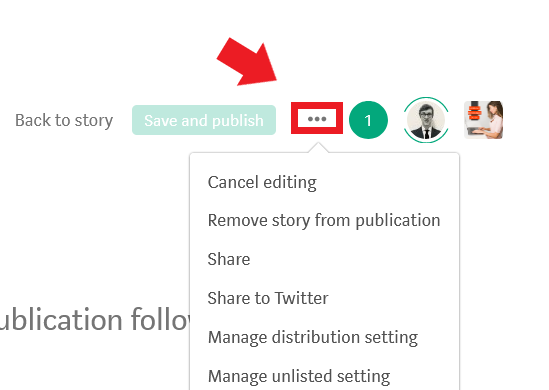
Step 2.

Select the cancel editing button from the drop down toolbar.
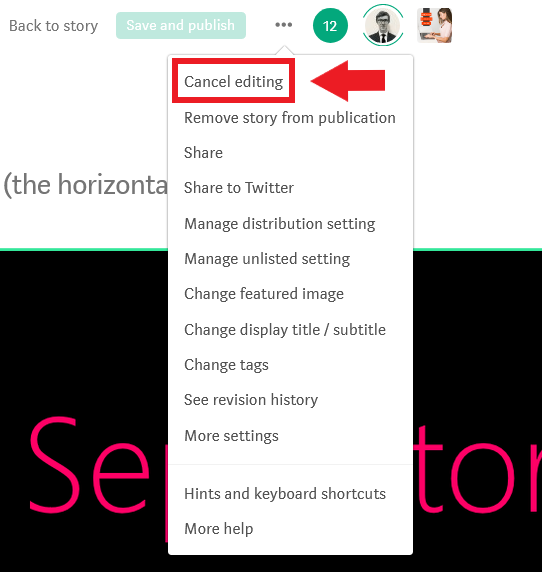
Step 3.

Confirm that you are erasing unpublished changes to an article.
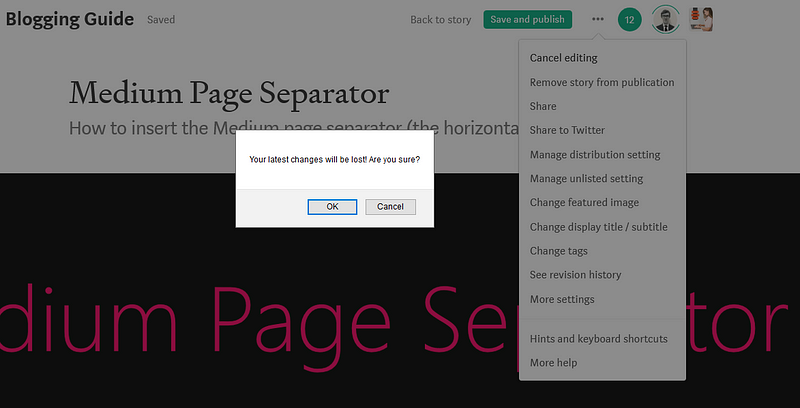
Notes About The Cancel Editing Function

  • The cancel editing function only works on published articles. For drafts, you must use the undo article revision tool.
  • You must confirm you wish to cancel editing so your story to save and revert to its previous version.
  • If you made changes to the article’s tags, make sure that you double check and see if your tags are correct. I have noticed that this is sometimes not correctly changed when using this function.

Casey Botticello

Thanks for reading this article! Leave a comment below if you have any questions. Be sure to sign up for the Blogging Guide newsletter, to get the latest tips, tricks, and news about writing on Medium and to join our Facebook group, Medium Writing, to share your latest Medium posts and connect with other writers.

If you liked this article, here are some other articles you may enjoy:

Casey Botticello is a partner at Black Edge Consulting. Black Edge Consulting is a strategic communications firm, specializing in online reputation management, digital marketing, and crisis management. Prior to founding Black Edge Consulting, he worked for BGR Group, a bipartisan lobbying and strategic communications firm.

Casey is the founder of the Cryptocurrency Alliance, a Super PAC dedicated to cryptocurrency and blockchain advocacy. He is a graduate of The University of Pennsylvania, where he received his B.A. in Urban Studies.

You can connect with him on LinkedIn, Twitter, Facebook, or by visiting his website, Blogging Guide.

Medium
Writing Tips
Tools
Editing
Writing
Recommended from ReadMedium
