
Understanding Angular project structure
In my previous article, I discussed how to create a new Angular project using Angular CLI. In this article, let’s understand the structure of the Angular project.

Link to video explanation: https://youtu.be/O7GDOaG6N0Q?si=eaTRZtdblYHhKICh

.angular
This folder is not generated during the initial project creation. It’s created dynamically when the application is run. Even if you delete this folder, it will be regenerated upon rerunning the application.
This behavior is because of the default caching enabled for the Development environment. If you wish to disable caching, there are several configuration commands available to achieve this.”
.vscode
This folder contains settings related to workspace debugging and a few other configurations.
.angular and .vscode folders are unrelated to your project, so you don’t need to concern yourself with them.
.editorconfig
This file contains configurations for the code editor, helping developers working on the same project in maintaining coding style consistency across various editors. It includes file formats to define coding styles.
node_modules
This is the folder where all the packages using npm will reside.
It houses all the packages and libraries that your project depends on. These packages are typically specified in a “package.json” file, and when you run the command to install dependencies (npm install or yarn install), the package manager downloads the required packages and stores them in the "node_modules" folder.
This folder can become quite large, containing all the dependencies and their nested dependencies, but it's essential for your project to run smoothly as it ensures that all the required modules are available for your application to function correctly.
.gitignore
This file specifies untracked files that Git should ignore.
the “node_modules” folder is often sizable and contains dependencies installed via package.json. Since these dependencies can be easily reinstalled, there’s no need to track them in version control.
angular.json
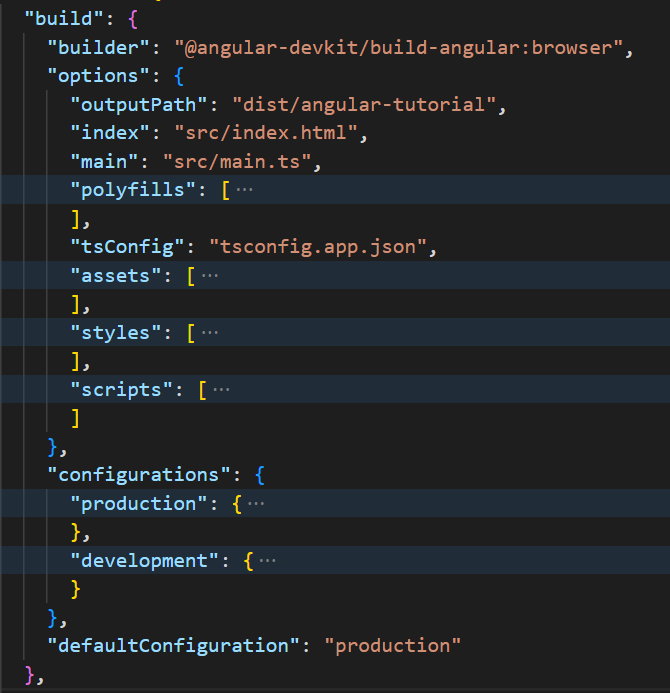
This file contains command-line interface configurations required for the project.
For instance, when running an Angular application, commands like “ng serve” are utilized. The behavior and settings associated with such commands are defined within this configuration file.
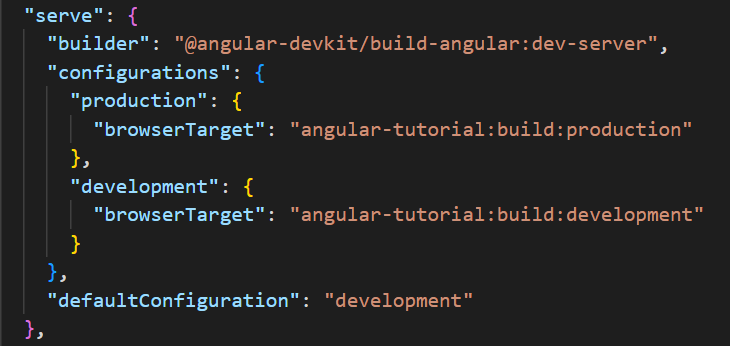
Similarly, when building the project, we execute the “npm build” command. The behavior and actions taken when this command is run are specified within this file.
package.json and pacakge-lock.json
As previously mentioned, “package.json” contains a list of dependencies and their versions. “package-lock.json” serves a similar purpose but is automatically generated by npm whenever packages are installed or updated based on the specifications in “package.json”.
In “package.json”, versions are denoted with the caret symbol (^), indicating a version range starting with the major version. For instance, “^16.0.8” implies that during installation, npm will seek the latest version available which is greater than 16.0.8.
On the other hand, “package-lock.json” locks the specific versions of installed packages and their dependencies. This ensures consistency across environments, preventing conflicts by guaranteeing that the same packages are installed consistently.
README.md
It stands for README.markdown. This file contains information about the project, version of Angular CLI, instructions to build, run, and test the project.
tsconfig.json
This file contains compiler options and settings for the TypeScript project.
Compiler options include ECMAScript version, type-checking options, output directory for the compiled files, etc.
You can also specify which files should be included or excluded from compilation.
tsconfig.app.json
Unlike the tsconfig.json file that contains TypeScript configuration settings for the entire project, including settings that are shared among different parts of the project, this file is specific to the Angular application and contains TypeScript configuration settings tailored for compiling TypeScript files within the “src” directory, where the Angular application source code resides.
tsconfig.spec.json
This file contains the configuration for the application tests.
src
“src” is the primary folder where you will focus your work during Angular application development. It serves as the central location for storing the source code, assets, and configuration files of the Angular project.
Within the “src” folder, you will find subdirectories such as
- “app” for Angular components, services, and modules,
- “assets” for static files like images or stylesheets
- “environments” for environment-specific configuration files.
- “styles.css” to define global styles that apply to all components and templates within the Angular application.
- “main.ts”. This is the entry point for an Angular application. It compiles the application with the JIT compiler and bootstraps the root module which is nothing but AppModule.

6. “index.html” is the main HTML file. It serves as the entry point for for the application when its loaded in a web browser.
The “src” folder is the starting point for developers to create, modify, and organize the code that comprises their Angular application.
favicon.ico
This is the icon displayed in the browser’s tab or address bar when the application is run.
Keep following my articles to learn more about Angular and don’t forget to subscribe to my channel InterviewPro.
Next: Create a new component in Angular
Thank you.


