
Turning ChatGPT Into A Web Search & Scraping Tool With WebChatGPT
Web search & scraping via the browser extension

There has been a lot of talk about WebChatGPT being the browser extension that allows ChatGPT to access the Internet. Well, that is a bit of an exaggeration. However, WebChatGPT is a great tool to turn ChatGPT into a web search and scraping engine if needed. It’s free, open source, and adds the following features to your ChatGPT browser tab:
- access to search results from DuckDuckGo
- customizable prompts that use search results & query
- slash commands to refine search results and search a specific site
- DuckDuckGo Bangs
TLDR, not all of the features are perfect at this time. However, customizable prompts and Bangs can be used to create pretty handy workflows. Let's take a closer look.
Getting started
First, download your browser’s version of WebChatGPT here:
Firefox: https://addons.mozilla.org/de/firefox/addon/web-chatgpt/
Chrome: https://chrome.google.com/webstore/detail/webchatgpt-chatgpt-with-i/lpfemeioodjbpieminkklglpmhlngfcn
Edge: https://microsoftedge.microsoft.com/addons/detail
Once downloaded, go into your browser’s settings and activate the extension (if you haven’t been asked to activate it automatically).
Basic Usage
Once the extension is activated, each time you navigate to chat.openai.com to use the ChatGPT interface, the extension will make slight adaptations to the website, e.g. adding this little menu below the default input box:

With the “Web access” slider activated, WebChatGPT will then use your input, send it to DuckDuckGo, and use the results from the search engine in a new prompt that gets injected into your ChatGPT conversation:

For example, my input
What is sea cucumber?gets replaced by WebChatGPT with this prompt
Web search results:

[1] "Sea cucumbers are echinoderms from the class Holothuroidea. They are marine animals with a leathery skin and an elongated body containing a single, branched gonad. Sea cucumbers are found on the sea floor worldwide. The number of holothurian species worldwide is about 1,717, with the greatest number being in the Asia-Pacific region. Many of these are gathered for human consumption and some species are cultivated in aquaculture systems.

        More at Wikipedia"
URL: https://en.wikipedia.org/wiki/Sea_cucumber

[2] "Sea cucumbers are echinoderms from the class Holothuroidea ( / ˌhɒləˌθjʊəˈrɔɪdi.ə, ˌhoʊ -/ ). They are marine animals with a leathery skin and an elongated body containing a single, branched gonad. Sea cucumbers are found on the sea floor worldwide."
URL: https://en.wikipedia.org/wiki/Sea_cucumber

[3] "Sea cucumber is a popular ingredient in Asian and Middle Eastern cuisine and has been used in traditional Chinese medicine. Sea cucumbers are incredibly nutritious Sea cucumbers are an..."
URL: https://www.healthline.com/nutrition/sea-cucumber


Current date: 29.4.2023

Instructions: Using the provided web search results, write a comprehensive reply to the given query. Make sure to cite results using [[number](URL)] notation after the reference. If the provided search results refer to multiple subjects with the same name, write separate answers for each subject.
Query: What is sea cucumber?
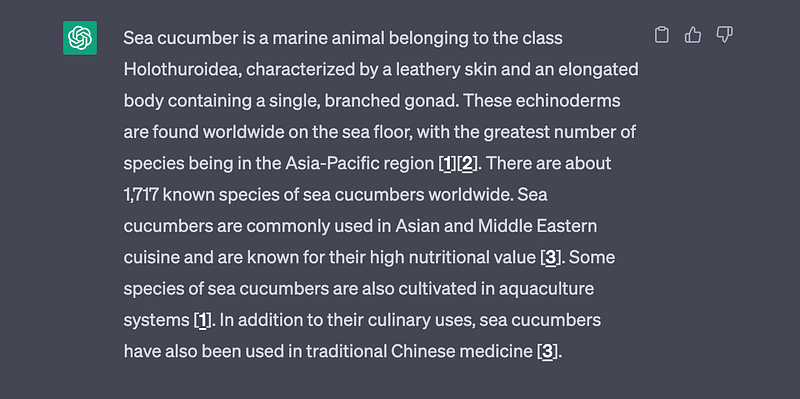
which ChatGPT then replies to:
Advanced usage: Custom prompts
A really great feature of WebChatGPT is the possibility to create custom prompts that work with search results & queries. Choose “New Prompt” from the dropdown menu on the right and a new tab will open in which you can create your custom WebChatGPT prompt:
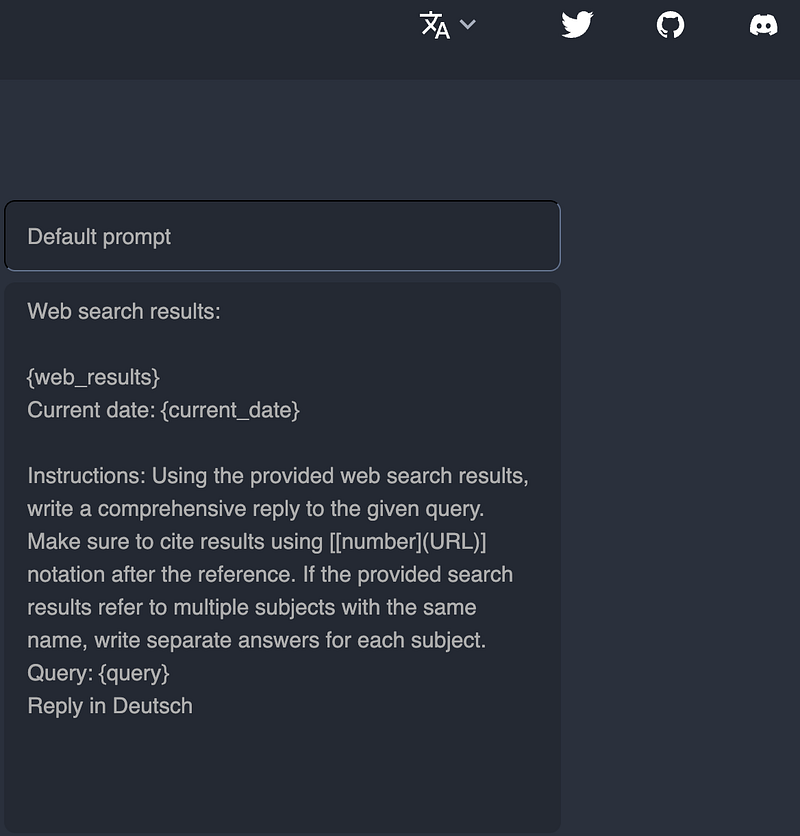
Replace “Default prompt” with a name for your new prompt and use the variables {web_results}, {query}, and {current_date} to refer to the DuckDuckGo search results or your search query (i.e. what you enter in the ChatGPT input).
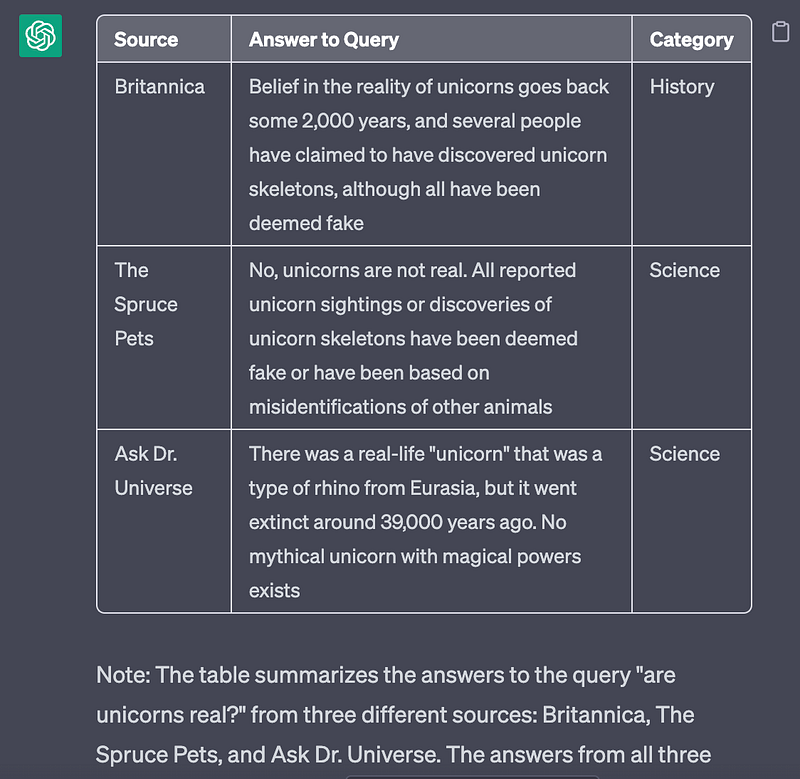
For example, you can create a new prompt named “table” and have the search results structured and evaluated in a table like this:
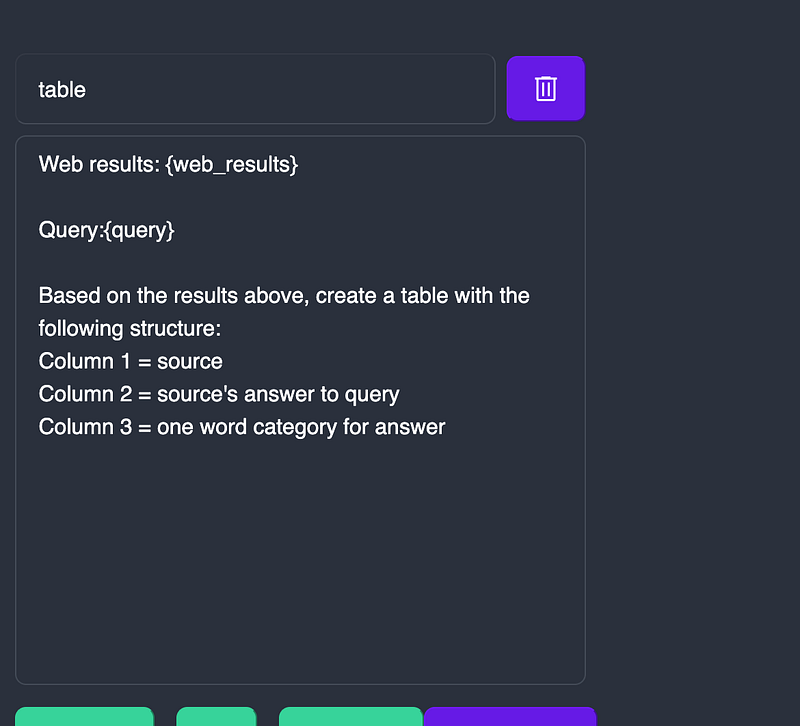
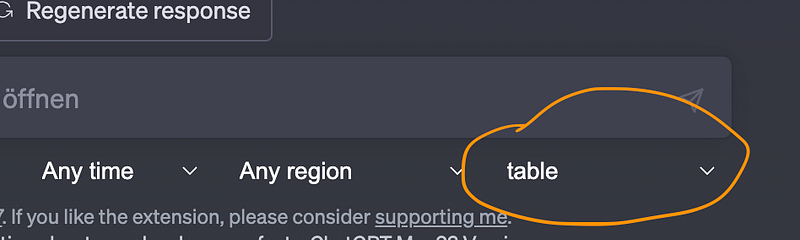
Once saved, choose your custom prompt in the lower right corner of WebChatGPT’s interface add-on:
When I now ask ChatGPT:
Are unicorns real?WebChatGPT forwards my query to DuckDuckGo and creates the following prompt using the results and my initial question:
Web results: [1] "A belief in the reality of unicorns goes back some 2,000 years, and it was especially strong in the mid-18th century, due to the sketching of what reportedly was a unicorn skeleton by the great philosopher Gottfried Wilhelm Leibniz. (It was an honest mistake, the field of paleontology then very much in its infancy.)"
URL: https://www.britannica.com/topic/Unicorns-They-Exist-2130405

[2] "Several unicorn skeletons also have been discovered, but all of them have been deemed fake. In the 1600s, German scientist and inventor Otto von Guericke created a fake unicorn skeleton with bones locals found in a cave. And a sketch based on the model was even included in a book on natural history written in the 1700s."
URL: https://www.thesprucepets.com/are-unicorns-real-1885833

[3] "This real-life unicorn was a kind of rhino from Eurasia. But it was bigger than modern rhinos and probably galloped like a horse. Scientists have known about Siberian unicorns since 1808. For a long time, they thought the unicorns went extinct 200,000 years ago. Recently, that changed. Now they think the unicorns went extinct closer to 39,000 ..."
URL: https://askdruniverse.wsu.edu/2023/04/06/7129/


Query:/table are unicorns real?

Based on the results above, create a table with the following structure:
Column 1 = source
Column 2 = source's answer to query
Column 3 = one word category for answer
ChatGPT’s response looks like this:
Advanced Usage: DuckDuckGo Bangs
Thanks to the implementation of DuckDuckGo, their “Bangs” are also available via WebChatGPT. DuckDuckGo Bangs are shortcuts for searches on other platforms.
For example, if you have WebChatGPT activated and type
!a life 3.0… under the hood, WebChatGPT uses DuckDuckGo’s Bang “!a” to conduct a search for "life 3.0" on Amazon. The search results from Amazon are then integrated into the prompt that gets reinjected into ChatGPT.
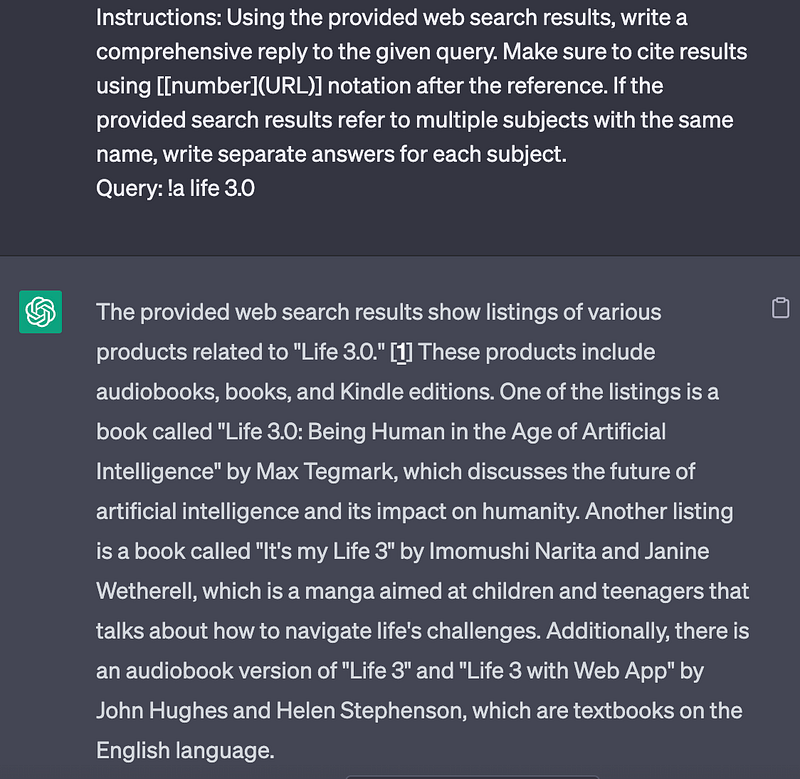
However, this does not work seamlessly with every DuckDuckGo Bang.
You can youse this tool to browse through all the 13.500 Bang shortcuts and: https://duckduckgo.com/bangs (for example, I found most social media bangs not to work properly, but !gn (Google News), !arxiv and !w (Wikipedia) worked well.)
Slash Commands
WebChatGPT currently offers two preset slash commands, that let you refine the search results being used in the prompts. The first one is:
/site
This command is intended to limit DuckDuckGo’s search results to a specific website. Unfortunately, this only sets a preference for the website you enter.
For example:
/site:www.wikipedia.com What's sea cucumber?gets send to DuckDuckGo and the results become this prompt:
Web search results:

[1] "Sea cucumbers are echinoderms from the class Holothuroidea ( / ˌhɒləˌθjʊəˈrɔɪdi.ə, ˌhoʊ -/ ). They are marine animals with a leathery skin and an elongated body containing a single, branched gonad. Sea cucumbers are found on the sea floor worldwide."
URL: https://en.wikipedia.org/wiki/Sea_cucumber

[2] "Sea Cucumbers Sea cucumbers are echinoderms—like starfish and sea urchins. There are some 1,250 known species, and many of these animals are indeed shaped like soft-bodied cucumbers. All..."
URL: https://www.nationalgeographic.com/animals/invertebrates/facts/sea-cucumbers

[3] "Sea cucumbers are a class of echinoderms, the Holothuroidea. They have a longish body, and leathery skin. Sea cucumbers live on the floor of the ocean. Most sea cucumbers are scavengers. There are about 1500 species of sea cucumbers. Sea cucumbers have a unique respiratory system, and effective defences against predators."
URL: https://simple.wikipedia.org/wiki/Sea_cucumber


Current date: 29.4.2023

Instructions: Using the provided web search results, write a comprehensive reply to the given query. Make sure to cite results using [[number](URL)] notation after the reference. If the provided search results refer to multiple subjects with the same name, write separate answers for each subject.
Query: sea cucumber
Obviously, although Wikipedia became the preferred source in the results, there is also a result from National Geographic that ChatGPT will work with.
/page
This command allows you to scrape a single website for information. Keep in mind that this will result in an error when the website you specify has too much text to fit into ChatGPT’s context window.
For example, my input
/page:https://docs.midjourney.com/docs/blend how does the blend command work?makes WebChatGPT scrape the page I specified and inject the results into my ChatGPT conversation with this prompt:
Web search results:

[1] "The /blend command allows you to upload 2–5 images quickly and then looks at the concepts and aesthetics of each image and merges them into a novel new image.
  /blend is the same as using multiple image prompts with /imagine, but the interface is optimized for easy use on mobile devices.
/blend works with up to 5 images. To use more than 5 images in a prompt use image prompts with /imagine
/blend does not work with text prompts. To use text and image prompts together, use image prompts and text with  /imagine
/blend Options
After typing the /blend command, you will be prompted to upload two photos. Drag and drop images from your hard drive or add images from your photo library when using a mobile device. To add more images, select the optional/options field and select image3, image4, or image5. The /blend command may take longer to start than other commands because your images must be uploaded before the Midjourney Bot can process your request.
Blended images have a default 1:1 aspect ratio, but you can use the optional dimensions field to select between a square aspect ratio (1:1), portrait aspect ration (2:3), or landscape aspect ratio (3:2).
Custom suffixes are added to the end of /blend prompts,  like any other /imagine prompt. Aspect ratios specified as part of the /blend command override aspect ratios within a custom suffix.
  Blending Tip
  For the best results, upload images that are the same aspect ratio as your desired result.
How to Use /blend"
URL: https://docs.midjourney.com/docs/blend


Current date: 29.4.2023

Instructions: Using the provided web search results, write a comprehensive reply to the given query. Make sure to cite results using [[number](URL)] notation after the reference. If the provided search results refer to multiple subjects with the same name, write separate answers for each subject.
Query: how does the blend command work?
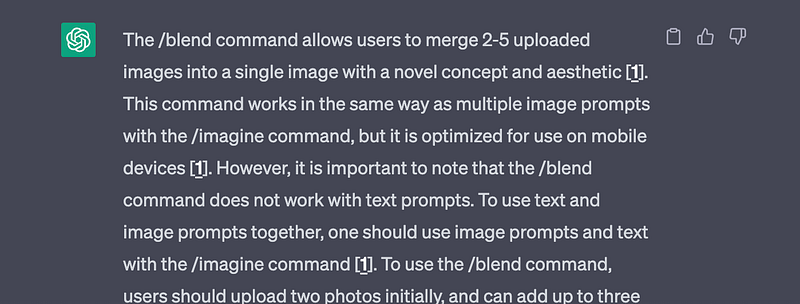
As a result, I get:
Further Information
There’s a Discord server where you can find the latest announcements for WebChatGPT. If you want to check out WebChatGPT’s source code or modify it to fit your needs, you can do so here: https://github.com/qunash/chatgpt-advanced
➡️ For more information about AI & Creativity, follow me on Twitter or Medium (use my referral link to get full access to all my articles and those of thousands of other writers).
➡️ If you like my content, why not leave a “clap” at the end of this article, so more people can see it?
You might also like:
Stay updated with the latest news and updates in the creative AI space — follow the Generative AI publication.


