
Troubleshooting Cross-Account AMI Permissions
ACM.214 when sharing a cross-account AMI doesn’t work and error messages don’t help
Part of my series on Automating Cybersecurity Metrics. The Code.
Free Content on Jobs in Cybersecurity | Sign up for the Email List
In the last post I showed you how I created an image of an EC2 instance and shared it to another account.
In another account, I have some images that I created with Hashicorp Packer and then use to start EC2 instances. I may explain that later but for now here’s the problem.
When I go to the image and share it to an external account as I showed you in my last post, it’s not working correctly.
Here’s the odd thing. After sharing the AMI, I tried to start an EC2 instance from it, because I presumed it use the same keys as the AMIs in my last post. The instance immediately starts and stops. I know from experience this is usually an encryption problem. But let’s look at what the error messages say.
I look at the AMIs in the account to which they are shared. Here I see the following. Note that I am looking at a different AMI ID here, but they all have the same problem.
Error loading snapshots: The snapshot ‘snap-xxxxxxxxx’ does not exist.
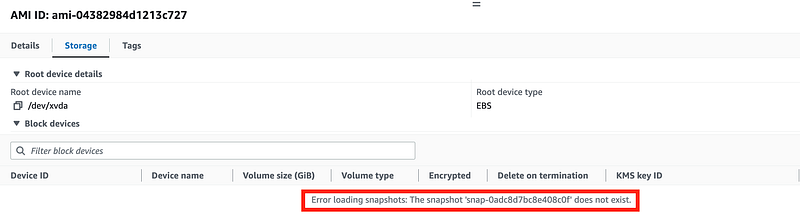
That is not the root problem. I really wish AWS would align the error messages with the root cause.
Next I log back into the account from which I shared the AMI. I can take a look at the snapshots for that particular AMI and see that some exist. I’m going to make sure I’m looking at the correct AMI by verifying the AMI ID is the same in both accounts.

Next look at the AMI permissions and make sure you share the AMI to the correct account number. I have.
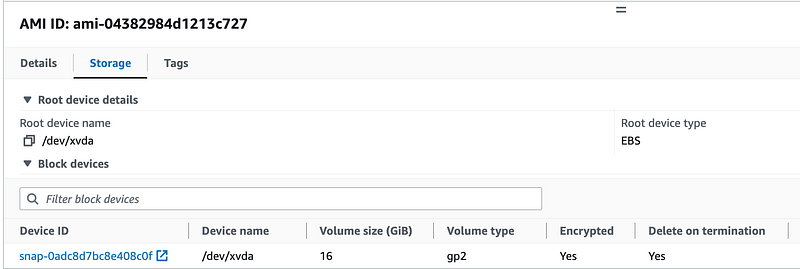
Then take a look at the storage tab.
Note that the snapshots exist. However, the snapshot ID does not match the snapshot in the error message.
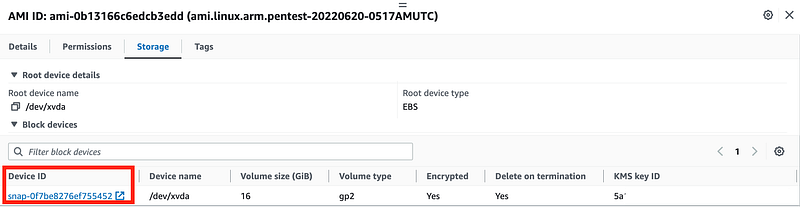
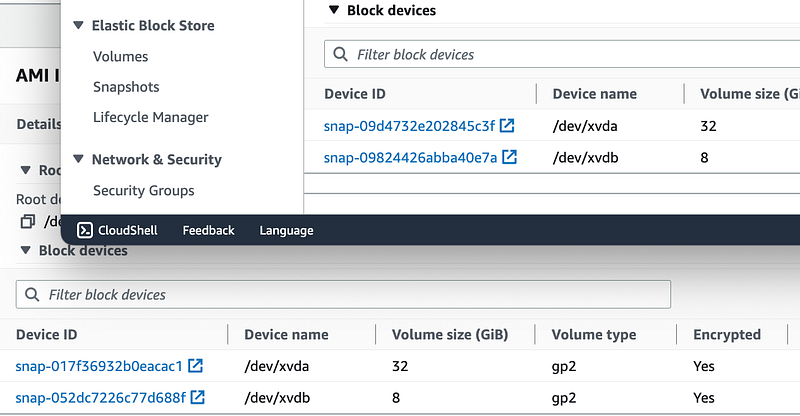
That is to be expected. If you look at the snapshot IDs for the image I shared in my last post, the snapshots are different:
I take a look at the Key ID.
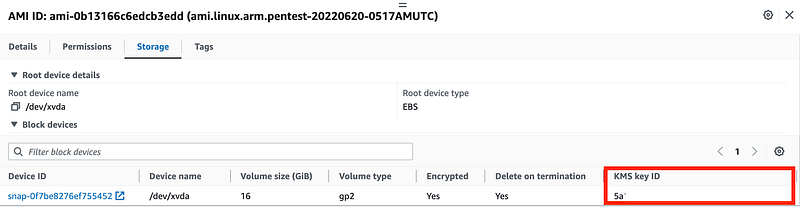
Is that the same key I granted access to in my last post? It is not.
I need to go add permissions to that key as explained in my last post.
Before that I take a look at CloudTrail for any description of the problem.
First I look in CloudTrail in the account to which the AMI is shared. I see no error except the AMI snapshot doesn’t exist. I see no errors related to the shared AMI or anything indicating the snapshot could not be created when the AMI was shared.
Next I look in the account where the AMI exists. No errors exist in CloudTrail indicating the AMI could not be shared.
I also check the CloudTrail logs in the account where the key exists. Again, no errors indicating a problem with accessing KMS keys exist in this account related to the AMI share.
Out of curiosity I deleted the permissions to share the AMI and re-shared it.
I check all the logs again.
~~~~
I don’t see any error messages indicating that the AMI could not be shared or that any problem exists which would prevent the account to which he AMI is shared from accessing this AMI at the point the AMI is shared and the snapshot should have been created.
~~~~
After updating the key permissions to allow the target account to use the key with which the AMI was encrypted, I still get the same error. I removed and re-added the permissions. Same error.
Next I remembered that I restricted use of the AMI to a specific OU:

Let’s remove that since I’m migrating all of this and this restriction no longer applies.
No. Still does not work.
What if I add permissions so the external account can access the snapshot in the account that owns the AMI? I did not have to do that the last time or every before but let’s try it.
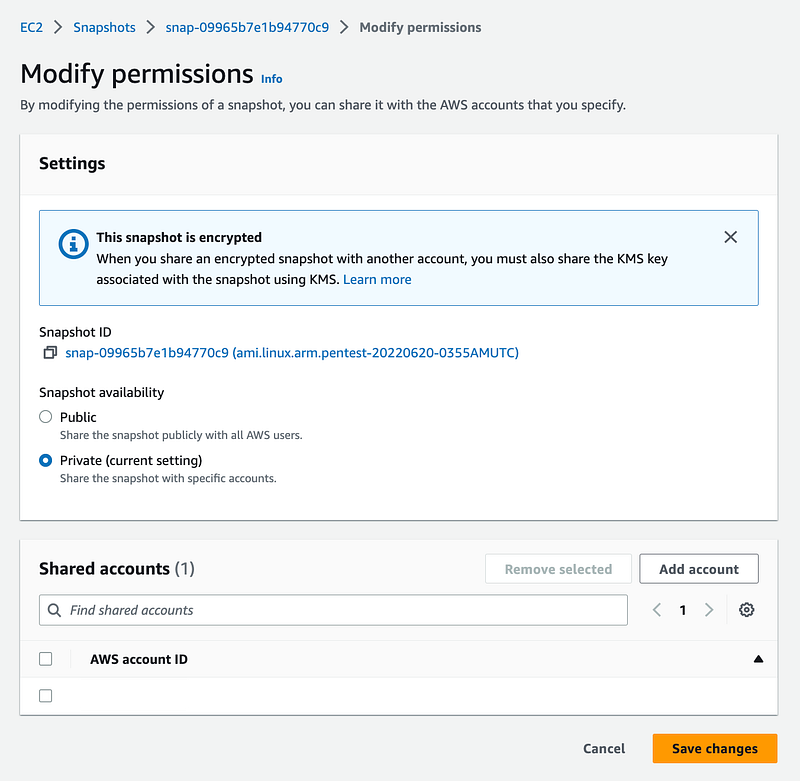
And…now I have a snapshot in the target account to which I’ve shared the AMI.
Now, I’ve been sharing AMIs for quite some time and I never had to take this additional step before. I don’t know if it is related to the particular configuration in this case or something changed at AWS. But in any case this resolved my problem with the snapshot.
Ok, let’s try to launch an EC2 instance with that AMI again…no luck.
Once again, I look in CloudTrail in all three related accounts and I can’t seem to find any errors related to this problem. I’m using the read-only option but clearing the true/false flag. I tried a couple of other options but this is what helped me find it.
I limited the resource to the AMI in question. Then I found the RunInstances action.
Then I used the timestamp to find the prior actions in the log, and as you can see below there’s an AccessDenied error just before RunInstances. I’m not sure why I didn’t see it before.

Then I looked at the next action which happens to be ReEncrypt — as expected KMS is the issue, as per usual, when trying to start an AMI that mysteriously terminates with no explanation.
I click on the ReEncrypt event and there I see the error message:
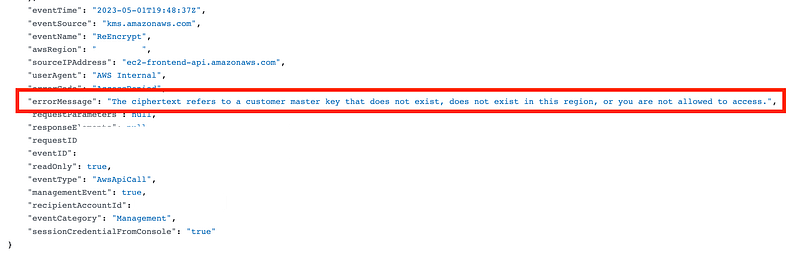
The ciphertext refers to a customer master key that does not exist, does not exist in this region, or you are not allowed to access.
That is not exactly obvious and AWS really needs to work on KMS error messages. I will keep reiterating this until hopefully someone sees this who can fix the problems with them.
The key exists, so there must be a problem with my key policy.
Additionally, the resources referenced in the error message inaccurately list nothing. This needs to show the key accessed, and whatever it was trying to ReEncrypt. I hope the KMS team will work on properly populating this information in the future.

I looked at my key policy and I have two accounts with very similar account numbers. I mistakenly though the account had access when it was actually another account. So I added the account that needed access.
Let’s see if my AMI works now.
No. The instance immediately terminates. I look at the key policy again.
I needed to add the account number in two separate statements the way that key policy was written.
And finally. It works.
More reasons for a generic key policy
And…I’m really looking forward to moving to the new account with the generic KMS key policy — that works.
Troubleshooting KMS errors is not fun.
The AWS error messages could be more helpful!
Hopefully the AWS Organizations, KMS, EC2, and CloudTrail teams will get together and improve the error messages in this post to make it easier to troubleshoot the related problems. #awswishlist
I feel that the AMI should not be sharable or at least you should get a warning if it is not going to be usable in the remote account.
Also, the KMS error message needs the appropriate resources associated with it so it is easier to find and the error message needs to show up in the error column in the CloudTrail console.
If sharing a snapshot is now a requirement also, that should also be a warning when trying to share the AMI. I’m not sure if there was actually any helpful error message at all in that case.
Well, another problem solved that took way too long…moving on.
Sharing to an Organization
Oh and by the way, about that organization restriction — I’m not sure what it is supposed to do but it doesn’t prevent someone from outside your organization from accessing your resources. It may enable the organization to see resources but it does not restrict anything. I was able to share another AMI externally with that permission in place. I have also not had success with that allowing access to an external account in the same organization either unless that got fixed. I may revisit that later.
Follow for updates.
Teri Radichel | © 2nd Sight Lab 2023
The best way to support this blog is to sign up for the email list and clap for stories you like. That also helps me determine what stories people like and what to write about more often. Other ways to follow and support are listed below. Thank you!
About Teri Radichel:
~~~~~~~~~~~~~~~~~~~~
Author: Cybersecurity for Executives in the Age of Cloud
Presentations: Presentations by Teri Radichel
Recognition: SANS Difference Makers Award, AWS Security Hero, IANS Faculty
Certifications: SANS
Education: BA Business, Master of Software Engineering, Master of Infosec
Company: Cloud Penetration Tests, Assessments, Training ~ 2nd Sight Lab
Like this story? Use the options below to help me write more!
~~~~~~~~~~~~~~~~~~~~~~~~~~~~~~~~~~~~~~~~~~~~~~~~~~~~~~~~~~~~~
❤️ Clap
❤️ Referrals
❤️ Medium: Teri Radichel
❤️ Email List: Teri Radichel
❤️ Twitter: @teriradichel
❤️ Mastodon: @[email protected]
❤️ Facebook: 2nd Sight Lab
❤️ YouTube: @2ndsightlab
❤️ Buy a Book: Teri Radichel on Amazon
❤️ Request a penetration test, assessment, or training
via LinkedIn: Teri Radichel
❤️ Schedule a consulting call with me through IANS ResearchMy Cybersecurity Book: Cybersecurity for Executives in the Age of Cloud



