
Transferring Files in S3 Between AWS Accounts
ACM.129 Migrating web site files and configuration before transferring domain names
Part of my series on Automating Cybersecurity Metrics. S3. The Code.
Free Content on Jobs in Cybersecurity | Sign up for the Email List
Before I got sidetracked with AWS SSO issues which ended in my last post:
I had transferred some domains to a new account using Route 53 commands:
Now initially I thought I would go ahead and transfer over the websites associated with those domains. But then I started thinking about how I would transfer the files and automate the configuration — some of which I have completed and some of which I have not.
As I mentioned those websites are still functional because the NS records for the websites don’t have to be in the same account where the domain name is registered.
The web sites are using CloudFront and S3 buckets. Those sites need to have some route 53 configuration in the same account as the S3 bucket where the site is hosted so I would need to set that up in the new account to transfer the files.
Also the web site files from the old account need to be transferred or copied into the new S3 buckets. I should set up the buckets and move over the files before I move the NS records for existing sites to ensure my sites continue to function properly.
I have to consider a few things when transferring files from one S3 bucket to a bucket in a different account:
- The cost of the transfer of the files.
- What is the most efficient way to transfer the files?
- Whether or not I need to encrypt the files
- Automating the transfer and the resulting configuration
- Where should I back up the files in my new structure?
Cost of transferring files
It looks like if I transfer the web sites to the new account in the same region I should not incur any fees:
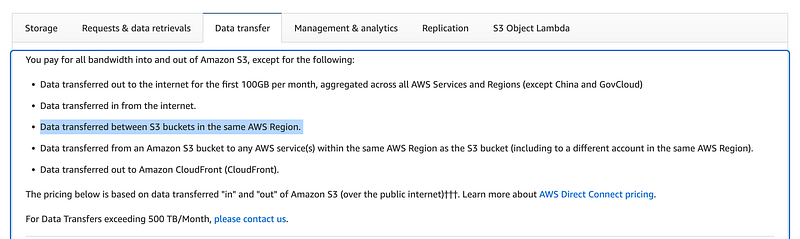
Also, the first 100 GB per month transferred to the Internet is free. I don’t think I have that much data but will have to double check that.
Data transferred out to the Internet over and above that would incur a fee:
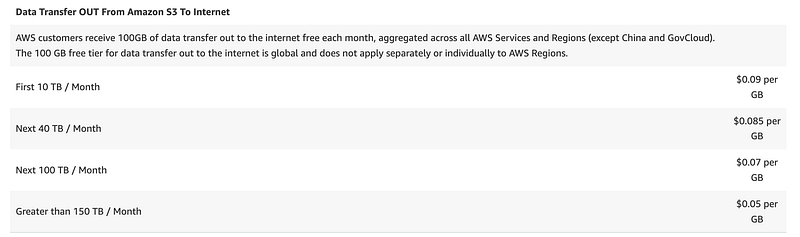
But in this case I’m transferring to another AWS region so I’d have to figure out what region I’m transferring to and the amount over 100GB. In my case, it’s not that much so the fees should be minimal.
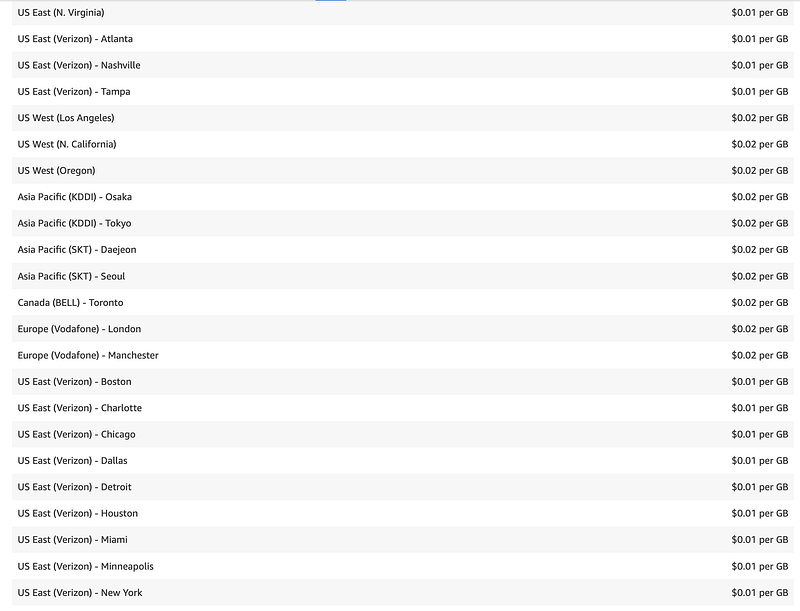
Note that AWS published this post on using AWS DataSync to transfer files:
With flat fee pricing based on the amount of data transferred:
You’ll have to do the math to see which option is cheapest based on the amount of data you have to transfer.
Commands to transfer the files between S3 buckets
This page has the commands to copy or sync the files to another account and region:
aws s3 cp s3:// DOC-EXAMPLE-BUCKET-SOURCE / \
       s3:// DOC-EXAMPLE-BUCKET-TARGET / \
      --recursive --source-region SOURCE-REGION-NAME --region DESTINATION-REGION-NAME
aws s3 sync s3:// DOC-EXAMPLE-BUCKET-SOURCE / \
s3:// DOC-EXAMPLE-BUCKET-TARGET / \
--source-region SOURCE-REGION-NAME --region DESTINATION-REGION-NAMEIn this case, I want to copy the files because I’m going to close the account where the web sites currently exist.
Encryption
For the web sites, the files will not be encrypted, since they need to be accessible from the Internet. Someone brought up the point that you could encrypt the files, which is true. However, since the files are meant to be public via a public website, I’m not sure what the benefit would be. Anyone is allowed to read the files. That said, AWS recently announced that all files from now on will be encrypted in an S3 bucket with AWS encryption. That means, when I transfer the files to the new account, they will be encrypted with AWS default encryption.
For other files I would want to ensure that I have a KMS encryption key set up in order to back up the files. I can enforce encryption on the bucket using a specific key and I would need to grant cross account access to the key to sync the files. For now we’ll just deal with the web site files which do not need encryption.
Automation
For automation, I would want to automate the following, all of which will be covered in future posts:
- NS records
- SSL certificate
- Creation of S3 bucket
- CloudFront configuration
- File transfer
- S3 replication for backup purposes
Backups
I’d like my backups to go to a separate account with limited permissions. I always tell customers that they should not use day to day credentials for backups. I can create a backup account and permissions for a resource in that account to access and replicate the files to the backup account. I will need to limit who has access to create users or change permissions in the backup account.
The following documentation explains how to create cross-account replication for an S3 bucket. I should probably set that up first so that as files are copied over, the backups are automatically generated.
All that is a lot more work than I initially considered. As I think through the automation it seems like my batch job code that I want to write may actually help me automate and migrate some of this data. I’m going to move back to setting up the NS record for my new batch job authentication flow first. Then I can create reusable templates for all of this and proceed with the transfer.
Once again I’m using the principle of abstraction to move common functionality to a single code base to limit the amount of work I’ll have to do in the end, and hopefully I can enforce a more secure and robust architecture in the process.
Follow for updates.
Teri Radichel | © 2nd Sight Lab 2023
About Teri Radichel:
~~~~~~~~~~~~~~~~~~~~
⭐️ Author: Cybersecurity Books
⭐️ Presentations: Presentations by Teri Radichel
⭐️ Recognition: SANS Award, AWS Security Hero, IANS Faculty
⭐️ Certifications: SANS ~ GSE 240
⭐️ Education: BA Business, Master of Software Engineering, Master of Infosec
⭐️ Company: Penetration Tests, Assessments, Phone Consulting ~ 2nd Sight Lab
Need Help With Cybersecurity, Cloud, or Application Security?
~~~~~~~~~~~~~~~~~~~~~~~~~~~~~~~~~~~~~~~~~~~~~~~~~~~~~~~~~~~~~
🔒 Request a penetration test or security assessment
🔒 Schedule a consulting call
🔒 Cybersecurity Speaker for PresentationFollow for more stories like this:
~~~~~~~~~~~~~~~~~~~~~~~~~~~~~~~~~~~~~~~~~~~~~~~~~~~~~~~~~~~~~
❤️ Sign Up my Medium Email List
❤️ Twitter: @teriradichel
❤️ LinkedIn: https://www.linkedin.com/in/teriradichel
❤️ Mastodon: @teriradichel@infosec.exchange
❤️ Facebook: 2nd Sight Lab
❤️ YouTube: @2ndsightlab


