avatarMark Ellis

Free AI web copilot to create summaries, insights and extended knowledge, download it at here

4918

Abstract

s truly instantly feel at home and relatively unhindered. Even third-party stuff is coming soon, which, one hopes, means plug-ins from the likes of MotionVFX.</p><div id="ad21" class="link-block"> <a href="https://readmedium.com/why-i-need-your-help-with-my-m2-ipad-pro-purchase-89a633f32ff8"> <div> <div> <h2>Why I Need YOUR Help With My M2 iPad Pro Purchase!</h2> <div><h3>My hand has been forced…</h3></div> <div><p>medium.com</p></div> </div> <div> <div style="background-image: url(https://miro.readmedium.com/v2/resize:fit:320/1*KyS6s9SfW_5mzqIHcnrEjg.jpeg)"></div> </div> </div> </a> </div><p id="4496">Apple is also making a serious play for users who are happy to use the iPad camera for shooting their videos. You can record directly into the Final Cut Pro project and even access manual camera controls — a workflow that has never been possible on the Mac version.</p><figure id="0d31"><img src="https://cdn-images-1.readmedium.com/v2/resize:fit:800/0*5VUxHQrJXP_yTyqB.jpg"><figcaption><i>Image courtesy of Apple</i></figcaption></figure><p id="81c9">However, there’s potentially one huge caveat to all of this. While Apple confirms that you can export Final Cut Pro projects made on the iPad for use on the Mac, there’s no mention of it being possible the other way around. This might mean that my idea of starting an editing project on the Mac and finishing it off in my local coffee shop on the iPad remains a pipe dream.</p><p id="c4a0">I can put that concern aside for the time being, though, because this <i>is</i> a huge step forward. And it <i>does</i> render my DaVinci Resolve test rather redundant, I think.</p><div id="c9e3" class="link-block"> <a href="https://readmedium.com/6-awesome-accessories-for-the-m2-mac-mini-699c3f9ddaa8"> <div> <div> <h2>6 AWESOME Accessories for the M2 Mac mini</h2> <div><h3>Check out my new setup!</h3></div> <div><p>medium.com</p></div> </div> <div> <div style="background-image: url(https://miro.readmedium.com/v2/resize:fit:320/1*gipLIEYLQmT0vpsWde1Qvw.jpeg)"></div> </div> </div> </a> </div><h2 id="f9db">Logic Pro for iPad</h2><ul><li><b>Price: £4.99 per month or £49 per year (one-month free trial)</b></li><li><b>Compatible with: Any iPad with A12 Bionic or later</b></li></ul><p id="5256">I’ve been making music for longer than I’ve been making videos — a <i>lot</i> longer. This might explain why I feel marginally more excited about Logic Pro finally making its way to the iPad. The fact that it’s doing so on far more devices than Final Cut Pro is a testament to the pro audio department at Apple.</p><figure id="deb6"><img src="https://cdn-images-1.readmedium.com/v2/resize:fit:800/0*V5gTF5dWDazyqC1F.png"><figcaption><i>Image courtesy of Apple</i></figcaption></figure><p id="9528">Logic Pro on the iPad sounds and looks incredibly complete. Apple is clearly confident that it has packed in enough to make this version of Logic Pro viable for artists outside of the beat-maker crowd (for whom I have a feeling it will become an essential creative tool). “Create and produce music in any genre,” says the landing page, before confirming that the iPad version of Logic Pro features, “an all-new creative interface. Made for touch.”</p><figure id="f8e4"><img src="https://cdn-images-1.readmedium.com/v2/resize:fit:800/0*vkcWdB2xmsdg5F15.png"><figcaption><i>Image courtesy of Apple</i></figcaption></figure><p id="b153">The age-old Logic Pro timeline, more recent Live Loops page, and the classic mixer are all present on the iPad. Plug-ins are, too (both first- and third-party). Just like Final Cut Pro, this should mean a relatively simple transition from Mac to iPad for Logic Pro long-termers.</p><div id="92d5" class="link-block"> <a href="https://readmedium.com/can-i-break-the-m2-pro-mac-mini-bbf2497a425b"> <div> <div> <h2>Can I BREAK the M2 Pro Mac mini?!</h2> <div><h3>Welcome to my Logic Pro stress test!</h3></div> <div><p>medium.com</p></div> </div> <div> <div style="background-image: url(https://miro.readmedium.com/v2/resize:fit:320/1*-Q4xqscSsZMeRoKF-N63gw.jpeg)"></div> </div> </div> </a> </div><p id="1586">Old meets new thanks to what looks like a touch-inspired redesign for pretty much every interface element and the introduction of Plug-in Tiles which provide quick access to essential controls (a double tap takes you into the full plug-in). The Apple Pencil looks like it’s being put to good use, too, with the

Options

ability to draw automations (that’s going to feel very satisfying) and make precise edits.</p><figure id="8e3d"><img src="https://cdn-images-1.readmedium.com/v2/resize:fit:800/0*-WBEIWZN42_JF4JN.png"><figcaption><i>Image courtesy of Apple</i></figcaption></figure><p id="217e">Apple would never have got away without support for external gear on the iPad version of Logic Pro, therefore it’s nice to see mention of audio interfaces, midi interfaces, and controllers.</p><p id="9ee1">The inclusion of a sound library featuring royalty-free loops and patches from big-name producers (although it isn’t clear if these are free or paid) completes what looks to be one hell of a mobile recording and production studio. I cannot wait to get my hands on the most mobile version of Logic Pro to date.</p><h2 id="af10">My take</h2><p id="0745">As many others have noted, the fact that the launch of these two huge apps for the iPad <i>didn’t</i> make WWDC suggests we’re in for quite a show in June. Equally, if they’re ready, why hang around? Apple knows the weight of expectations on the iPad Pro, and the nonchalant, “well, here you go” press release approach will quell most of the concerns. For now.</p><div id="b033" class="link-block"> <a href="https://readmedium.com/what-i-think-well-see-at-wwdc23-c6bd6a9c37bc"> <div> <div> <h2>What I Think We’ll See at WWDC23</h2> <div><h3>And no, it won’t be a new Mac Studio!</h3></div> <div><p>medium.com</p></div> </div> <div> <div style="background-image: url(https://miro.readmedium.com/v2/resize:fit:320/1*P0x3J7syPYhA_GUDczIKcg.png)"></div> </div> </div> </a> </div><p id="ae12">I still need to get my hands on Final Cut Pro and Logic Pro for the iPad before passing full judgement. How easy will they be to use? What’s missing that Apple has swept under the carpet during the announcement? More importantly, how seamlessly can users switch between projects on the Mac and iPad?</p><p id="ee8e">The latter is what I want, but I’m already conceding that it might not be quite as simple as that — particularly with Final Cut Pro. There are too many cumbersome file structures and decade-long OS and third-party tie-ins on the Mac versions of these apps to make full project sharing viable.</p><p id="19e8">I also can’t ignore the fact that I’m slightly more excited about Logic Pro than I am about Final Cut Pro (ironically). The latter feels like more of a tool than something which offers near-endless creative possibilities (although I am speaking as a traditional camera shooter — I doubt I’ll use the iPad Pro as my camera).</p><div id="4052" class="link-block"> <a href="https://readmedium.com/is-vr-arriving-at-the-wrong-time-for-apple-cec719a8d5e"> <div> <div> <h2>Is VR Arriving at the Wrong Time for Apple?</h2> <div><h3>I can’t stop thinking about this</h3></div> <div><p>medium.com</p></div> </div> <div> <div style="background-image: url(https://miro.readmedium.com/v2/resize:fit:320/1*3ecUI0KWdqO1qDdmkSiQGA.png)"></div> </div> </div> </a> </div><p id="e624">As for the pricing strategy, that isn’t the story, in my book. Those who are complaining about Apple’s subscription model either didn’t live through — or have forgotten about — the days of professional software requiring big up-front payments. I’m afraid £49 for an incredibly capable pro app that is fully supported and inclusive of future updates is an absolute bargain and a tiny investment for creatives. Raising this as a concern is lazy.</p><p id="ace5">More importantly, we are finally entering an era where Apple is putting the might of its top-end iPad silicon to use. The M1 and M2 chips look like they will both be given a serious workout with Final Cut Pro and Logic Pro — and rightly so.</p><p id="15c1">Are you looking forward to these releases? Add your thoughts in the comments section, below.</p><h2 id="5fca">Before you go</h2><p id="a062"><a href="https://markellis.substack.com/"><b><i>Join my Substack newsletter for tips on becoming a profitable, happy online creator!</i></b></a></p><p id="4f66"><i>If you enjoy my writing, it’s only a snippet of what’s on Medium. I’m a paying member myself and highly recommend joining. <a href="https://markellisreviews.medium.com/membership"><b>Click here to join</b></a> (a portion of your membership fee will be sent my way and therefore directly support my work!).</i></p><p id="8a97"><i>Originally published at <a href="https://markellisreviews.com/final-cut-pro-and-logic-pro-coming-to-ipad-everything-you-need-to-know/">https://markellisreviews.com</a> on May 9, 2023.</i></p></article></body>

This Is a GAME CHANGER for the iPad Pro

Final Cut Pro and Logic Pro are coming to the iPad!
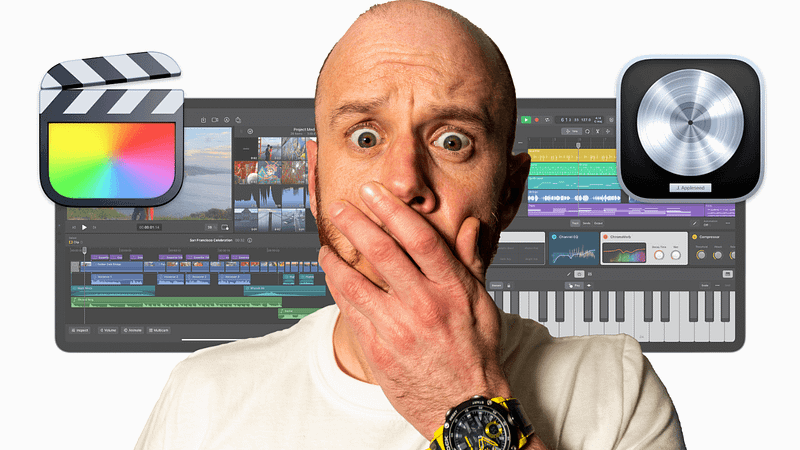
Image courtesy of author and Apple

Remember when I said, “I’m fast concluding that Apple has no interest in launching Final Cut Pro on the iPad Pro”?

I got that wrong, didn’t I?

As I write, it’s Tuesday, 9th May, and a few hours ago, Apple announced that Final Cut Pro will be coming to the iPad on 23rd May.

They went a step further by revealing that it would be joined by Logic Pro on the same day, for the same device, and for the same price (more on that later).

If there’s one thing that never fails to surprise me even though it surprises me every single time, it’s how good Apple is at surprising us.

I won’t waffle on about how much I’ve waited for this, because if you’ve read any of my stuff before, you’ll know how I feel. Instead, I’ll dive straight into what we know about these two apps and give you my thoughts on what we might experience come next week’s big launch.

Final Cut Pro for iPad

  • Price: £4.99 per month or £49 per year (one-month free trial)
  • Compatible with: M1 or M2 iPad Pro (both sizes), 5th-generation iPad Air

It also looks like Apple hasn’t left anything on the cutting room floor when porting Final Cut Pro from the Mac to the iPad Pro (and the 5th-generation iPad Air, of course). In fact, they very much expect you to use it as an end-to-end solution; “Record, edit, finish and deliver. All on iPad,” reads the landing page, proudly.
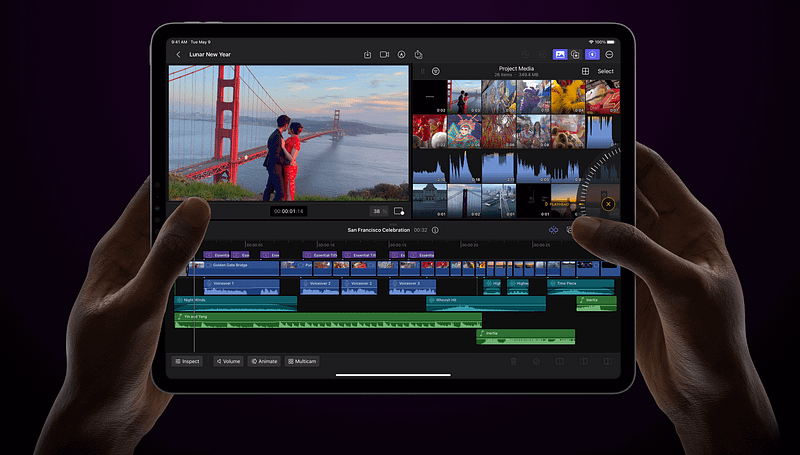
Image courtesy of Apple

However, just below that, we’re informed that users will be able to create “vlogs, social content, music videos, shorts and more”, which suggests that this version of Final Cut Pro is probably intended more for short-form and social content than it is longer projects. An unfair assumption? We’ll see.

What isn’t in doubt is the fact that this is a complete re-imagining of Apple’s video editing suite. The “touch-first interface” enables editing with your finger and the ability to scrub through footage with a brand-new jog wheel. The Apple Pencil gets a serious look-in, too, with footage skimming available via the iPad Pro’s ‘hover’ feature.
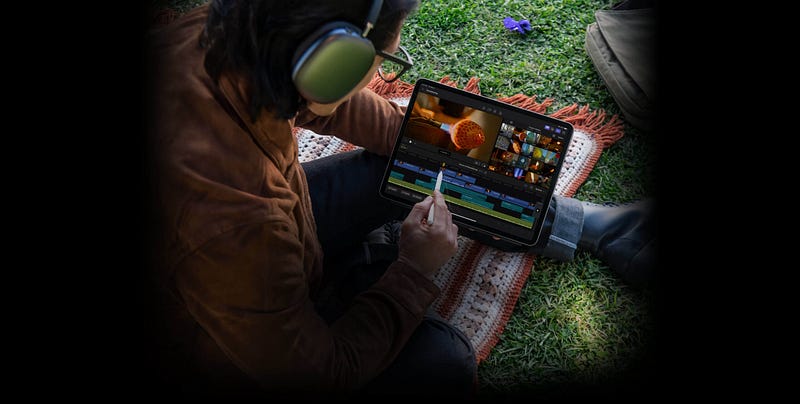
Image courtesy of Apple

There’s the promise of some serious machine learning-fuelled image manipulation, too, including the ability to remove backgrounds without a green screen and auto-crop scenes, which will be ideal for repurposing content for different destinations.
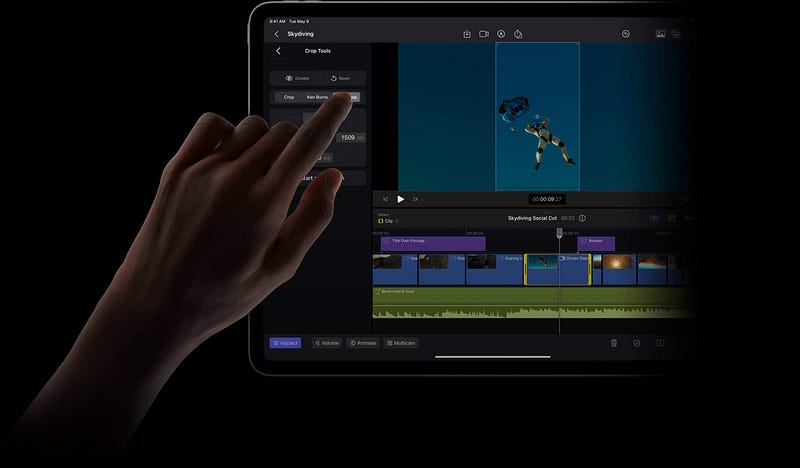
Image courtesy of Apple

Reassuring for serious Final Cut Pro users is the fact that so many of the Mac app’s features appear to be present. Support for “most popular video formats” (including ProRes RAW), LUTs, keyframes, voice isolation, and full export options should mean people like yours truly instantly feel at home and relatively unhindered. Even third-party stuff is coming soon, which, one hopes, means plug-ins from the likes of MotionVFX.

Apple is also making a serious play for users who are happy to use the iPad camera for shooting their videos. You can record directly into the Final Cut Pro project and even access manual camera controls — a workflow that has never been possible on the Mac version.
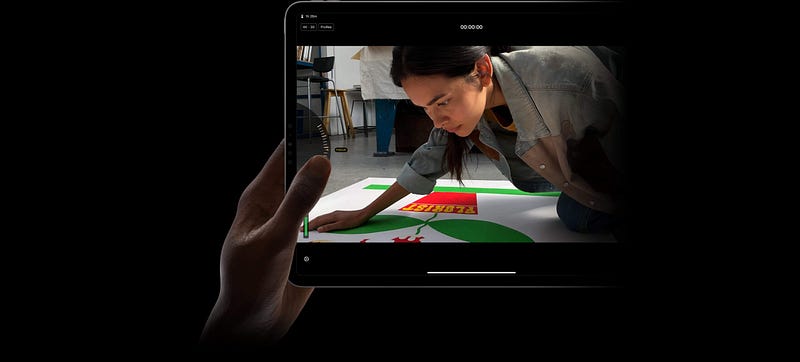
Image courtesy of Apple

However, there’s potentially one huge caveat to all of this. While Apple confirms that you can export Final Cut Pro projects made on the iPad for use on the Mac, there’s no mention of it being possible the other way around. This might mean that my idea of starting an editing project on the Mac and finishing it off in my local coffee shop on the iPad remains a pipe dream.

I can put that concern aside for the time being, though, because this is a huge step forward. And it does render my DaVinci Resolve test rather redundant, I think.

Logic Pro for iPad

  • Price: £4.99 per month or £49 per year (one-month free trial)
  • Compatible with: Any iPad with A12 Bionic or later

I’ve been making music for longer than I’ve been making videos — a lot longer. This might explain why I feel marginally more excited about Logic Pro finally making its way to the iPad. The fact that it’s doing so on far more devices than Final Cut Pro is a testament to the pro audio department at Apple.
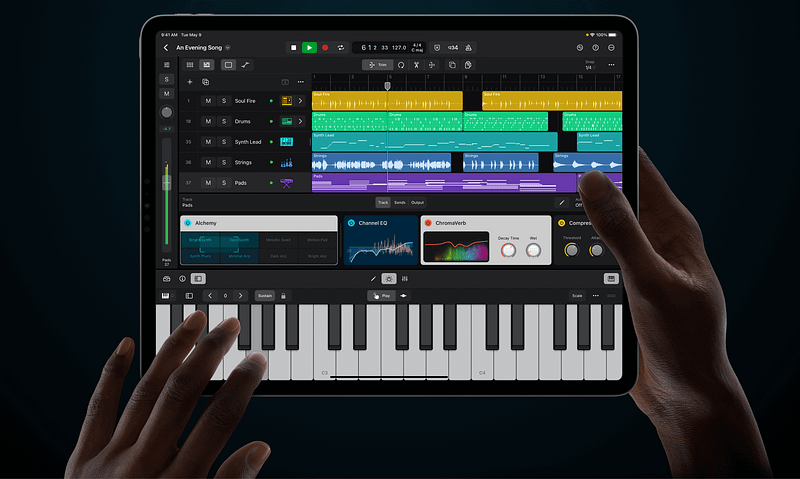
Image courtesy of Apple

Logic Pro on the iPad sounds and looks incredibly complete. Apple is clearly confident that it has packed in enough to make this version of Logic Pro viable for artists outside of the beat-maker crowd (for whom I have a feeling it will become an essential creative tool). “Create and produce music in any genre,” says the landing page, before confirming that the iPad version of Logic Pro features, “an all-new creative interface. Made for touch.”
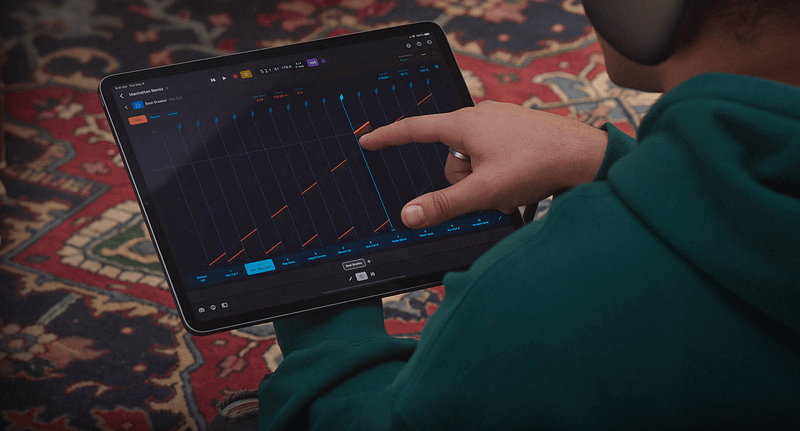
Image courtesy of Apple

The age-old Logic Pro timeline, more recent Live Loops page, and the classic mixer are all present on the iPad. Plug-ins are, too (both first- and third-party). Just like Final Cut Pro, this should mean a relatively simple transition from Mac to iPad for Logic Pro long-termers.

Old meets new thanks to what looks like a touch-inspired redesign for pretty much every interface element and the introduction of Plug-in Tiles which provide quick access to essential controls (a double tap takes you into the full plug-in). The Apple Pencil looks like it’s being put to good use, too, with the ability to draw automations (that’s going to feel very satisfying) and make precise edits.
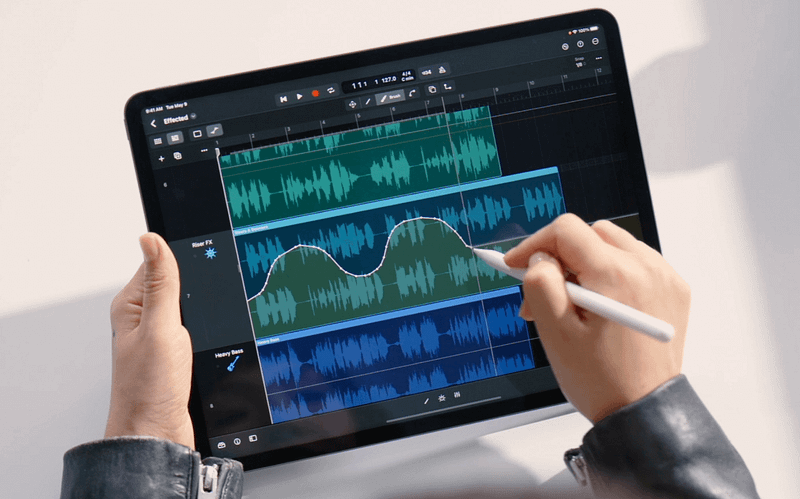
Image courtesy of Apple

Apple would never have got away without support for external gear on the iPad version of Logic Pro, therefore it’s nice to see mention of audio interfaces, midi interfaces, and controllers.

The inclusion of a sound library featuring royalty-free loops and patches from big-name producers (although it isn’t clear if these are free or paid) completes what looks to be one hell of a mobile recording and production studio. I cannot wait to get my hands on the most mobile version of Logic Pro to date.

My take

As many others have noted, the fact that the launch of these two huge apps for the iPad didn’t make WWDC suggests we’re in for quite a show in June. Equally, if they’re ready, why hang around? Apple knows the weight of expectations on the iPad Pro, and the nonchalant, “well, here you go” press release approach will quell most of the concerns. For now.

I still need to get my hands on Final Cut Pro and Logic Pro for the iPad before passing full judgement. How easy will they be to use? What’s missing that Apple has swept under the carpet during the announcement? More importantly, how seamlessly can users switch between projects on the Mac and iPad?

The latter is what I want, but I’m already conceding that it might not be quite as simple as that — particularly with Final Cut Pro. There are too many cumbersome file structures and decade-long OS and third-party tie-ins on the Mac versions of these apps to make full project sharing viable.

I also can’t ignore the fact that I’m slightly more excited about Logic Pro than I am about Final Cut Pro (ironically). The latter feels like more of a tool than something which offers near-endless creative possibilities (although I am speaking as a traditional camera shooter — I doubt I’ll use the iPad Pro as my camera).

As for the pricing strategy, that isn’t the story, in my book. Those who are complaining about Apple’s subscription model either didn’t live through — or have forgotten about — the days of professional software requiring big up-front payments. I’m afraid £49 for an incredibly capable pro app that is fully supported and inclusive of future updates is an absolute bargain and a tiny investment for creatives. Raising this as a concern is lazy.

More importantly, we are finally entering an era where Apple is putting the might of its top-end iPad silicon to use. The M1 and M2 chips look like they will both be given a serious workout with Final Cut Pro and Logic Pro — and rightly so.

Are you looking forward to these releases? Add your thoughts in the comments section, below.

Before you go

Join my Substack newsletter for tips on becoming a profitable, happy online creator!

If you enjoy my writing, it’s only a snippet of what’s on Medium. I’m a paying member myself and highly recommend joining. Click here to join (a portion of your membership fee will be sent my way and therefore directly support my work!).

Originally published at https://markellisreviews.com on May 9, 2023.

Technology
Apple
iPad
Innovation
Music
Recommended from ReadMedium