This Cute Feature Summarizes Why I Prefer Mac to Windows and Linux
MAC = Man And Computer
There are many reasons to love Mac, and many to hate it. On my blog, you probably have seen some of them. As with some forms of perfectionist emotions, the love and hatred come entangled; the love is there, and it’s exactly the reason you get annoyed by things that could have been even better, hence the hatred. Therefore, you don’t really have feelings of hatred towards that thing, you just get disappointed when things aren’t perfect.
Anyway, that is my relationship with Mac. If I were an Apple fanboy, I’d always talk about the good aspects of Mac, and if I were a hater, I’d only mention what’s wrong with it. I’m both and neither. I love it when Mac surprises me with yet another easter-egg feature that delights me, and I get sad when it falls short on some basic tasks that are pretty much standard with other operating systems (e.g., Windows).
But every once in a while, I discover something new about Mac that just makes my day. It could be a new keyboard shortcut that I didn’t know exists, some cool gesture that makes life simpler, or in the case of today’s post, a simple (and honestly overlooked) animation in login screen!
An Animation in Login Screen?
Did you know that you can choose one of your memojis as your profile avatar on Mac? To do this, obviously you first need to create a memoji of yourself. This should be done on iPhone and you can find online tutorials about it. Once you have a memoji, do this on Mac to set it as your profile picture:
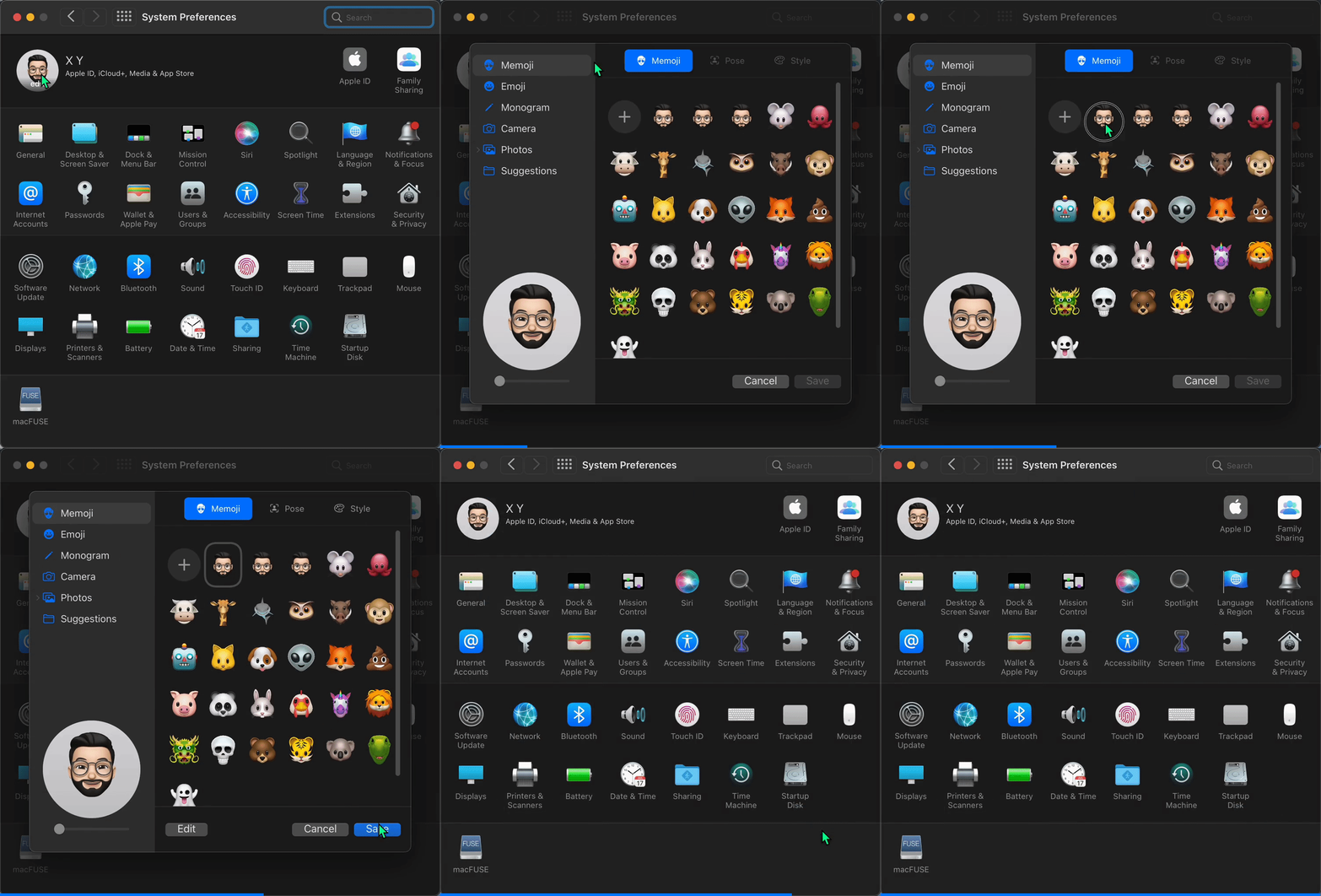
Having done that, now every time you’re on the login page, notice how the memoji reacts to your password! When typing your password, the cute memoji keeps staring at the entered digits, and if it’s wrong, it shows some funny gestures 😄

It’s so amazing that such a simple feature makes so much difference in user-friendliness of the Mac. In fact, it’s so simple that you might wonder why didn’t Microsoft or thousands of Linux’s open-source developers come up with that?! Someone at Apple really did this, and for that I’m grateful.
Takeaway
As the title says, this cute feature pretty much sums up why I use Mac and not Windows or Linux. In my book, user-friendliness and attention to detail is as important as providing a rock solid product that just works. Apple has been mostly successful at both, and while Windows and Linux advocates might disagree with me, their opinion doesn’t change the fact that Apple has put in effort to make sure their software is as smooth and visually appealing as it can be, a friendly reminder of the importance of “M” in the name “MAC”.