
The String Concatenation Trap: Why You Should Avoid It in Loops and How to Fix It

Concatenating strings within a loop is a common programming practice that can lead to inefficiencies in the performance of your code. While string concatenation may seem like an easy and straightforward approach to build a string, it can become slow and memory-intensive when repeated multiple times within a loop.
In this post, we will explore why it is best to avoid string concatenation in loops, and offer alternative solutions that can enhance the performance and efficiency of your code.
If you don’t have a medium membership, you can use this link to reach the article without a paywall.
Let’s say we are developing a console application with Java and we need a list of all historic commands used for our CLI, which will be shown to the user. What are the steps to do that?
1 — fetch data from datasource
2 — aggregate data
3 — show data
In step 2, we don’t know the size of the data, so we need to be careful while making the implementation in this step. If we just get all commands as strings from the data source and concatenate those strings, our application will have a huge problem.
In every iteration, a new string object will be created because string object is immutable and cannot be changed after the object is created. Hence, in every concatenation operation, we are creating a new string object for concatenated strings.
We were not aware of the size of the data beforehand. If the size of the data is too large, like 10k or more, we will create 10k objects because of the concatenation. But instead of a string concatenation, if you use StringBuilder or StringBuffer, there will be only one object creation, and the content of the object will change while you are adding all the data.
Here are sample codes and benchmark results of the comparison of string concatenation, stringBuilder, and stringBuffer.
@BenchmarkMode(Mode.Throughput)
@OutputTimeUnit(TimeUnit.MILLISECONDS)
@State(Scope.Benchmark)
@Fork(value = 2, jvmArgs = {"-Xms2G", "-Xmx2G"})
public class StringBenchmark {

  public static void main(String[] args) throws RunnerException {

    Options opt = new OptionsBuilder()
        .include(StringBenchmark.class.getSimpleName())
        .warmupIterations(5)
        .measurementIterations(5)
        .forks(1)
        .build();

    new Runner(opt).run();
  }


  @Benchmark
  public static void stringConcatenation() {
    String result = "";
    for (int i = 0; i < 100000; i++) {
      result += "Hello";
    }
  }

  @Benchmark
  public static void stringBuilder() {
    StringBuilder result = new StringBuilder();
    for (int i = 0; i < 100000; i++) {
      result.append("Hello");
    }
  }

  @Benchmark
  public static void stringBuffer() {
    StringBuffer result = new StringBuffer();
    for (int i = 0; i < 100000; i++) {
      result.append("Hello");
    }
  }
}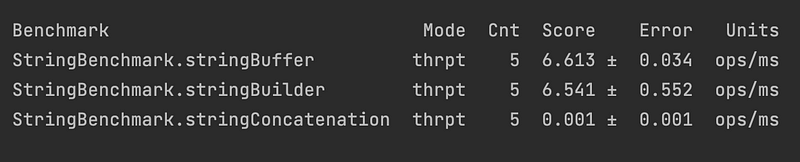
In conclusion, using string concatenation in a loop can have negative impacts on the performance and efficiency of your code. It’s essential to be mindful of this practice and consider alternative approaches, such as using a StringBuilder or StringBuffer or preallocating the necessary memory for the string. By making these changes, you can improve the speed and scalability of your code, leading to a better user experience and more efficient use of resources. Remember, when it comes to string concatenation in loops, less is often more.
👏 Thank You for Reading!
👨💼 I appreciate your time and hope you found this story insightful. If you enjoyed it, don’t forget to show your appreciation by clapping 👏 for the hard work!
📰 Keep the Knowledge Flowing by Sharing the Article!
✍ Feel free to share your feedback or opinions about the story. Your input helps me improve and create more valuable content for you.
✌ Stay Connected! 🚀 For more engaging articles, make sure to follow me on social media:
🔍 Explore More! 📖 Dive into a treasure trove of knowledge at Codimis. There’s always more to learn, and we’re here to help you on your journey of discovery.


