avatarNikhil Vemu

Free AI web copilot to create summaries, insights and extended knowledge, download it at here

4190

Abstract

expenses directly from a small widget on your home screen or Today view.</p><figure id="8b0c"><img src="https://cdn-images-1.readmedium.com/v2/resize:fit:800/1*drWSsgXcNJPMzWu1LQRI2A.jpeg"><figcaption>Image courtesy of <a href="https://www.macrumors.com/2022/01/27/ios-15-4-features/">MacRumors</a></figcaption></figure><p id="f76d">This shows your current balance and spending activity in different categories.</p><h1 id="ba28">#5. Shh…ortcuts</h1><p id="d9ce">We’ve all undergone this annoying thing of having the Shortcuts app notification every single time an automation happens.</p><figure id="78df"><img src="https://cdn-images-1.readmedium.com/v2/resize:fit:800/1*Jo90LcPZiLYnTA_6u5aqlQ.jpeg"><figcaption><b>For example.</b> (Screenshot by the author)</figcaption></figure><p id="fe61">As a person having multiple automations throughout the day, dozens of Shortcut notifications cludge up my notification centre all the time.</p><p id="5331">I found no way to disable Shortcuts notifications except with the <a href="https://www.pcguide.com/ios/how-to/turn-off-shortcut-notifications-ios-15/">loophole in the Screen time menu</a>. However, this update, we officially get that feature.</p><figure id="e283"><img src="https://cdn-images-1.readmedium.com/v2/resize:fit:800/1*ii6frIm7P45CqGoMBr4xLQ.jpeg"><figcaption>Image from <a href="https://twitter.com/viticci/status/1486808055601938432?s=20&amp;t=-Tg5vdmef0WD0vKKJs_ncA">@viticci</a>, Twitter</figcaption></figure><p id="efbc">Simply unchecking the <code>'Notify When Run'</code> prompt makes sure you wouldn’t get a notification whenever the automation runs.</p><h1 id="46d7">#6. Custom Email domain 📧</h1><figure id="858b"><img src="https://cdn-images-1.readmedium.com/v2/resize:fit:800/1*_gXjWwHnlgzTrPIOrzjz7Q.jpeg"><figcaption>Image courtesy of <a href="https://www.macrumors.com/2022/01/27/ios-15-4-custom-email-domains/">MacRumors</a></figcaption></figure><p id="8beb">Yahooo! (Not yahoo mail), Apple enables the “Custom Email Domain” facility to be setup directly from your iPhone in iOS 15.4. Prior to this, we needed to set it up in the official iCloud website, and was a tedious process.</p><p id="9745">For this, you now only need an iCloud+ subscription (starts at 0.99 a month). And you can get upto five custom domains (like [email protected]) and can be shared with your family too.</p><p id="931e"><i>Isn’t this the cheapest pricing for a custom domain? Just 0.99 a month!</i></p><h1 id="66b5">#7. Disable iCloud data access on web</h1><figure id="ecb5"><img src="https://cdn-images-1.readmedium.com/v2/resize:fit:800/1*ADYfA-TFVKfR6aDmHeCacg.jpeg"><figcaption>Image from <a href="https://imgur.com/a/9aqDJRU/">imgur</a></figcaption></figure><p id="e0b6">You might already know this — you can access your iCloud photos, contacts, notes, and files directly from <a href="https://www.icloud.com">iCloud.com</a> website.</p><p id="bc96">But if you think you don’t use them on web, iOS 15.4 brings you a feature that lets you disable their access there, which would be an extra layer of security.</p><p id="2778">It’s worth noting “Find My” still works on the web.</p><h1 id="d510">#8. Notes in Keychain</h1><figure id="cb44"><img src="https://cdn-images-1.readmedium.com/v2/resize:fit:800/1*B1-PKne43-cjGvIu6WcXqQ.jpeg"><figcaption>Image courtesy of <a href="https://www.macrumors.com/2022/01/27/ios-15-4-features/">MacRumors</a></figcaption></figure><p id="cb2d">While this won’t be a widely used feature, it’s still a productive feature for many. In iOS 15.4, Apple adds the option to add notes to any password in your Keychain.</p><p id="931b">This brings Apple official password locker closer to its rival 1Password.</p><h1 id="876d">#9. Vaccination records directly in Health and Wallet apps 💉</h1><figure id="a6e4"><img src="https://cdn-images-1.readmedium.com/v2/resize:fit:800/1*Kq0wS02jGDZNgZ9ywN1ZXA.jpeg"><figcaption>Image courtesy of <a href="https://www.macrumors.com/2022/01/28/ios-15-4-eu-covid-vaccine-certificates-wallet/">MacRumors</a></figcaption></figure><p id="a461">A great news for people in the European Union!</p><p id="3f3f">You now get a facility to record your vaccination certificate

Options

s in the Health and Wallet apps. A nice minimalist feature tho. Now people don’t need to install third-party apps to prove their vaccination.</p><p id="f7d6">You also might be aware of the fact you could add your driving license to your Wallet app.</p><p id="909f" type="7">Apple is slowly making iPhones people’s ID cards.</p><h1 id="6b77">Other new changes…</h1><h2 id="4896">#1. Shareplay directly from share sheet</h2><p id="f30a">Prior to iOS 15.4, Shareplay had a different location. Now, you could activate it directly from the share sheet in supported apps like Music and TV.</p><h2 id="5888">#2. TV gets up-next displays</h2><p id="8e7f">In TV settings in System Settings, you get two options to choose from for up-next displays.</p><ol><li><b>Still Frame:</b> shows still frames from what you’re watching.</li><li><b>Poster Art:</b> shows main title images from shows of movies.</li></ol><h2 id="e227">#3. Safari experimental features get ‘Reset all to default’ option</h2><p id="7b3b">If you’ve messed up Safari experimental features by turning them on or off randomly, you now get ‘Reset all to default’ option for your rescue.</p><p id="d6bf">For this, go to <code>Settings < Safari < Advanced < Experimental Features < Reset all to default</code></p><h2 id="a102">#4. 120Hz animations in third-party apps</h2><p id="505b">The bug that didn’t let third-party apps display all their animations in 120Hz pro-motion display is fixed in iOS 15.4. Now, your iPhone will be wholly smooth.</p><h2 id="c20f">#4. AirPods connect display has bolder text</h2><p id="5e37">A simple change. This makes the AirPods prompt look more beautiful than the previous normal text.</p><h2 id="be0d">#5. Notifications section in App Store</h2><p id="8225">You can now choose to get notified for new features & updates, and recommendations & offers by the App Store.</p><h1 id="19ac">Conclusion</h1><figure id="6a82"><img src="https://cdn-images-1.readmedium.com/v2/resize:fit:800/0*FkjrMPV-j5iMRZMD"><figcaption>Photo by <a href="https://unsplash.com/@williamtm?utm_source=medium&amp;utm_medium=referral">William Hook</a> on <a href="https://unsplash.com?utm_source=medium&amp;utm_medium=referral">Unsplash</a></figcaption></figure><p id="b174">This is just a glimpse of iOS 15.4, as it’s currently in Beta stage. Looks like this update would be the biggest one ever released since iOS 15 was out.</p><p id="382b">Aren’t you excited?</p><p id="8050"><b>If you liked this story, you might also like:</b></p><div id="73c9" class="link-block"> <a href="https://readmedium.com/10-amazing-things-you-didnt-know-your-iphone-could-do-294c37628850"> <div> <div> <h2>10 Amazing Things You Didn’t Know your iPhone Could Do</h2> <div><h3>Unleash your iPhone’s hidden superpowers</h3></div> <div><p>medium.com</p></div> </div> <div> <div style="background-image: url(https://miro.readmedium.com/v2/resize:fit:320/0*xQh9s8-7Z_R6jaIQ)"></div> </div> </div> </a> </div><div id="3cf1" class="link-block"> <a href="https://readmedium.com/7-hidden-iphone-hacks-you-probably-never-knew-about-c663089372f3"> <div> <div> <h2>7 Hidden iPhone Hacks You Probably Never Knew About</h2> <div><h3>If you knew these tricks, you’re no less than an iOS pro</h3></div> <div><p>medium.com</p></div> </div> <div> <div style="background-image: url(https://miro.readmedium.com/v2/resize:fit:320/0*HkBveJDa8_5cQwiB)"></div> </div> </div> </a> </div><p id="61ff"><a href="https://nikhilvemu.medium.com/subscribe"><i>Get notified</i></a><i> via email whenever I publish.</i></p><p id="70f4"><i>Not a Medium member yet? Me too. But if you consider signing up for it, <a href="https://nikhilvemu.medium.com/membership">Sign up</a> now!</i></p><p id="c209"><i>(It’s an affiliate link so I receive a portion of your payment, with zero extra cost for you.)</i></p></article></body>

The iOS 15.4 Update Is Exactly What You Didn’t Know You Needed — What’s New?

With 37 New Emojis, Mask ID, Email Domains, and many more

Photo by Dennis Brendel on Unsplash

The iOS 15.3 update disappointingly hadn’t any much to bring — just few bug fixes, security updates, and wording changes. However, the iOS 15.4 Beta is released lately, and is awesome, it overdelivered lots and lots of important features I just couldn’t wait to share with you.

A couple of these were already promised by Apple in WWDC 21, and now my wait is over.

#1. Face ID — with mask, without Apple Watch

Back in the iOS 14.5 days, Apple released the so-called Mask ID that could unlock your iPhone even while you’re wearing a mask. For that, you needed an Apple Watch, yes, few hundreds of dollars, damn.

Luckily, this update, Apple silently pushed the Watch-less, inexpensive, and reliable Mask ID.

For this, just show your iPhone how you look with and without a mask on, when prompted, and the complex Face ID algorithm says you’re good to go.

#2. 37 new emojis 😳
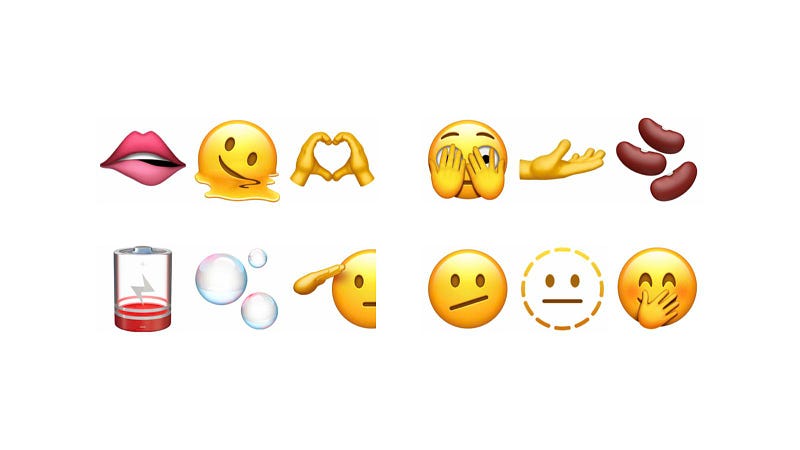
Image courtesy of MacRumors

Despite having thousands of emojis in our iPhones, it never feels enough to convey all our emotions in a virtual chat. Fortunately,

Apple releases a bunch of new emojis to comply with the Unicode standard 14.0.0. This update, you get:

  • A melting face,
  • saluting face,
  • dotted face,
  • biting lips emoji,
  • battery low emoji,
  • playground slide emoji,

and many more… Happy texting!

#3. Login to websites the new way: Passkey 🗝

On specific apps and websites, along with the Sign in with Google, Apple, phone number , you might now see Sign in with Passkey option. This is a new login way.

This uses the on-device authentication method to verify your identity with Face or Touch ID to log you in — killing the need for typing passwords for every new website you visit.

#4. Apple Card widget 💳

This is a rather simple feature that helps you track your Apple Card expenses directly from a small widget on your home screen or Today view.
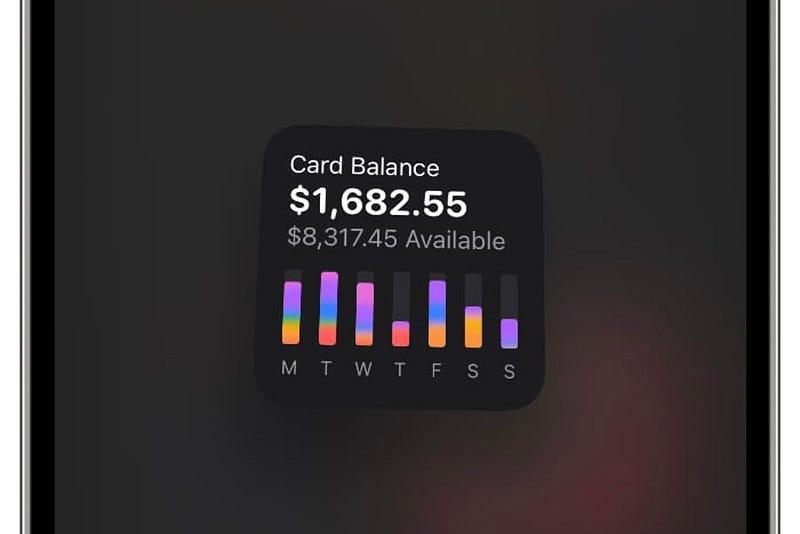
Image courtesy of MacRumors

This shows your current balance and spending activity in different categories.

#5. Shh…ortcuts

We’ve all undergone this annoying thing of having the Shortcuts app notification every single time an automation happens.

For example. (Screenshot by the author)

As a person having multiple automations throughout the day, dozens of Shortcut notifications cludge up my notification centre all the time.

I found no way to disable Shortcuts notifications except with the loophole in the Screen time menu. However, this update, we officially get that feature.
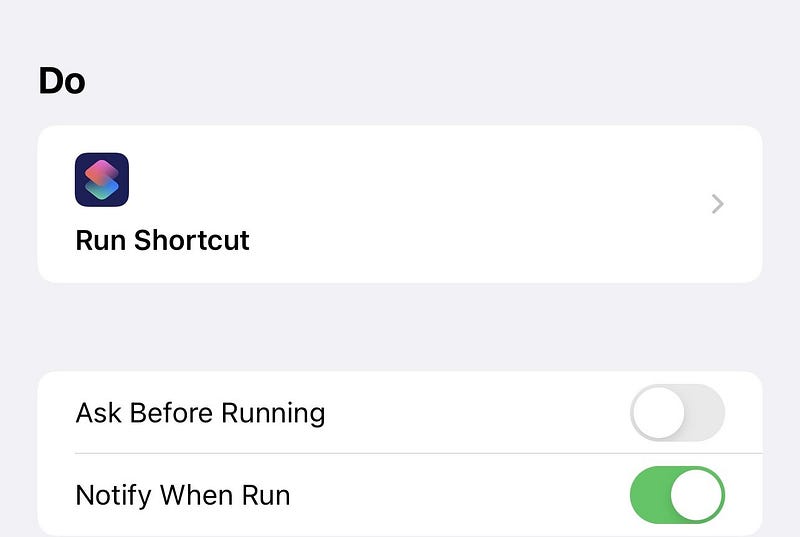
Image from @viticci, Twitter

Simply unchecking the 'Notify When Run' prompt makes sure you wouldn’t get a notification whenever the automation runs.

#6. Custom Email domain 📧
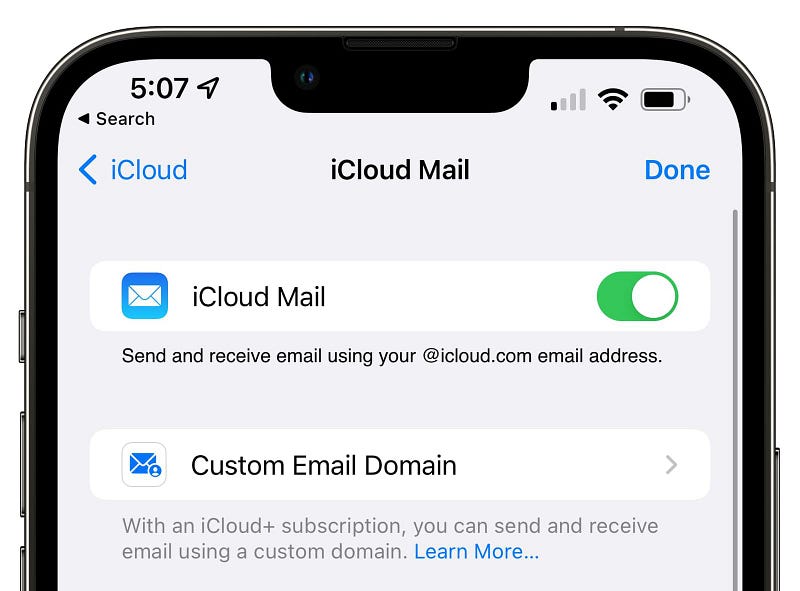
Image courtesy of MacRumors

Yahooo! (Not yahoo mail), Apple enables the “Custom Email Domain” facility to be setup directly from your iPhone in iOS 15.4. Prior to this, we needed to set it up in the official iCloud website, and was a tedious process.

For this, you now only need an iCloud+ subscription (starts at $0.99 a month). And you can get upto five custom domains (like [email protected]) and can be shared with your family too.

Isn’t this the cheapest pricing for a custom domain? Just $0.99 a month!

#7. Disable iCloud data access on web
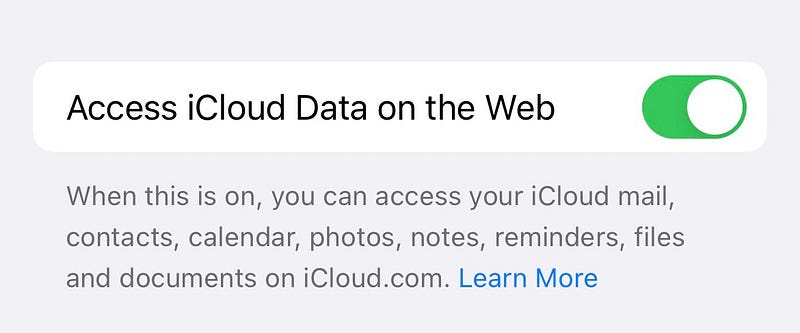
Image from imgur

You might already know this — you can access your iCloud photos, contacts, notes, and files directly from iCloud.com website.

But if you think you don’t use them on web, iOS 15.4 brings you a feature that lets you disable their access there, which would be an extra layer of security.

It’s worth noting “Find My” still works on the web.

#8. Notes in Keychain
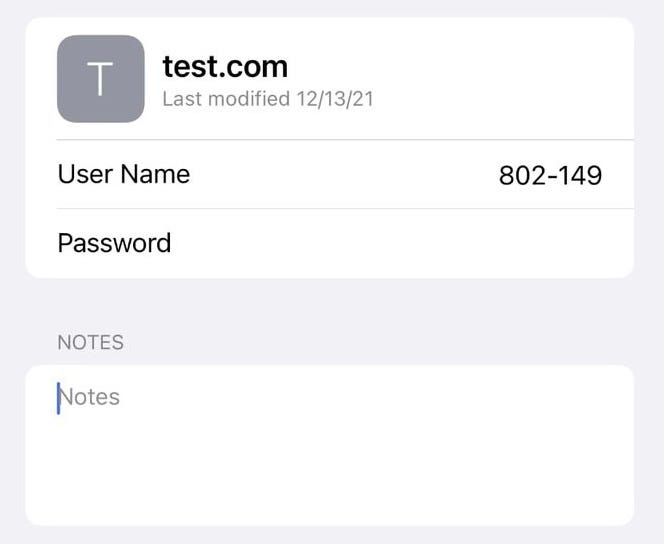
Image courtesy of MacRumors

While this won’t be a widely used feature, it’s still a productive feature for many. In iOS 15.4, Apple adds the option to add notes to any password in your Keychain.

This brings Apple official password locker closer to its rival 1Password.

#9. Vaccination records directly in Health and Wallet apps 💉
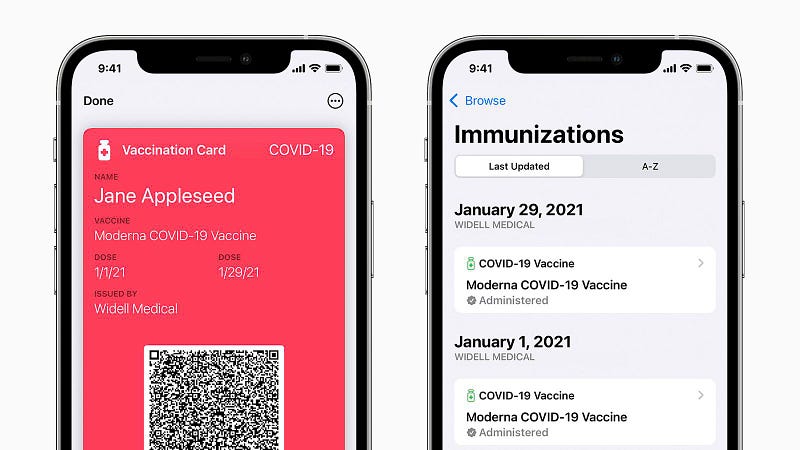
Image courtesy of MacRumors

A great news for people in the European Union!

You now get a facility to record your vaccination certificates in the Health and Wallet apps. A nice minimalist feature tho. Now people don’t need to install third-party apps to prove their vaccination.

You also might be aware of the fact you could add your driving license to your Wallet app.

Apple is slowly making iPhones people’s ID cards.

Other new changes…

#1. Shareplay directly from share sheet

Prior to iOS 15.4, Shareplay had a different location. Now, you could activate it directly from the share sheet in supported apps like Music and TV.

#2. TV gets up-next displays

In TV settings in System Settings, you get two options to choose from for up-next displays.

  1. Still Frame: shows still frames from what you’re watching.
  2. Poster Art: shows main title images from shows of movies.

#3. Safari experimental features get ‘Reset all to default’ option

If you’ve messed up Safari experimental features by turning them on or off randomly, you now get ‘Reset all to default’ option for your rescue.

For this, go to Settings < Safari < Advanced < Experimental Features < Reset all to default

#4. 120Hz animations in third-party apps

The bug that didn’t let third-party apps display all their animations in 120Hz pro-motion display is fixed in iOS 15.4. Now, your iPhone will be wholly smooth.

#4. AirPods connect display has bolder text

A simple change. This makes the AirPods prompt look more beautiful than the previous normal text.

#5. Notifications section in App Store

You can now choose to get notified for new features & updates, and recommendations & offers by the App Store.

Conclusion
Photo by William Hook on Unsplash

This is just a glimpse of iOS 15.4, as it’s currently in Beta stage. Looks like this update would be the biggest one ever released since iOS 15 was out.

Aren’t you excited?

If you liked this story, you might also like:

Get notified via email whenever I publish.

Not a Medium member yet? Me too. But if you consider signing up for it, Sign up now!

(It’s an affiliate link so I receive a portion of your payment, with zero extra cost for you.)

Technology
Mobile
Apple
iPhone
Innovation
Recommended from ReadMedium