
The Evolution of Android Network Access
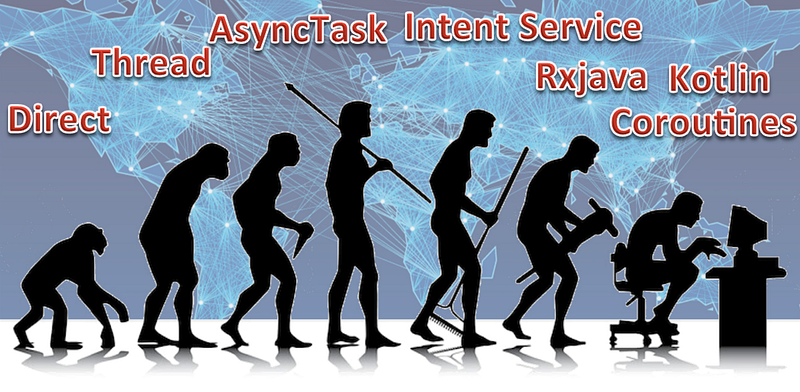
Android has been in the industry for more than 10 years, and how developers use Android to access the Network has also evolved. Here I’m sharing my view of this evolution with an app with a code example given. Enjoy the journey!
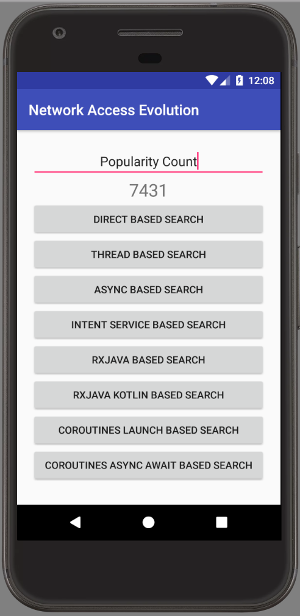
Dinosaur Age — Direct Access

In the beginning, network access is treated just like any code. You could code into your Android Activity as you like, using it directly in the main thread (aka UI thread).
String result = Network.fetchHttp(searchText);
view.updateScreen(result);
Before Android 2.2, the code as above is perfectly fine to make an Android App.
However, this is not ideal as network access code is slow (up to several seconds, which is like a lifetime for a response time in an App!), and will halt the app to feel irresponsive.
To ensure App behave well, Android now will throw NetworkOnMainThreadException during run time when it detects such operation.
There’s a workaround to still force Android to permit such operation on the main thread (as coded in my example app), but it is not something anyone should do (except for educational purposes like this one).
Stone Age — Using Thread

Experienced programmers know that for more responsive Apps, they could move the network access task to a background thread. This allows the UI to be still responsive while the network fetching work is still in progress.
The code example is below.
thread = new Thread(new Runnable() {
    @Override
    public void run() {
        final String result = Network.fetchHttp(searchText);

        // Run the result on Main UI Thread
        new Handler(Looper.getMainLooper()).post(new Runnable() {
            @Override
            public void run() {
                view.updateScreen(result);
            }
        });
    }
});

thread.start();
The above code is the simple form of network fetching in thread. Do note to update the screen, it has to be handled later in the UI thread i.e. Looper.getMainLooper(). If not, you’ll see CalledFromWrongThreadException get thrown.
There are various deficiencies in this approach, as managing thread is always tricky, as well as canceling it. Passing such a challenging job to a developer risk the quality of the App, so Google has to do something about it.
Bronze Age — AsyncTask

With the disabling of running network access code on the main thread, Google now provides a recommended approach to network access. It is called AsyncTask.
It has various cool features, such as allowing pre-fetch and post-fetch operation on the main thread, and then the network access could be done on the background thread. It also allow progressive update, which looks cool.
Code sample as below
private static class MyAsyncTask extends AsyncTask<String, Void, String> {

    private WeakReference<MainView> view;

    // only retain a weak reference to the activity
    MyAsyncTask(MainView view) {
        this.view = new WeakReference<>(view);
    }

    @Override
    protected String doInBackground(String... params) {
        String result = Network.fetchHttp(params[0]);
        return result;
    }

    @Override
    protected void onPostExecute(String result) {
        if (view.get() != null) {
            view.get().updateScreen(result);
        }
    }
}
At some point, this was called the STANDARD way of network access code. Various tutorials could be found related to it on the internet.
Even though this is introduced by Google, various flaws have been identified by developers especially in regards to how it could correspond to the Android life cycle. Below is one article shared.
Hence though it was the STANDARD, not many people are using it anymore.
Middle Age — Intent Service

Due to the dissatisfaction with AsyncTask, another popular approach emerge. That is using IntentService in Android.
This is not a newly introduce approach by Google to overcome the deficiency of AsyncTask. It was originally created as an approach for a long-lasting background service (e.g. for downloading a file etc).
However, given that AsyncTask was so badly viewed by the community, developer start considering this approach as the alternative.
This approach is not easily elaborate with some snippet of code, but in a diagram as below. The IntentService resides outside the Activity, so it has to be registered separately in AndroidManifest.
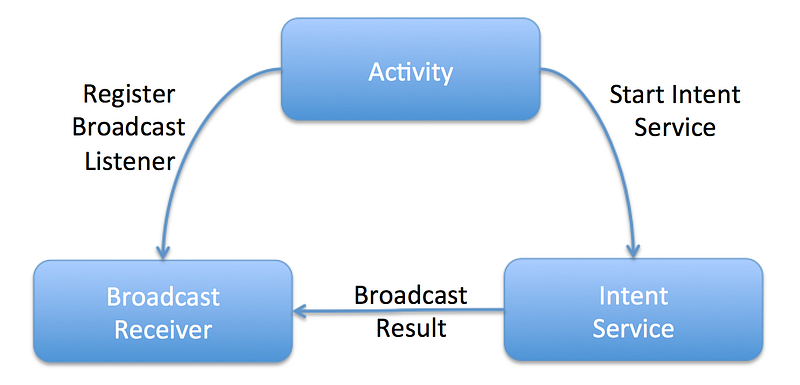
The IntentService is treated like another thread, and perform the network access as below.
@Override
protected void onHandleIntent(@Nullable Intent intent) {
    String searchText = intent.getStringExtra(PARAM_IN_MSG);
    String result = Network.fetchHttp(searchText);

    Intent broadcastIntent = new Intent();
    broadcastIntent.setAction(ACTION_RESP);
    broadcastIntent.addCategory(Intent.CATEGORY_DEFAULT);
    broadcastIntent.putExtra(PARAM_OUT_MSG, result);
    sendBroadcast(broadcastIntent);
}
Once it is done, it broadcast the result over to the BroadcastListener, that pass the result back to Activity.
Well, as hinted above, though this seems like an alternative, but a relatively heavy-weighted approach. It is just too much if one just needed a simple network access.
Industrial Age — RxJava

With the advent of Functional Programming popularity and reactive programming, RxJava is being introduced to the Android community.
Very quickly, the STANDARD way of network access is the RxJava way of doing things.
disposable = Single.fromCallable(new Callable<String>() {
    @Override
    public String call() throws Exception {
        return Network.fetchHttp(searchText);
    }
})
        .subscribeOn(Schedulers.io())
        .observeOn(AndroidSchedulers.mainThread())
        .subscribe(new Consumer<String>() {
            @Override
            public void accept(String s) throws Exception {
                view.updateScreen(s);
            }
        });
This very style of coding gain its popularity due to its ability to defined the main thread and background thread in a chaining approach as above.
I think if someone claims to say he has used RxJava, there’s a likelihood he has used it only in the network access side of code and not the other part of the actual reactive style of coding.
This phenomena is because Reactive Programming itself it's a relative tricky concept to grasp, and adds to the need of using Anonymous Classes (due to Android development at that time is limited to Java 6 and 7), makes it not a fun thing to code.
Current Time — Rxjava in Kotlin

In 2017, Google announced the first-class citizen Kotlin support in Android Studio. The wildfire spread that Kotlin usage in Android now grow like crazy… With the availability of lambda in replacing Anonymous Classes, The use of RxJava becomes much more cleaner.
Checkout the equivalent code of RxJava network access provided previously in Kotlin below
disposable = Single.fromCallable { Network.fetchHttp(searchText) }
        .subscribeOn(Schedulers.io())
        .observeOn(AndroidSchedulers.mainThread())
        .subscribe { result -> view.updateScreen(result) }
The code is more concise while achieving the same goal. Hence RxJava approach of network access gained further popularity. More and more interesting RxJava approaches are explored to expand its use in a more elegant network fetching way.
Below are two articles related to that
Future — Coroutines

Well, even though RxJava is doing a great job now for many, its learning curve is still steep for many beginners. The reactive approach of programming is not natural to many. The link between the source (network fetched result) linking to its destiny (result sent to UI View) is deemed not directly connected.
On the latest development of Kotlin, Coroutines is now introduced. It is though, in the experimental stage, it looks relatively promising. (Updated: Now it is in production)
The main gist of it is, it makes asynchronous code looks so much like synchronous as below, through its ability to suspend function.
coroutineScope.launch {
val result = Network.fetchHttp(searchText) launch(Dispatchers.Main) {
view.updateScreen(result)
}
}If one prefers a more elegant way, with concept like future or promises that looks more reactive in nature, it could also do so with it’s async-await style of coding.
coroutineScope.launch {
    val defer = async(Dispatchers.IO) {
        Network.fetchHttp(searchText)
} view.updateScreen(defer.await())
}Hence I view coroutines is now bridging the new learning community as well as the experienced gurus.
There’s a very nice article that combine Kotlin’s coroutines with the Android Lifecycle API.
Just love code that looks like this (extract from the article link below)
load { restApi.fetchData(query) } then { adapter.display(it) }Very promising I think. That’s my prediction of what’s next in terms of the Network Access trend for Android in the coming months… But I’m open to other views.
Updated: To better understand coroutine, you can start from the article below
Thanks for reading this far. Hopes you enjoy the journey of how Android Network Access has evolved. As promised, you could get the code from the GitHub below.
I hope you appreciate this post and it’s helpful for you. Do share with others.
You could check out my other interesting topics here.
Follow me on medium, Twitter or Facebook for little tips and learning on Android, Kotlin etc related topics. ~Elye~


