
RxJava: Clean way of prefetching data and use later
Just like preparing lunch box, we would like to fetch data as soon as possible and not only when we need it. When the UI is ready, we could use it instantly. Conversely, if the UI becomes ready first while the data fetching is still not ready, we would want the UI to show loading state, then when immediately upon the data is fetched, we show it.
Thinking of implementing this imperatively, could be messy. The logic could be all over the place to check if either the UI is ready, or the Data is already available…
However using RxJava, this is now made cleaner.
Background
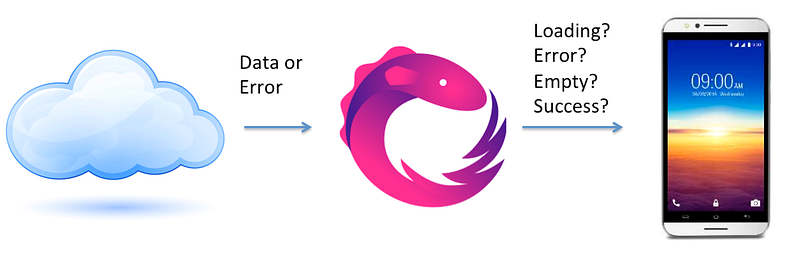
Refers to manage network state using RxJava, below shows how we could have a single chain to have the UI notified on each Loading State.
// When ui is Ready
service.fetchUiState().subscribe {
       uiState -> view.updateUi(uiState)
}
However, the down side of this is, fetching only begins when the UI is ready. Hence this might not be ideal for cases where UI is would only be ready much later, we don’t want to wait to fetch it only by then. Too slow.

Initial Solution : Behavior Subject
Initially I thought the RxJava solution is simple, we could use something call Subject.
A Subject could be view as an optional bridge one could use to link the Observable and Subscriber together. To be that bridge, a Subject is both a Subscriber and Observable (i.e. To an Observable, Subject is the Subscriber. To a Subscriber, Subject is the Observable). This allow decoupling of the chain.
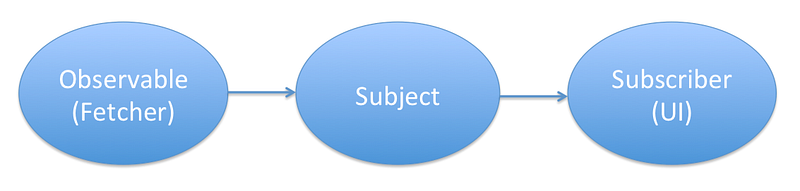
There are multiple type of Subject, well explained by Amit Shekhar. In our Context, Behavior Subject would suit best, as we only want the last Emitted Item to be shown, i.e. when the UI is ready when fetching is still Loading, show Loading, else just show the data fetch.
val fetcher : Observable<UiState> = service.fetchUiState()
val subject = BehaviorSubject.create<UiState>()
// Start Fetching
fetcher.subscribe(subject)// When UI Ready
subject.subscribe { uiState -> view.updateUi(uiState) }This sounds perfect. But bumper, at times no UI state shows at all?! Not even loading state!!

Oh, apparently for BehaviorSubject, once the last item complete emitting, onComplete is called, it finishes. When a UI subscriber subscribe to a completed Subject, nothing would be emitted.
We could use ReplaySubject though, but it is not ideal, as it will replay everything i.e. Loading State show first, even if the data fetching is completed.
Working Solution : Replay Operator
After some exploration, found a promising solution; the Replay Operator of RxJava. The replay is an operator that allows one to replay the emit-items at a desired time, by calling the Connect operation. It also allows one to set how many emit-items, which in our case is the last one, i.e. One (1), perfectly match our need.
So to do that, let’s chain our Observable with replay operator as below.
val fetcher : Observable<UiState> =
        service.fetchUiState().replay(1).autoConnect()
// Start Fetching
fetcher.subscribe()// When UI Ready
fetcher.subscribe { uiState -> view.updateUi(uiState) }Here, we use autoConnect, where by once it is subscribed, it would automatically connect it, to have it start emitting. (this eliminate the need to manually connecting it)
So to start, fetching, one just need to subscribe to it, and it would automatically connected, and start the fetching.
Later at a time when the UI is ready, subscribe to it again, and it will only replay the last emitted item (i.e. if it is Loading State, it will be Loading State… then follow by Fetched Data. If data is already fetch, then it would only show Fetched Data state).
The Bonus : Disposable
Beginning RxJava 2.0, a disposable will be given when we subscribe to an observable. Disposable is very useful to terminate the chain process in the event that we have to end it earlier (e.g. destroy an Activity or Fragment).
However, when subscribing a subject, no disposable is given. So it can’t be easily terminated.
Fortunately, we are not using subject here. Both are actual subscription that will return disposable. We could use CompositeDisposable to keep tracks of the disposables, and dispose then as needed. Blessing in disguise that Subject are not working for us.
To make it even more fun, I use Kotlin’s extension function,
fun Disposable.addTo(compositeDisposable: CompositeDisposable) {
    compositeDisposable.add(this)
}
My code now looks like that
var disposableContainer: CompositeDisposable = CompositeDisposable()
val fetcher : Observable<UiState> =
        service.fetchUiState().replay(1).autoConnect()
// Start Fetching
fetcher.subscribe().addTo(disposableContainer)// When UI Ready
fetcher.subscribe({
uiState -> view.updateUi(uiState
) }).addTo(disposableContainer)// On Terminating
disposableContainer.dispose()With this now you have a clear framework that
- Decouple fetching and using of data independently
- Ability to dispose the chain activity easily when needed.
Cheer!
I hope you appreciate this post and it’s helpful for you. Do share with others.
You could check out my other interesting topics here.
Follow me on medium, Twitter or Facebook for little tips and learning on Android, Kotlin etc related topics. ~Elye~


