
Understanding suspend function of Kotlin Coroutines

When we talk about coroutine, Suspend Functions are like its backbone. So it is very important to know what it is before one could really appreciate coroutines in full.
However, to understanding what Suspend Functions is, even after reading from various writing found on the internet, it not that straightforward, especially how could it not block the Thread? How is coroutine really different from Thread?
In the Kotlin official coroutines documentation, it is stated
Basically, coroutines are computations that can be suspended without blocking a thread

Hunting to know BLOCKING vs SUSPENDING
I search for blocking vs suspending and found it in English Language Site
A process is blocked when there is some external reason that it can not be restarted, e.g., an I/O device is unavailable, or a semaphore file is locked. A process is suspended means that the OS has stopped executing it, but that could just be for time-slicing (multitasking). There is no implication that the process can not be resumed immediately.
Neither of these words, especially blocked, are being used the same as in non-computer contexts.
Wow, very computer science English Term.
But it is helpful. This provides some cue to it. There’s something about time-slicing and resume immediately.
Illustrating in Diagram
From the cue above, I could imagine the difference between Blocking and Suspending as below
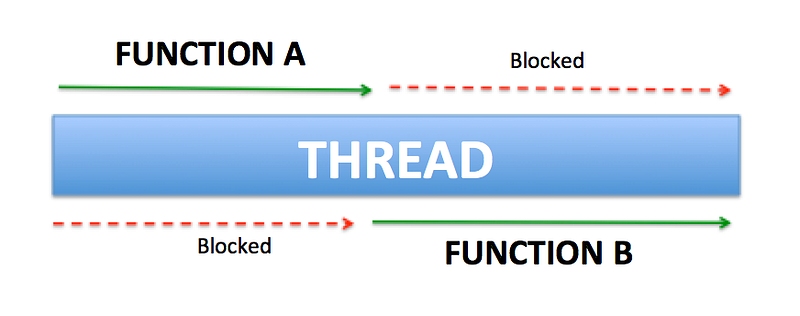
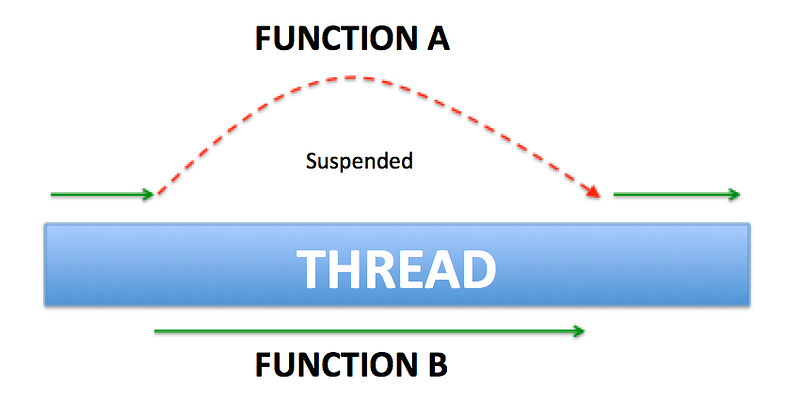
In short, the suspend function is a function that could be started, paused and resume, (and pause and resume…. if wanted repeatedly) and then end.
Let’s talk code, launch vs thread…
Talking about coroutines without code is so intangible. Let’s get into it.
launch as thread
Let’s start with a simple example
fun testRunFunction() {
    // Start a coroutine
    launch {
        println("In start : ${getThreadName()}")
        Thread.sleep(200)
        println("In ended : ${getThreadName()}")
    }

    run {
        println("Out start: ${getThreadName()}")
        Thread.sleep(300)
        println("Out ended: ${getThreadName()}")
    }
}
The result as below.
Out start: main
In start : ForkJoinPool.commonPool-worker-1
In ended : ForkJoinPool.commonPool-worker-1
Out ended: main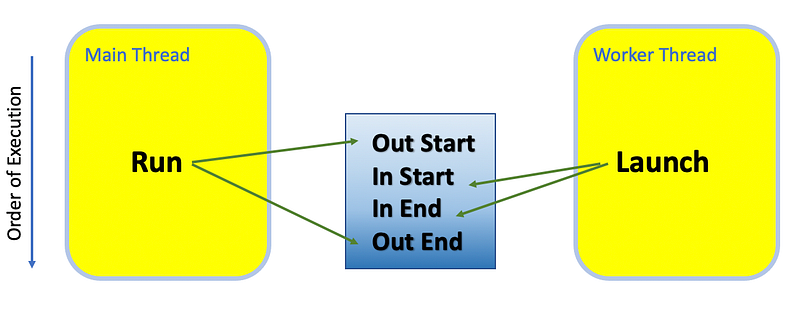
Great, could do threading… … But wait, can’t I just use Thread{} to do so, since it is launched in a different Thread (i.e. ForkJoinPool.commonPool-worker-1) anyway. Where’s the suspend functionality? So what’s so special about launch?
Forcing launch to run on the same thread
But wait…. didn’t I just draw my suspension function illustration above showing SINGLE THREAD? If I could force launch to run on the same thread, maybe we could see something.
Found there’s a way to do so, by putting it in runBlocking and add coroutineContext as parameter to launch
fun testRunFunction() {
    runBlocking {
        // Start a coroutine
        launch(coroutineContext) {
            println("In start : ${getThreadName()}")
            Thread.sleep(200)
            println("In ended : ${getThreadName()}")
        }

        run {
            println("Out start: ${getThreadName()}")
            Thread.sleep(300)
            println("Out ended: ${getThreadName()}")
        }
    }
}
Let’s look at the result
Out start: main
Out ended: main
In start : main
In ended : main
Nice, all are run on main thread!
Hold on… but the In is run after Out. Why?
Well the reason is launch is suspended until the run is completed.
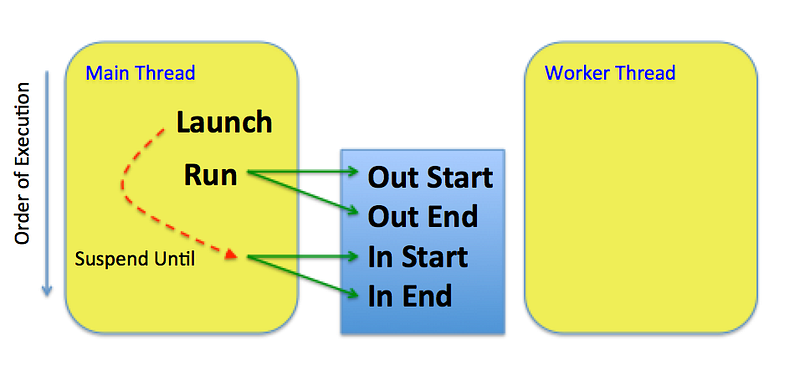
In the run block, there are no non-blocking functions that allow launch to start its work. There’s now at least some suspension functionality seen.
But, it doesn’t seem very useful if all it does can just be done right after the caller function completed. Let check out further…
Replace sleep with delay
Well, let’s use the special function introduced in Kotlin, i.e. delay() to replace Thread.sleep().
fun testRunFunction() {
    runBlocking {
        // Start a coroutine
        launch(coroutineContext) {
            println("In start : ${getThreadName()}")
            delay(200)
            println("In ended : ${getThreadName()}")
        }

        run {
            println("Out start: ${getThreadName()}")
            delay(300)
            println("Out ended: ${getThreadName()}")
        }
    }
}
The result as below
Out start: main
In start : main
In ended : main
Out ended: main
This looks much more interesting now, as In and Out is both mixed up the result. Let’s understand what’s going on with the below diagram.
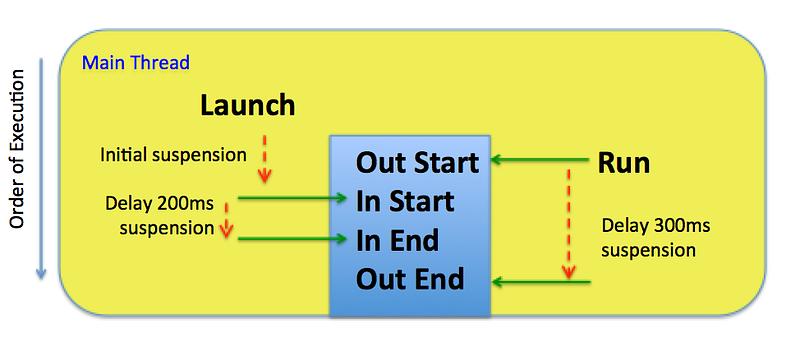
From the diagram, we could clearly see that the use of delay() doesn’t block the Thread, but release the Thread for the other coroutine to continue its work, and regain it back as the Thread is released.
This now clearly exhibits what was mentioned here.
We are using the
delay()function that's likeThread.sleep(), but better: it doesn't block a thread, but only suspends the coroutine itself. The thread is returned to the pool while the coroutine is waiting, and when the waiting is done, the coroutine resumes on a free thread in the pool.
Hopefully, this makes it crystal clear the meaning of the suspend function that is not blocking the Thread.
Launching on Android UI Thread
As we know we could launch on the same Thread and run things in parallel, why not let’s try it on the Android Main UI Thread, updating some UI in Parallel.
I wrote a simple App that update 3 different color status bar with some incremental random number, and race to see who reach the final first
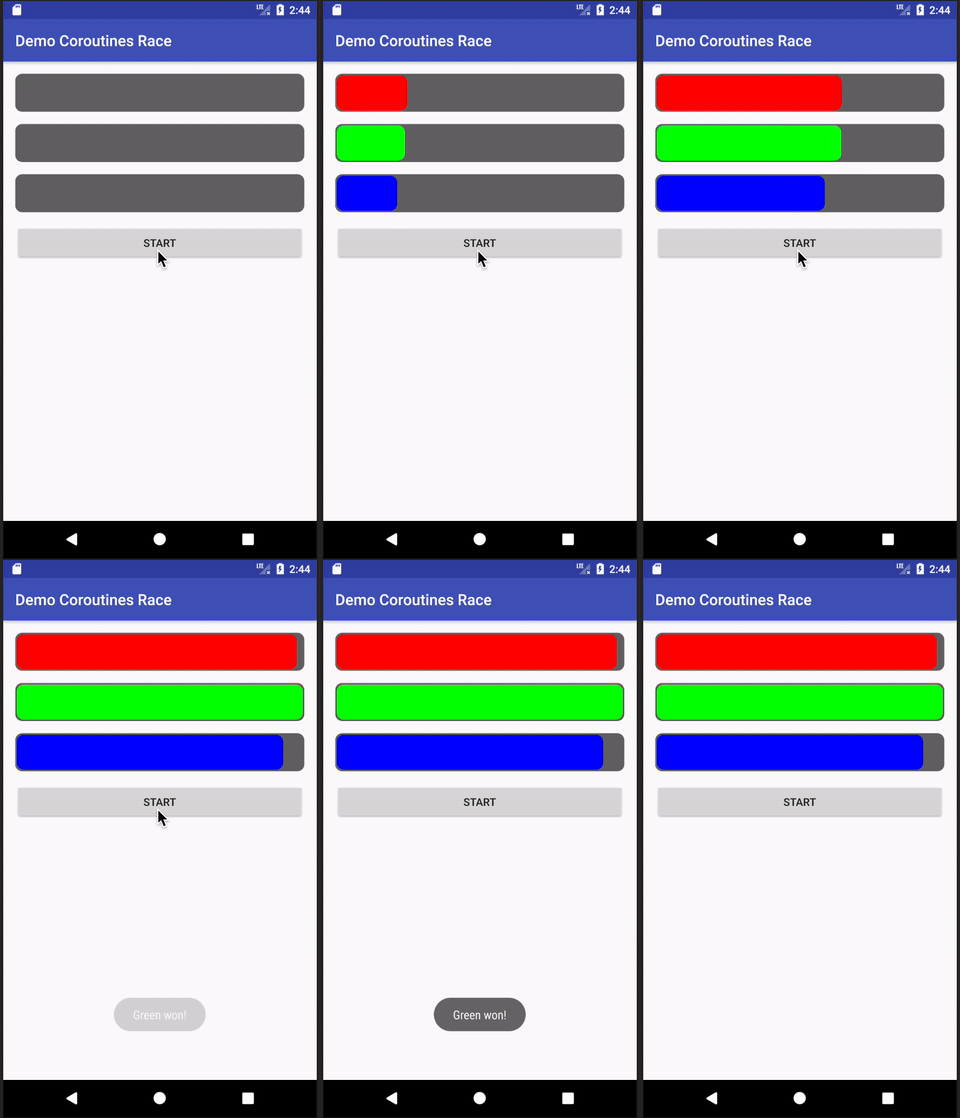
The gist of the code as below
private fun startUpdate() {
    resetRun()

    greenJob = launch(Android) {
        startRunning(progressBarGreen)
    }

    redJob = launch(Android) {
        startRunning(progressBarRed)
    }

    blueJob =launch(Android) {
        startRunning(progressBarBlue)
    }
}

private suspend fun startRunning(
           progressBar: RoundCornerProgressBar) {
    progressBar.progress = 0f
    while (progressBar.progress < 1000 && !raceEnd) {
        delay(10)
        progressBar.progress += (1..10).random()
    }
    if (!raceEnd) {
        raceEnd = true
        Toast.makeText(this, "${progressBar.tooltipText} won!",
              Toast.LENGTH_SHORT).show()
    }
}
Here you could see there are three jobs got launched. And all calling the same function to update their respective progress bar. The bar got updated in a seemingly parallel fashion. All done in the Main UI Thread without spawning other threads. Amazing!
Check out the code in
For further reading, refers to below.
Thanks for reading. You can check out my other topics here.
You can follow me on Medium, Twitter, Facebook, and Reddit for little tips and learning on mobile development, medium writing, etc related topics. ~Elye~


