
The Conundrum of Limiting Access to Change a Single Service Control Policy
ACM.398 A policy can’t limit access to itself and the ARN is random
~~~~~~~~~~~~~~~~~~~~~~~~~~~~~~~~~~~~~~~~~~~~~~~~~~~~~~~~~
⚙️ Part of my series on Automating Cybersecurity Metrics. The Code.
🔒 Related Stories: AWS Organizations | IAM | Deploying a Static Website
💻 Free Content on Jobs in Cybersecurity | ✉️ Sign up for the Email List
~~~~~~~~~~~~~~~~~~~~~~~~~~~~~~~~~~~~~~~~~~~~~~~~~~~~~~~~~
In the last post I automated the deployment of my AWS Organization Resource Policy which defines Delegated Administrator accounts for the AWS Organizations service.
Next I was going to add an admin user that account to which I delegated organizations access but I spent far too long on this, so it’s becoming it’s own post.
I was thinking about creating a default admin user in each account in case of emergency. The admin user would be restricted by service control policies. I thought that perhaps I could write a single admin service control policy that would limit access for the new user in my root-orgadmin account. The account will be all-powerful but didn’t want it — or any other admin — to be able to change the Administrator SCP.
I hit some roadblocks and likely won’t be using SCPs for this purpose.
What restrictions do we want to place on our default admin users?
For the root-orgroot user we want pretty broad permissions to fix problems as needed across accounts in case of emergency.
The main service control policy I want to apply at this time is a restriction on changing other people’s credentials. I took a look at how to do that in prior posts with IAM policies.
Creating a Service Control Policy for this based on principal was complicated, but I found some addition possible options we can try:
Because that topic is a bit long, I’m saving this topic for another post.
For now I’m going to create an SCP to limit IAM actions apply it to the root:
administratorpolicy.yaml
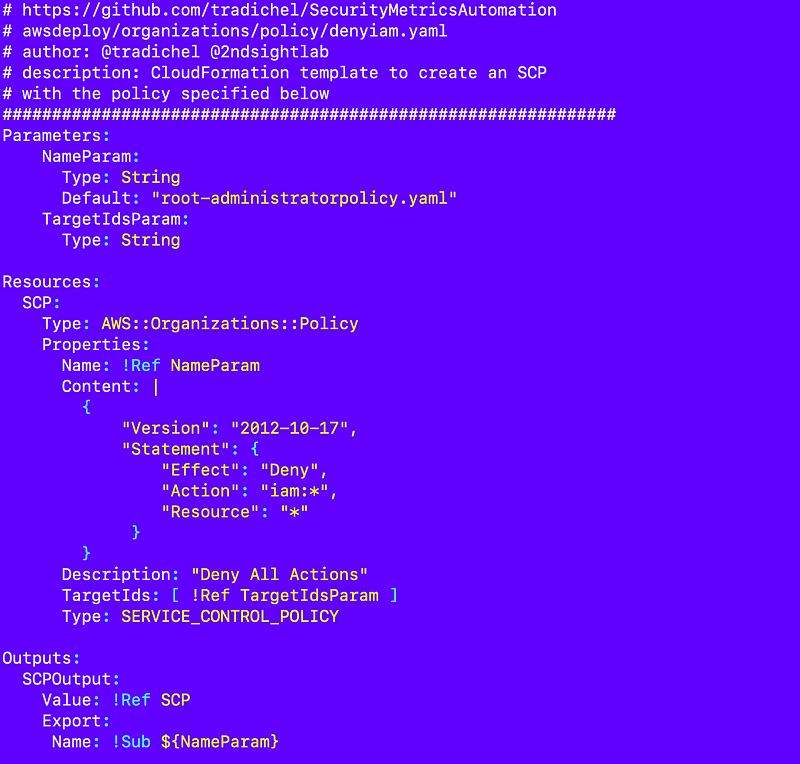
That policy will affect my new account but not the management account.
I moved the scp_functions.sh file over, renamed, and adjusted it.
/resources/organizations/policies/policy_functions.sh
So I have this policy but the problem is, if I make the root-orgadmin account a delegated administrator, that account can change it’s own policy.
No problem, or so I thought. I’ll just restrict the user from modifying that single policy.
Here’s where the catch 22 comes in. There’s no “this” construct in CloudFormation that I am aware of like there is in Java to reference a policy in itself, perhaps for a reason. I’m not sure. I can’t add a statement to disallow the user from editing the current policy in the policy.
No problem, I thought. I’ll get the format of the ARN and reference the policy ARN with it’s name inside itself. But no.
AWS decided to name Service Control Policies with some random value at the end for some unknown reason. These newer resources that vary from all other resources on AWS are causing problems. People don’t seem to understand why the naming convention exists as it does and it is making policies difficult to write.
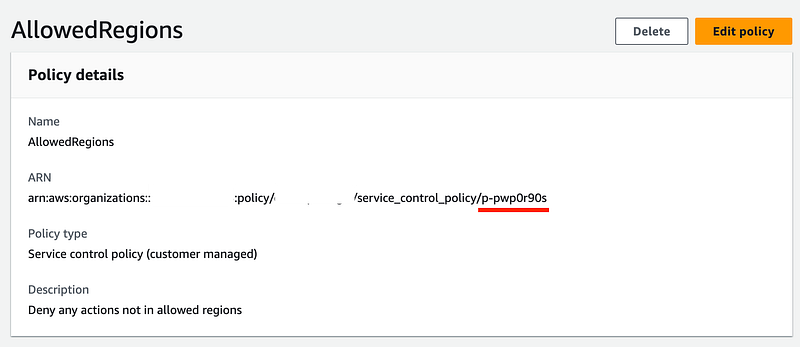
I can’t guess what the new ARN will be so I have to first deploy the resource, get the name, and then update the SCP. Yuck.
The other thing I tried to do is use conditions to create my policy. I started with the following for sanity reasons, deployed it, and it worked.
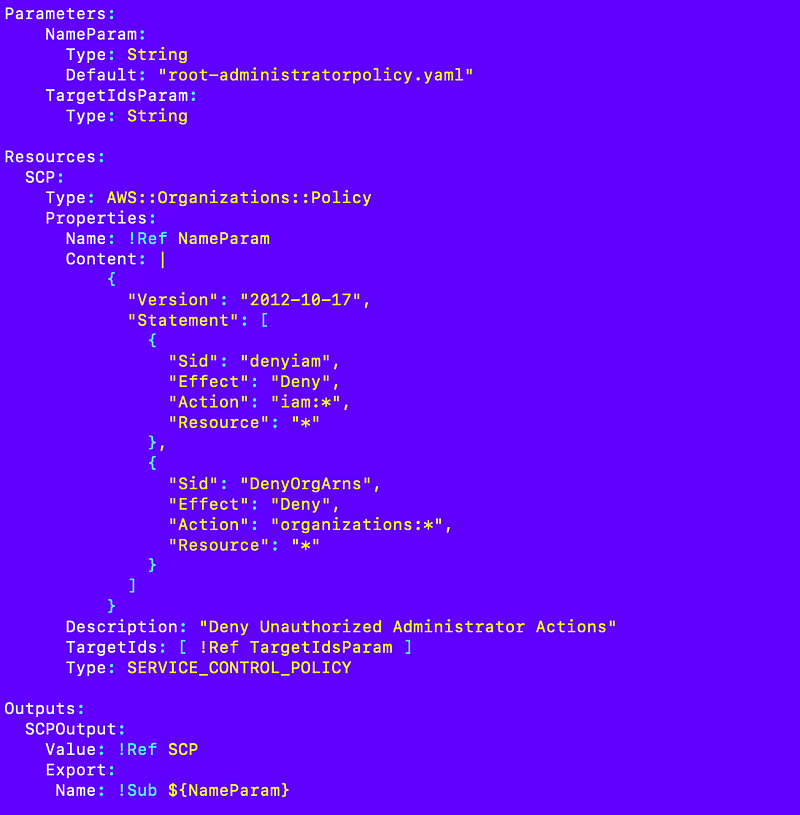
Then I tried all manner of variations to try to dynamically change the resource based on whether or not an ARN was passed in, using a true/false parameter and referencing the import at the bottom of the template if it was already deployed and a whole bunch of other nonsense that didn’t work. Perhaps you can’t include dynamic values in SCPs and if you can would love to see an example in the documentation.
But most of all — need a better error message for this error below! This is not the first time I’ve written about this error message and it cost me a lot of time both times because you have to hunt nad peck and reverse-engineer what is causing the problems. Other blog posts I linked to were doing the same or staring at this for hours to figure out what is wrong.
Going to leave this for now. I guess I can just deploy the admin policy and then deploy a policy on new admins limiting them from modifying the administrator SCP there but it’s not what I wanted to do. Most admins won’t have SCP permissions. The two that will are the root-orgadmin user and what will be the governance-admin IAM user, and possibly some federated users in the governance account. Hopefully those users are trustworthy but if their credentials are stolen that could be a problem — so I might have to resort to IAM policies to some degree.
Follow for updates.
Teri Radichel | © 2nd Sight Lab 2023
About Teri Radichel:
~~~~~~~~~~~~~~~~~~~~
⭐️ Author: Cybersecurity Books
⭐️ Presentations: Presentations by Teri Radichel
⭐️ Recognition: SANS Award, AWS Security Hero, IANS Faculty
⭐️ Certifications: SANS ~ GSE 240
⭐️ Education: BA Business, Master of Software Engineering, Master of Infosec
⭐️ Company: Penetration Tests, Assessments, Phone Consulting ~ 2nd Sight Lab
Need Help With Cybersecurity, Cloud, or Application Security?
~~~~~~~~~~~~~~~~~~~~~~~~~~~~~~~~~~~~~~~~~~~~~~~~~~~~~~~~~~~~~
🔒 Request a penetration test or security assessment
🔒 Schedule a consulting call
🔒 Cybersecurity Speaker for PresentationFollow for more stories like this:
~~~~~~~~~~~~~~~~~~~~~~~~~~~~~~~~~~~~~~~~~~~~~~~~~~~~~~~~~~~~~
❤️ Sign Up my Medium Email List
❤️ Twitter: @teriradichel
❤️ LinkedIn: https://www.linkedin.com/in/teriradichel
❤️ Mastodon: @teriradichel@infosec.exchange
❤️ Facebook: 2nd Sight Lab
❤️ YouTube: @2ndsightlab