
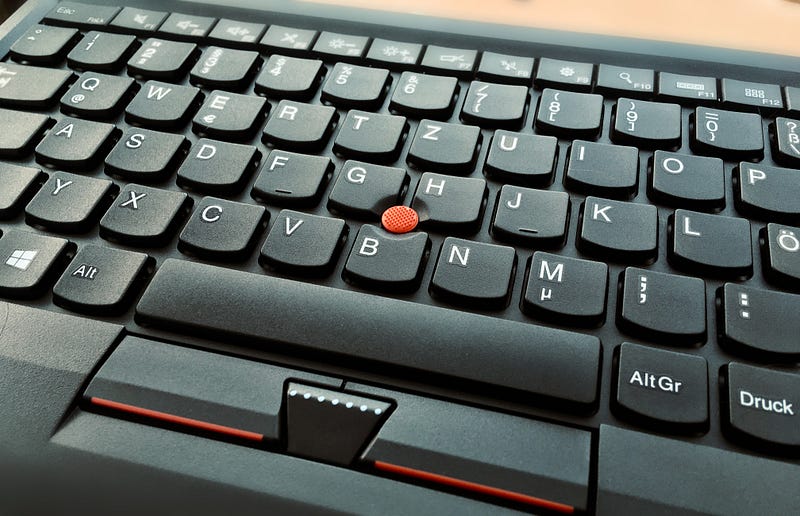
The Best Cheap Keyboard You Didn’t Know You Wanted
The best features of Thinkpads, but for your desk!
I still firmly believe, that a mechanical keyboard is the best choice for anyone who writes for a living. But tastes differ. Many writers prefer flat, chiclet-style keyboards, like the Apple Magic Keyboard. One particularly good keyboard is the one used in Thinkpads, featuring “the nub”. To me, it’s the best laptop keyboard, period. Even though Thinkpads are awesome otherwise, the keyboard alone would be reason enough to get a Thinkpad, it’s that good.
Even now, after Apple finally got their act together and started going back to the scissor-switch keyboards on the MacBook Pro 16" and the MacBook Air, the Thinkpad keyboard is superior. The feeling of actually typing on a Thinkpad is the best thing ever, short of an actual mechanical keyboard.
It’s quieter too.
Did you know, that you can have that awesome Thinkpad keyboard sans the actual Laptop? Yep, you really can, since 2013 actually.

Function over form
Thinkpads are known for being stoic workhorses, weathering the storm of whatever kind of workload you throw at them. They look the part too. There’s very little room for fancy fluff. They’re get-down-and-dirty business machines and thats that. There can be found some kind of simple elegance in their stealthy, sturdy design, for sure. Personally, I think they’re sexy (as sexy as a lifeless object can get) but I don’t obsess over them.
They’re tools.
So is the standalone Thinkpad keyboard, that’s either available with a wired USB-connection or as a wireless bluetooth keyboard.
Besides the trademark “nub” and the three separate clickpads just above where the touchpad would be on a laptop, this keyboard screams productivity. The function row is very cleverly designed and gives you expanded control over your computer with the press of a button. Personally I take this approach over a fancy touchbar any day.
But what’s the most important function of a keyboard? Hitting those keys hard, fast and accurate. Boy does it succeed in this. The shape of the separate keys kind of “guide” your fingers into their centre. The actual typing sensation is a bit “cushioned” but still “clicky” enough to feel responsive. If you’re an enthusiast typist, you’ll also value the softened clicky sound this thing emits, when hammering away on it.
And, of course, there’s “the nub” that, after a week or two of getting used to it, quietly and elegantly eliminates the need for a mouse altogether…
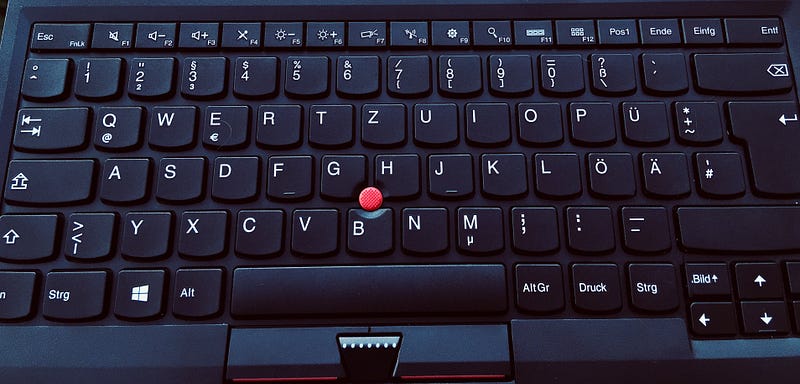
How awesome “the nub” really is
With a little bit of practice, you will never have to move your hands away from the home position anymore. You won’t need a mouse. At all. On a desktop machine.
Think about the strain your’re exposing your tendons and muscles to, if you continuously move your hand away from the keyboard and to your mouse.
This won’t sound like much, but the Trackpoint (that’s what “the nub” is actually called) will be such a relief, if used correctly. Moving your arm ten or twenty times to adjust your cursor won’t do you much harm. But doing it thousands of times probably can and will.
The Trackpoint will not only save you from this, but will also significantly improve your productivity and speed. It’s a bit like drinking wine for the first time — just give it some time to grow on you.
The pros and cons at a glance
Just for your information: I use the wired version of the Thinkpad Keyboard from 2013.
PROS
- great typing experience
- stylish angular, understated design
- removes the need for a mouse
- lightweight
- clever function row
- the signature Trackpoint allows for fast navigation without ever lifting your hands
- clever flipout feet on the backside
- connection cable is removable
- a new model (Thinkpad Trackpoint Keyboard II) is on the way, so you can get this model for really cheap (about $49)
CONS
- no backlight
- lettering is not very resistant and will deteriorate with use
- old micro USB connection
- not as good of quality as the keyboards in Thinkpads (but close enough for the price)
Once I get my hands on the new model, I’ll be sure to follow up with an in-depth review!
Conclusion
Well if you can’t or don’t want to have a mechanical keyboard, or you’re deprived of desk real estate, I really recommend giving this Thinkpad keyboard a try. It’s convenient, tactile, precise, cheap and comfortable to type on fast. A second generation model, that’s allegedly better in every regard, is on the horizon (it should release between May and June 2020). Maybe you can make up your mind, by trying this keyboard and giving the Trackpoint a whirl. Who knows, your next Laptop might be a Thinkpad.
Once you made friends with “the nub”, everything is possible!
Oh, and one more thing: You should really keep your eyes on this year’s Thinkpads (T14 and T14s) — they will sport the latest 4000 series Ryzen mobile CPUs with integrated graphics. Despite still not getting Thunderbolt 3, this year the Thinkpads will ascend to another level, performance wise, thanks to AMD. Once I upgrade to a T14s this year, I’ll follow up with an in-depth review!
Thank you so much for reading!
If you enjoyed this piece, you might be interested in reading about my mechanical keyboard recommendation, or why Thinkpads are still the best laptops for writers!
Stay safe, healthy and keep creating!
This article is purely based on personal experience and opinion. I took all the images used myself. This article contains no affiliate links and I am in no way associated to any of the brands mentioned.


