

My Perfect Laptop for Writers
After over two years of trying different machines, here’s what I’ve learned.
I spent more than two years trying to find the perfect laptop for my needs as a writer and I gladly share my findings with you. Maybe you can save yourselves some headaches and find the information I provide useful.
Short, simple answer
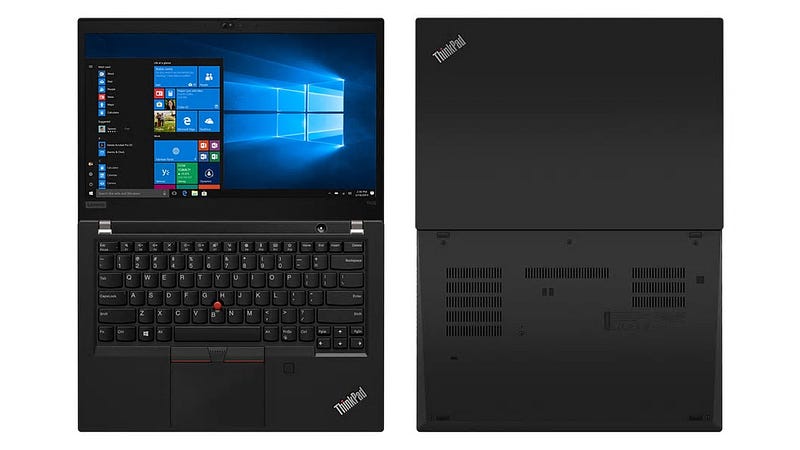
Lenovo Thinkpad.
Slightly longer answer
If you’re thinking about a laptop, you might want to be “mobile” when writing. We all know the cliché of a writer sitting at Starbucks, hammering away, slurping his soy milk latté. But if you’re serious about writing, especially creative writing in long form, you’ll spend lots and lots of time stationary, in one location, staring at screen, hunching over, typing away.
A Laptop has many drawbacks for the price of mobility. The screen sizes can be too small, the keyboards oftentimes are sub par and you pay much more for a laptop than for a comparable desktop computer, just because everything needs to be smaller. Also the performance of Laptops, even if they have cought up a lot recently, still is no match for a desktop computer. But for writing, you really don’t need that much horsepower anyways.
Still, you want a laptop and live that “mobile livestyle” — then make sure that the screen is perfectly usable in all light conditions, the keyboard is as ergonomic and tactile as possible and you got a plethora of connectivity for any usecases that might emerge.
With a Thinkpad you get all of that and, depending on how “mobile” and “sexy” you want your computer, you can get it all for a reasonable price. I mean the most expensive and slimmest series of Thinkpads is the X. Thin and light, sturdy as hell and all the good stuff too. The T models are the workhorses, only slightly bulkier than the X ones, the E models are the budget oriented ones. Bulkier, but still sporting that awesome keyboard.
Without further fanfare, here are the benefits of using a Lenovo Thinkpad (I focused my research onto the T and X models, personal experience with a Carbon X1):
- sturdy, solid, professional looking and feeling build
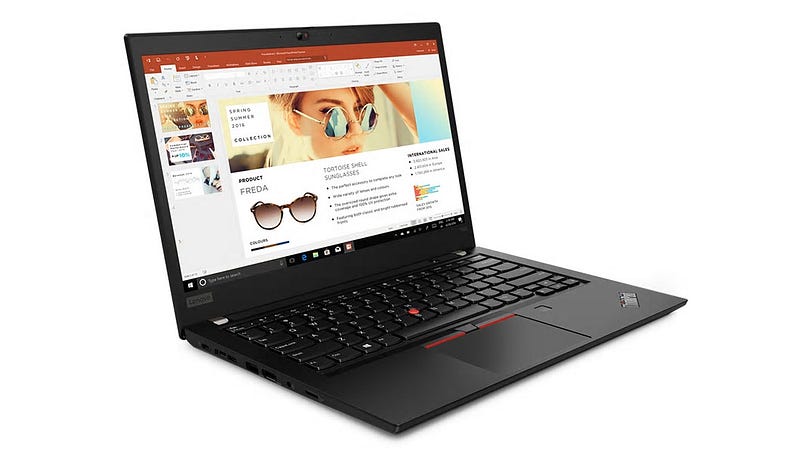
- that sweet 14" screen size, which sits perfectly between tiny 13" and too bulky 15" screens
- industry leading, spill proof, ergonomic keyboard with track point
- plenty of customization when ordering
- 1080p, power saving 400 nits, matte screen option
- lots of ports for plenty of connectivity
That 1080p, power saving 400 nits matte screen is the true highlight here. For a 14" screen you don’t benefit from a higher resolution (Retina or 4K) screen. You simply won’t be able to see a difference. 1080p is plenty, saves you money and is easier on the battery, especially Lenovo’s power saving screen units.
Obviously you want to be able to work mobile, away from an outlet as long as possible, and this helps a ton. Also 400 nits is plenty bright, almost as bright as the MacBooks. The brightness and the matte display help a lot, when working outside in daylight. Go out and enjoy that fresh breeze of air, you’ll even be able to see what you type!
The keyboard is something you need to try to understand. Every other keyboard, especially the ones on Apple laptops, can’t hold a candle to this smooth keyboard. If you have to type for longer periods of time, this keyboard won’t let you down, nor give you a strained wrist. It is tactile, comfortable and as fast as you can type.
Also, these laptops look and feel like a tool. Meant to be used, hard! Like a sketchpad or a typewriter. A tool to get your work done. If you prefer the more flashy models of Apple, HP, Asus and Dell to show off in your local Starbucks, you won’t find that kind of bling here. Thinkpads are sober working tools for pros and workaholics.
What about that “nipple”?
Ah, the trackpoint. With touchpads and multi-finger-gestures this odd nipple must be a thing of the past right? Wrong!
Coders love it, as do writers, who got used to it. Why? Because, contrary to a mouse and even a touchpad, the trackpoint allows you to move the cursor without your fingers leaving the home position. Small edits on the fly — a writer’s dream. You’ll get the hang of it within a week, at least I did. Even if you don’t use it, it won’t get in the way, and if you really, really hate it, you can remove that red cap.
What you should really invest in, besides your laptop
All that said I conciously recommend a Thinkpad as your writing laptop, but if you spend lots of time working stationary, then you should think about a few more things to make your work more bearable and ergonomic.
- a very comfy, ergonomic chair — at some point in your life, you WILL run into back pains, if you can bear it, you might want to work standing
- an external monitor, 22" to 27", in a comfortable height to reduce neckstrain (24" and up it should be higher resolution than 1080p)
- a good mechanical keyboard (HOT TIP: Ducky)
- a good printer with low running costs
As good as working in a Starbucks, or outside on your balcony, might be on a Thinkpad, nothing beats a comfy chair, that’s yours, with a larger screen in a comfortable height and a high quality mechanical keyboard, if you need to work hard and long.
Luckily, there are many solutions (USB-C and thunderbolt docks, Monitors with integrated USB-C hub, …) for your Thinkpad to make connecting to your “homebase” as hasslefree as possible. Ideally you only need to connect one USB-C cable for your peripherals, charging your laptop and transmitting to your screen and you’re set. You can also use the internal screen of your Thinkpad as secondary screen for research and notes. Helps me a ton.
Conclusion
If you’re a serious writer, who writes high volumes of words each day, a Lenovo Thinkpad can and will be a worthy companion. If you’re more budget oriented, there are the E series models for you. Those are a bit bulkier, the screens are not as bright, but you still get that awesome keyboard for a much more sensible price. If you feel unsure about what model to get, do some research on Lenovos website. There’s so much choice, it can be daunting at first. I highly recommend you take a closer look at the latest T and X models.
Once I got my Thinkpad, I was never looking back. Oh, and if you hate Windows, you can also easily install Linux on them. If it has to be macOS, well you know what to do, but if you just want good hardware, for a reasonable price, that will last you years and many many novels, my opinion is: Thinkpad is the way to go.
Thank you so much for reading! This article is purely based on personal, first-hand experience and my opinion. It contains no affiliate links and I am not associated with any of the brands or manufacturers mentioned.


