
Is This The Perfect Printer for Writers?
When proofreading on screen just doesn’t cut it — you need a reliable, economical printer!
I read a lot. I write a lot. I print a lot. I refuse to completely transfer my workflow to digital only, as I am sick enough already from looking at a bazillion different screens during the day. I like paper. With this mindset I was looking into a whole lot of printers, to find a reliable greyscale-only workhorse, that prints crisp text economically (i.e. cheap) and quickly. I’ve finally found what I was looking for and want to share my experiences with you.
It’s 2020, Why Even A Printer?
Well, in times of climate-related buzzwords it might seem a bit backwards to talk about printers, when the work of a writer actually can be done 100% paperless. Still, I’m old(school) and when writing short stories or other forms of creative prose, I like to print (in ECO-mode, mind you) my manuscripts, to give them a few reads and take notes directly on paper.
Also, in my daily work-life I often need to print documents for reference, which is much easier on my already strained eyes, than working on yet another screen.
So maybe, you’re like me and you want to archive your stories, proofread them on real paper or maybe you want to keep a paper-backup of important E-Mails — then this printer is for you!

Why THIS Printer?
I’ve been looking for a workhorse of a printer with low running costs for quite a while. I’ve been on the laser-train the longest time but printing costs, if you print a lot and don’t actually sell the prints you make (like a copy shop), can accumulate quickly to undesireable amounts.
So, when I stumbled over the EcoTank line of printers by Epson a while back, I was intrigued. I was eyeing some of their bigger machines, the all-in-one types with color-printing, copy-function etc. but settled on this one, because it is, how I like my things: simple and functional.
It’s meant to churn out text-laden documents in huge volumes on plain, recycled or extra thin paper (to keep those pesky binders small).
Features
As said, this gadget is simple and functional. Here are it’s key features:
- greyscale-printing in duplex mode
- wireless printing from wifi and devices
- 250+ sheets of A4 paper fit into its tray
- if necessary it can print envelopes (one after another) too
- ECO-tank system allows for extremely low running costs
- text-prints are quick and crisp
- once set up, easy to use
That’s it and apparently this is just what I was looking for. The setup though, was a huge hassle.
Setup And Compatibility
To be honest, the setup process was weird at best and having worked with all major manufacturers (HP, Canon, Brother, Kyocera) Epson really does not offer good support, nor clear instructions or easy-to-find drivers.
If you are going to use this printer only through USB-connection, everything is fine. Plug it in, add it in printer settings and you’re good to go with the standard drivers, be it under Windows or Mac OS.
IF you want to use it’s advanced features (cloud printing, device printing, WIFI) you have to use the driver that’s included in the box.
Which is on a CD.
Which can be tricky in 2020. Also, my disk didn’t contain a Mac OS setup, only files for Windows and since I was using multiple computers from both camps, I was out of luck.
If you think, you can just push the WIFI Button on the device and then go find it in printer settings as a network printer (HP does a good job at that) — you’re out of luck too (it’s meant to be a way of directly connecting your printer to one device only, via it’s own network).
What you have to do is, connect the printer via USB, then run the correct setup (more on that in a second), do all steps that you’re told to do and then, after maybe two or three tries, you’ve got your printer hooked up into your network.
What IS the right driver then? If you want to use the latest drivers and software for Windows, or use the Printer wirelessly under MacOS at ALL, you need to get Epsons setup-program called “Navi”. Try to find it from an official source (their website), which at the time of this writing, was a mess to navigate and it was not so easy to even find this printer, the Epson M-1170 EcoTank on their own Website (because it wasn’t listed under EcoTank, just M-1170).
Anyways. If you got that Navi-program, connect the printer to your computer via USB and run the setup. If you’re lucky, you’re good to go within 10 to 20 minutes.
Also note, that the first setup, including filling the EcoTank the very first time, will take a while, as the printer cleans the nozzles and sets everything up.
This is normal. Don’t worry.
Here’s The Seller: Running Costs
I’ll come straight to the point. With my current laser printer I had running costs of about 5 to 9 Eurocents per printed page.
Which is a lot.
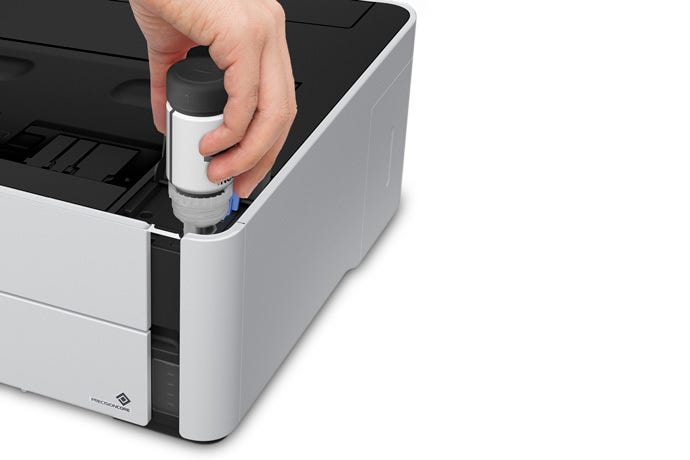
With the EcoTank system from Epson you’re looking at bottles instead of cartridges, containing 120 ml of black ink, that are filled whole and hassle-free directly into the tank of the printer.
Each bottle is rated for around 6.000 text page prints. And it’s only around 15,00 Euro. If you do the math you’ll end up with something like
0,25 Cents per page +/- depending on page coverage
If you only print in draft mode, you can further extend your printing range significantly. Add in some electricity and paper and you’ll have costs of… still a whole lot less than a laser printer.
There is — of course — one downside to it all. It’s the initial price you’ve to put down to get one of those. I was lucky and got mine for about 235,- Euro and still I felt like this was way too expensive for what the hardware feels like.
But it comes with 11.000 printed textpages in ink bottles and after doing the math again, I was convinced.
Still, for how the printer feels and the features it has, it might look expensive, but if you’re printing lots of pages, you’ll make back your initial investment within a year, compared to a laser printer.
Conclusion
The Epson M-1170 Ecotank looks nice enough, is not exactly built like a tank and it could be a bit more silent while printing. But, it prints fast and it is an excellent text printer, as the letters come out sharp and once you’ve got the horrid setup process behind you, it’s a reliable tool for your home-office. It handles all your greyscale-printing very well (even occassional graphics and photos) and it’s a conscious decision to get one of those to not only save running costs for yourself, but also reduce waste overall.
It’s a simple and functional thing without any bells and whistles, a work horse and if this fit’s your mentality and your needs, I can only highly recommend this “page spitter” — as I’ve lovingly called it. Of course this printer isn’t exclusively aimed at writers, but anyone who has to print high volumes of text-based documents.
PROS
- prints fast and crisp
- extremely low running costs
- duplex printing
- 250 sheets of paper can be loaded into the tray
- EcoTank inks are easy to refill
- light and can be put inside a cupboard
- can easily handle even the ultra thin 60 gsm paper, to conserve space in binders
- the ink is jetblack, dries quickly and is highly smudge-resistent
CONS
- comparatively big initial investment for a very basic printer
- first setup is a traumatizing experience
- no reliable/supported printing on heavier papers from the tray
- manual feed is single-sheet only
Thank you so much for reading! This article is purely based on personal experience and opinion. It doesn’t contain any affiliate links!