avatarEduardo Morales

Free AI web copilot to create summaries, insights and extended knowledge, download it at here

7620

Abstract

sseminated within the network by the <a href="https://readmedium.com/instagram-hashtags-everything-you-need-to-know-3761a825a268">Instagram hashtags</a> you use for it and the <a href="https://readmedium.com/how-to-measure-what-an-instagram-post-is-worth-ffb38e91a9dd?source=user_profile---------24-------------------">people who engage</a> (like, comment, share) with it.</p><p id="6d49">Each hashtag and engagement creates new opportunities for people to discover your post, see your profile, and decide that they like your content enough to follow your page (if you have great content and a nice-looking grid).</p><p id="d956">Think of it as similar to placing an ad in a magazine or on a website. Every time a person sees your ad, you’re creating a new opportunity for someone to see your brand or business, discover what you have to say, and then decide if they like it enough to consider buying something from you.</p><figure id="7cf3"><img src="https://cdn-images-1.readmedium.com/v2/resize:fit:800/1*zlL4AztO9ILrH7l5EiBp1Q.gif"><figcaption>FYI — here’s an article about the best <a href="https://readmedium.com/the-best-instagram-content-scheduling-and-post-automation-tools-2e52e48373d3">Instagram content scheduling and post automation tools</a>. Using them will help your posting process a lot more efficient 👍🏽</figcaption></figure><p id="02ac">The more discovery opportunities you create by posting engaging content with the right hashtags (just like placing ads in the right magazines or website), the larger the number of people who will see your profile and business. If you have clearly communicated value in your content through a great visual grid (aka great ads and a value-adding product), the more chance that a larger percentage of them will stick around and follow you (or even better, buy something from you).</p><h2 id="8dbe">The best tool for the job: Onlypult</h2><p id="0c58">The problem with posting so often is that you have to stop everything you’re doing several times a day to stick to the posting schedule. That can be disruptive to your work-flow, and if you’re a busy entrepreneur or small business owner, you want to be focusing your energy on other, more essential parts of your business. Here’s where <a href="https://onlypult.com/?io=pinlord">Onlypult</a> can help.</p><p id="bbcf"><b>What is <a href="https://onlypult.com/?io=pinlord">Onlypult</a>?: </b>Onlypult is a web-based Instagram post publisher that makes it painless for you to stick to your daily posting schedule by allowing you to schedule your future posts straight from your web browser. Once you do, they take care of posting them to your Instagram on the day and time that you’d like, so you don’t have to think about it.</p><p id="4a22"><b>Why is it the best tool on the market? : </b>Hootsuite, Buffer, and Later are Instagram content management tools that claim to fully automate publishing but in reality, <a href="https://buffer.com/instagram">they have a lot of restrictions around how and what you automate</a>. <a href="https://onlypult.com/?io=pinlord">Onlypult</a> has no restrictions (except video posts, which you can’t automate anywhere), it’s cost-effective (starting at $15 a month), and, most importantly, it has a feature that allows you to add your hashtags to the first comment — a perk that no other service provides and that will give your posts the benefit of using hashtags without it looking like you use hashtags.</p><p id="8055"><b>How do you use it? </b>To start out, if you want to<b> </b>post once a day, you know that you’ll need seven photos for the week. Spend some time at the beginning of the week shooting all of the photos at once, instead of deciding what photo to take every day. Creating content on the fly every day is time-consuming and distracting — avoid it as much as possible!</p><p id="8ecc">Once you have the images, plan how they are going to look on your grid using Planoly, then upload them to <a href="https://readmedium.com/how-to-automate-posts-on-instagram-from-your-computer-7138ba26658f">Onlypult</a>, scheduling them during your optimal posting times for each day of the week. If you don’t know when your optimal times for posting are, <a href="https://readmedium.com/how-to-optimize-posting-times-to-fix-your-falling-engagement-rates-on-instagram-f9ecf87e82aa">this article will help</a>. Crop your photos, write the copy, add photo tags, and place <a href="https://readmedium.com/a-simple-system-to-find-the-30-most-effective-hashtags-for-your-instagram-4c2a4ffba34a">your most effective hashtags</a> in their <i>first comment </i>feature.</p><figure id="518b"><img src="https://cdn-images-1.readmedium.com/v2/resize:fit:800/1*Z-f3wioFJaaHH-1NyYxKyw.png"><figcaption></figcaption></figure><p id="7d5c">Once you have them all lined up, hit <i>save </i>and <a href="https://readmedium.com/how-to-automate-posts-on-instagram-from-your-computer-7138ba26658f">Onlypult</a> will post everything for you during the week. You’ll no longer have to stop everything you’re doing to take out your phone and post on Instagram because Onlypult manages the whole process.</p><figure id="113b"><img src="https://cdn-images-1.readmedium.com/v2/resize:fit:800/1*moUosFbJuLp7D67muJpJGQ.png"><figcaption></figcaption></figure><p id="77ff">If you want to know more about this tool, <a href="https://readmedium.com/how-to-automate-posts-on-instagram-from-your-computer-7138ba26658f">here’s a detailed explanation of how to use Onlypult.</a></p><h1 id="ba5a">3. Measure Your Instagram Growth Metrics</h1><p id="9913">You have great Instagram content and you’re posting every day, but how do you know if the results you’re getting are great, good, mediocre, or bad? Just like evaluating your sales numbers on a weekly or monthly basis to find out whether you’re effectively running your business, it’s important to evaluate your weekly or monthly <a href="https://readmedium.com/how-to-grow-your-instagram-without-buying-followers-76e1d984d00e">Instagram growth</a> and engagement metrics to understand if you’re effectively growing your Instagram.</p><p id="52f1">Here are the two most important growth metrics you should be evaluating per week:</p><ol><li><b>New followers: </b>This number tells you how effective you are at being discovered by new people on Instagram each week (by posting great content with effective hashtags every day) and converting them to followers (by having a great visual grid). The more people you reach and the more of them who follow you, the larger this number will be.</li><li><b>Average likes and comments per post:</b> This metric tells you how engaging your audience finds your content. The more engaging your content is, the more it will show up on other people’s activity feeds and explorer pages, and the more likely it is to be ranked favorably by the Instagram algorithm (read here <a href="https://hackernoon.com/the-principles-behind-how-the-instagram-algorithm-works-bec902eca17e">how the Instagram algorithm works</a>). This will translate into more growth because more people will be discovering your account.</li></ol><h2 id="b571">The best tool for the job: Instagram business insights</h2><p id="4f07"><b>What is it?: </b>Instagram Business Insights is the built-in metrics dashboard on an <a href="https://www.degdigital.com/insights/how-to-switch-your-account-to-instagram-for-business/">Instagram business account</a> once you <a href="https://www.degdigital.com/insights/how-to-switch-your-account-to-instagram-for-business/">turn your personal account into a business account</a>.</p><figure id="c61b"><img src="https://

Options

cdn-images-1.readmedium.com/v2/resize:fit:800/1*oDYEHgKQ7iaKY_8HBUfM3Q.png"><figcaption></figcaption></figure><p id="3841"><b>Why is it the best tool on the market?: </b>Honestly, there used to be <i>much </i>better tools out there, but since Instagram stopped allowing third-party metrics companies access to your data, they are now the only accessible insights tool on the market. For now, Instagram metrics will get the job done. At least it’s free.</p><p id="d05e"><b>How do you use it?: </b>To measure your new followers per week, on the same day every week, go to your Instagram Insights, tap on the Audience tab and measure the new followers you gained in the last seven days.</p><figure id="bd2e"><img src="https://cdn-images-1.readmedium.com/v2/resize:fit:800/1*8vf6qDk5ieQLgZbp55er8w.png"><figcaption>It’s important that you measure this number on the same day every week, otherwise, the numbers won’t be as insightful as it’ll be harder for you to compare your performance accurately.</figcaption></figure><p id="0ccc">The higher that number is, the more you’re being discovered by Instagram users and the more of them are subsequently following you. If you see that number plateau or decrease, it’s a sign you may need to change what you’re doing, improve your content and make it more differentiated (learn why by reading this article on <a href="https://readmedium.com/why-your-instagram-account-isnt-growing-and-why-it-s-not-because-of-the-latest-instagram-523f6137014b">why your Instagram isn’t growing</a>).</p><p id="931e">There’s no hack around this. Creating content that people love will always be the key to growth on Instagram.</p><p id="8a31">To measure your average likes and comments per post, on the same day every week, go to your Instagram Insights, tap on the Content tab, See all > Filter All by Engagement in the past seven days, then add the total number of engagements divided by the total number of posts and you’ll get your average engagement. Easy.</p><figure id="b25f"><img src="https://cdn-images-1.readmedium.com/v2/resize:fit:800/1*iBD7wpLL_mTwJhKPuTQbLw.png"><figcaption></figcaption></figure><figure id="6f02"><img src="https://cdn-images-1.readmedium.com/v2/resize:fit:800/1*ZwKVjQk6M8XlCjRh8Vm39w.png"><figcaption></figcaption></figure><p id="08f0">The higher that number is, the better you’re getting at creating content your audience <i>loves. T</i>hat will translate into your account being surfaced more on Instagram, which means you’ll grow faster. If you’re seeing that number plateau or decrease — again, <i>change what you’re doing.</i> I<a href="https://readmedium.com/why-your-instagram-account-isnt-growing-and-why-it-s-not-because-of-the-latest-instagram-523f6137014b">mprove your content and make it more differentiated</a>.</p><p id="3dff">Like any other business, things will change. But if you have the data to understand when and why they are changing, you’re much more likely to be able to adapt to those changes. Measuring your Instagram growth metrics will help you to do this.</p><h1 id="c57a">Conclusion</h1><p id="aaa2">That’s it! Those are the three most effective Instagram Business tools and strategies that I recommend you focus on in order to grow your business on Instagram.</p><p id="1825">Make sure you’re executing them at a high level before moving on to the next “latest Instagram algorithm hack” article on the internet. I promise you, these are the strategies that will take up 20% of the time and get you 80% of the way to being a fast-growing and valuable presence on Instagram.</p><p id="44e3">Oh, and if you want to learn more about other strategies that’ll help you grow on Instagram effectively, read these articles on <a href="https://theeduardomorales.medium.com/what-instagram-really-is-how-it-works-ad5d7ff5b6a0">what Instagram really is and how works</a>, <a href="https://theeduardomorales.medium.com/what-the-instagram-algorithm-does-how-it-works-how-to-use-it-to-your-advantage-752356122c67">how the Instagram algorithm works</a>, <a href="https://readmedium.com/instagram-niches-why-they-are-the-new-key-to-growth-on-instagram-beca2878d55d">Instagram niches and why they are the key to growth</a>,, <a href="https://readmedium.com/how-to-create-an-instagram-repost-account-that-makes-money-928a404560">how to build an Instagram repost account that makes money</a>, how to <a href="https://hackernoon.com/3-simple-steps-to-check-if-youre-shadowbanned-what-shadowbanning-is-what-causes-it-and-how-to-175723df938b">check if you’re shadowbanned</a>, <a href="https://readmedium.com/4-steps-to-writing-the-perfect-instagram-bio-8f3a29ef6b0">how to write an Instagram bio</a>, <a href="https://readmedium.com/how-to-increase-your-instagram-engagement-why-its-important-44a89c04cb07">how to increase your Instagram engagement</a>, <a href="https://hackernoon.com/the-best-instagram-bot-that-will-keep-your-account-safe-4aaf0ccaee4d">the best Instagram bots</a>, <a href="https://readmedium.com/how-to-automate-an-effective-instagram-bot-that-isnt-spammy-b2146a2c0b19">how to automate in Instagram bot that isn’t spammy</a>, <a href="https://readmedium.com/how-to-pick-the-best-instagram-username-9af1b49b7ad">how to pick the right Instagram username</a>, <a href="https://readmedium.com/instagram-bots-in-2021-everything-you-need-to-know-b57fb0a3b8e9">Instagram bots 2021</a>, <a href="https://bettermarketing.pub/the-best-instagram-bots-for-2022-the-most-effective-options-everything-else-you-need-to-know-73fa36f4e433">Instagram bot</a>, how <a href="https://readmedium.com/how-to-make-money-on-instagram-7b13ce4b300d">I make money on Instagram</a>, <a href="https://readmedium.com/how-to-create-a-visually-appealing-instagram-grid-layout-b1f81315c1bd">how to create a visually appealing Instagram grid</a>, <a href="https://readmedium.com/why-youre-losing-instagram-followers-and-how-to-fix-it-3f51b9d88fee">why you’re losing followers and how to fix it</a>, <a href="https://hackernoon.com/how-to-create-an-effective-instagram-story-ad-bf9aef9eb9">how to create effective Instagram story ads</a>, <a href="https://readmedium.com/how-to-create-effective-instagram-sponsored-posts-ea948b18f582">how to create effective Instagram sponsored posts</a>, <a href="https://readmedium.com/how-to-schedule-instagram-posts-from-your-computer-7138ba26658f">how to automate your Instagram posts</a>, as well as <a href="https://hackernoon.com/how-to-search-for-and-find-the-most-valuable-influencers-on-instagram-df8ddd5b2243">how to find the most valuable influencers on Instagram</a>, <a href="https://hackernoon.com/how-to-measure-what-an-instagram-influencer-is-worth-cb488f605ffe">how to measure what an influencer is worth</a>, everything you need to know about <a href="https://readmedium.com/tiktok-bots-the-best-bot-providers-ca6ebe9a0134">TikTok Bots</a>, <a href="https://hackernoon.com/how-to-reach-out-to-instagram-influencers-to-maximize-response-rates-16f429008f62">how to reach out to influencers</a>, and <a href="https://readmedium.com/how-to-measure-influencer-marketing-roi-on-instagram-321b9b397ef4">how to measure your influencer marketing ROI</a>.</p><figure id="e4c2"><img src="https://cdn-images-1.readmedium.com/v2/resize:fit:800/1*s-6XRQYMxY7oq7k4Hg9zFw.gif"><figcaption></figcaption></figure><h2 id="9bf8">Thanks so much for taking the time to read my article! If you enjoyed it, you can support me by signing up to my Instagram Small Business class, sharing this article and giving it a bunch of claps. You can also follow me on Instagram to get updates whenever I publish a new piece ❤</h2></article></body>

The 3 Things You Need To Do To Have a Decent Instagram Account.

Grid layout, posting once a day, and measuring the right growth metrics
Are you proud of what people find when they search for your business on Instagram?

Today, young people are more likely than ever to discover your business on Instagram, rather than older channels like Google or Facebook.

With so much traffic coming from the platform, it’s surprising to know that brand and business-related Instagram accounts are in the lower 25-percentile in terms of engagement on the app. Why? The traditional marketing and branding strategies we’re taught at school, as well as the skills we’ve learned while marketing our business outside of social media, don’t translate into the content people love on Instagram.

If you’re not creating content people love on Instagram. You’re probably spending a lot of time and energy on the platform and not getting much value from it.

Stop wasting your time building an Instagram that isn’t creating value!

Instead, focus on executing the most essential principles and tools to get your Instagram business to a place where you can feel proud of it.

They will take 20% of your time and get you 80% of the results you’d see from implementing every single Instagram best practice out there.

After helping hundreds of people build their Instagram business, I can tell you with confidence that these are the essentials.

1. Have a Visually Appealing Instagram Grid Layout

On Instagram three are hundreds, if not thousands, of other businesses competing with you for people’s attention. Without engaging and differentiated content the chances of building a valuable audience there are slim to none.

There’s no tool in the market that can create engaging and differentiated content for you, but there are apps out there that can help you clearly communicate the value of your awesome content by making it easy for you to plan and execute a visually appealing Instagram grid layout.

What exactly is an Instagram grid layout?

Long story short, it just means how your grid looks when people go to your profile page and scroll through your photos. Like this:

Why is this important?

When people first stumble upon an Instagram account, the first thing most of them do is quickly glance at the bio, scroll through the grid layout, and possibly tap on one or two photos, all within five seconds. If within that time your content is perceived as valuable, people tend to follow you. If not, people just tap out and go back to whatever they were doing.

This means that how your account looks at first glance is often the only way people decide whether or not to follow you once they discover you. The better you are at executing an eye-catching visual grid, the faster your business is likely to grow.

These are examples of great visual grids:
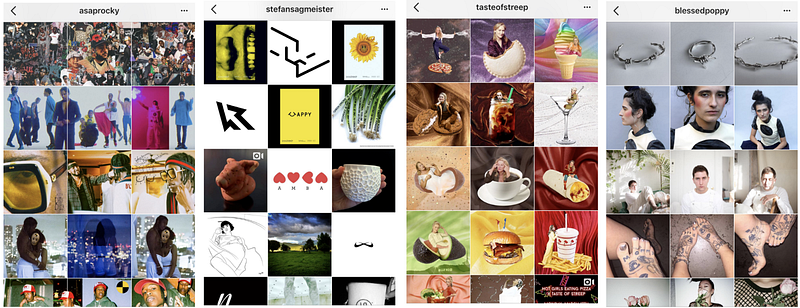
How does the visual grid compare? Are you putting in effort to make it differentiated and unique? If not, you’ll likely find it much more difficult to grow a valuable audience on Instagram for your business.

The best tool for the job: planoly

In most cases, the reason we don’t execute a great grid layout is that we don’t know how our next post will influence how all of our other posts look together once they are displayed in the grid view. Planoly solves this problem.

What is Planoly? Planoly is an Instagram grid planner that facilitates your grid layout visualization and creation process. It imports your last 18 Instagram images so you can then upload and rearrange photos of your upcoming posts and easily plan how your grid layout will look in the future.

Why is it the best tool on the market? UNUM is another grid planner but it’s only available on mobile, and since most people get most of their work done on a laptop, Planoly’s web browser accessibility usually for a more efficient work-flow. It’s also the most simple to use at an accessible price of $9.99 per month.

How can you use it? After you’ve created your profile and synced the current grid layout on your account, upload your next 11 posts (or however many photos you have ready) to the mock grid.
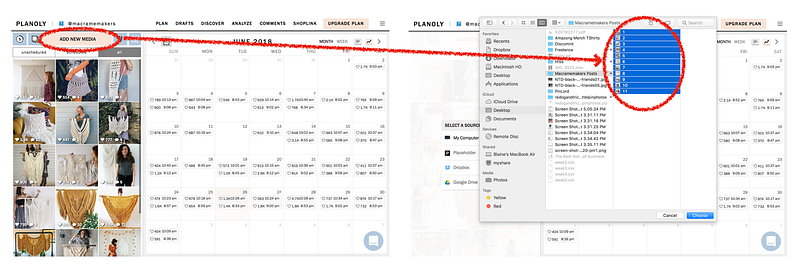
Then move them around to optimize the pattern in which you post them so they create a visually appealing grid.
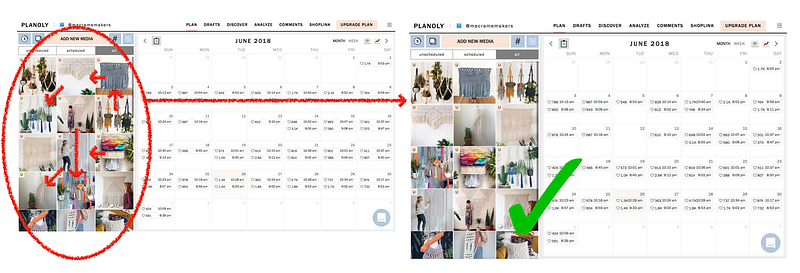
In this case, to create a well-planned grid, I grouped the types of posts in groups of three. The bottom line is macrame creators on a white background, the second line is colorful macrames with plants, the third is white macrame creations on a white background, and the fourth is again colorful macrames. They key is consistency! You can read about some other nice-looking grid layouts here.

Once you can craft what your grid will look like ahead of time, all that’s left is executing the posts in the same order. Once you do that, voila — a great Instagram grid layout!

The better your grid looks, the faster you’ll grow. It’s all up to you.

Here are some more ideas of what great grids look like and how to create them.

2. Post at Least Once a Day

To grow your Instagram audience at a fast and consistent pace, it’s important that you aim to post (photo, video, story, or live) at least once a day.

Why should you post at least once a day? Every time you post a new photo/video/story/live session on Instagram, you’re creating a piece of content that will be disseminated within the network by the Instagram hashtags you use for it and the people who engage (like, comment, share) with it.

Each hashtag and engagement creates new opportunities for people to discover your post, see your profile, and decide that they like your content enough to follow your page (if you have great content and a nice-looking grid).

Think of it as similar to placing an ad in a magazine or on a website. Every time a person sees your ad, you’re creating a new opportunity for someone to see your brand or business, discover what you have to say, and then decide if they like it enough to consider buying something from you.

FYI — here’s an article about the best Instagram content scheduling and post automation tools. Using them will help your posting process a lot more efficient 👍🏽

The more discovery opportunities you create by posting engaging content with the right hashtags (just like placing ads in the right magazines or website), the larger the number of people who will see your profile and business. If you have clearly communicated value in your content through a great visual grid (aka great ads and a value-adding product), the more chance that a larger percentage of them will stick around and follow you (or even better, buy something from you).

The best tool for the job: Onlypult

The problem with posting so often is that you have to stop everything you’re doing several times a day to stick to the posting schedule. That can be disruptive to your work-flow, and if you’re a busy entrepreneur or small business owner, you want to be focusing your energy on other, more essential parts of your business. Here’s where Onlypult can help.

What is Onlypult?: Onlypult is a web-based Instagram post publisher that makes it painless for you to stick to your daily posting schedule by allowing you to schedule your future posts straight from your web browser. Once you do, they take care of posting them to your Instagram on the day and time that you’d like, so you don’t have to think about it.

Why is it the best tool on the market? : Hootsuite, Buffer, and Later are Instagram content management tools that claim to fully automate publishing but in reality, they have a lot of restrictions around how and what you automate. Onlypult has no restrictions (except video posts, which you can’t automate anywhere), it’s cost-effective (starting at $15 a month), and, most importantly, it has a feature that allows you to add your hashtags to the first comment — a perk that no other service provides and that will give your posts the benefit of using hashtags without it looking like you use hashtags.

How do you use it? To start out, if you want to post once a day, you know that you’ll need seven photos for the week. Spend some time at the beginning of the week shooting all of the photos at once, instead of deciding what photo to take every day. Creating content on the fly every day is time-consuming and distracting — avoid it as much as possible!

Once you have the images, plan how they are going to look on your grid using Planoly, then upload them to Onlypult, scheduling them during your optimal posting times for each day of the week. If you don’t know when your optimal times for posting are, this article will help. Crop your photos, write the copy, add photo tags, and place your most effective hashtags in their first comment feature.
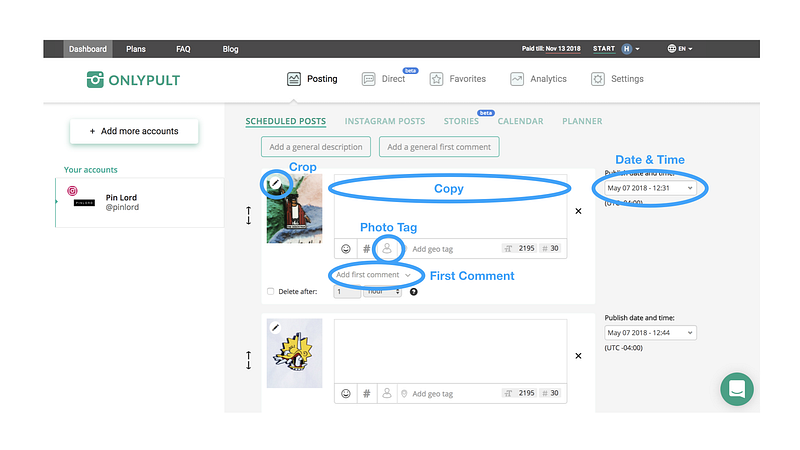
Once you have them all lined up, hit save and Onlypult will post everything for you during the week. You’ll no longer have to stop everything you’re doing to take out your phone and post on Instagram because Onlypult manages the whole process.
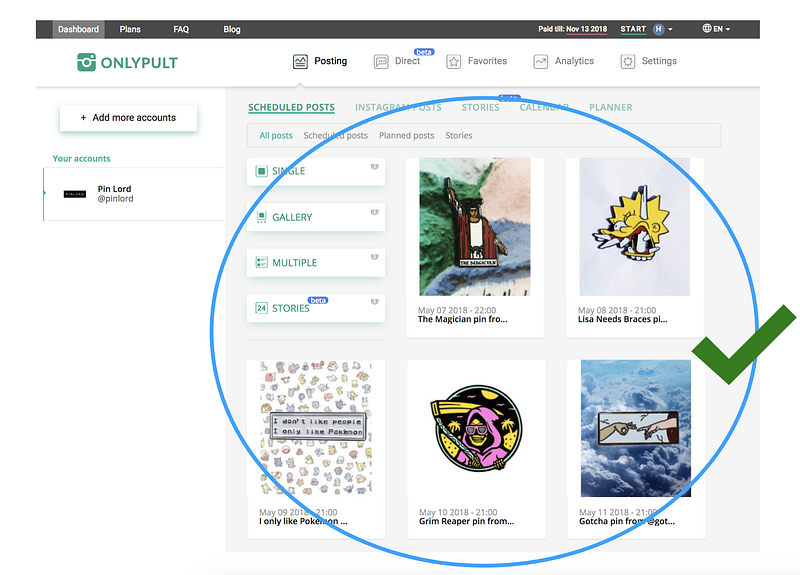
If you want to know more about this tool, here’s a detailed explanation of how to use Onlypult.

3. Measure Your Instagram Growth Metrics

You have great Instagram content and you’re posting every day, but how do you know if the results you’re getting are great, good, mediocre, or bad? Just like evaluating your sales numbers on a weekly or monthly basis to find out whether you’re effectively running your business, it’s important to evaluate your weekly or monthly Instagram growth and engagement metrics to understand if you’re effectively growing your Instagram.

Here are the two most important growth metrics you should be evaluating per week:

  1. New followers: This number tells you how effective you are at being discovered by new people on Instagram each week (by posting great content with effective hashtags every day) and converting them to followers (by having a great visual grid). The more people you reach and the more of them who follow you, the larger this number will be.
  2. Average likes and comments per post: This metric tells you how engaging your audience finds your content. The more engaging your content is, the more it will show up on other people’s activity feeds and explorer pages, and the more likely it is to be ranked favorably by the Instagram algorithm (read here how the Instagram algorithm works). This will translate into more growth because more people will be discovering your account.

The best tool for the job: Instagram business insights

What is it?: Instagram Business Insights is the built-in metrics dashboard on an Instagram business account once you turn your personal account into a business account.
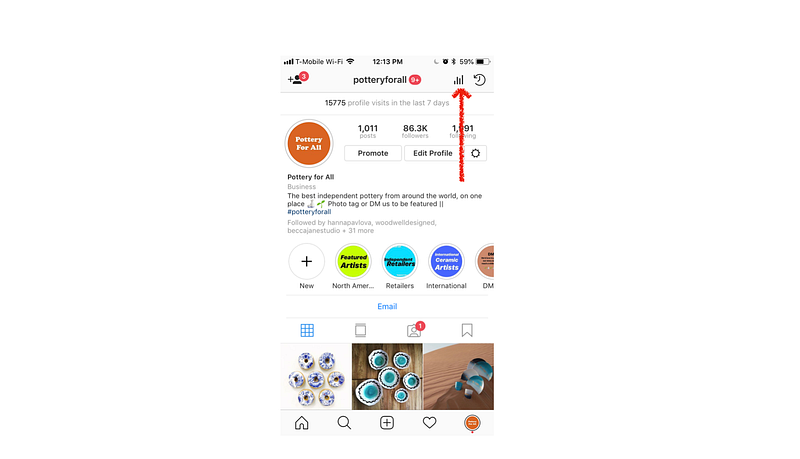
Why is it the best tool on the market?: Honestly, there used to be much better tools out there, but since Instagram stopped allowing third-party metrics companies access to your data, they are now the only accessible insights tool on the market. For now, Instagram metrics will get the job done. At least it’s free.

How do you use it?: To measure your new followers per week, on the same day every week, go to your Instagram Insights, tap on the Audience tab and measure the new followers you gained in the last seven days.
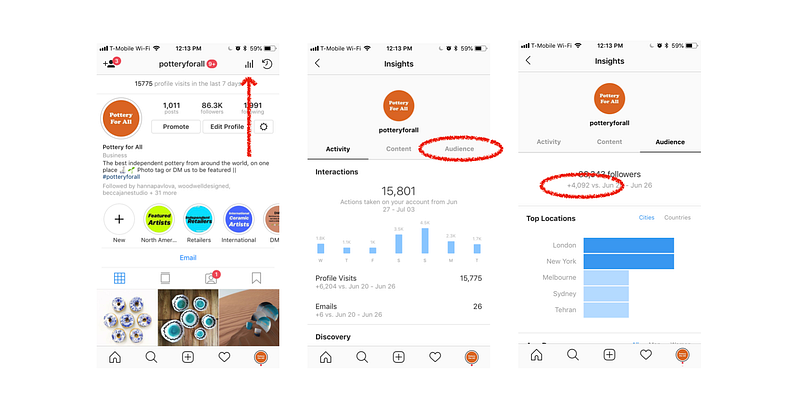
It’s important that you measure this number on the same day every week, otherwise, the numbers won’t be as insightful as it’ll be harder for you to compare your performance accurately.

The higher that number is, the more you’re being discovered by Instagram users and the more of them are subsequently following you. If you see that number plateau or decrease, it’s a sign you may need to change what you’re doing, improve your content and make it more differentiated (learn why by reading this article on why your Instagram isn’t growing).

There’s no hack around this. Creating content that people love will always be the key to growth on Instagram.

To measure your average likes and comments per post, on the same day every week, go to your Instagram Insights, tap on the Content tab, See all > Filter All by Engagement in the past seven days, then add the total number of engagements divided by the total number of posts and you’ll get your average engagement. Easy.
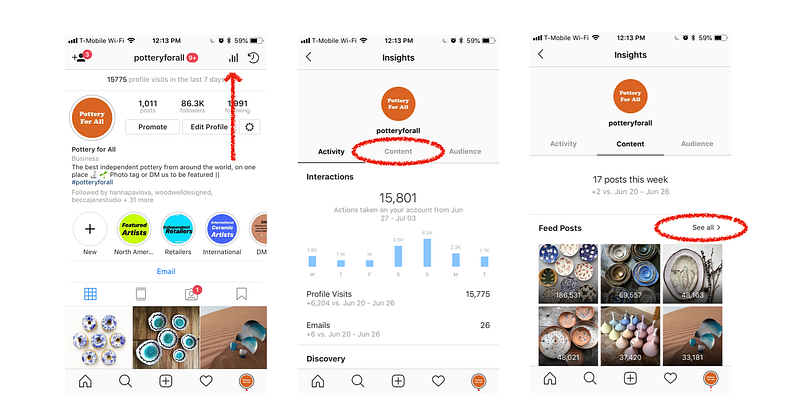
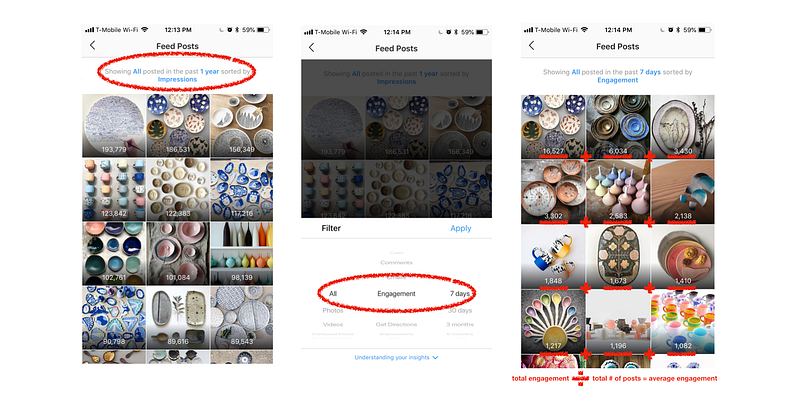
The higher that number is, the better you’re getting at creating content your audience loves. That will translate into your account being surfaced more on Instagram, which means you’ll grow faster. If you’re seeing that number plateau or decrease — again, change what you’re doing. Improve your content and make it more differentiated.

Like any other business, things will change. But if you have the data to understand when and why they are changing, you’re much more likely to be able to adapt to those changes. Measuring your Instagram growth metrics will help you to do this.

Conclusion

That’s it! Those are the three most effective Instagram Business tools and strategies that I recommend you focus on in order to grow your business on Instagram.

Make sure you’re executing them at a high level before moving on to the next “latest Instagram algorithm hack” article on the internet. I promise you, these are the strategies that will take up 20% of the time and get you 80% of the way to being a fast-growing and valuable presence on Instagram.

Oh, and if you want to learn more about other strategies that’ll help you grow on Instagram effectively, read these articles on what Instagram really is and how works, how the Instagram algorithm works, Instagram niches and why they are the key to growth,, how to build an Instagram repost account that makes money, how to check if you’re shadowbanned, how to write an Instagram bio, how to increase your Instagram engagement, the best Instagram bots, how to automate in Instagram bot that isn’t spammy, how to pick the right Instagram username, Instagram bots 2021, Instagram bot, how I make money on Instagram, how to create a visually appealing Instagram grid, why you’re losing followers and how to fix it, how to create effective Instagram story ads, how to create effective Instagram sponsored posts, how to automate your Instagram posts, as well as how to find the most valuable influencers on Instagram, how to measure what an influencer is worth, everything you need to know about TikTok Bots, how to reach out to influencers, and how to measure your influencer marketing ROI.

Thanks so much for taking the time to read my article! If you enjoyed it, you can support me by signing up to my Instagram Small Business class, sharing this article and giving it a bunch of claps. You can also follow me on Instagram to get updates whenever I publish a new piece ❤

Social Media
Instagram
Instagram Marketing
Business
Photography
Recommended from ReadMedium