
The Best Instagram Content Scheduling and Post Automation Tools
They’re not the same thing, and you must know the difference to pick the right one

Most people in search of an Instagram post scheduler are trying to solve one problem: how to not have to stop everything you’re doing, take out your phone, fumble around on the Instagram app, upload your content, and publish it several times a day. Once you have your content, it can be the most time consuming and disruptive activity of maintaining a consistent posting rate on your Instagram account (which is essential for growth). For small business owners or solo entrepreneurs, it is also one of the most common obstacles faced when trying to execute an Instagram strategy effectively.
Although most Instagram post schedulers offer helpful features, such as content collaboration, grid visual planning, and bulk uploading (which help most corporation or agency-based social media managers), many of them don’t actually offer the most critical feature that small businesses and solo-entrepreneurs need: a software that directly uploads and posts all types of scheduled content to Instagram. They all have limitations around what type of account you need to have (only business accounts) and what type of content you can automate (only single photos and videos).
This is mainly due to the fact that Instagram’s guidelines don’t allow software companies to enable all types for all types of accounts to be posted directly to the app, but like many other activities that Instagram doesn’t allow, there are legitimate third-party software companies that have developed the tools to do it.
This separates Instagram post scheduling companies into two main categories: first, third-party Instagram post automation that helps you schedule any type of content from any type of account and automatically post it directly to the app for you; and second, the Instagram Official Partner post schedulers that help you schedule your content but don’t post it directly to Instagram for you, unless you are a business account and unless you only want to post a single image or video. For the latter, they only send you a reminder for you to post by hand if the type of content you want to post or the type of account you want to post from don’t fit into their very limited guidelines.
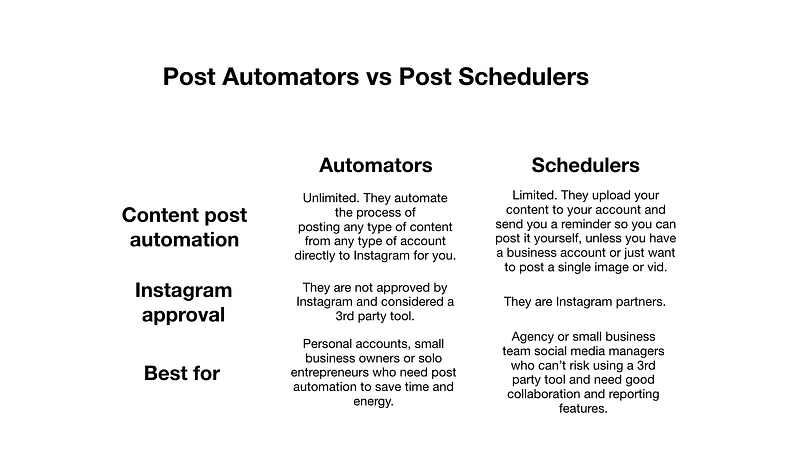
Here’s a breakdown of the pros, cons, and best schedulers in both categories so that you can gather the information you need to decide which scheduler might be best for you.
Instagram Post Automation Tools
For post automation that schedules content and posts it directly to your Instagram, these are the pros and cons, as well as the best (and safest) service providers out there:
The pros
The obvious and most important benefit of using a service that automatically publishes any type of scheduled posts from any type of account is the incredible amount of time and energy you’ll save. The ability to schedule a week’s, or even month’s, worth of content in a few hours and not have to open the app again can be the difference between having a consistent, successful and valuable Instagram account or not having one at all. Here’s an article about how I automate my Instagram posts. For most small business owners who have a lot on their plate (like me), a tool like this can be a lifesaver. Life-saving enough that it’s worth the potential risks discussed in the cons below.
The cons
As Instagram doesn’t allow any third party apps to post to the platform, all post schedulers that perform the function of posting content for you are not “officially approved” by Instagram. Like any other service that isn’t approved by Instagram, this means that at any point, Instagram could try shut down the service provider or make an effort to disconnect you from it. Even while knowing that’s a possibility, I’ve used post automation on all of my Instagram accounts and not once have I seen any of them negatively impacted by using these third party services. Although that might change in the future, the reality is that identifying the accounts who use post automation is not a high priority for Instagram and it’s unlikely to be so in the future because they actually want people to post more on the platform. Homefeed posts are how they serve ads, so they are incentivized to promote increased posting activity. Here’s an article on how to automate a bot that isn’t spammy. That being said, it’s something that you need to be aware of, and working with companies that have a consistent and reputable track record is important to keep your account as safe as possible.
The best (and safest) service providers
The cheapest and easiest to use:
The cheapest and easiest to use is Onlypult. Starting at $12.75 a month, Onlypult is the simplest and most affordable post automation tool out there right now. It’s also the one I use for my businesses and also explain how to use to grow your account in my Instagram Small Business Class. Why do I prefer it? Because all I need to do is automate my posts and not much else, for a good price. It has great customer support, as well as the standard tagging, bulk uploading, and first comment features that most other services have, but none of the extra complexity that a deep analytics or search function might bring. I don’t need those extra features for my small one-person business so it does exactly what I need at the lowest price.
The Best Analytics:
The one with the best analytics is Apphi. Starting at $13 per month, if what you want is a post automation tool that also offers deep analytics and other fancy features, like searching for content and unlimited accounts management on top of all of the standard features like first comment, bulk uploading, and visual grid planning, then Apphi is what you’re looking for. It’s not as easy to use as Onlypult, but has good customer service and does the best job at providing content performance information for those people and small companies who need more than what Instagram Insights provides.
Runners-up: Starting at $19 a month, Hopper HQ is another long-running service that’s a great option if you’re looking for good analytics and Apphi isn’t the right fit for you.

The Best Value:
The one you should use if you’re in the market for more automation tools is Ingramer. If you’re in need of post automation but also a wider array of automation tools like interaction automation, DM automation, hashtag targeting, Instagram search, content downloads, and comment tracking, Ingramer is the most well-rounded option out there right now, and starts at $57 a month. They don’t offer a first comment feature alongside their grid planning and bulk upload offering, but given that they have effective interaction automation software and so many other features included in their pricing, you won’t find a better deal out there if you want to automate other activities as well.

Runners-up: Combin is the second-best option that offers content posting automation as well as interaction automation (an Instagram bot). They don’t have all of the tools that Ingramer has, but their subscription starts at $15 a month so it’s the best option if you’re on a budget. If none of the post automators mentioned above is the right fit for you, you can try MassInsta or Social Bu, which has all of the post automation features as well as one that allows you to respond to Instagram communication directly from the software, so you don’t have to use your phone.


The Instagram Post Scheduling Tools
Here are the pros and cons of “Instagram approved” content schedulers that remind you to post, but don’t post for you, as well as the best service providers out there.
The pros
The benefits of using a content scheduler that is officially partnered with Instagram is that, although you won’t have the benefit of any of your posts being automatically posted for you, it is much less likely that Instagram will disconnect you or negatively affect your account for using the service. Another common pro of these services is that they are usually optimized to be used in teams (with features like allowing many people to see and edit the scheduled content), as well as for running reports. All of which are much more important if you are someone managing an Instagram account for someone else or a big company, and not necessarily a small business owner or solo entrepreneur who won’t need those additional features.

The cons
The most obvious disadvantage of this type of software is that although it helps you plan and schedule your content, it doesn’t post directly to Instagram for you under all circumstances. They to automatically post, they require you to have a business account and they also don’t allow all types of content to be posted (only 1:1 photos for now), which means that you’d still have to post videos and differently formatted photos or slideshows by hand. If your case doesn’t fit into their very limited guidelines, they just send you a notification that reminds you to post, which isn’t really solving the issue of saving time or having your day disrupted by having to post. Additionally, most are made with social media managers at agencies and big companies in mind, so they come with a lot of extra bells and whistles, which are unnecessarily cumbersome and complicated for a small business owner that just wants a simple way to automate posting their content.
The best service providers
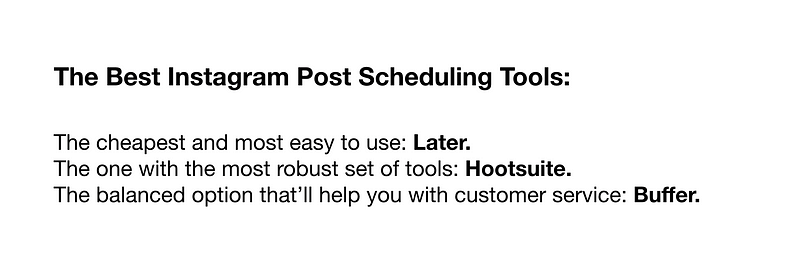
The cheapest is Later. Starting at $7.50 a month for the basic account, Later is the most cost-effective option for someone who is looking for all the basic features needed to manage an Instagram account for a corporation or small business team. It’s super easy to use, does everything you need it to do such as content scheduling, analytics, reporting, first comment, and content search, and would likely be the best option if you don’t need super powerful analytics or reporting, as Hootsuite does.
The most robust is Hootsuite. Starting at $29 a month, if you’re looking for the most robust and the deepest set of tools, but don’t care about a simple user experience, then Hootsuite is the one for you. They offer conversion tracking, contact management, customer targeting, and a whole bunch more on top of the basics like content scheduling, analytics, and reporting that all of the other competitors offer.
The balanced option that’ll help you with customer service is Buffer. Starting at $15 a month, Buffer is the best option if you are mindful of your budget and care about a simple UX, like Later, but also want a slightly more robust set of tools, like Hootsuite. Buffer is used by many agency- and company-based social media managers because it finds the right balance between Later and Hootsuite. It has all of the essential scheduling, analytics and reporting tools on top of a very effective feature (called Reply) that helps you respond to the messages you receive on social media, which is a very valuable feature for companies who receive a lot of correspondence through their social channels.

How to Get the Most Out of Your Content Scheduling and Automation
Once you’ve identified the right Instagram post scheduler or automator for your needs, here are two super simple tips that I use myself to help you get the most out of your investment:
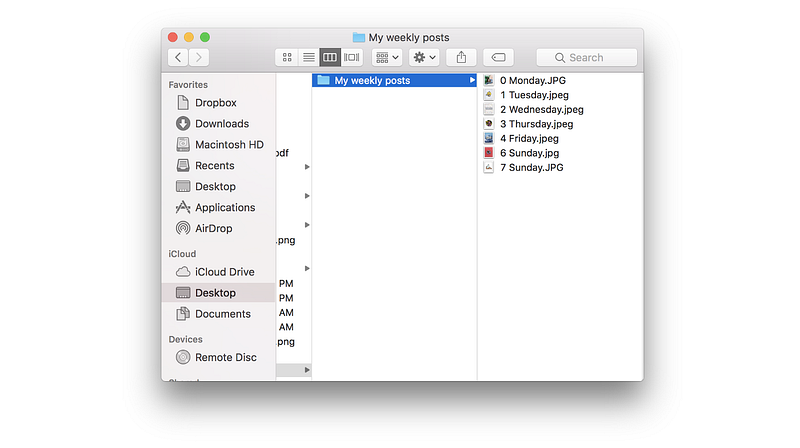
- Bulk schedule once a week: Take full advantage of automating content posting by creating content in bulk and scheduling it all at once. Instead of creating new content every single day, it is much more efficient and time-saving to shoot or gather all your content and schedule it out in one day. This can be one day each week or even each month if you can gather enough posts at a time. For example, if you want to post once a day for a week to grow your account faster, you know that you’ll need seven photos. This way, your Instagram account will publish content consistently and grow by itself without you having to use the Instagram app or even think about posting, if you find you prefer that. I like to name my files with the number and name of the day that I’ll post them so I can upload them in numerical order to my Onlypult account. Being able to create content in bulk will also help you to plan your Instagram grid ahead of time, allowing you to differentiate your account and grow your audience much faster.
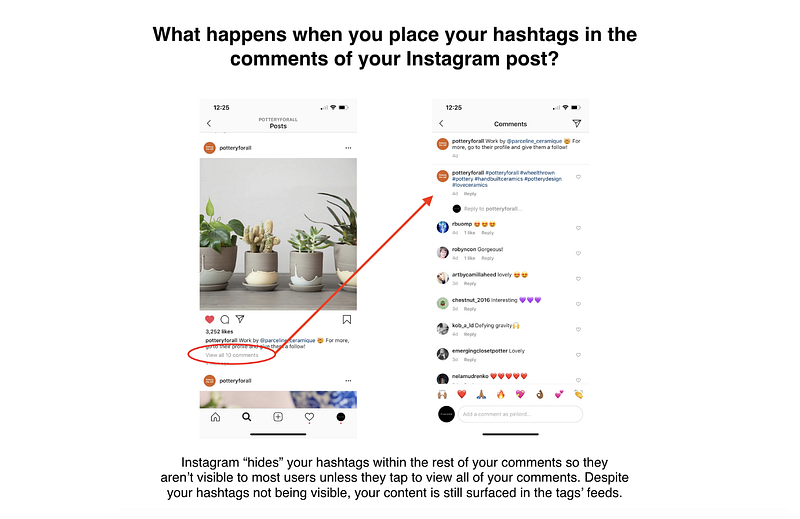
- Place your Instagram hashtags in the first comment of your post: Take advantage of this feature, which allows you to automate the first comment of every post, and place your hashtags there. It can give you a slight increase in growth over time because I’ve noticed that some Instagram users tend to not follow accounts that use hashtags in the captions of their posts. By hiding your hashtags in your comments, you avoid turning off those users who wouldn’t have followed you if they saw the tags in your caption, and it just looks neater.
In Summary
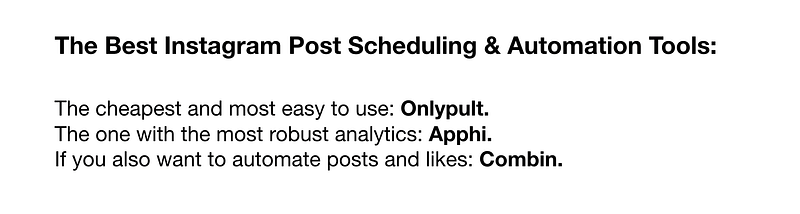
If you are a small business owner or solo entrepreneur who needs post automation in order to maintain and grow an Instagram account, post automators are the best option for you. They are a slightly bigger risk but the time-saving benefit of automating posting might make it worthwhile for someone who can’t spend a lot of time on their social media but need it for their business. Onlypult is the most efficient and cost-effective automator, Apphi has the most robust set of features, and Ingramer combines interaction automation with post automation.
On the other hand, if you are a social media manager who runs an Instagram account for an agency or company team, a content scheduler might be the best option for you. They don’t automate the process of posting in all cases, but there is no risk in them and they are usually optimized to serve the needs of larger companies with features like content collaboration as well as deep analytics, social media customer support efficiency, and reporting. Later is the cheapest and most easy to use, Hootsuite has the most robust set of features, and Buffer finds the right balance between a great UX and robust features.
That’s it, folks! Hope you find it useful. Finding the right tool for you can truly be the difference between having a mediocre and inconsistent Instagram account and one that is consistent and effective at communicating your growing brand.
Thanks so much for taking the time to read my article! If you enjoyed it, you can support me by signing up to my Instagram Small Business class, sharing this article and giving it a bunch of claps. You can also follow me on Instagram to get updates whenever I publish a new piece ❤
Oh, and btw, if you want to learn about how Instagram works, read what Instagram really is and how works, Is Instagram dying?, how the Instagram algorithm works, Instagram niches and why they are the key to growth, how to increase your Instagram engagement, how I make money on Instagram, how to create a visually appealing Instagram grid, the best Instagram bots, how to automate in Instagram bot that isn’t spammy, how to automate your Instagram posts, how to check if you’re shadowbanned, how to write the perfect Instagram bio, how to create a repost account, how to pick the right Instagram username, Instagram bots 2021, as well as how to find the most valuable influencers on Instagram, how to measure what an influencer is worth, how to reach out to influencers, and how to measure your influencer marketing ROI.


