Instagram Hashtags — Everything You Need to Know

Do hashtags seem like they aren’t working for you lately but you don’t know what to do next? Well, you’re not alone. For most casual Instagram users, understanding how hashtags work, how their effectiveness has changed, and how they should be used moving forward has been an increasingly frustrating endeavor. What makes matters worse is that it seems like every article out there gives different, conflicting advice and everyone has a different opinion about “how to use hashtags right”.
In my opinion, any sound Instagram advice should be given based on the principles of how the platform works, not on intuition, so in this article, I’ve made an effort to apply that reasoning to the most common hashtag-related questions.
What do hashtags do? Why use them? Are they still effective? How do you know if they are creating value for you? How to use them effectively? What are the best hashtags to use? How do you find them?
Here are the answers to all of your hashtag-related questions, based on how the Instagram platform works (you can learn about everything else you need to do to grow and monetize your account through my Instagram Small Business Class):
What do hashtags do?
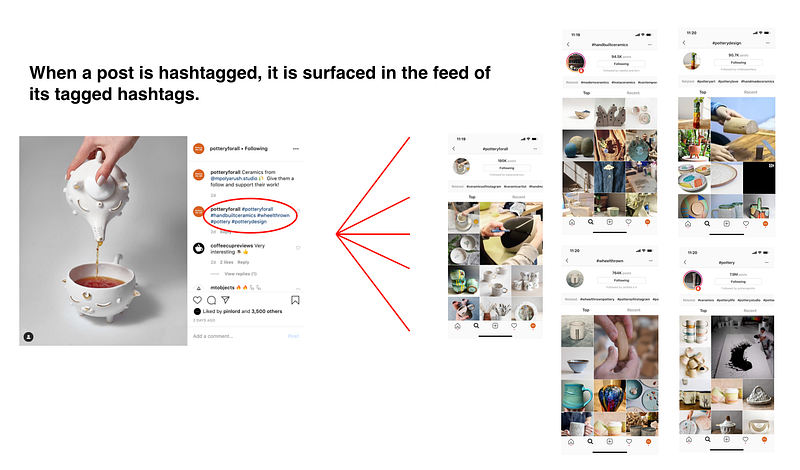
When a post is tagged with a hashtag, it’s surfaced on that hashtag’s feed, making it potentially discoverable by all of the people who are viewing that feed.
Why use hashtags?
Most people use hashtags because the additional visibility gained from showing up on hashtag feeds can potentially lead to new users discovering their content, engaging with it, tapping through their username, viewing their account, following them, engaging with their other content, and/or tapping through their link in bio to drive traffic to another page of their business.
All of these actions create value for an Instagram account so, in summary, people use hashtags in an effort to create value.

How do you know how much value you’re creating through your hashtag use?
The larger the number of people that discover your content through a hashtag feed, the more value you are creating through your hashtag use.
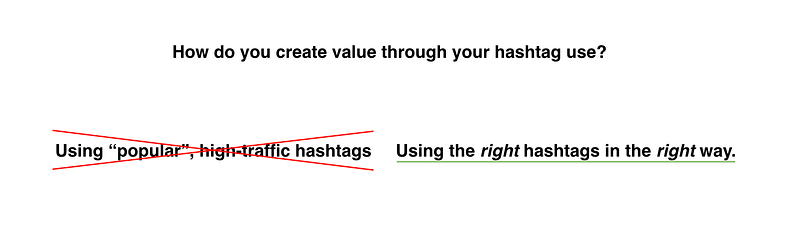
Being discovered by people through a hashtag comes from using the right hashtags in the right way, not by just tagging a “popular” hashtag and hoping it will magically generate traffic.
Are hashtags still effective?
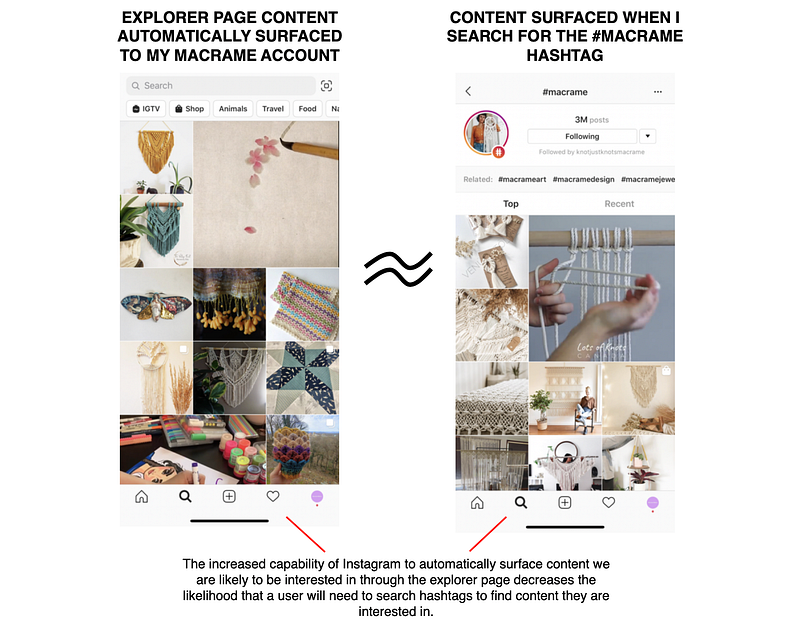
The effectiveness of hashtags to increase the visibility of your content, and therefore, the amount of new followers, engagement, traffic, and value you can generate from hash-tagging your posts has greatly decreased since late 2018-early 2019.
Why aren’t they as effective as they were before?
This decrease in effectiveness is mainly due to the following reasons:
- Instagram users search hashtags less: One of the main reasons why hashtags are much less effective at increasing your posts’ visibility is because Instagram users search for hashtags much less now than they used to. Why? Before late 2018-early 2019, Instagram’s content surfacing technology (the Instagram algorithm) wasn’t as developed as it is now. This meant that the home feed and explorer pages were not as effective at showing you content that you were interested in and searching for a specific hashtag was a much more effective way of finding the exact type of content you wanted. Because of that, a much higher percentage of Instagram users searched for content through hashtags, more eyes saw each hash-tagged post (there were also much less tagged posts per hashtag back then), and therefore, each post, on average, received more visibility, engagement, follower conversion, and traffic — these were the days when hashtags “worked”. That all changed in late 2018-early 2019, as the Instagram algorithm evolved and became much more effective at surfacing the content you want to see on your home and explorer page. More relevant home and explorer page content means that fewer people needed to search hashtags to find what they want so there are fewer eyes on hashtag feeds, less visibility, engagement, follower conversion, and traffic on each individual hash-tagged post.
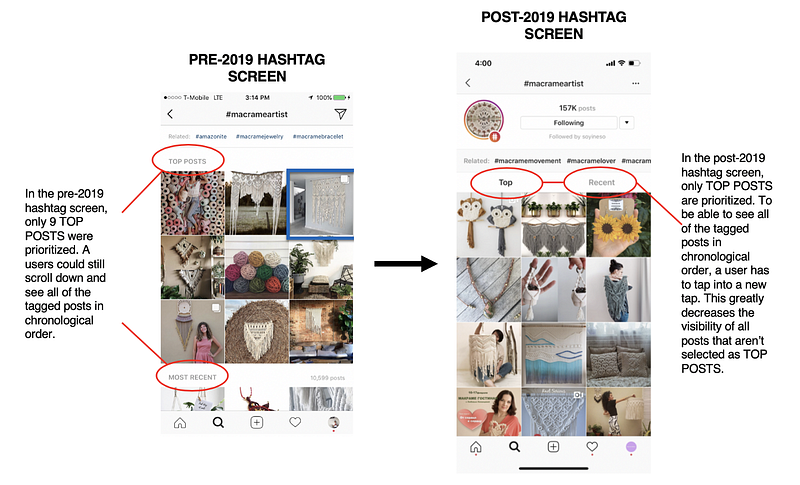
- Only the posts that show up in a hashtag feed’s TOP POSTS section receive any significant visibility: Another reason why hashtags are much less effective is that, in early 2019, Instagram changed the design of their hashtag page. In comparison to the pre-2019 design, in which 9 TOP POSTS were highlighted at the top of the feed followed by the RECENT section where you could see all tagged posts in chronological order (see the image below), the new design now shows users a feed of only TOP POSTS whenever you searched for a hashtag. The chronological order section is only visible if you take an extra step and tap on the RECENT tab (see image below). This change encourages users to prioritize only scrolling through the TOP POSTS section, in which all posts are selected by the Instagram algorithm. That results in much-diminished visibility for all of the other posts in the RECENT section, where the 90%+ of hash-tagged posts reside.
- There is a much higher density of posts per hashtag and the Instagram algorithm is growing increasingly effective at selecting accurately tagged posts for the TOP POSTS section: In comparison to Instagram from 2011 to 2017, when hashtags could still generate a lot of value (when used properly), there are now literally hundreds of millions of more users creating content on Instagram and a larger percentage of them are savvy enough to use hashtags with the aim of growing their accounts. This means that there are A LOT more posts per hashtag feed and there is a smaller likelihood for each post to be viewed overall. Not only that, the Instagram algorithm has also become increasingly discerning at selecting TOP POSTS with hashtags accurately describing their content. These two factors, coupled with the fact that there are fewer people searching for hashtags and a hashtag feed that greatly favors TOP POSTS, means that a much, much lower percentage of posts tagged with a hashtag ever see any significant visibility, in comparison to the visibility they could get on Instagram from 2011–2017.
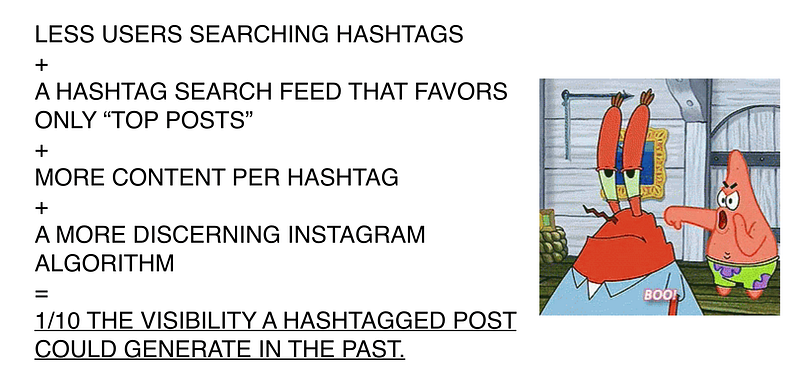
I don’t have access to Instagram’s data, but from my own first-hand measurements, all of these factors combine to reduce the visibility of an average hash-tagged post to 1/10th of the impressions that it could generate in the days when hashtags “worked” (check out my article about Is Instagram dying? to learn about other reasons why your growth and engagement numbers are decreasing). This is a ROUGH estimate, but it is comparable to the decrease in engagement people have gained from using hashtags. For example, in the past, an effectively hash-tagged could generate 100 likes, now it might only generate 10.
How do you use hashtags the right way?
Because of this steep decline in effectiveness, it’s VERY important for you to remember that although hashtags can provide a small extra growth of followers and engagement, if used correctly, they ultimately wont ever be the reason your account is or isn’t growing so DON’T LOSE SLEEP OVER THEM! If you’re using hashtags and not growing, focus on learning why your Instagram account isn’t growing, what activities you can do to grow it or enroll in a branding class for your business instead of thinking that hashtags are the reason your account isn’t doing well. They are not…
That being said, if you still want to put in the effort to generate value by hashtags right, these are the best practices that will increase the likelihood of being discovered by the largest amount of people through your hashtag use:
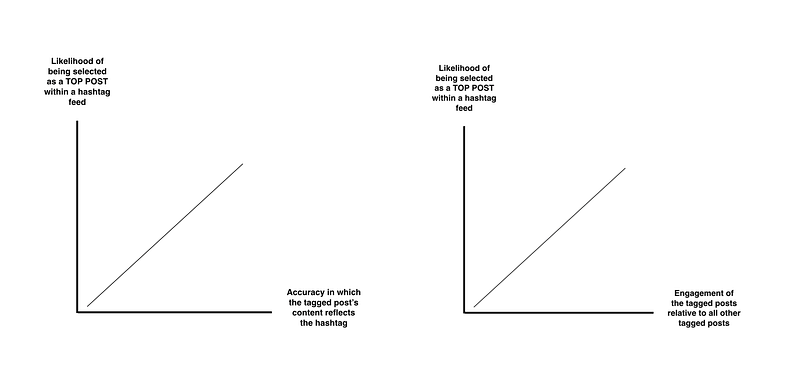
- Know how the Instagram Algorithm selects TOP POST: With the new hashtag feed layout, generating value from the traffic of a hashtag now almost entirely depends on the likelihood that your posts can be consistently selected as TOP POSTS in the hashtags you use. Because of that, it’s important that you know how TOP POSTS are selected. The TOP POSTS section is meant to showcase the most engaging and accurate posts from that hashtag. And so, the Instagram algorithm is optimized to select the posts that are most accurately tagged and are the most highly engaged, relative to all of the other posts tagged with that hashtag. Therefore, the more accurately your hashtags describe the content of your post and the more highly engaged your content is, the more likely you are to be selected as a TOP POST. Knowing this will help you keep in mind that accuracy and engagement should always be increased in order to generate more value.
- Randomize the order in which your place your hashtags in every post: Now we know that the most effective way to create value through the use of a hashtag is to be selected as a TOP POST, but being selected as a TOP POST isn’t simple or easy. One essential way you can increase the likelihood of your tagged post being selected is by always randomizing the order in which you place your hashtags for every post. In other words, never copy-paste or place your hashtags in the same order in consecutive posts! Why? To reduce the number of hashtag-spammers who are selected to appear in the TOP POSTS section of a hashtag, the Instagram algorithm also avoids selecting posts that repeatedly place their hashtags in the same order in consecutive posts (learn more about why Instagram wants to steer clear of hashtag spamming in the text of the image below). Users who place the same number of hashtags in the same order in consecutive posts are much more likely to be copy-pasting hashtags and therefore, much more likely to be tagging posts with hashtags that don’t accurately represent the post’s content. So to improve your chances of TOP POST selection, always randomize the order in which you place your tag.
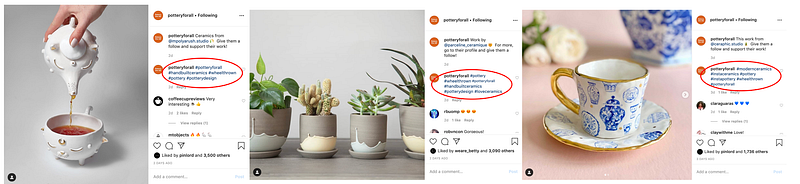
- Only use 5–7 hashtags: Another way to increase the likelihood of being selected as a TOP POST is to consistently change the number of total hashtags that you use in every post, only placing the tags that are accurately relevant to your content and your post. For example, if you use 5 hashtags in today's post, you should use 4, 6 or 7 in tomorrow’s post. Why? Apart from the order in which an account places their hashtags, the algorithm also looks at the number of hashtags an account uses as an indicator of a potential hashtag spammer. This is because the higher the number of hashtags a post is tagged with, the higher the likelihood that it contains hashtags that don’t accurately describe the content that is being tagged. Inaccurately tagged content creates ineffective hashtags feeds, which Instagram wants to reduce. Read the text in the image below for an example of how I like to execute this on my account.
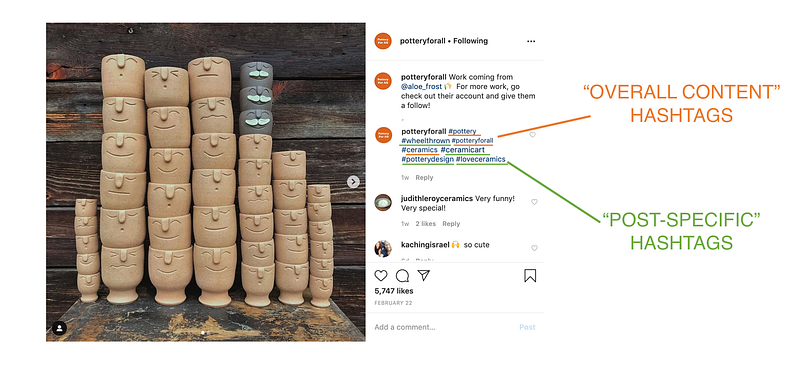
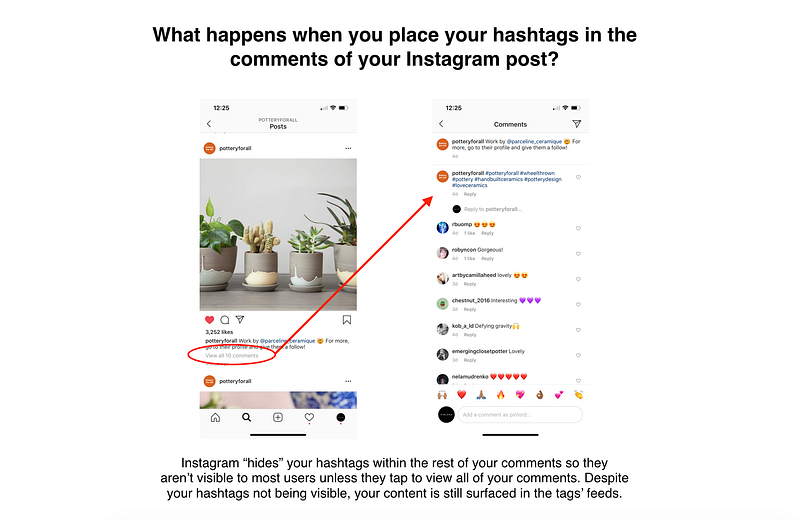
- Place your hashtags in the comments of your posts, as soon as your post goes live: This one is more of an aesthetic choice, but placing your hashtags in the first comment of your posts vs your caption can give you a slight increase in the effectiveness of your hashtags over time. Why? There are many Instagram users who tend to not follow accounts that use hashtags in the captions of their posts. Since your posts are still surfaced on a hashtag feed regardless of where the hashtag is placed (caption or comment), by placing your tags in your comment, most users won’t be able to see that you’ve used hashtags unless they tap into your comments. By hiding your hashtags in your comments, not only do you not affect your post’s surface-ability, but more importantly you avoid turning off those users who don’t follow accounts who use hashtags in the captions of their posts. In an environment where every single detail counts, this subtle tactic can make a difference in the long run.
What are the right hashtags to use?
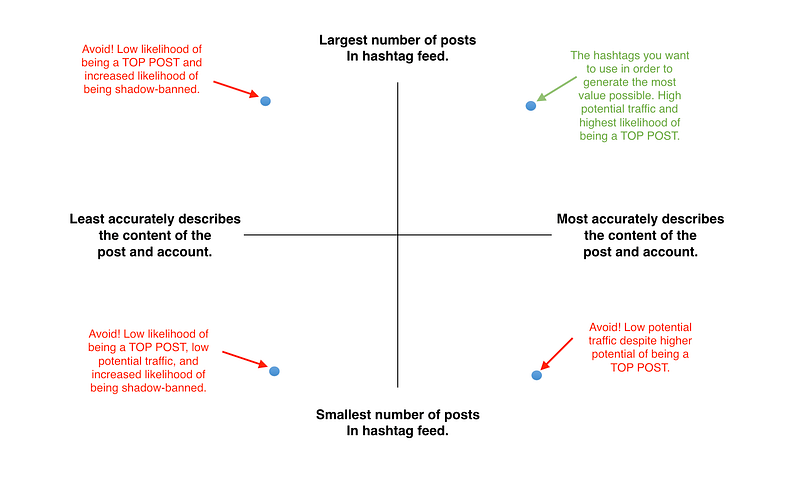
The right hashtags are the ones that generate the most value for your specific account. Those are the hashtags that most accurately describe your content and have the largest number of posts.
As I’ve mentioned before, Instagram wants its hashtag feeds to be as accurate as possible. To achieve this, they changed the aforementioned layout of a hashtag grid (favoring TOP POSTS which they can control) and use machine learning and big data to constantly improve their algorithm’s ability to discern which hashtags accurately describe the content of the post and the account that posted it, and which don’t.
This means that moving forward, the more accurate your hashtags are at describing your content, the more likely you are to be selected as a TOP POST and you want to be selected as a TOP POST because this is the only section of the feed in which your content has a realistic possibility of being discovered and therefore generating value.
Equally as important as the likelihood of being selected as a TOP POST, is the number of posts that the hashtag feed has. The number of posts in a hashtag usually reflects the amount of traffic that a feed has, so to maximize the value you generate from each tag you should use the hashtags that have the largest number of posts in which you have a realistic chance of being a TOP POST. Those are the hashtags that most accurately describe your content.
How do you find the hashtags that create the most value for your account?
Here’s a simple step by step process of how to find the hashtags that have the largest number of posts and most accurately describe your content for your account:
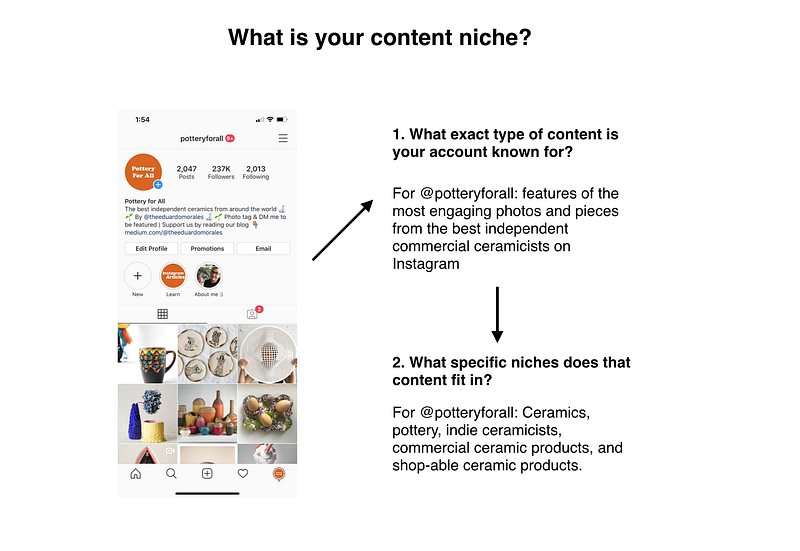
A) Clarify your content niche: We all create content about a particular topic, this is our content niche. The more effective you are at clarifying this niche and creating truly differentiated content about it, the more valuable your hashtag use will likely generate for you.
- For example, my @potteryforall account features the most engaging photos and pieces from the best independent commercial ceramicists on Instagram. My niche is ceramics and sub-niches are pottery, indie ceramicists, commercial ceramic products, and shop-able ceramic products.
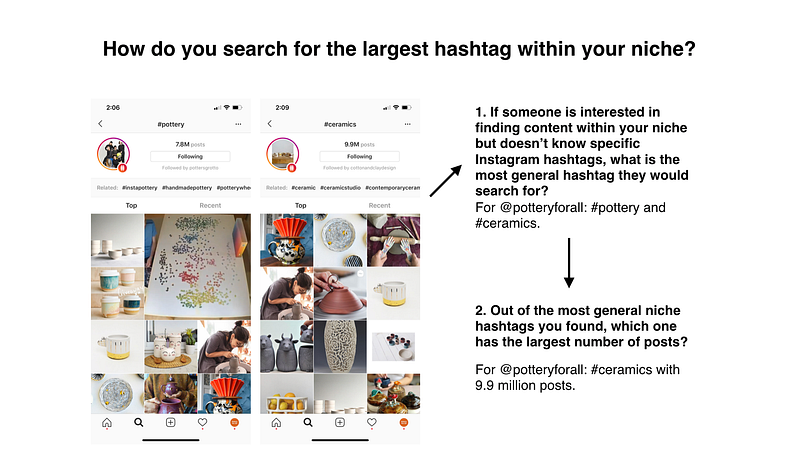
B) Search for the hashtag within your niche that has the largest number of posts: In every niche and related sub-niches, there is always one hashtag that has the largest number of posts. Usually, it’s also the one that most broadly describes the general topic of the niche and it’s the one that the largest percentage of the community uses in an effort to have their content be discovered by the most people interested that niche. Start by finding the hashtag with the largest number of posts within your niche. Although not likely to be the best hashtag to use for your content (because it’s likely not accurate and specific enough for your content to make you a highly-probably TOP POST selection), it’s usually the best place to begin searching for the most accurate and high-traffic hashtags for you.
- For example, the hashtag within @potteryforall’s niches that has the largest number of posts is #ceramics with 9.9 million posts. I found it by searching for the vaguest and general terms someone who is interested in my niche would search for. In my case, those are #pottery (7.8M posts) and #ceramics (9.9M posts).
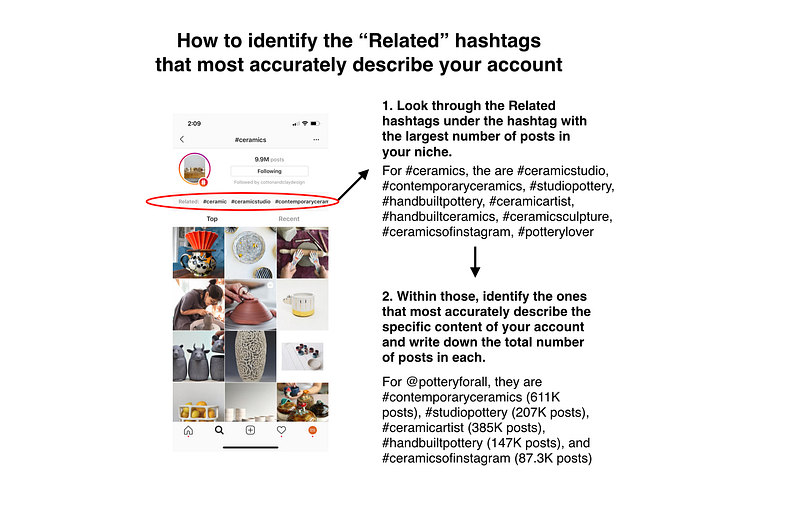
C) Identify the “Related” hashtags that most accurately describe your content: Look through the “Related” hashtag recommendations within the feed of the largest hashtag within your niche (found right under the “Follow” button in a hashtag feed) and write down the names and number of posts of all the ones that most accurately describe the exact content of your account.
- For example, the Related hashtags within the #ceramics feed are #ceramic, #ceramicstudio, #contemporaryceramics, #studiopottery, #handbuiltpottery, #ceramicartist, #handbuiltceramics, #ceramicsculpture, #ceramicsofinstagram, #potterylover. Within those, find the ones that most accurately describe the specific content of your account. For @potteryforall they’re #contemporaryceramics (611K posts), #studiopottery (207K posts), #ceramicartist (385K posts), #handbuiltpottery (147K posts), #handbuiltceramics (94.1K posts), and #ceramicsofinstagram (87.3K posts).
D) Identify the “Related” hashtags that most accurately describe your content within the “Related” hashtags that you previously found:
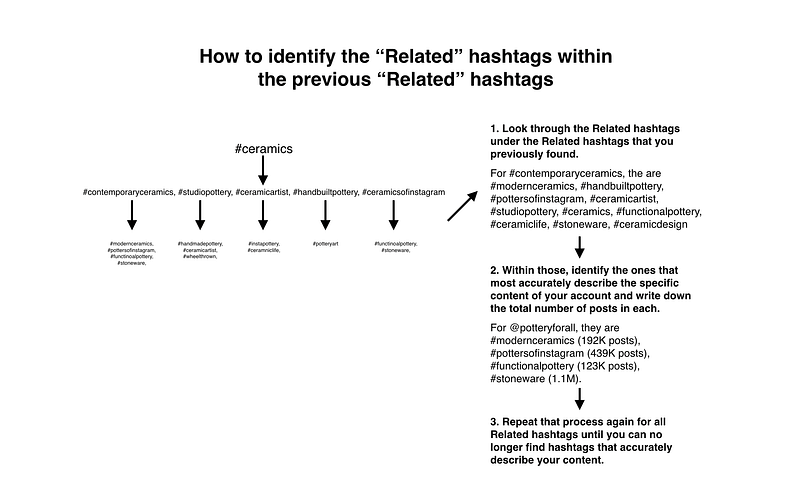
Now that you’ve found a group of hashtags that are accurate to your account’s content, look through the “Related” hashtags of all of them and identify which hashtags within those describe your content with even more accuracy. Write them down as well as the number of posts for each. Repeat that process again for all of the “Related” that you’ve found so far until you can no longer find new hashtags that most accurately describe your content.
- For example, from the group of “Related” hashtags I found previously, I’ll start by looking through the “Related” hashtags of #contemporaryceramics (611K posts) (which are #modernceramics, #handbuiltpottery, #pottersofinstagram, #ceramicartist, #studiopottery, #ceramics, #functionalpottery, #ceramiclife, #stoneware, #ceramicdesign) and identify the ones that even more accurately describe the content of @potteryforall. In this case, those are #modernceramics (192K posts), #pottersofinstagram (439K posts), #functionalpottery (123K posts), #stoneware (1.1M). I’ll repeat that process again for all of the “Related” hashtags (including the most recent ones).
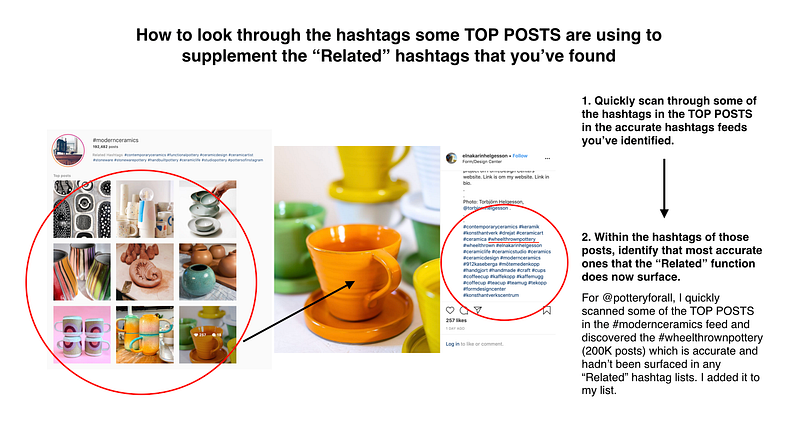
E) Look through the hashtags TOP POSTS are using to supplement the “Related” hashtags that you’ve found: Although Instagram’s “Related” function will capture 80–90% of the most valuable hashtags within a niche, it’s always helpful to quickly scan through the hashtags of some of the TOP POSTS within some of the most accurate tags you’re finding. This might help you identify some valuable tags that the “Related” fields missed. As in the previous steps, identify the most accurate (if any), write down the number of posts they have and add them to the list.
- For example, I quickly scanned some of the TOP POSTS in the #modernceramics feed and discovered the #wheelthrownpottery (200K posts) which is accurate and hadn’t been surfaced in any “Related” hashtag lists. I added it to my list. The more TOP POSTS I look for, the more likely I am to find new valuable hashtags that the “Related” recommendations missed.
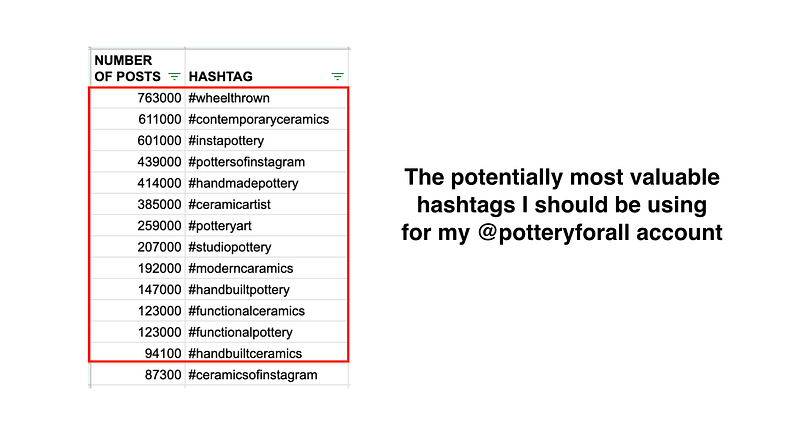
F) Identify the 10–15 “Related” hashtags that have the largest number of posts: Once you’ve repeated the process above, you’ll likely end up with a list of around 20–30 higher-traffic hashtags that accurately describe your content. Sort those by the total number of posts and identify the 10–15 that have the largest number of posts.
These are the group of hashtags from which you’ll select the randomly ordered 5–7 hashtags that best describe each of your posts, as described in the “How to use hashtags right” section. If you can’t find 10–15 that accurately describe your content, then use however many you find that are accurate and have +1000 posts. Also keep in mind that some niches will be bigger and others smaller, so adjust your hashtag selection according to what is right for your account. Regardless of size, know that the process and reasoning will remain the same for all niches.
- For example, through this process I found 14 hashtags that accurately describe @potteryforall’s content. After evaluating which ones have the largest number of posts, I’ve decided to use 13 of the 14 as the pool from which I select the 4 -7 I use in every post, alongside some post-specific tags that would be the most accurate depending on the content.
Other tips:
Now that you know which hashtags to use and how to use them right, here are some other hashtag-related strategies that will help you along the way:
- Don’t think that your hashtag use is the reason why your account is or isn’t growing: This is probably the most important one. I get a lot of people telling me “My account has stopped growing and I’m worried it’s because I’m not using hashtags right. What should I do?”. Given how hashtags are much less effective after the 2019 Instagram changes, the truth is that how fast or slow your Instagram is growing likely has nothing to do with your hashtag use. If you’re not growing, check out my articles on why your account isn’t growing or focus on getting better at executing the activities detailed in my how to grow your Instagram article.
- Use SUPER specific hashtags with lower number of posts if you don’t have many followers or Instagram engagement: The smaller the total number of followers and/or engagement on your account, the less likely you are to be selected as a TOP POST on hashtags that have a higher number of posts. This is because there is a lot more competition in these hashtags and you are less likely to be one of the most highly engaged posts within that feed (that’s mostly how the algorithm selected TOP POSTS, apart from the accuracy of the tag). Due to this, you are much more likely to generate value by using hashtags that are SUPER specific to your content and have lower numbers of posts, because at least there you’ll have a higher chance of being selected as a TOP POST. Without being selected as a TOP POST you won’t generate value.
- Don’t use “the most popular” hashtags commonly listen in articles: As I’ve mentioned before, you can tag high-traffic, broad hashtags but unless you are a TOP POST, you will get ZERO value from that because you won't be seen. Don’t waste your limited hashtag space on hashtags you won't get value from.
- Tweak your hashtags over time: To optimize the hashtags you select over time, it’s always helpful to re-visit the process of finding the right hashtags every few months to try and identify any new, accurate and popular hashtags that might pop up within your niche.
- Make an effort to increase your account’s overall engagement: Because TOP POSTS are selected based on the accuracy of tag and highest engagement relative to the other hash-tagged posts, increasing your content’s overall engagement will always increase the likelihood of being a TOP POST.

- Don’t listen to your friends who give you hashtag recommendations but aren’t a serious & seasoned Instagram expert: I’ve had many people say the following…“but my friend told me I should do X, Y, and Z for hashtags”. Would you take workout advice on how to run a marathon from someone who jogs a couple of times a week? Probably not. The same applies to your friends who give you hashtag use advice but aren’t experienced hashtags experts.
In conclusion:
A hashtag’s potential to increase your visibility, engagement, follower count, and traffic has greatly decreased over time. They are at least 1/10 as effective as they were in late 2018-early 2019. Knowing that they likely won't have a big impact on your growth, the right way to use them in order to maximize their potential value is by always placing a different number of 5–7 randomly ordered hashtags that have the largest number of posts and most accurately describe your content, in the first comment of your posts.
Hope this helps! And don’t forget… Instagram isn’t about how “cool” or “social” you are — it’s about understanding how the platform works and learning how to execute the right growth activities consistently, at a high level.

Btw, if you want to learn about other strategies that will help you grow quickly on Instagram, read these articles on what Instagram really is and how works, how the Instagram algorithm works, Instagram niches and why they are the key to growth, how to write an Instagram bio, how to increase your Instagram engagement, how to know if your Instagram is worth growing?, the best Instagram content scheduling and post automation tools, how to pick the right Instagram username, Instagram bots 2021, the best Instagram bots, how to automate in Instagram bot that isn’t spammy, how I make money on Instagram, how to create a visually appealing Instagram grid, why you’re losing followers and how to fix it, how to create effective Instagram story ads, how the Instagram algorithm works, how to build an Instagram repost account that makes money, how to check if you’re shadowbanned, how to create effective Instagram sponsored posts, how to automate your Instagram posts, as well as how to find the most valuable influencers on Instagram, how to measure what an influencer is worth, how to reach out to influencers, how to measure your influencer marketing ROI, and everything you need to know about TikTok Bots.
Good luck folks.