
Terraform — Remote States Overview
What is Terraform Remote State — Introduction to Terraform Remote Storage!
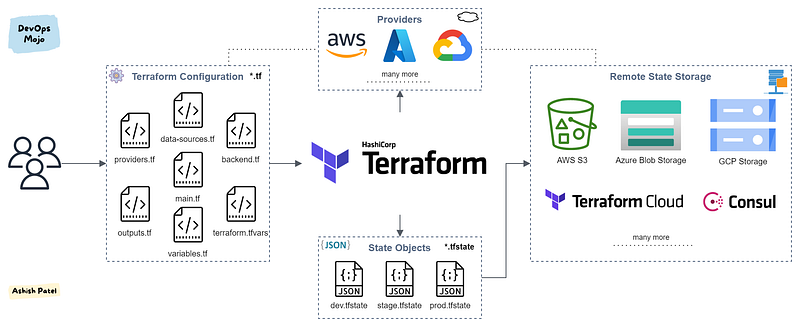
TL;DR
With remote state, Terraform writes the state data to a remote data store, which can be shared between all team members.
Why you need Terraform Remote States?
By default, Terraform stores its state in the file terraform.tfstate in local filesystem. This works well for personal projects, but working with Terraform in a team, use of a local file makes Terraform usage complicated because each user must make sure they always have the latest state data before running Terraform and make sure that nobody else runs Terraform at the same time.
The best way to do this is by running Terraform in a remote environment with shared access to state. Remote state solves those challenges. Remote state is simply storing that state file remotely, rather than on your local filesystem. With a single state file stored remotely, teams can ensure they always have the most up to date state file.
Best practice: In a enterprise project and/or if Terraform is used by a team, it is recommended to setup and use remote state.
What is Terraform Backend?
Terraform backends enable you to store the state file in a shared remote store.
- Remote state is implemented by a backend, which you can configure in configuration’s root module.
- Backends determine where state is stored. For example, the local (default) backend stores state in a local JSON file on disk.
- Backends provide an API for state locking. It is optional.
When using a non-local backend, Terraform will not persist the state anywhere on disk except in the case of a non-recoverable error where writing the state to the backend failed.
Benefits of using Terraform Remote State
- Shared Storage: Remote state (Backend) allow each of your team members to access same Terraform state files to manage infrastructure.
- Locking: With fully-featured remote backends, Terraform can lock the state file while changes are being made. This ensures all changes are captured, even if concurrent changes are being attempted against the same state. Without locking, if two team members are running Terraform at the same time, you may run into race conditions as multiple Terraform processes make concurrent updates to the state files, leading to conflicts, data loss, and state file corruption.
- Versioning: Some backends support versioning. This maintains versions of your Terraform state files allowing you to download an old version if needed. Likewise, it provides audit logs to know who changed what and when.
- Encryption: Many backends support encryption of the state file both in transit and at rest.
- Security: A local state file save the content in plain text. It is very common to have secrets or sensitive data in the state, so local state files are insecure. Remote state resolves this issue.
- Remote operations: Some backends allow to manage operations remotely (Terraform plan and apply execution). You don’t need to use terraform on your system to apply the changes. You could either trigger it from a Web UI, API call or CLI tool.
- Less Manual Errors: Using a local state file as a shared storage, manually sync the changes could cause someone forget to sync the state file. Remote state will always sync the state automatically whenever it change. There are less changes of accidentally deletion of state file when it is stored remotely than on the local machine.
Terraform Remote State Storage Options
Terraform supports storing state in
- Amazon S3
- Azure Blob Storage
- Google Cloud Storage
- Terraform Cloud
- HashiCorp Consul
- Many more.
Read more about: Terraform Workspaces
Backend Configuration Example
Remote state setup can be achieved by setting up backends specific to the cloud.
- Setting up a remote state in Amazon S3:
2. Setting up a remote state in Azure Blob Storage:
3. Setting up a remote state in Google Cloud Storage (GCS):
Summary
When working with Terraform as a team, it is always ideal to set up a remote state as multiple people want to update the same state file and it is not really easy to work with multiple copies of divergent state files. Other features like locking, versioning and encryption can be implemented by setting up Remote states.
View more from DevOps Mojo
- Kubernetes — Difference between Deployment and StatefulSet in K8s
- Prometheus — Overview
- Terraform — Overview
Happy Learning!!!


