
Terraform — Workspaces Overview
What is Terraform Workspace — Introduction to Terraform Workspace!
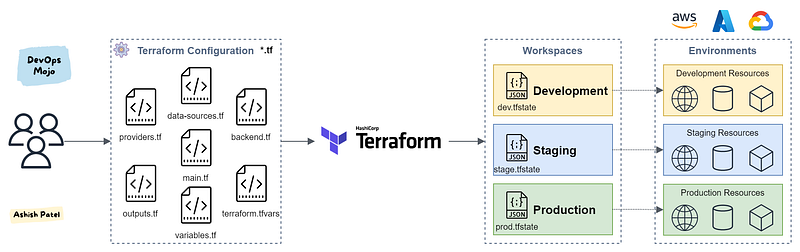
TL;DR:
Workspaces in Terraform are simply independently managed state files. A workspace contains everything that Terraform needs to manage a given collection of infrastructure, and separate Workspaces function like completely separate working directories. We can manage multiple environments with Workspaces.
What is Terraform Workspace?
If we use the local backend for storing Terraform state, Terraform creates a file called terraform.tfstate to store the state of the applied configuration. However, in scenarios where you want to use the same configuration for different contexts, separate states might be necessary with same configuration.
Workspaces allows you to separate your state and infrastructure without changing anything in your code when you wanted the same exact code base to deploy to multiple environments without overlap. i.e. Workspaces help to create multiple state files for set of same terraform configuration files.
Each of environments required separate state files to avoid collision. With the use of workspaces, you can prepend the workspace name to the path of the state file, ensuring each workspace (environment) had its own state.
Read more about: Terraform — Remote States
Key Points
- With Workspaces, we can set deploy different environment with same terraform configuration files.
- To manage multiple distinct sets of infrastructure resources (e.g. multiple environments), we can use Workspaces.
- Workspaces isolate Terraform state. It is a best practice to have separate state per environment. Workspaces are technically equivalent to renaming your state file.
- Workspaces ensure that the environments are isolated and mirrored.
- Workspaces are the successor to old Terraform Environments.
Commands:
terraform workspace new Productionterraform workspace select Production# Create deployment plan
terraform plan -out prod.tfplan# Apply the deployment
terraform apply "prod.tfplan"Usage: Within your Terraform configuration, you may include the name of the current workspace using the ${terraform.workspace} interpolation sequence. This can be used anywhere where interpolations are allowed.
resource "aws_s3_bucket" "bucket" {
  bucket = "${var.bucket-name}-${terraform.workspace}"
  acl    = "private"
}
Default Workspace: If you don’t declare a workspace, Terraform uses a default workspace named default and it cannot ever be deleted. If you don’t specify workspace explicitly, it means you use default workspace.
Workspace Internals
For Local state, Terraform stores the workspace states in a directory called terraform.tfstate.d. Within that, it creates a sub-directory for every workspace and sub-directories contain individual state files for the particular workspace. All state files are stored in /.terraform.state.d/<workspacename>. This directory should be treated similarly to local-only terraform.tfstate.
For Remote state, the workspaces are stored directly in the configured backend. Usually, the workspaces are stored by appending the workspace name to the state path. To ensure that workspace names are stored correctly and safely in all backends, the name must be valid to use in a URL path segment without escaping.
Use Cases
Workspaces are convenient in a number of situations:
- Multiple Environments: One common need in infrastructure management is to build multiple environments, with mostly the same setup but keeping a few variables different, like networking and sizing. 1. Production 2. Staging 3. Development
- Multiple Regions/Locations: Replicate infrastructure in multiple places for High Availability (HA) and Disaster Recovery (DR). 1. us-east-1 2. eu-west-2
- Multiple Accounts/Subscriptions: Create infrastructure in multiple accounts. 1. Cloud Account 1 2. Cloud Account 2
- Testing and Research: Quickly create a new infrastructure for temporary pilot testing, freely experiment or R&D purpose, and destroy it with single command.
Summary
Terraform Workspace help you keeping your infrastructure consistent and use a single manifest to create many of the same things again and again. Working with Terraform involves managing collections of infrastructure resources.
View more from DevOps Mojo
- Top useful and most popular DevOps Tools
- Terraform Best Practices
- Provision Amazon EKS Cluster using Terraform
- Kubernetes Architecture Overview
- Kubernetes Service Types Overview
- Kubernetes Ingress Overview
- Kubernetes Storage Overview — PV, PVC and Storage Class
Happy Learning!!!


